
1. Introduction
This manual provides essential information for the installation, operation, and maintenance of your ANNKE 4K PoE Security Camera System. This system is designed to provide comprehensive surveillance with advanced features for enhanced security.
Key features of your system include:
- 4K PoE Surveillance System with Dual Lens: Delivers crystal-clear 8MP HD video and features a seamless 180° ultra-wide view via a 2mm dual lens, eliminating blind spots for complete property coverage.
- AI Human/Vehicle Detection & 2-Way Audio: Deep-learning AI accurately identifies people and vehicles with high accuracy, reducing false alarms. Built-in microphone and speaker enable real-time two-way communication and record video with synchronized audio.
- Smart Dual-Light Color Night Vision: Operates in black-and-white mode normally, then activates white light and switches to full-color night vision upon detecting a person or vehicle. Enjoy 4K clear night vision up to 100ft.
- H.265+ & Smart Playback: Advanced H.265+ compression saves up to 80% on storage compared to H.264. The 12MP NVR comes with a 2TB hard drive for 24/7 continuous recording. Quickly find key moments by playing back video clips triggered by human or vehicle events.
- Easy Plug and Play PoE Setup: Utilizes one network cable for both power and data transmission to the built-in PoE ports (supports 802.3af/at). An extended mode boosts the range up to 250m, simplifying installation.
2. What's in the Box
Please verify that all components listed below are included in your package:
- 1 x 8CH 12MP PoE NVR with 2TB Hard Drive
- 4 x 8MP Dual-lens Dome Cameras
- 2 x 100ft/30m Network Cables
- 2 x 60ft/18m Network Cables
- 1 x USB Mouse
- 1 x HDMI Cable
- 1 x Power Adapter
- 1 x Wall Sticker
- 1 x User Manual
- 4 x Screw Kits

Image: All components included in the ANNKE 4K PoE Security Camera System package.
Video: An unboxing demonstration of the ANNKE 4K PoE Security Camera System, showing all included components and accessories.
3. Setup Instructions
Follow these steps to set up your ANNKE 4K PoE Security Camera System:
- Unpack Components: Carefully remove all items from the packaging and verify against the 'What's in the Box' section.
- NVR Placement: Place the Network Video Recorder (NVR) in a secure, well-ventilated area near your monitor and power source.
- Camera Mounting: Choose suitable locations for your 8MP Dual-lens Dome Cameras, ensuring optimal coverage and a clear line of sight. Use the provided screw kits and drill templates for secure mounting. The IP67 rating ensures durability in various weather conditions.
- Connect Cameras to NVR: Connect each camera to an available PoE port on the NVR using the provided network cables. The Power over Ethernet (PoE) technology simplifies installation by providing both power and data through a single cable.
- Connect NVR to Monitor: Connect the NVR to a monitor using the HDMI cable for local viewing and configuration.
- Connect USB Mouse: Plug the USB mouse into an available USB port on the NVR for navigation.
- Power On: Connect the NVR to a power outlet using the power adapter. The system will boot up automatically.
- Initial Configuration: Follow the on-screen prompts to complete the initial setup, including setting a password and configuring network settings.

Image: The simple plug-and-play setup for the PoE security system, connecting cameras directly to the NVR with a single cable.
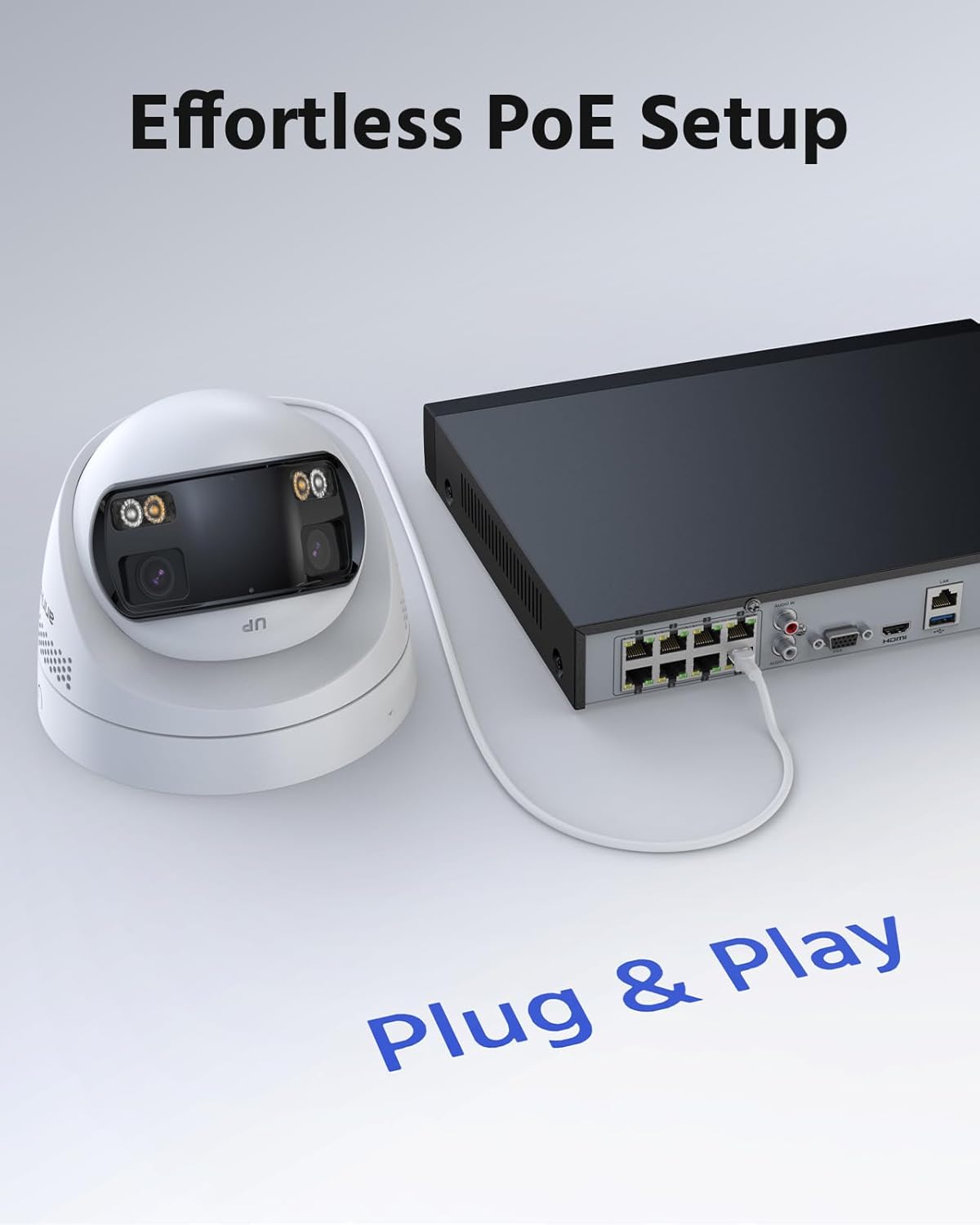
Image: A visual representation of the effortless Power over Ethernet (PoE) setup, highlighting the simplicity of connecting the camera to the NVR.
4. Operating Instructions
This section details how to operate your security system for optimal performance.
4.1 Live View and Playback
- Local Access: Use the connected monitor and mouse to navigate the NVR interface. Select 'Live View' to see real-time footage from all connected cameras.
- Remote Access: Download the ANNKE VISION app on your smartphone or tablet. Follow the app's instructions to add your NVR for remote live viewing and playback.
- Playback Recordings: Access the 'Playback' function on the NVR or through the mobile app. Use the timeline to select specific dates and times to review recorded footage. The system supports smart playback, allowing you to quickly find events triggered by human or vehicle detection.

Image: A clear 4K Ultra HD visual from the security camera, as seen on a smartphone, highlighting the detail captured.

Image: Demonstrates the 180° ultra-wide viewing capability of the dual-lens camera, providing seamless panoramic coverage.

Image: Smart remote playback feature on a mobile device, allowing users to easily review recorded events.
4.2 Smart AI Detection
- Human/Vehicle Detection: The system uses advanced AI to distinguish between humans, vehicles, and other moving objects, significantly reducing false alarms. Configure detection zones and sensitivity settings via the NVR interface or mobile app.
- Alerts: Receive instant notifications on your mobile device when human or vehicle activity is detected in designated areas.

Image: Demonstrates AI human and vehicle detection, showing the system accurately identifying subjects and sending alerts.

Image: Illustrates the ability to set customized motion detection areas, focusing surveillance on specific zones.
4.3 Two-Way Audio
- Communication: Utilize the built-in microphone and speaker on the cameras to engage in two-way conversations with visitors or deter intruders directly through the mobile app.

Image: Shows the real-time two-way audio feature in action, allowing communication with individuals near the camera.
4.4 Smart Dual-Light Color Night Vision
- Night Vision Modes: The cameras offer three night vision modes: Color Mode (when white light is active), IR Mode (black and white infrared), and Smart Dual-Light Triggered Mode.
- Automatic Switching: In Smart Dual-Light mode, the camera automatically switches from infrared (black and white) to full-color night vision when human or vehicle motion is detected, providing detailed color footage.

Image: Depicts the three smart security modes: Color Mode, IR Mode, and Smart Dual-Light Triggered Mode for versatile night vision.
5. Maintenance
Regular maintenance ensures the longevity and optimal performance of your security system.
- Camera Cleaning: Periodically clean the camera lenses with a soft, damp cloth to remove dust, dirt, or smudges that may affect image quality. Do not use harsh chemicals.
- NVR Ventilation: Ensure the NVR's ventilation openings are clear of obstructions to prevent overheating.
- Firmware Updates: Check the ANNKE website or mobile app regularly for firmware updates. Keeping your system updated ensures access to the latest features and security enhancements.
- Hard Drive Management: The 2TB hard drive provides ample storage. The H.265+ compression technology optimizes storage usage. Regularly back up important footage if needed.
6. Troubleshooting
If you encounter issues with your ANNKE security system, refer to the following common troubleshooting steps:
- No Video/Offline Camera:
- Check all cable connections between the camera and NVR. Ensure they are securely plugged in.
- Verify the NVR is powered on and functioning correctly.
- Ensure the camera's PoE connection is active. Try connecting the camera to a different PoE port on the NVR.
- Poor Image Quality:
- Clean the camera lens to remove any dirt or smudges.
- Check for obstructions in the camera's field of view.
- Ensure the camera is properly focused (if applicable).
- No Motion Detection Alerts:
- Verify that motion detection is enabled in the NVR settings or mobile app.
- Check the configured detection zones and sensitivity levels. Adjust as necessary.
- Ensure the system's date and time are correct.
- No Two-Way Audio:
- Check the audio settings on the NVR and mobile app to ensure the microphone and speaker are enabled and volume levels are adequate.
- Ensure there are no physical obstructions blocking the camera's microphone or speaker.
- NVR Not Recording:
- Check the hard drive status in the NVR settings. Ensure it is detected and has sufficient free space.
- Verify recording schedules are correctly configured.
For more detailed troubleshooting or persistent issues, please refer to the ANNKE official support resources.
7. Specifications
Below are the technical specifications for your ANNKE 4K PoE Security Camera System:
| Feature | Specification |
|---|---|
| Brand | ANNKE |
| Model Number | AU-N98PBK2-94ET-P |
| Connectivity Technology | Wired (PoE) |
| Video Capture Resolution | 4K UHD 2160p |
| Number of Channels | 8 |
| Memory Storage Capacity | 2 TB (NVR) |
| Special Features | App Control, Human Detection, Night Vision, Two-Way Audio, Video Recording |
| Color | White |
| Power Source | Corded Electric |
| Item Dimensions (L x W x H) | 16.14 x 12.09 x 11.02 inches |
| Operating System | Axis OS |
| Recommended Uses | Outdoor |
| Low Light Technology | Night Vision (Smart Dual-Light) |
| Night Vision Range | 100 Feet |
| Frame Rate | 20 fps |
| Recording Mode | Video and Audio |
| Lens Type | Wide Angle (Dual Lens) |
| Viewing Angle | 180 Degrees |
| Item Weight | 17.64 pounds |
| Ingress Protection (Camera) | IP67 (Weatherproof) |
8. Warranty and Support
ANNKE provides a limited warranty for its products. For specific warranty terms and conditions, please refer to the warranty card included in your package or visit the official ANNKE website.
For technical support, product inquiries, or service requests, please contact ANNKE customer support through their official website or the contact information provided in your product documentation. Ensure you have your model number (AU-N98PBK2-94ET-P) and purchase details ready when contacting support.