
1. Product Overview
The AKALULI Portable Voice Amplifier (Model B0G58R396Z) is designed to project your voice clearly and loudly, making it ideal for teachers, tour guides, presenters, coaches, and anyone speaking to a large group. It features 10W high-fidelity audio output, advanced noise suppression, and anti-howling circuitry to ensure crisp sound without distortion or feedback. This device also offers versatile playback options, including Bluetooth 5.3, USB flash drive, and TF (Micro SD) card support.

Image: The AKALULI Voice Amplifier in a classroom setting, demonstrating its use for clear voice projection.
Video: An overview of the voice amplifier's features and benefits for various users like teachers and tour guides.
2. What's in the Box
Your AKALULI Portable Voice Amplifier package includes the following items:
- 1 x Voice Amplifier Unit
- 1 x Wired Headset Microphone
- 1 x Adjustable Lanyard/Strap
- 1 x USB-C Charging Cable
- 1 x User Manual

Image: A visual representation of all items included in the product package: voice amplifier, microphone, strap, charging cable, and manual.
3. Setup Instructions
Setting up your voice amplifier is straightforward and requires no complicated pairing or menus.
- Connect the Microphone: Insert the wired headset microphone's 3.5mm jack into the "MIC" port on the voice amplifier unit.
- Power On: Locate the ON/OFF switch, which is integrated with the volume dial. Turn the dial clockwise to power on the device. The display will illuminate, indicating it is active.
- Position the Microphone: For optimal amplification and to minimize feedback, position the microphone head as close to your mouth as possible, ideally within 1-2cm.
- Adjust Volume: Use the analog volume dial to adjust the sound level to your preference.

Image: Detailed view of the amplifier's ports and controls, highlighting the wired microphone input and the combined ON/OFF and volume dial.

Image: Illustration demonstrating how to adjust the wired headset microphone for optimal sound capture and amplification.
4. Operating Instructions
4.1 Voice Amplification
Once the microphone is connected and the unit is powered on, your voice will be amplified through the speaker. Adjust the volume dial for desired loudness.
4.2 Wearing Methods
The amplifier is designed for portability and hands-free use:
- Belt/Pocket Clip: Use the integrated clip on the back of the unit to attach it securely to your belt or pocket.
- Lanyard: Attach the included lanyard to the designated loops on the amplifier and wear it around your neck for easy access and mobility.

Image: Demonstrates multiple wearing options for the voice amplifier, including hanging on the waist, shoulder, back buckle, and over the head.
4.3 Versatile Playback Options (3-in-1)
Beyond voice amplification, the device supports audio playback from multiple sources:
- Bluetooth 5.3: Press the 'M' key to switch to Bluetooth mode. Pair with your smartphone or other Bluetooth-enabled device to stream music wirelessly.
- USB Flash Drive: Insert a USB flash drive into the USB port to play audio files directly.
- TF (Micro SD) Card: Insert a TF card into the designated slot to play audio files.
The device supports single song repeat, playlist loop, and track skipping functions for USB/TF card playback.
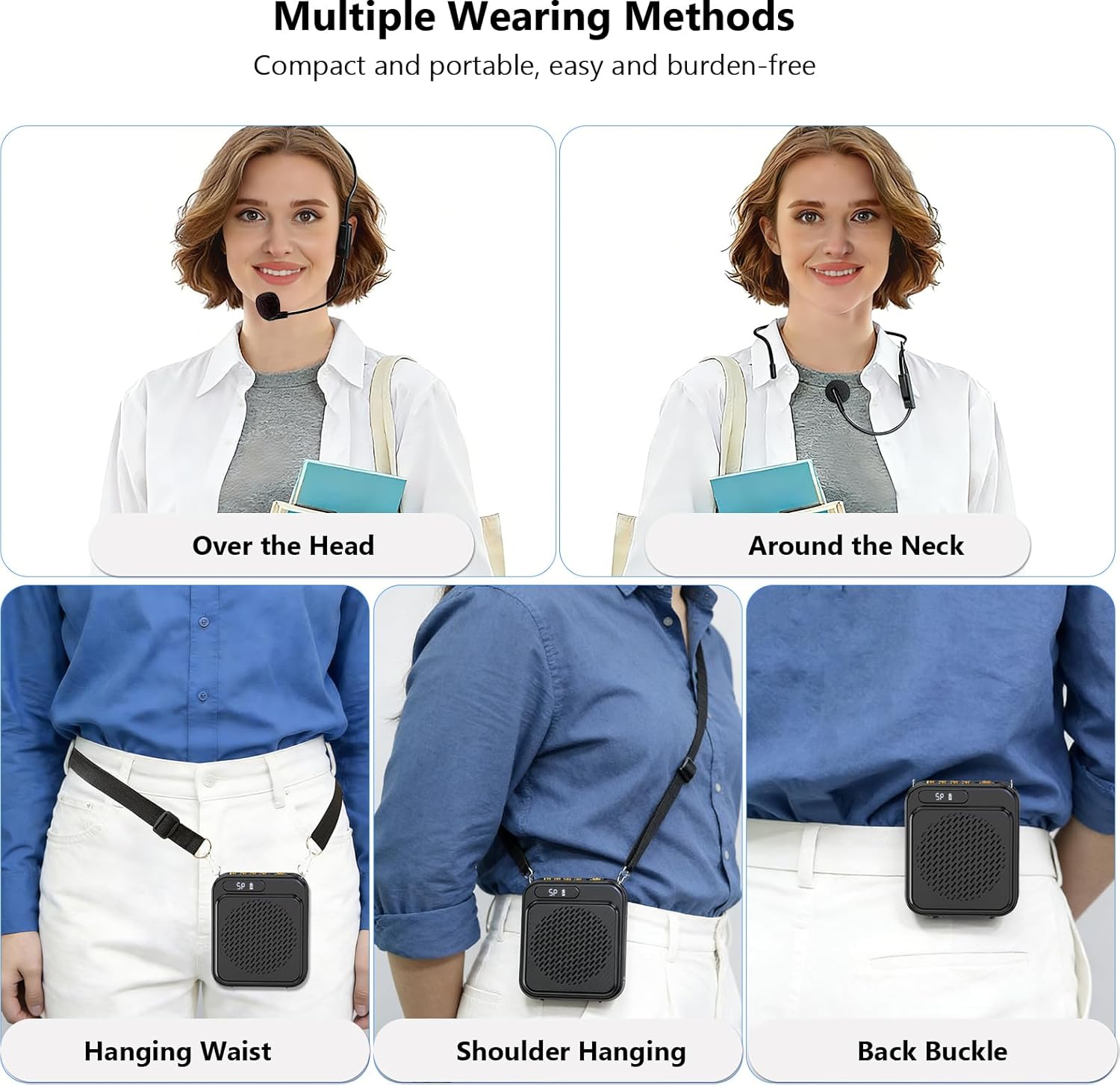
Image: A user interacting with the voice amplifier, demonstrating its Bluetooth connectivity and options for USB and TF card playback.
5. Maintenance
5.1 Charging the Battery
The voice amplifier is equipped with a rechargeable lithium battery. To charge:
- Connect the provided USB-C charging cable to the USB-C port on the amplifier.
- Plug the other end of the cable into a compatible USB power adapter (not included) or a computer's USB port.
- The charging indicator lights will show the charging status. A full charge typically takes approximately 3 hours.
A full charge provides approximately 7-8 hours of continuous wired microphone use.

Image: Visual details on the amplifier's battery life (8 hours) and charging time (3 hours) via USB-C.
5.2 General Care
- Keep the device dry and away from extreme temperatures.
- Clean the exterior with a soft, dry cloth. Do not use harsh chemicals or abrasive cleaners.
- Store the device in a safe place when not in use to prevent damage.
6. Troubleshooting
If you encounter any issues with your AKALULI Voice Amplifier, please refer to the following common solutions:
- No Sound/Low Volume:
- Ensure the device is powered on and fully charged.
- Check that the microphone is securely plugged into the "MIC" port.
- Increase the volume using the analog dial.
- Verify the microphone is positioned correctly near your mouth.
- Feedback/Howling Sound:
- Reduce the volume.
- Ensure the microphone is not too close to the speaker unit. Maintain a distance of at least 1-2cm between the microphone and your mouth, and ensure the microphone is not pointing directly at the speaker.
- Bluetooth Connection Issues:
- Ensure the amplifier is in Bluetooth mode (indicated by the display).
- Turn off and on your device's Bluetooth, then try pairing again.
- Ensure the amplifier is within the effective range of your Bluetooth device.
- USB/TF Card Playback Issues:
- Ensure the device is in the correct playback mode (USB or TF card).
- Check that the audio files on the USB drive or TF card are in a supported format.
- Ensure the USB drive or TF card is inserted correctly.
7. Specifications
| Feature | Specification |
|---|---|
| Brand | AKALULI |
| Model | B0G58R396Z |
| Connectivity Technology | Wired, Bluetooth 5.3 |
| Color | Black |
| Output Power | 10W Peak |
| Power Source | Battery Powered (Rechargeable Lithium) |
| Charging Time | Approx. 3 hours (via USB-C) |
| Usage Time (Wired Mic) | 7-8 hours |
| Compatible Devices | Headset, Smartphone (via Bluetooth) |
| Connector Type | AUX (3.5mm for Mic), USB (for charging/playback) |
| Enclosure Material | Plastic |
8. Warranty and Support
For warranty information, technical support, or any product-related inquiries, please refer to the contact details provided on the product packaging or visit the official AKALULI website. Please retain your proof of purchase for warranty claims.