1. Important Safety Information
Please read all instructions carefully before operating your WheelWavi mobility scooter. Failure to follow safety guidelines may result in injury or damage to the product.
- Weight Capacity: Do not exceed the maximum weight capacity of 275 lbs (125 kg).
- Incline Limits: The scooter is designed to climb inclines up to 12 degrees. Do not attempt to operate on steeper slopes.
- Tires: The scooter is equipped with durable 8-inch puncture-proof tires. Regularly inspect tires for wear and damage.
- Anti-Tip Protection: The scooter features anti-tip protection for enhanced stability. Always maintain a balanced posture during operation.
- Braking: The electromagnetic brake system provides instant stopping when the handle is released. Ensure the braking system is functioning correctly before each use.
- Battery Safety: Follow all instructions for battery charging and handling. Do not expose the battery to extreme temperatures or moisture.
- Environmental Conditions: Avoid operating the scooter in heavy rain, snow, or on icy surfaces.
2. Setup and Initial Assembly
Your WheelWavi mobility scooter comes largely pre-assembled. Follow these steps for initial setup.
2.1 Unboxing and Inspection
Carefully remove the scooter and all components from the packaging. Inspect for any signs of damage during transit. The package includes the scooter, two armrests, a charger, two NFC cards, and a storage bag.
2.2 Initial Battery Activation
For first-time use, the battery needs to be activated. Locate the small circular button on the battery pack (often labeled 'k' or similar). Press and hold this button until you hear a beep to wake the battery.
2.3 Unfolding the Scooter
The scooter can be unfolded using three methods:
- Remote Control Folding: Press the 'unfold' button on the remote control. The scooter will automatically unfold in approximately 1 second.
- Electric Button Folding: Locate the electric folding button on the scooter's body. Press and hold to unfold.
- Manual Folding: If the battery is low or the electric function is unavailable, the scooter can be manually unfolded. Refer to the detailed instructions in the manual for the specific latch and lever locations.
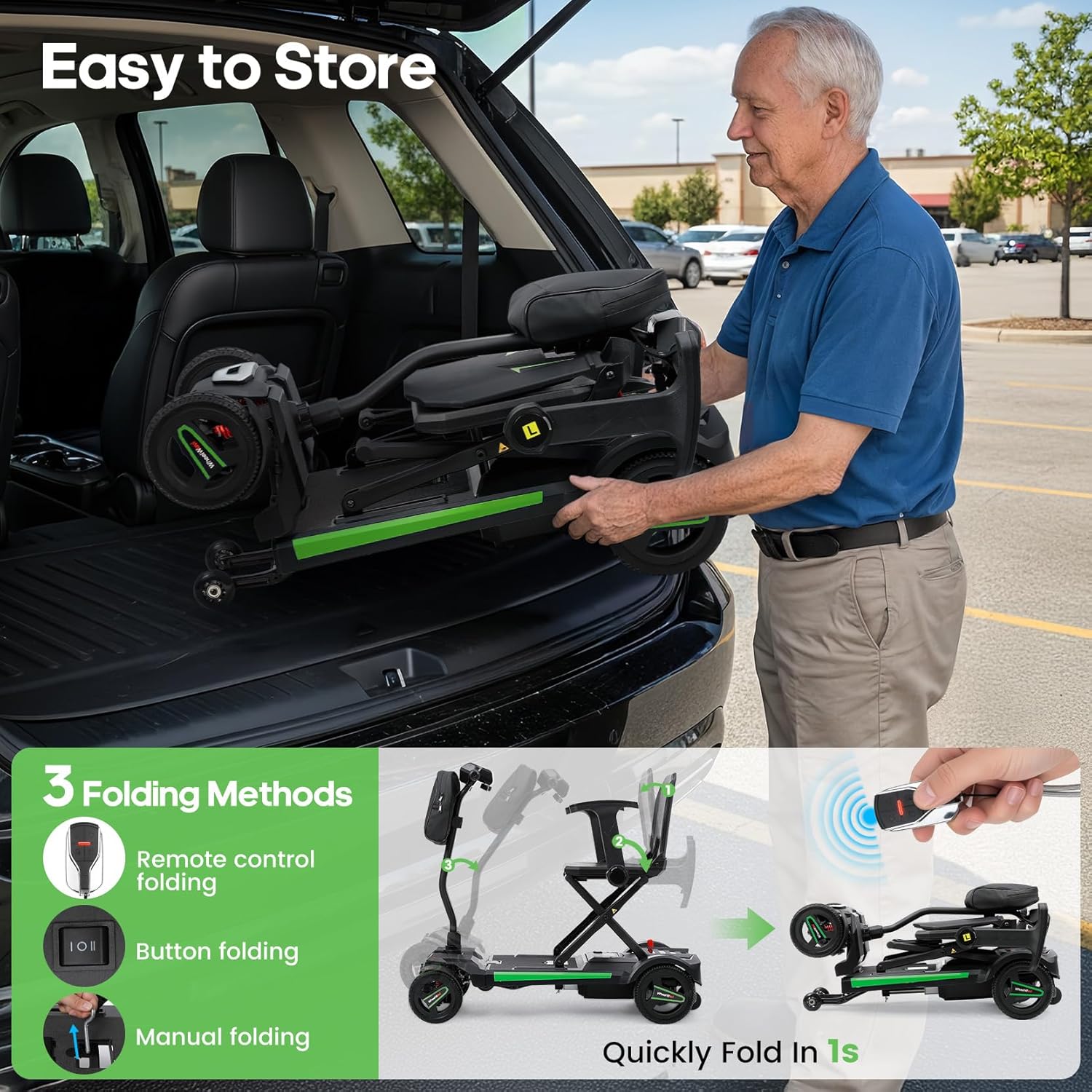
Figure 2.1: The WheelWavi scooter demonstrating its three folding methods and compact storage.
2.4 Attaching Armrests and Storage Bag
- Armrests: Insert the armrests into the designated slots on either side of the seat. Ensure they click securely into place. The armrests are adjustable and removable.
- Storage Bag: Attach the provided storage bag to the handlebar using its straps.

Figure 2.2: Adjustable and removable armrests for user comfort.
3. Operating Instructions
Familiarize yourself with the control panel and driving modes before operating the scooter.
3.1 Powering On and NFC Smart Unlock
- Power On: Press the power button on the control panel.
- NFC Unlock: Tap one of the two included NFC cards or your NFC-enabled phone to the NFC unlock area on the control panel. The scooter will unlock in approximately 0.5 seconds.

Figure 3.1: The smart control panel with NFC unlock and various function buttons.
3.2 Control Panel Functions
- Digital Display: Shows current speed (Mph/Km/h), gear level (1-4), battery capacity, and error codes.
- Horn Switch: Activates the horn.
- Deceleration Switch: Reduces speed.
- Power On/Off Switch: Turns the scooter on or off.
- Acceleration Switch: Increases speed.
- Headlight Switch: Turns the front LED headlight on or off.
- Lever: Used for acceleration and deceleration.
3.3 Driving and Maneuvering
- Speed: The scooter can reach speeds up to 3.7 mph (6 km/h). Adjust speed using the acceleration/deceleration switches and lever.
- Turning Radius: The scooter has a tight turning radius of 47.2 inches (120 cm) for easy navigation in confined spaces.
- All-Terrain Capability: Equipped with 8-inch solid tires and anti-tip wheels, the scooter can handle various surfaces including concrete, grass, and gravel roads. It features smart hill assist for inclines up to 12 degrees, boosting power uphill and automatically slowing downhill.

Figure 3.2: Demonstrating the scooter's hill assist and turning capabilities.
3.4 Manual and Electric Modes
The scooter can be switched between manual (freewheel) and electric (drive) modes. Locate the red lever near the rear wheel. Push the lever to switch between modes. In manual mode, the scooter can be pushed by hand without resistance from the motor.
Video 3.1: Official product video demonstrating the remote-control electric auto-folding feature and various operational aspects of the WheelWavi mobility scooter.
4. Maintenance and Charging
Proper maintenance ensures the longevity and safe operation of your WheelWavi scooter.
4.1 Battery Charging
The scooter is powered by a 24V 12AH lithium battery, offering a range of up to 12.4 miles on a single charge. There are multiple ways to charge the battery:
- Onboard Charging: Plug the charger directly into the charging port located on the battery pack while it is installed in the scooter.
- Removable Battery Charging: The battery pack is detachable. Remove the battery pack and charge it separately using the provided charger.
- Front-Port Charging: A charging port is conveniently located on the front control panel for easy access.
- Side-Body Charging: An additional charging port is located on the side of the scooter's body.

Figure 4.1: The detachable lithium battery with charging options.
4.2 General Care and Inspection
- Cleaning: Wipe the scooter with a damp cloth. Avoid using harsh chemicals or excessive water.
- Storage: Store the scooter in a dry, cool place when not in use.
- Regular Checks: Periodically check all bolts, nuts, and moving parts for tightness and proper function. Ensure the anti-tip wheels are in good condition.
Video 4.1: Installation guide for the Electric Folding Mobility Scooter, demonstrating assembly and charging procedures.
5. Troubleshooting
This section provides solutions to common issues you might encounter.
- Scooter Not Powering On:
- Ensure the battery is fully charged and properly connected.
- Verify the battery has been activated for first-time use (press and hold the 'k' button on the battery).
- Check if the power button on the control panel is functioning.
- Scooter Not Moving:
- Confirm the scooter is in electric (drive) mode, not manual (freewheel) mode.
- Ensure the NFC card has successfully unlocked the scooter.
- Check the digital display for any error codes. Refer to the full manual for specific error code meanings and solutions.
- Folding/Unfolding Issues:
- Ensure the battery has sufficient charge for electric folding/unfolding.
- Check for any obstructions preventing the mechanism from moving freely.
- If using manual folding, ensure all latches are disengaged as per the manual.
For persistent issues or error codes not listed, please contact WheelWavi customer support.
6. Product Specifications
| Feature | Specification |
|---|---|
| Model Name | N3473 |
| Product Dimensions (D x W x H) | 38.2" x 17.8" x 32.1" (97 x 45.2 x 81.5 cm) |
| Item Weight | 44 Pounds (20 kg) |
| Maximum Weight Recommendation | 275 Pounds (125 kg) |
| Maximum Speed | 3.7 mph (6 km/h) |
| Wheel Size | 8 Inches |
| Turn Radius | 47.24 Inches (120 cm) |
| Power Source | Battery Powered (24V 12AH Lithium) |
| Range per Charge | Up to 12.4 miles (20 km) |
| Brake Style | Electromechanical |
| Frame Material | Magnesium Alloy |
| Color | Green |
7. Warranty and Support
WheelWavi is committed to your satisfaction and mobility. Each scooter is securely packaged to ensure safe delivery.
7.1 Customer Support
Our dedicated customer service team is available to assist you with any questions or concerns regarding your WheelWavi mobility scooter. You can reach us by phone or email. Please refer to your purchase documentation for specific contact details.
7.2 Warranty Information
This product comes with a standard manufacturer's warranty. Details regarding the warranty period and coverage are provided with your purchase. Please retain your proof of purchase for warranty claims.

