
1. Product Overview
The GetD 2026 AI Smart Glasses combine advanced eyewear technology with artificial intelligence capabilities. These glasses offer a 3-in-1 solution, integrating an AI assistant, open-ear audio for music and calls, and photochromic lenses for versatile use. They are designed for daily wear, travel, and productivity, providing hands-free access to smart features.

Figure 1: Diagram illustrating the 3-in-1 functionality of GetD AI Audio Glasses, combining AI, earbuds, and glasses.
2. What's in the Box
- GetD 2026 AI Smart Glasses
- Charging Cable
- Cleaning Cloth
- Protective Pouch
- User Guide (this document)

Figure 2: Contents of the GetD AI Smart Glasses packaging, including the glasses, charging cable, cleaning cloth, and user manual.
3. Setup
3.1 Charging the Glasses
Before first use, fully charge your GetD AI Smart Glasses. The glasses feature magnetic charging for convenience.
- Connect the provided charging cable to a USB power source.
- Attach the magnetic connectors of the charging cable to the charging ports on each arm of the glasses.
- The indicator lights on the arms will show charging status. A full charge takes approximately 1.5 hours.
A 10-minute charge provides approximately 1 hour of use. The glasses are equipped with over-voltage and overload protection.
Video 1: Tutorial demonstrating how to turn on and charge the GetD AI Smart Glasses using the magnetic charging cable.
3.2 App Installation and Pairing
To unlock the full potential of your GetD AI Smart Glasses, download and install the official GetD app on your smartphone.
- Search for "GetD" in the Apple App Store (for iOS devices) or Google Play Store (for Android devices).
- Download and install the app. The app supports Android 8.1 and above, and iOS 15.6 and above.
- Ensure Bluetooth is enabled on your smartphone.
- Power on your GetD AI Smart Glasses by pressing and holding the power button on one of the arms.
- Open the GetD app and follow the on-screen instructions to pair your glasses via Bluetooth 5.4.

Figure 3: The GetD Smart App interface, demonstrating successful Bluetooth connection to the glasses and showing various control options.
4. Operating Instructions
4.1 AI Assistant and Conversation
Your GetD AI Smart Glasses integrate an AI assistant powered by advanced models like ChatGPT and DeepSeek, accessible through the GetD app. This allows for intelligent, accurate, and efficient conversations.
- To activate the AI assistant, ensure your glasses are paired with the GetD app.
- Use voice commands or the app interface to interact with the AI.
- The AI can answer questions, provide information, and assist with various tasks.

Figure 4: A user interacting with the GetD AI Assistant, which is powered by ChatGPT and DeepSeek, for intelligent conversations and information retrieval.
Video 2: Demonstration of the AI glasses supporting AI translation and AI conversation features.
4.2 Real-time Translation
Experience seamless communication with the real-time translation feature, supporting 145 languages for bi-directional simultaneous translation in over 170 countries.
- Activate the translation mode in the GetD app.
- Speak in your native language, and the glasses will translate and relay the conversation in the selected foreign language.
- The translation is delivered directly to your ears via the open-ear audio system.

Figure 5: Visual representation of the AI-powered translation feature, supporting 145 languages with high accuracy and fast response.
Video 3: A demonstration of the GetD Smart Sunglasses, highlighting their smart features including translation.
4.3 Voice Recorder
The integrated voice recorder allows you to quickly convert spoken words into text with high accuracy, ideal for meeting notes, memos, and recordings.
- Activate the voice recorder function via the GetD app.
- Speak clearly, and the glasses will capture and transcribe your speech.
- Review and manage your recordings within the app.
4.4 Music Playback and Phone Calls
Enjoy your audio content and manage calls with the revolutionary open-ear audio system.
- Music Playback: The GDirect Directional Open-Ear Design delivers superior stereo sound. Control music playback (play/pause, skip tracks) using the touch panel on the glasses.
- Phone Calls: Make and receive hands-free calls with crystal-clear audio, thanks to the 2 Beam-forming Environment Noise Reduction microphones.
- Volume Control: Adjust volume using the touch controls on the arms of the glasses.

Figure 6: An overview of the GetD Next-Generation Smart Glasses features, including AI Voice Conversation, AI Real-time Translation, AI Voice Recording, AI Voice Assistant, Play Music, and Take Calls.
4.5 Photochromic Lenses
The glasses feature photochromic lenses that automatically adjust their tint based on UV light exposure, providing optimal vision indoors and outdoors.
- Indoors, the lenses remain clear.
- Outdoors, in sunlight, the lenses darken to provide 100% UV protection and reduce glare.

Figure 7: Illustration of the photochromic lenses transitioning from clear (cloudy) to dark (sunny) conditions.
Video 4: A short clip demonstrating how the transition lenses stay clear indoors.
5. Maintenance
5.1 Cleaning
To maintain the clarity and longevity of your glasses:
- Use the provided cleaning cloth to gently wipe the lenses and frame.
- Avoid using harsh chemicals or abrasive materials that could damage the lenses or frame.
5.2 Water Resistance
The GetD AI Smart Glasses are IP54 water resistant, meaning they are protected from limited dust ingress and water splashes from any direction. They are not designed for submersion in water.
- Avoid exposing the glasses to heavy rain or submerging them in water.
- If the glasses get wet, wipe them dry immediately with a soft cloth.
5.3 Battery Care
To maximize battery life and performance:
- Charge the glasses regularly, avoiding complete discharge.
- Store the glasses in a cool, dry place when not in use.
- Avoid extreme temperatures, which can affect battery performance.
6. Troubleshooting
6.1 Connectivity Issues
- Glasses not pairing: Ensure Bluetooth is enabled on your phone and the glasses are powered on. Try restarting both devices.
- Frequent disconnections: Ensure your phone is within the Bluetooth range (up to 10 meters). Avoid obstacles that might interfere with the signal.
6.2 AI Assistant Not Responding
- Verify that the GetD app is open and connected to your glasses.
- Ensure your smartphone has an active internet connection for AI functions.
- Speak clearly and directly into the glasses' microphones.
6.3 Audio Problems
- No sound: Check the volume levels on both your glasses and your smartphone. Ensure the glasses are properly connected.
- Poor sound quality: Ensure the speakers are not obstructed. Check for any interference from other Bluetooth devices.
6.4 Charging Issues
- Glasses not charging: Ensure the magnetic charging cable is securely attached to both the glasses and the power source. Try a different USB port or power adapter.
- Slow charging: Use a certified USB power adapter.
7. Specifications
| Feature | Specification |
|---|---|
| Model Name | GG |
| Operating System Compatibility | iOS & Android |
| Memory Storage Capacity | 8 MB |
| Special Features | AI Assistant, Music Player, Phone Call, Real-time Translation |
| Battery Capacity | 0.81 Watt Hours (Two 115mAh batteries) |
| Music Playback Time | Up to 11 hours (at 50% volume) |
| Call Time | Up to 9 hours (at 50% volume) |
| Standby Time | Up to 15 days |
| Battery Charge Time | 1.5 hours (10 mins charge for 1 hour use) |
| Connectivity Technology | Bluetooth 5.4 |
| Water Resistance Level | IP54 Water Repellent |
| Human Interface Input | Microphone, Touch Panel |
| Frame Material | Lightweight TR90 |
| Lens Type | Photochromic (for this variant), 100% UV protection |
| Manufacturer | GetD |
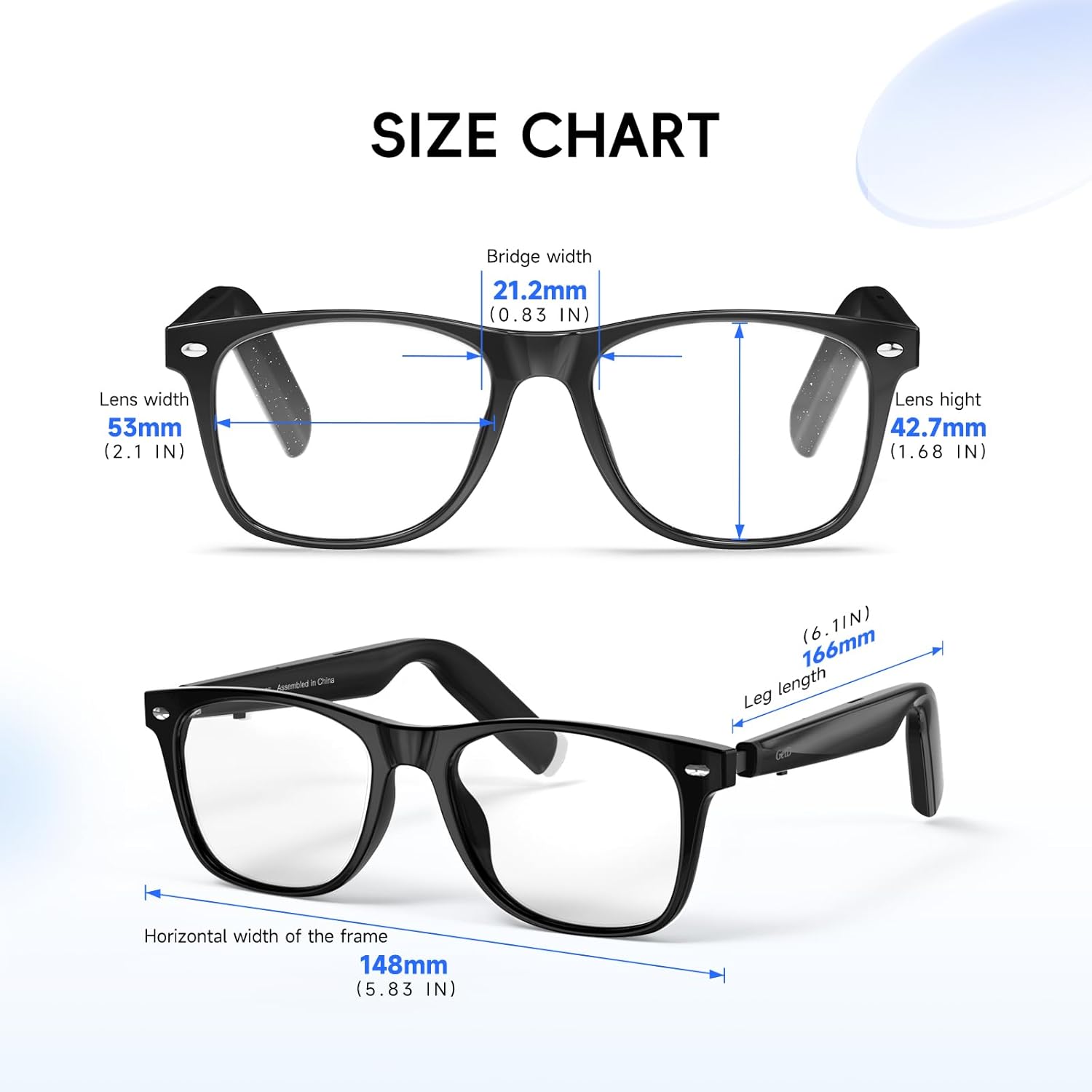
Figure 8: Detailed size chart for the GetD AI Smart Glasses, showing lens width, bridge width, lens height, horizontal width, and leg length.
8. Warranty and Support
8.1 Warranty Information
The GetD 2026 AI Smart Glasses come with a 1-year standard warranty from the manufacturer, GetD. This warranty covers defects in materials and workmanship under normal use. Please retain your proof of purchase for warranty claims.
8.2 Customer Support
For further assistance, technical support, or warranty inquiries, please refer to the GetD app for contact information or visit the official GetD website. The app often provides FAQs and troubleshooting guides.

