1. Product Overview
The SYMIK Insta360 X4 Air Advanced 5-in-1 Battery Charger is designed for Insta360 X4 Air batteries. This device integrates five key functions: a 27W dual-channel fast charging case, a 10W output power source converter, a battery accumulation device, a battery even-out equalizer, and a battery and SD card storage case. It provides comprehensive battery management for various usage scenarios.
Note: This charger is compatible only with Insta360 X4 Air batteries and does not contain an internal battery. Batteries and camera are sold separately.

Image 1.1: The SYMIK Insta360 X4 Air Advanced 5-in-1 Battery Charger, highlighting its five operational modes: Charger Mode, Power Source Converter, Accumulation Mode, Even Out Mode, and Settings Mode.
2. Setup and Initial Use
2.1 Package Contents
- SYMIK Insta360 X4 Air Advanced 5-in-1 Battery Charger
- User Manual (this document)
Note: A USB-C to USB-C cable and a 30W PD charger are recommended for optimal fast charging, but are not included.
2.2 Inserting Batteries and SD Cards
- Open the charger lid.
- Insert up to two Insta360 X4 Air batteries into the designated slots. Ensure correct orientation.
- (Optional) Insert up to two microSD cards into the dedicated storage slots located within the charger.
- Close the lid securely.

Image 2.1: The charger with its lid open, illustrating the dual battery slots and two microSD card storage slots.
2.3 Connecting to Power
Connect the charger to a power source using a USB-C cable. For fast charging, use a 30W Power Delivery (PD) charger and a USB-C to USB-C cable. The LCD screen will activate upon connection, displaying battery status.
3. Operation
3.1 Charging Batteries (Charger Mode)
Once connected to a power source with batteries inserted, the charger automatically enters Charger Mode. It supports simultaneous charging of two Insta360 X4 Air batteries. With a 12W per channel input, batteries can reach 80% charge in approximately 35 minutes and 100% in 50 minutes. The charger dynamically allocates power for optimal speed.

Image 3.1: The charger actively charging two batteries, indicating charging progress and estimated times to 80% and 100% charge.
3.2 Power Bank Function (Power Source Converter Mode)
The charger can function as a power bank to charge external devices such as smartphones, laptops, or tablets. This is achieved by discharging the Insta360 X4 Air batteries inserted into the charger. Connect your external device to the charger's USB-C port. The maximum output power in this mode is 5V 2.1A (10.5W).

Image 3.2: The charger connected via USB-C to a smartphone, illustrating its capability to act as a power bank.
4. Advanced Energy Management Modes
4.1 Accumulation Mode
Accumulation Mode intelligently combines the remaining charge from two or three partially charged batteries into one fully charged battery. This feature is useful for consolidating power and avoiding mid-shoot battery swaps.
4.2 Even Out Mode
Even Out Mode actively transfers energy from batteries with a higher State of Charge (SOC) to those with a lower SOC. This equalizes charge levels across multiple batteries, extending their overall lifespan and preparing them for optimal storage.

Image 4.1: Visual representation of Accumulation Mode and Even Out Mode, showing energy transfer between batteries.
5. LCD Display and Settings
5.1 1.47" High-Definition LCD Screen
The charger features a 1.47-inch high-definition LCD screen that provides real-time metrics for informed battery management. Information displayed includes:
- State of Charge (SOC)
- Voltage
- Current
- Health Cycles
- Temperature (in Celsius and Fahrenheit)
- Power Source Capabilities

Image 5.1: A detailed view of the LCD screen, illustrating various battery parameters such as power, voltage, current, cycle counts, and temperature.
5.2 Customizable Settings Menu
The charger offers a customizable settings menu with over 12 adjustable parameters. This allows users to tailor the charging experience to their specific needs. Access the settings menu by pressing the control button on the charger.

Image 5.2: The charger's LCD screen showing the settings menu with various adjustable parameters for brightness, idle timers, and charging power settings.
6. Maintenance and Safety
6.1 General Care
- Keep the charger clean and dry. Avoid exposure to moisture or extreme temperatures.
- Do not disassemble or attempt to repair the charger yourself.
- Store the charger and batteries in a cool, dry place when not in use.
6.2 Temperature Protection
The charger incorporates high and low temperature protection, monitoring battery temperature 600 times per hour to ensure safe charging. It complies with IEC-62368 standards and displays real-time temperature readings.

Image 6.1: The charger's display showing real-time battery temperature monitoring, indicating its built-in temperature protection features.
6.3 Charging Accuracy
Equipped with high-precision charging chips from Texas Instruments, the charger achieves a charging voltage accuracy of ±8mV. This precision helps prevent overcharging or undercharging, which can extend battery lifespan and ensure safety.

Image 6.2: An illustration of the high-precision Texas Instruments charging chips and a comparison of charging accuracy (±8mV vs. ±45mV).
7. Troubleshooting
7.1 Common Issues and Solutions
| Issue | Possible Cause | Solution |
|---|---|---|
| Charger not turning on/display off | No power connection or faulty cable/adapter. | Ensure USB-C cable is securely connected to a working power source. Try a different cable or power adapter. |
| Batteries not charging | Incorrect battery insertion, low power input, or incompatible battery. | Verify batteries are inserted correctly. Ensure power source provides sufficient wattage (e.g., 30W PD for fast charging). Confirm batteries are Insta360 X4 Air compatible. |
| Slow charging speed | Insufficient power input (e.g., 5V USB-A source). | Use a 30W Power Delivery (PD) charger and a USB-C to USB-C cable for optimal charging speed. |
| External device not charging in Power Bank Mode | No batteries inserted, batteries too low, or incompatible device. | Ensure charged Insta360 X4 Air batteries are inserted. Check if the external device supports 5V 2.1A input. |
7.2 Contact Support
If you encounter any issues not covered in this manual, please contact SYMIK customer support via Amazon for assistance.
8. Specifications
| Feature | Detail |
|---|---|
| Product Dimensions | 2.99 x 1.89 x 2.36 inches (76 x 48 x 60 mm) |
| Item Weight | 4.1 ounces (115 grams) |
| Compatibility | Insta360 X4 Air Batteries ONLY |
| USB-C Input | 5V 3A, 9V 3A (27W Max) |
| Charge Power (Per Channel) | Up to 20W adjustable |
| Power Bank Mode USB-C Output | 5V 2.1A (10.5W) |
| Charging Time (0-80% @12W) | 35 minutes |
| Charging Time (0-100% @12W) | 50 minutes |
| LCD Screen Size | 1.47 inches |
| Operating Temperature | 32° to 104°F (0° to 40°C) |
| Color | High Tech Gray |
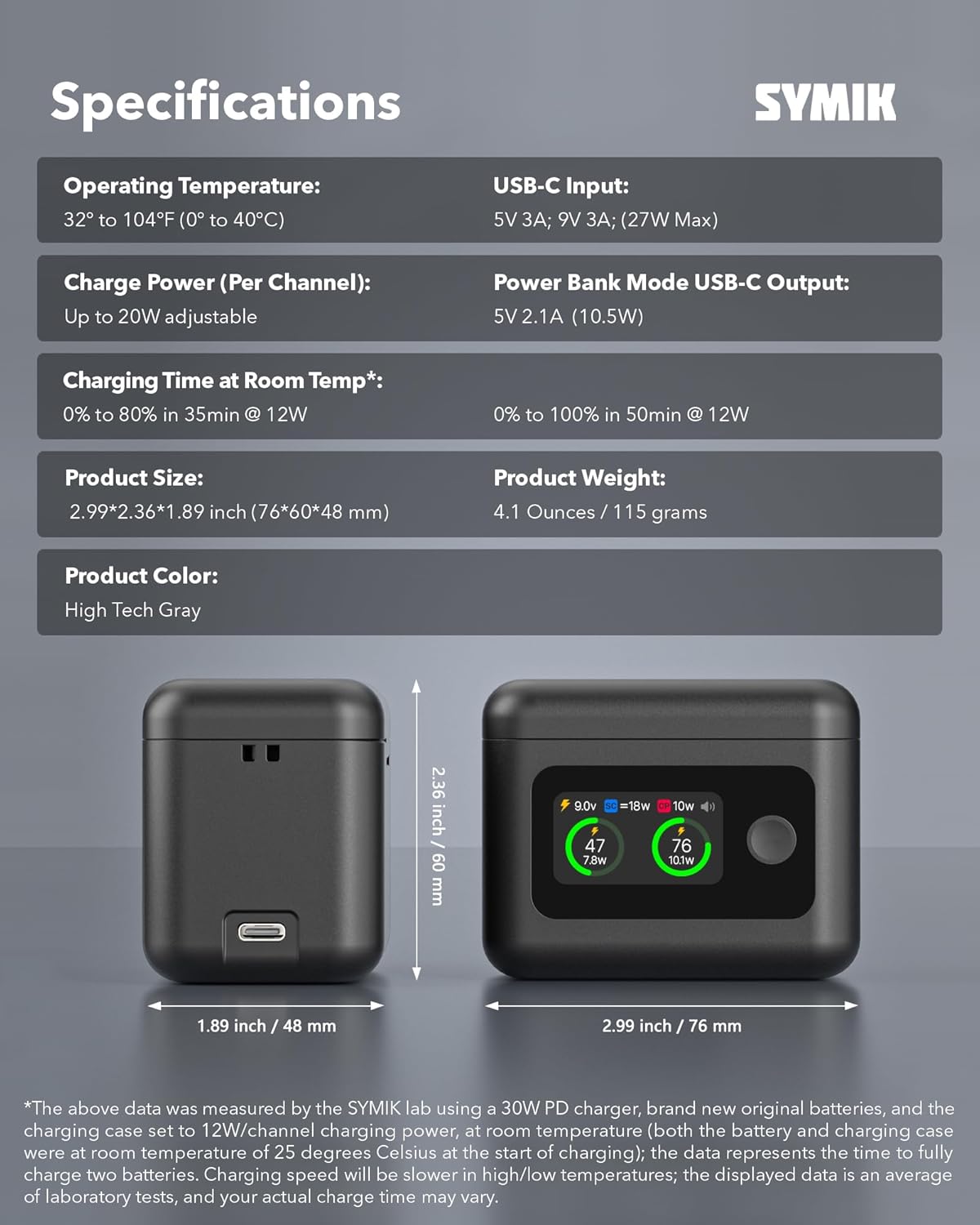
Image 8.1: Visual representation of the charger's dimensions and key specifications.
9. Warranty and Customer Support
9.1 Warranty Information
SYMIK products are manufactured with high-quality standards. For specific warranty details, please refer to the product packaging or contact SYMIK customer support.
9.2 Customer Support
Should you encounter any issues or have questions regarding your SYMIK Insta360 X4 Air Advanced 5-in-1 Battery Charger, please do not hesitate to contact us. Our customer support team is available to assist you. You can reach us through the Amazon platform where you purchased the product.
Video 9.1: An official product video demonstrating the features and operation of the SYMIK Intelligent Two Way Charger for Insta360 X4 Air.


