
Introduction
This manual provides instructions for the installation, operation, and maintenance of your Aipsun 23.6" Brushed Nickel Rechargeable LED Picture Light. This battery-operated art light features a 12000mAh rechargeable battery, 3 CCT dimmable lighting, and a rotatable head for optimal illumination of your artwork or display.
Safety Information
- Read all instructions before installation and use.
- This product is designed for indoor use only. Do not expose to moisture or extreme temperatures.
- Use only the specified 5V/2A charger and USB-C cable for charging to prevent damage to the battery or light.
- Do not attempt to disassemble or modify the light fixture or battery.
- Keep out of reach of children.
- Ensure the mounting surface is stable and can support the weight of the light fixture.
- The remote control contains a battery. Ensure the bottom insulator is removed before first use.
Package Contents
Verify that all components are present before beginning installation:
- Aipsun 23.6" LED Picture Light
- Instruction Manual
- Mounting Hardware (screws included)
- Remote Control
- USB-C Charging Cable
Product Features
- 12000mAh Rechargeable Battery: Provides 10-20 hours of continuous illumination on a full charge.
- 3 CCT & Dimmable: Adjustable color temperature (Warm, Natural, White light) and brightness (10%-100%) via remote control.
- Rotatable Head: The light bar can be rotated 150° up and down to direct light precisely.
- Timer Function: Preset auto-off timers for 0.5-8 hours (remote offers 1H, 2H, 4H options).
- Cordless Design: No wiring required, allowing for flexible installation.
- Safety Features: IC card constant current driver with short circuit protection, overload protection, and stable current.

The Aipsun Cordless Picture Light features a 12000mAh rechargeable battery, eliminating the need for wires and offering flexible placement.

This battery-operated art light provides 10-100% stepless dimming and can serve as an emergency light.
Setup
1. Initial Charging
Before first use, fully charge the picture light using the provided USB-C cable and a 5V/2A charger (not included). The charging port is located on the side of the main unit. A full charge can take several hours.
2. Remote Control Preparation
The remote control comes with a battery insulator. Locate the battery compartment on the back of the remote and remove the clear plastic tab before use.

The remote control requires the removal of a bottom insulator before first use to activate the battery.
3. Installation (Screw Mount)
The picture light is designed for screw installation. Follow these steps:
- Choose a suitable location on the wall above your artwork. Ensure the mounting surface is solid.
- Use the mounting bracket as a template to mark the screw positions on the wall.
- Drill pilot holes at the marked positions. Insert wall anchors if necessary (for drywall).
- Secure the mounting bracket to the wall using the provided screws.
- Attach the picture light fixture to the mounted bracket, ensuring it is securely fastened.

The diagram illustrates the dimensions of the 23.6-inch picture light and its 300° rotatable head for precise light positioning.
Operating Instructions
1. Power On/Off
Press the ON button on the remote control or use the manual touch switch on the light fixture to turn the light on. Press the OFF button on the remote or press and hold the manual switch to turn it off.

The picture light can be turned ON or OFF using the remote or the manual touch switch.
2. Adjusting Brightness
Use the Brightness+ and Brightness- buttons on the remote control for stepless dimming from 10% to 100%. Alternatively, the remote has preset buttons for 30%, 70%, and 100% brightness. The manual touch switch also supports dimming by pressing and holding.
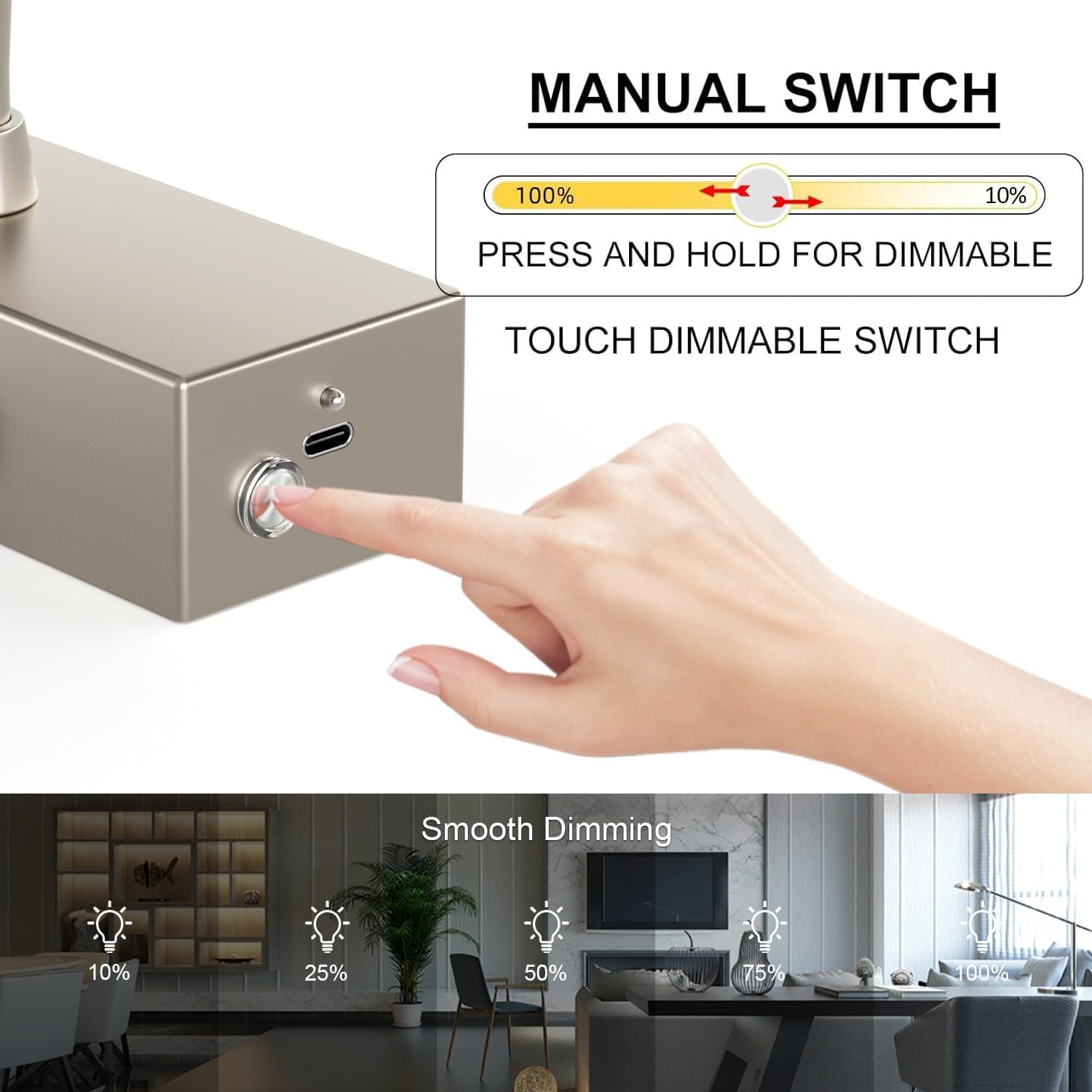
The manual switch allows for dimming by pressing and holding, offering 10% to 100% brightness adjustment.
3. Changing Color Temperature (CCT)
The remote control features buttons to switch between three color temperatures:
- W (Warm Light): Approximately 3000K
- C (Natural Light): Approximately 4500K
- CW (White Light): Approximately 6000K

The light offers three color temperature options: Warm (3000K), Natural (4500K), and White (6000K).
4. Setting the Timer
Use the timer buttons on the remote control to set the light to automatically turn off after a specified duration:
- 1H: Turns off after 1 hour.
- 2H: Turns off after 2 hours.
- 4H: Turns off after 4 hours.

The remote control allows for setting timers (1, 2, or 4 hours) and adjusting brightness and color temperature.
5. Adjusting Light Direction
The light bar can be manually rotated up to 150° vertically. Gently adjust the light head to direct the illumination as desired.
Maintenance
Cleaning
To clean the light fixture, ensure it is turned off and disconnected from any charging cable. Wipe the surface with a soft, dry, or slightly damp cloth. Do not use abrasive cleaners or solvents.
Battery Care
To prolong battery life, avoid fully discharging the battery frequently. Recharge the light when the brightness noticeably diminishes. If storing the light for an extended period, charge it to approximately 50% every 3-6 months.
Troubleshooting
- Light does not turn on:
- Ensure the battery is charged. Connect to a charger and check if the charging indicator activates.
- Verify the remote control battery insulator has been removed and the battery is functional.
- Light does not hold a charge:
- Ensure you are using a 5V/2A charger. Lower amperage chargers may not fully charge the device.
- If the issue persists after multiple full charge cycles, contact customer support.
- Remote control not responding:
- Check if the remote control battery is depleted or if the insulator tab is still present.
- Ensure there are no obstructions between the remote and the light fixture.
- Brightness or color temperature not adjusting:
- Confirm the remote control is functioning correctly (see above).
- Ensure the light is not in a fixed mode if such a feature exists (not applicable for this model based on features).
Specifications
| Model Number | CG0030 |
| Product Dimensions | 59.9L x 15W x 5H centimetres (23.6 x 5.9 x 1.97 inches) |
| Weight | 1.02 kg |
| Battery | 12000mAh Lithium Ion (included) |
| Power Source | Battery Powered, USB-C Rechargeable |
| Charging Recommendation | 5V/2A Charger |
| Wattage | 9 watts |
| Brightness | 765 lumens (max) |
| Color Temperature | 3000K (Warm), 4500K (Natural), 6000K (White) |
| Dimmable Range | 10% - 100% |
| Rotatable Angle | 150° (vertical) |
| Control Method | Remote Control, Touch Switch |
| Material | Aluminum, High Quality Acrylic |
| Indoor/Outdoor Usage | Indoor Only |
| Manufacturer | Aipsun |
Warranty and Support
For warranty information or technical support, please refer to the contact information provided with your purchase or visit the official Aipsun website. Keep your purchase receipt for warranty claims.