
Introduction
This manual provides comprehensive instructions for the assembly, operation, and maintenance of your HeroSet Leather Office Chair. Designed for ergonomic comfort and durability, this chair features water-resistant leather, adjustable flip-up arms, lumbar support, 360° swivel, and tilt functionality. Please read this manual thoroughly before assembly and use to ensure proper function and longevity of your product.
Important Safety Information
- Do not exceed the maximum weight capacity of 275 pounds.
- Ensure all screws and bolts are securely tightened before use. Periodically check and re-tighten as necessary.
- Keep small parts away from children during assembly.
- Use the chair on a flat, stable surface to prevent tipping.
- Avoid standing on the chair or using it as a step stool.
- Do not use abrasive cleaners or harsh chemicals on the leather.
Package Contents
Before beginning assembly, please verify that all components listed below are present and undamaged. If any parts are missing or damaged, please contact customer support.
- Backrest
- Seat Cushion
- Armrests (2)
- Gas Lift Cylinder
- Star Base
- Caster Wheels (5)
- Mechanism Plate
- Assembly Hardware (screws, washers, Allen wrench)
- Lumbar Support Pillow (optional accessory)
Setup and Assembly
Assembly of your HeroSet office chair is designed to be straightforward, typically taking about 15 minutes. Follow the steps below or refer to the provided video guide for visual assistance.
Assembly Steps:
- Assemble the Chair Base: Attach the five caster wheels to the star base. Insert the gas lift cylinder into the center hole of the star base.
- Attach Mechanism to Seat: Secure the mechanism plate to the underside of the seat cushion using the provided screws. Ensure the "FRONT" label on the mechanism faces the front of the seat.
- Connect Seat to Base: Place the assembled seat onto the gas lift cylinder, ensuring it is firmly seated.
- Attach Armrests: Secure the armrests to the seat cushion and the backrest using the appropriate screws. Ensure they are aligned correctly.
- Connect Backrest: Attach the backrest to the armrests and seat assembly. Tighten all screws securely.
- Cover Screws: Place decoration caps over any visible screw heads for a finished look.

Image: All components of the HeroSet office chair laid out for assembly, including the backrest, seat, armrests, gas lift, base, casters, and mechanism.
Assembly Video Guide:

Video: Step-by-step assembly guidance for the office chair, demonstrating how to connect each component.

Video: Visual instructions for assembling the Marsail Office Chair MSOC4, showing the process from unboxing to final setup.
Operating Instructions
Your HeroSet office chair offers several adjustable features to customize your seating experience for optimal comfort and support.
1. Seat Height Adjustment
To adjust the seat height, locate the lever on the right side beneath the seat. Pull the lever upwards while applying slight pressure to the seat to lower it, or lift your weight off the seat to raise it. Release the lever at your desired height.

Image: The chair's dimensions, including the adjustable height range from 47cm (18.5") to 57cm (22.4") from the floor to the seat.
2. Tilt and Rocking Function
The chair features a gentle rocking recline. To activate the rocking function, pull the lever on the left side of the seat outwards. To lock the chair in an upright position, push the lever inwards. The tilt tension can be adjusted by rotating the round knob located underneath the seat, allowing you to control the resistance of the rocking motion.
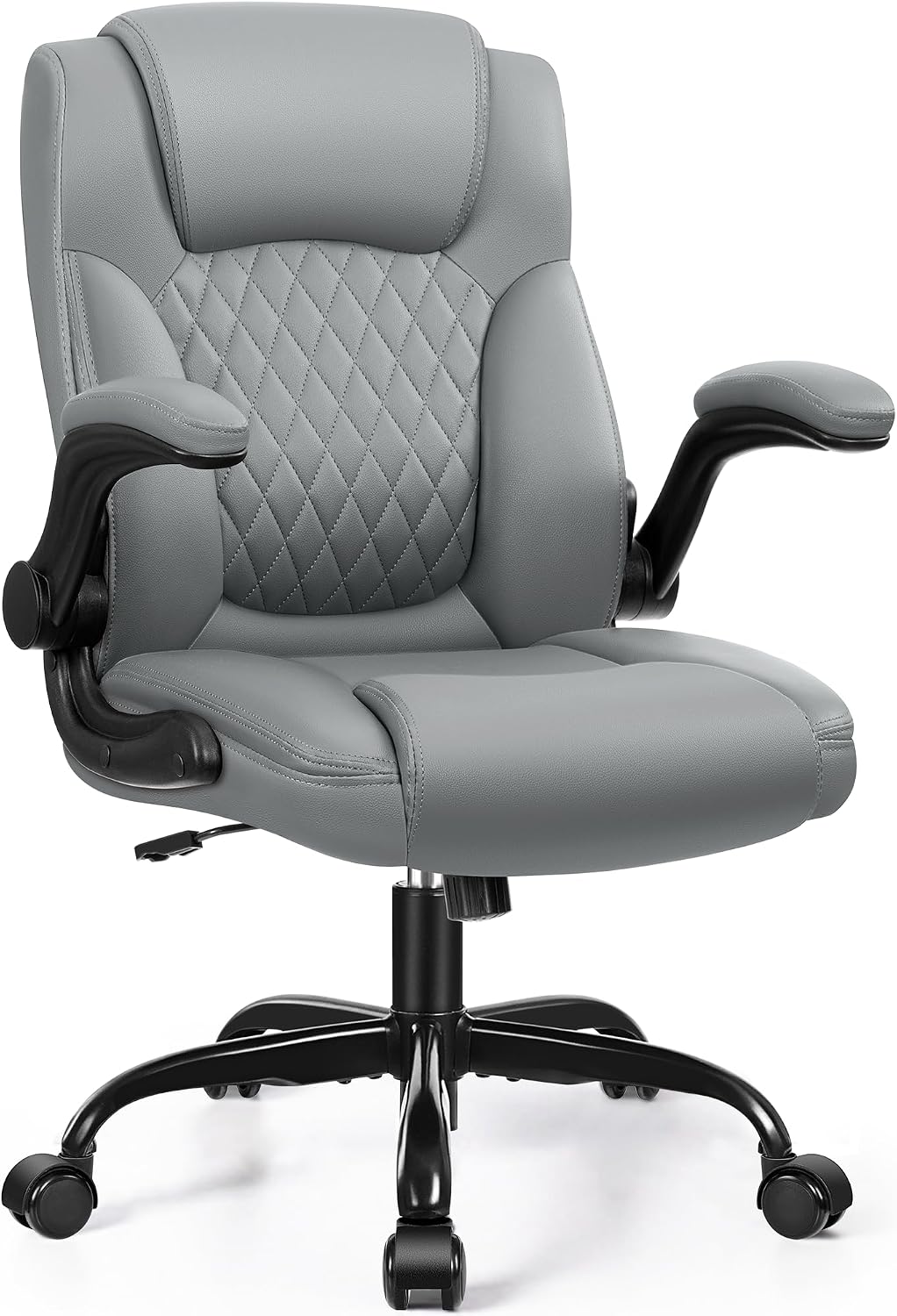
Image: Visual representation of the chair's recline angles: 90° for work, 105° for relaxation, and 120° for full recline.
3. Flip-Up Armrests
The armrests are designed to flip up 90 degrees. This allows you to easily tuck the chair under your desk, saving space, or to sit closer to your workstation without obstruction. Simply lift the armrests upwards until they lock into the vertical position.

Image: The 90° flip-up armrests feature, illustrating how they can be lifted to slide the chair under a desk and save space.
4. Lumbar Support
The chair features an adjustable high backrest with integrated lumbar support that contours to your spine, providing comfort during long periods of sitting. An additional lumbar support pillow is included for personalized comfort, which can be positioned as needed.

Image: An illustration highlighting the ergonomic spine support provided by the chair, including neck, back, and lumbar support areas.
Maintenance
Proper maintenance will extend the life and appearance of your HeroSet office chair.
- Cleaning the Leather: The premium, water-resistant, and stain-resistant leather is durable and easy to clean. For general cleaning, wipe with a soft, damp cloth. For spills, blot immediately with a clean, dry cloth. Avoid using harsh chemicals or abrasive cleaners, as these can damage the material.
- Caster Wheels: Periodically check the rubber caster wheels for any accumulated debris (hair, dust, etc.) and clean them to ensure smooth and quiet rolling.
- Hardware Check: Regularly inspect all screws and bolts to ensure they remain tight. Re-tighten any loose hardware to maintain the chair's stability and safety.

Image: The luxury PU leather material is shown to be soft, thick, and easy to clean, emphasizing its water-resistant and durable qualities.
Troubleshooting
If you encounter any issues with your HeroSet office chair, please refer to the following common solutions:
- Chair does not adjust height: Ensure the gas lift lever is fully engaged and not stuck. If the issue persists, the gas lift cylinder may need replacement.
- Chair wobbles or feels unstable: Check all assembly screws and bolts, especially those connecting the seat to the mechanism and the base. Tighten any loose hardware. Ensure the chair is on a flat, even surface.
- Caster wheels do not roll smoothly: Inspect the wheels for any hair, dust, or debris that may be obstructing their movement. Clean the wheels thoroughly.
- Backrest does not recline or lock: Verify that the tilt tension knob is not overtightened, preventing movement. Ensure the tilt lock lever is correctly engaged or disengaged.
For further assistance, please contact HeroSet customer support.
Specifications
| Brand | HeroSet |
| Color | Grey |
| Product Dimensions | 25.2"D x 12.6"W x 20.87"H |
| Material | Leather |
| Fill Material | Foam |
| Maximum Weight Recommendation | 275 Pounds |
| Item Weight | 32 pounds |
| Arm Style | Flip-Up |
| Back Style | Solid Back |
| Reclining Position Count | 2+ |
| Assembly Instructions | Provided in print or via video guide |
Warranty and Support
The HeroSet Leather Office Chair is backed by a lifetime warranty, ensuring peace of mind regarding its quality and durability. For any questions, concerns, or assistance with your product, our professional support team is available 24/7. Please refer to the contact information provided with your purchase for direct support.