
1. Introduction
The Lefant M330 Plus is an advanced robot vacuum cleaner and mop designed to provide a comprehensive cleaning solution for your home. It features powerful suction, intelligent navigation, and convenient control options to simplify your daily cleaning routine.
Key features include a 3-in-1 cleaning system (vacuum, sweep, mop), 5000Pa suction power, dToF laser mapping for precise navigation, and an anti-tangle design ideal for pet owners. The robot also intelligently adapts to different floor types and supports smart home integration.

Image: The Lefant M330 Plus robot vacuum cleaner operating in a living room with a family and their pet, highlighting its integration into a modern home environment.
2. Safety Information
Before using the Lefant M330 Plus, please read all safety instructions carefully to prevent injury or damage. Keep this manual for future reference.
- This appliance can be used by children aged 8 years and above and persons with reduced physical, sensory or mental capabilities or lack of experience and knowledge if they have been given supervision or instruction concerning use of the appliance in a safe way and understand the hazards involved.
- Children shall not play with the appliance. Cleaning and user maintenance shall not be made by children without supervision.
- Ensure the charging base is placed on a flat, stable surface away from water or heat sources.
- Do not use the robot in wet environments or on wet surfaces.
- Remove any loose cables, small objects, or fragile items from the cleaning path to prevent entanglement or damage.
- Do not operate the robot if it is damaged or malfunctioning. Contact customer support.
For detailed safety information, refer to the provided safety document: Safety Information (PDF).
3. Package Contents
Verify that all items are included in the package:
- Lefant M330 Plus Robot Vacuum Cleaner and Mop
- Charging Docking Station *1
- Water Tank *1
- Side Brushes *4
- Filters for Dustbin *2
- Washable Mop Pads *2
- Quick Start Guide / Instruction Manual

Image: A visual representation of all components included in the Lefant M330 Plus package, including the robot, charging station, water tank, brushes, filters, and mop pads.
4. Product Overview and Features
4.1. 3-in-1 Cleaning System
The M330 Plus combines sweeping, vacuuming, and mopping functions into one device, providing comprehensive cleaning without the need to switch tools. It effectively handles fine dust, long hair, daily dirt, and pet fur.

Image: The Lefant M330 Plus robot vacuum cleaner illustrating its 3-in-1 function, showing how it simultaneously sweeps, vacuums, and mops to remove dirt and stains.
4.2. Powerful Suction and Anti-Tangle Design
Equipped with 5000Pa suction power, the robot efficiently removes stubborn dirt. Its unique brush-less central structure prevents hair and pet fur from tangling, reducing manual maintenance.

Image: The Lefant M330 Plus robot vacuum cleaner showcasing its powerful 5000Pa suction, lifting debris from a carpeted floor.
4.3. Intelligent dToF Laser Navigation and Mapping
The M330 Plus uses dToF laser technology to create precise maps of your home, enabling efficient room-by-room cleaning paths. It supports up to 3 independent maps, making it suitable for multi-story homes.
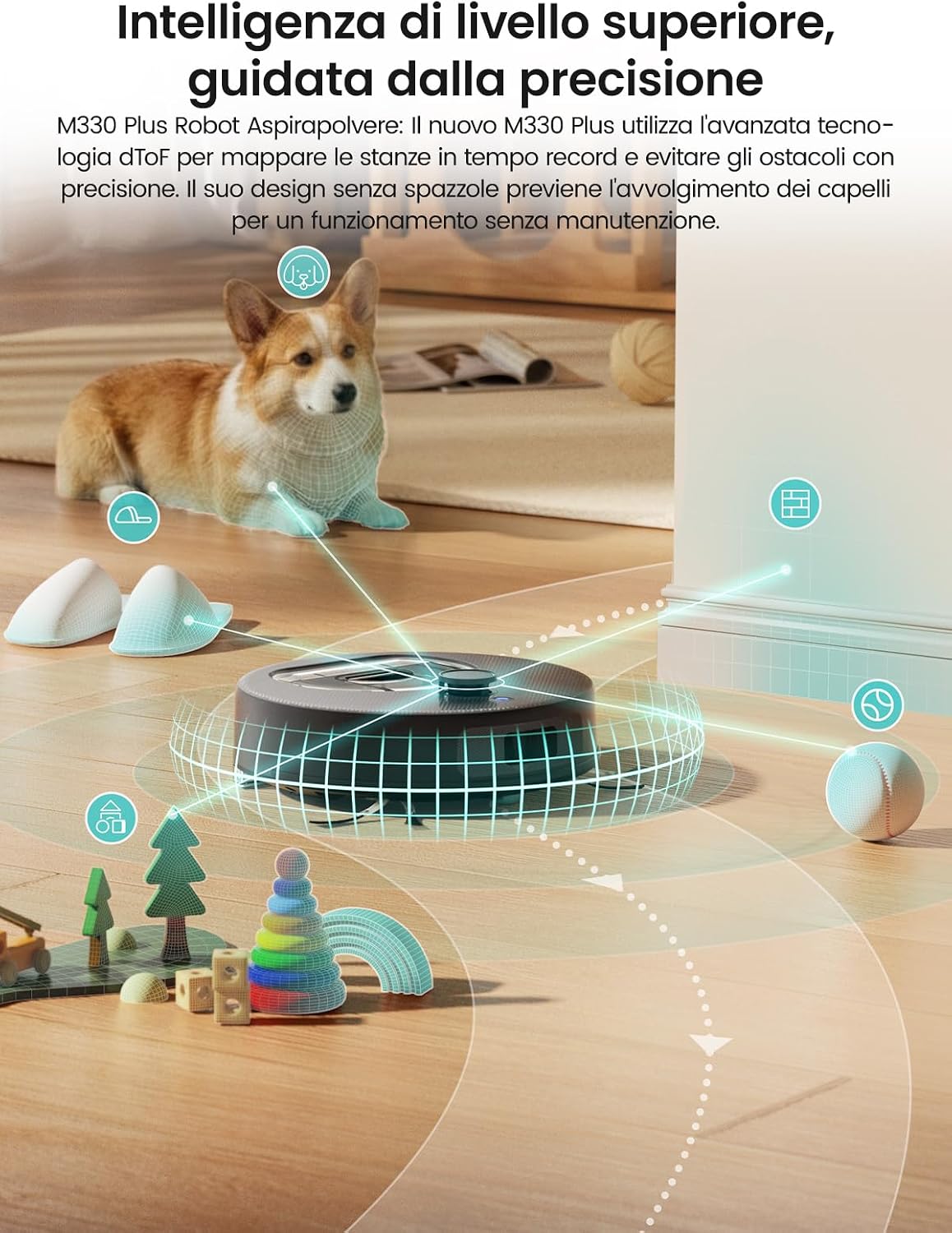
Image: The Lefant M330 Plus robot vacuum cleaner utilizing dToF laser navigation to accurately map its surroundings and detect obstacles, ensuring thorough cleaning.
4.4. Adaptive Surface Cleaning
The robot automatically recognizes different floor types. During mopping, it avoids carpets to protect them from moisture. In vacuuming mode, it automatically increases suction power on carpets for deeper cleaning.

Image: The Lefant M330 Plus robot vacuum cleaner demonstrating its adaptive intelligence, increasing suction power from 2000Pa (standard) to 5000Pa (max) when transitioning from hard floor to carpet.
4.5. Long Runtime and Low Noise
With a battery life of up to 150 minutes, the M330 Plus can clean areas up to 150 square meters on a single charge. It operates at a low noise level (55dB), ensuring minimal disturbance.

Image: The Lefant M330 Plus robot vacuum cleaner highlighting its long runtime of 150 minutes, capable of cleaning up to 150 square meters on a single charge.
5. Setup Guide
5.1. Charging the Robot
- Place the charging station against a wall in an open area, ensuring there are no obstacles within 1 meter to the sides and 1.5 meters in front.
- Connect the power adapter to the charging station and plug it into a wall outlet.
- Place the robot onto the charging station. Ensure the charging contacts on the robot align with those on the station. The indicator light will show charging status.
- Allow the robot to fully charge before its first use (approximately 4-5 hours).
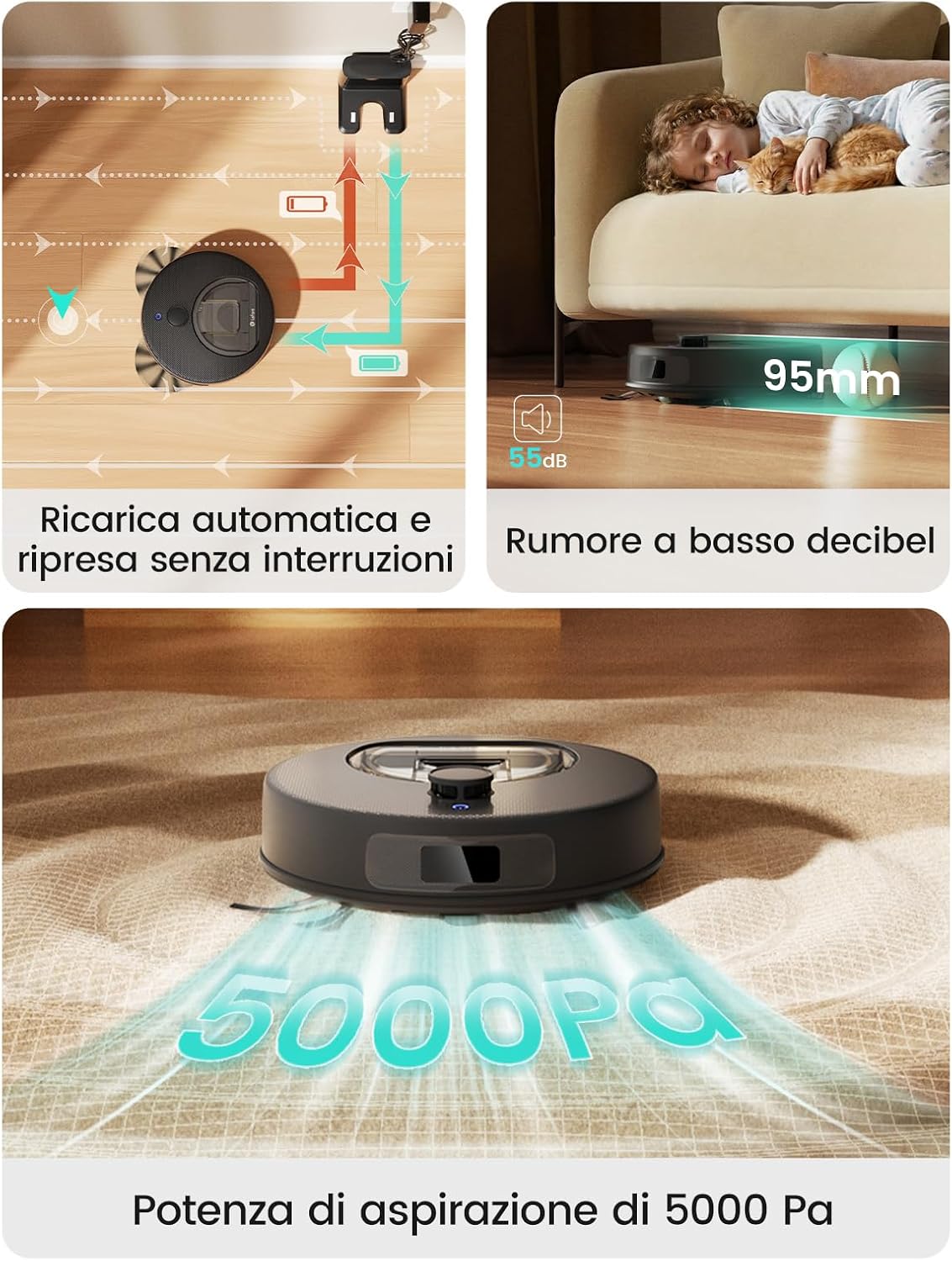
Image: The Lefant M330 Plus robot vacuum cleaner demonstrating automatic recharging and its low noise operation (55dB), with a child and cat sleeping undisturbed.
5.2. Connecting to the Lefant App
The Lefant app allows you to control your robot, set cleaning schedules, view maps, and more.
- Download the "Lefant" app from your mobile app store.
- Register or log in to your account.
- Add your M330 Plus robot vacuum to the app.
- Connect to a 2.4 GHz or 5 GHz Wi-Fi network.
- Power on the robot vacuum by pressing the power button.
- Press and hold the start button for 6 seconds to enter network configuration mode.
- Select M330 Plus in the app and wait for successful pairing.

Image: A step-by-step visual guide demonstrating the process of connecting the Lefant M330 Plus robot vacuum cleaner to the Lefant mobile application.
5.3. Voice Control Setup (Alexa/Google Home)
Integrate your M330 Plus with voice assistants for hands-free control.
- Open the Lefant app, go to 'Third-party voice service'.
- Note your account and voice password.
- Launch the Alexa App, go to 'Skills & Games'.
- Search for the 'Smart Life' skill.
- Tap 'Enable to Use'.
- Select your region, enter your account and voice password from step 2.
- Wait for the account to be successfully linked.

Image: A visual guide detailing the steps to configure Alexa voice control for the Lefant M330 Plus robot vacuum cleaner.
6. Operating Instructions
6.1. Cleaning Modes
The Lefant app provides various cleaning modes and customization options:
- Auto Clean: The robot intelligently cleans the entire mapped area.
- Zone Clean: Select specific areas on the map for the robot to clean.
- Spot Clean: Direct the robot to clean a concentrated area of dirt.
- Scheduled Clean: Set specific times for the robot to automatically start cleaning.

Image: The Lefant M330 Plus robot vacuum cleaner being controlled through its mobile app and voice commands, showcasing smart home integration in a living room.
6.2. Setting Forbidden Zones
You can define virtual boundaries to prevent the robot from entering specific areas.
- Open the Lefant app and access the map interface.
- Select the 'Forbidden Zones' option.
- Draw rectangular areas on the map where you do not want the robot to clean or mop. This is useful for delicate carpets, cable clusters, or pet areas.
- Save the settings.

Image: The Lefant M330 Plus app interface displaying the functionality to set customizable forbidden zones on the cleaning map, preventing the robot from entering specific areas.
6.3. Multi-Level Mapping
The M330 Plus can store up to 3 different maps, making it ideal for multi-story homes. The robot will automatically recognize which floor it is on and use the corresponding map.

Image: The Lefant M330 Plus app interface illustrating its multi-level mapping capability, allowing it to store and utilize maps for up to three different floors.
6.4. Apple Watch Control
Control your Lefant M330 Plus directly from your Apple Watch for added convenience.
- Download the Lefant app on your iPhone and Apple Watch.
- Pair your Apple Watch with your iPhone.
- Open the Lefant app on your Apple Watch.
- Access the Lefant app on your iPhone and log in.
- Connect your Lefant robot to the app.
- Control your robot seamlessly from your Apple Watch.

Image: A visual guide demonstrating how to control the Lefant M330 Plus robot vacuum cleaner directly from an Apple Watch, showing the app interface on both devices.
7. Maintenance
Regular maintenance ensures optimal performance and extends the lifespan of your Lefant M330 Plus.
7.1. Emptying the Dustbin
The transparent 450ml dustbin allows you to easily see when it needs emptying. Empty it after each cleaning cycle or when full.
- Press the dustbin release button and pull out the dustbin.
- Open the dustbin lid and empty its contents into a trash can.
- Close the lid and reinsert the dustbin into the robot until it clicks into place.
7.2. Cleaning Filters
Clean the filters regularly to maintain strong suction. Replace them every 3-6 months depending on usage.

Image: A set of replacement filters for the Lefant M330 Plus robot vacuum cleaner.
- Remove the dustbin.
- Take out the filter assembly.
- Tap the filter against a trash can to remove dust. Do not wash the HEPA filter with water.
- Brush off any remaining debris with a cleaning brush.
- Reassemble and reinsert.
7.3. Cleaning Side Brushes
Inspect and clean the side brushes weekly to remove tangled hair or debris. Replace them if they are worn or damaged.

Image: A set of replacement side brushes for the Lefant M330 Plus robot vacuum cleaner.
- Pull the side brushes upwards to remove them.
- Remove any hair or debris wrapped around the brushes.
- Reattach the brushes, ensuring they click into place.
7.4. Cleaning Mop Pads
The magnetic mop pads are washable and should be cleaned after each use to ensure hygiene.

Image: A pair of replacement mop pads for the Lefant M330 Plus robot mop.
- Detach the mop pad from the water tank.
- Hand wash the mop pad with water and mild detergent.
- Allow it to air dry completely before reattaching.
8. Troubleshooting
If you encounter issues with your Lefant M330 Plus, refer to the following common problems and solutions:
| Problem | Possible Cause | Solution |
|---|---|---|
| Robot does not turn on | Low battery; Power button not pressed | Charge the robot; Press and hold the power button for a few seconds. |
| Robot cannot charge | Charging contacts dirty; Charging station not powered | Clean charging contacts on robot and station; Ensure charging station is plugged in. |
| Robot gets stuck frequently | Obstacles in path; Robot stuck on high thresholds | Clear loose cables and small objects; Use forbidden zones for high thresholds. |
| Poor cleaning performance | Dustbin full; Filters clogged; Side brushes worn | Empty dustbin; Clean/replace filters; Clean/replace side brushes. |
| App connection issues | Incorrect Wi-Fi password; Robot not in pairing mode; Router issues | Verify Wi-Fi password; Re-enter pairing mode; Restart router. |
If the problem persists, please contact Lefant customer support for assistance.
9. Specifications
| Feature | Detail |
|---|---|
| Brand | Lefant |
| Model Name | M330 Plus |
| Suction Power | 5000 Pa |
| Navigation Type | LiDAR (dToF) |
| Battery Life | 150 Minutes |
| Battery Composition | Lithium Ion |
| Dustbin Capacity | 450 ml |
| Control Method | App, Voice (Alexa, Google Assistant) |
| Special Features | LiDAR Navigation, Anti-Tangle Design, Carpet Detection, Multi-Level Mapping |
| Dimensions (LxWxH) | 28L x 28W x 9.5H cm |
| Item Weight | 2.15 Kilograms |
| UPC | 609484081439 |
10. Warranty and Support
Lefant products come with a standard manufacturer's warranty. For specific warranty details and duration, please refer to the warranty card included in your product packaging or contact Lefant customer support.
For technical support, troubleshooting assistance, or to inquire about replacement parts, please visit the official Lefant website or contact their customer service team. You can also refer to the Data Transparency Statement (PDF) for additional information.
Online resources and FAQs may also be available on the Lefant brand store: Lefant Store.


