
1. Introduction
The Aoleaby SX711 is a portable water quality monitoring instrument designed for accurate measurement of pH, mV, and ORP (Oxidation-Reduction Potential). This device is engineered for reliability and ease of use across various applications, including water treatment, power generation, and food processing.
Key features of the SX711 include:
- High Accuracy: Built-in pH sensor provides stable readings with minimal error.
- Wide Application: Suitable for diverse industrial and laboratory environments.
- Excellent Stability: Durable pH electrode ensures consistent performance.
- Compact Design: Small size for enhanced portability and convenient use.
- User-Friendly Operation: Intuitive interface simplifies measurement processes.

Figure 1: The Aoleaby SX711 pH/mV/ORP Meter, showing its display and control buttons.
2. Setup
2.1. Battery Installation
The SX711 meter operates on two (2) AA batteries (1.5V x 2). To install or replace batteries:
- Locate the battery compartment cover on the back of the instrument.
- Slide or unclip the cover to open.
- Insert the two AA batteries, ensuring correct polarity (+/-) as indicated inside the compartment.
- Close the battery compartment cover securely.
2.2. Electrode Connection
Connect the pH/ORP electrode to the designated BNC connector on the bottom of the meter. Ensure the connection is firm to prevent signal interference.
3. Operation
3.1. Power On/Off
Press the ON/OFF button to power on the instrument. Press and hold the ON/OFF button again to power off.
3.2. Mode Selection
Press the MODE button to switch between pH, mV, and ORP measurement modes. The current mode will be displayed on the screen.
3.3. pH Calibration
For accurate pH measurements, regular calibration is essential. Follow these steps:
- Prepare standard pH buffer solutions (e.g., pH 4.00, 7.00, 10.00).
- Rinse the electrode with distilled water and blot dry.
- Immerse the electrode into the first buffer solution (e.g., pH 7.00).
- Press the CAL button. The meter will automatically recognize the buffer and begin calibration.
- Wait for the reading to stabilize and the calibration indicator to confirm completion.
- Rinse the electrode and repeat the process with the next buffer solution (e.g., pH 4.00 or 10.00) as needed for multi-point calibration.
- Press ENTER to confirm and save calibration.
3.4. Taking Measurements
After calibration, immerse the electrode into the sample solution. Allow sufficient time for the reading to stabilize before recording the measurement. The meter automatically compensates for temperature variations within its specified range.
3.5. Data Storage and Recall
The SX711 can store measurement data. Use the M+/RM button to save current readings or recall previously stored data. The meter supports storage of up to 200 groups for pH/mV and 100 groups for ORP, including serial number, measured value, unit, and temperature.
4. Maintenance
4.1. Electrode Care
- Cleaning: Always rinse the electrode with distilled or deionized water before and after each measurement. For stubborn deposits, use a mild cleaning solution recommended for pH electrodes.
- Storage: Store the pH electrode in a suitable electrode storage solution or a 3M KCl solution when not in use. Never store the electrode dry.
4.2. Instrument Cleaning
Wipe the meter's body with a soft, damp cloth. Do not use abrasive cleaners or solvents. Ensure no liquid enters the battery compartment or connectors.
4.3. Battery Replacement
Replace batteries when the low battery indicator appears on the display to ensure continuous accurate operation.
4.4. Storage Conditions
When storing the instrument for extended periods, remove the batteries. Store the meter in a dry place with an ambient temperature between 5 - 35 °C and relative humidity not exceeding 85%.
The SX711 has an IP57 rating, indicating it is dust-proof and waterproof against temporary immersion.
5. Troubleshooting
5.1. Unstable Readings
- Cause: Dirty electrode, air bubbles on the electrode, expired buffer solutions, or damaged electrode.
- Solution: Clean the electrode, gently tap to remove air bubbles, use fresh buffer solutions, or replace the electrode if damaged.
5.2. Calibration Errors
- Cause: Incorrect buffer solutions, electrode not properly immersed, or electrode malfunction.
- Solution: Verify buffer values, ensure electrode is fully immersed, or clean/replace electrode.
5.3. Meter Does Not Power On
- Cause: Dead or incorrectly installed batteries.
- Solution: Check battery polarity, replace with new AA batteries.
6. Specifications
The following tables detail the technical specifications for the Aoleaby SX711 pH/mV/ORP Meter.
6.1. pH and mV Specifications
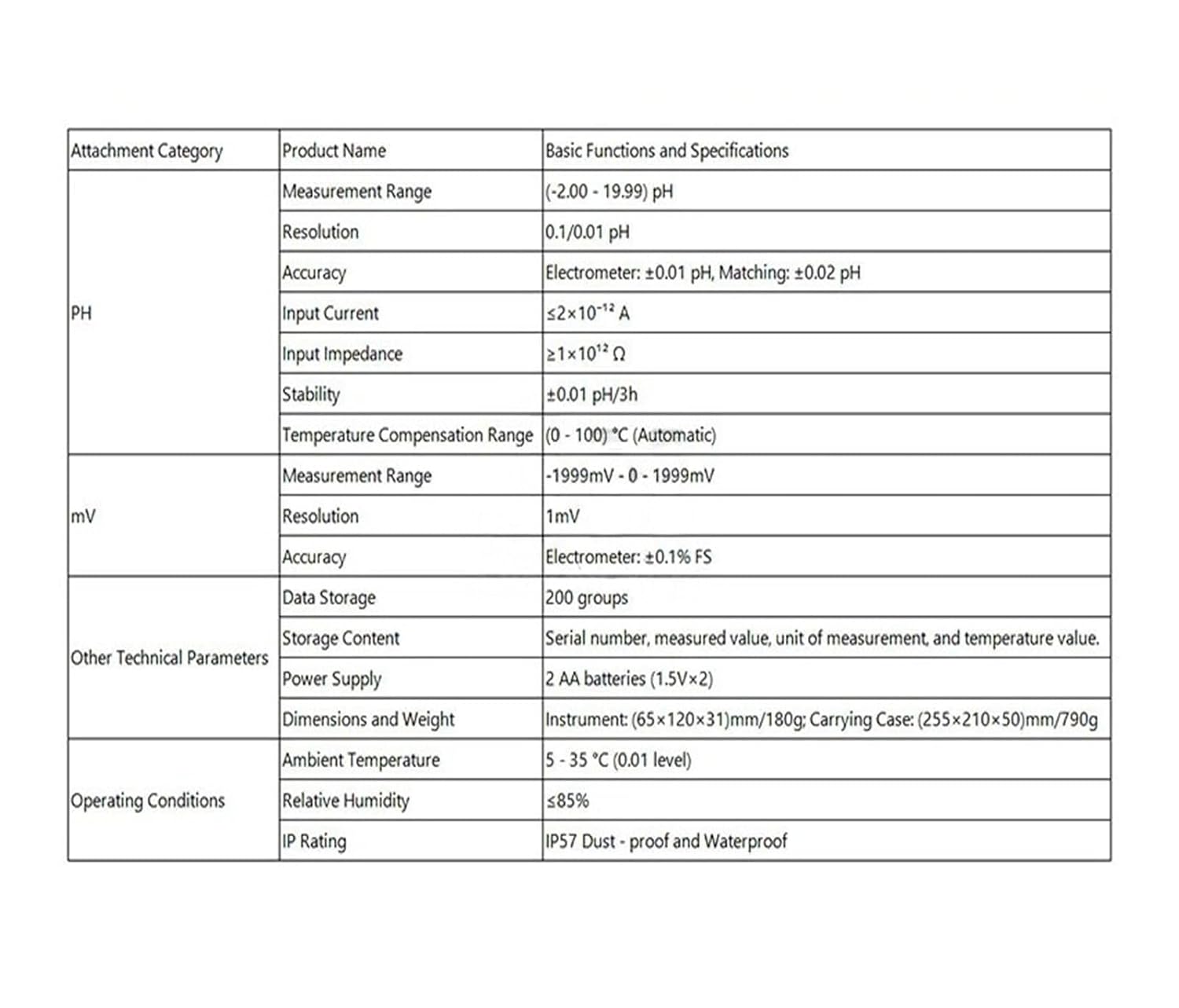
Figure 2: Detailed specifications for pH and mV measurements.
| Attachment Category | Product Name | Basic Functions and Specifications |
|---|---|---|
| pH | Measurement Range | (-2.00 - 19.99) pH |
| Resolution | 0.1/0.01 pH | |
| Accuracy | Electrometer: ±0.01 pH, Matching: ±0.02 pH | |
| Input Current | ≤2×10⁻¹² A | |
| Input Impedance | ≥1×10¹² Ω | |
| Stability | ±0.01 pH/3h | |
| Temperature Compensation Range | (0 - 100) °C (Automatic) | |
| mV | Measurement Range | -1999mV - 0 - 1999mV |
| Resolution | 1mV | |
| Other Technical Parameters | Accuracy | Electrometer: ±0.1% FS |
| Data Storage | 200 groups | |
| Storage Content | Serial number, measured value, unit of measurement, and temperature value. | |
| Power Supply | 2 AA batteries (1.5V×2) | |
| Dimensions and Weight | Instrument: (65×120×31)mm/180g; Carrying Case: (255×210×50)mm/790g | |
| Operating Conditions | Ambient Temperature | 5 - 35 °C (0.01 level) |
| Relative Humidity | ≤85% | |
| IP Rating | IP57 Dust - proof and Waterproof |
6.2. ORP Specifications

Figure 3: Detailed specifications for ORP measurements.
| Attachment Category | Product Name | Basic Functions and Specifications |
|---|---|---|
| ORP | Measurement Range | -1999mV - 0 - 1999mV |
| Resolution | 1mV | |
| Accuracy | Electrometer: ±0.1% FS; Matching: ±15mV | |
| Other Technical Parameters | Data Storage | 100 groups |
| Power Supply | 2 AA batteries (1.5V×2) | |
| Dimensions and Weight | Instrument: (65×120×31)mm/180g; Carrying Case: (255×210×50)mm/790g | |
| Operating Conditions | Ambient Temperature | 5 - 35 °C (0.01 level) |
| Relative Humidity | ≤85% | |
| IP Rating | IP57 Dust - proof and Waterproof |
6.3. General Specifications
| Parameter | Value |
|---|---|
| Package Dimensions | 0.39 x 0.39 x 0.39 inches |
| Item Weight | 1.32 pounds |
| Manufacturer | Aoleaby |
| ASIN | B0G51HSLG9 |
| Date First Available | December 4, 2025 |
7. Warranty and Support
For specific warranty information, please refer to the documentation provided with your purchase or contact the seller directly. Aoleaby is the manufacturer of this product.
For technical support or service inquiries, please contact your authorized dealer or the manufacturer's customer service department.