
1. Important Safety Instructions
Always read and understand all safety warnings and instructions before operating this power tool. Failure to follow the warnings and instructions may result in electric shock, fire, and/or serious injury.
- Work Area Safety: Keep your work area clean and well-lit. Cluttered or dark areas invite accidents. Do not operate power tools in explosive atmospheres, such as in the presence of flammable liquids, gases, or dust.
- Electrical Safety: Avoid body contact with earthed or grounded surfaces such as pipes, radiators, ranges, and refrigerators. There is an increased risk of electric shock if your body is earthed or grounded.
- Personal Safety: Always wear eye protection. Use personal protective equipment such as dust masks, non-skid safety shoes, hard hats, or hearing protection when appropriate.
- Tool Use and Care: Do not force the power tool. Use the correct power tool for your application. It will do the job better and safer at the rate for which it was designed.
- Battery Use and Care: Recharge only with the charger specified by the manufacturer. A charger that is suitable for one type of battery pack may create a risk of fire when used with another battery pack.
2. Product Overview
The BLACK+DECKER BCD712VHD-IN is a versatile cordless impact hammer drill kit designed for drilling and screwdriving tasks in various materials including wood, metal, and masonry.
2.1 Components Included
- 1 x BCD712VHD-IN Cordless Impact Hammer Drill
- 1 x Charger
- 1 x 60mm Magnetic Bit Holder
- 2 x Metal Drill Bits (4mm, 6mm)
- 2 x Masonry Drill Bits (4mm, 6mm)
- 2 x Wood Drill Bits (4mm, 6mm)
- 10 x 25mm Screwdriving Bits
- User Manual
- Warranty Card

Image: The BLACK+DECKER BCD712VHD-IN drill kit, showing the drill, charger, and 17 accessories.
2.2 Key Features
- 10mm (3/8") Keyless Chuck: Allows for quick and easy bit changes.
- 10.8V (12V MAX*) 1.5Ah Li-Ion Battery: Integrated for practicality and autonomy, with a battery level indicator.
- Variable Speed & Reverse Switch: Provides control for various applications and enables screwdriving operations.
- Impact System: For efficient drilling in masonry.
- Built-In LED Light: Illuminates the work area for improved visibility in low-light conditions.
- Rubberized Grip: Enhances comfort and control during use.

Image: A detailed diagram pointing out the LED light, rubberized grip, battery indicator, and impact function of the drill.
3. Setup
3.1 Charging the Battery
- Connect the charger to a standard electrical outlet.
- Insert the drill into the charger base. Ensure the drill is securely seated.
- The battery level indicator on the drill will show the charging status. Charge until the indicator shows a full charge.
- Disconnect the charger from the outlet and remove the drill once fully charged.

Image: The BLACK+DECKER BCD712VHD-IN drill placed on its charging base, connected to a power outlet.
3.2 Installing and Removing Bits
- Ensure the drill is switched off and the forward/reverse switch is in the center (locked) position.
- Grip the rear half of the chuck and rotate the front half counter-clockwise until the chuck jaws are wide enough to accept the bit.
- Insert the desired drill bit or screwdriving bit into the chuck. For screwdriving bits, use the provided 60mm magnetic bit holder.
- Rotate the front half of the chuck clockwise until the bit is securely tightened.
- To remove a bit, reverse the process.
4. Operating Instructions
4.1 Selecting Operating Mode
The drill features a mode selector ring located behind the chuck. Rotate the ring to select the appropriate mode:
- Drilling Mode (Drill Icon): For drilling in wood, metal, and plastic.
- Hammer Drilling Mode (Hammer Icon): For drilling in masonry and concrete.
- Screwdriving Mode (Screw Icon): For driving and removing screws. Adjust the torque setting for screwdriving.
Video: This video demonstrates the BLACK+DECKER BCD712VHD-IN drill in various applications, including screwdriving, drilling wood, and hammer drilling masonry, highlighting its versatility and ease of use.
4.2 Drilling and Screwdriving
- Select the correct bit and mode: Choose a bit appropriate for the material and task. Set the mode selector to drilling or hammer drilling as needed. For screwdriving, select the screwdriving mode and adjust the torque collar to prevent overtightening or stripping.
- Position the tool: Hold the drill firmly with both hands if possible. Position the bit at the desired location.
- Start drilling/screwdriving: Press the trigger switch to start the tool. The variable speed trigger allows for precise control; press lightly for slower speed and harder for faster speed.
- Use the LED light: The built-in LED light activates when the trigger is pressed, illuminating the work surface.
- Reverse switch: Use the forward/reverse switch to change the direction of rotation for removing screws or backing out drill bits.
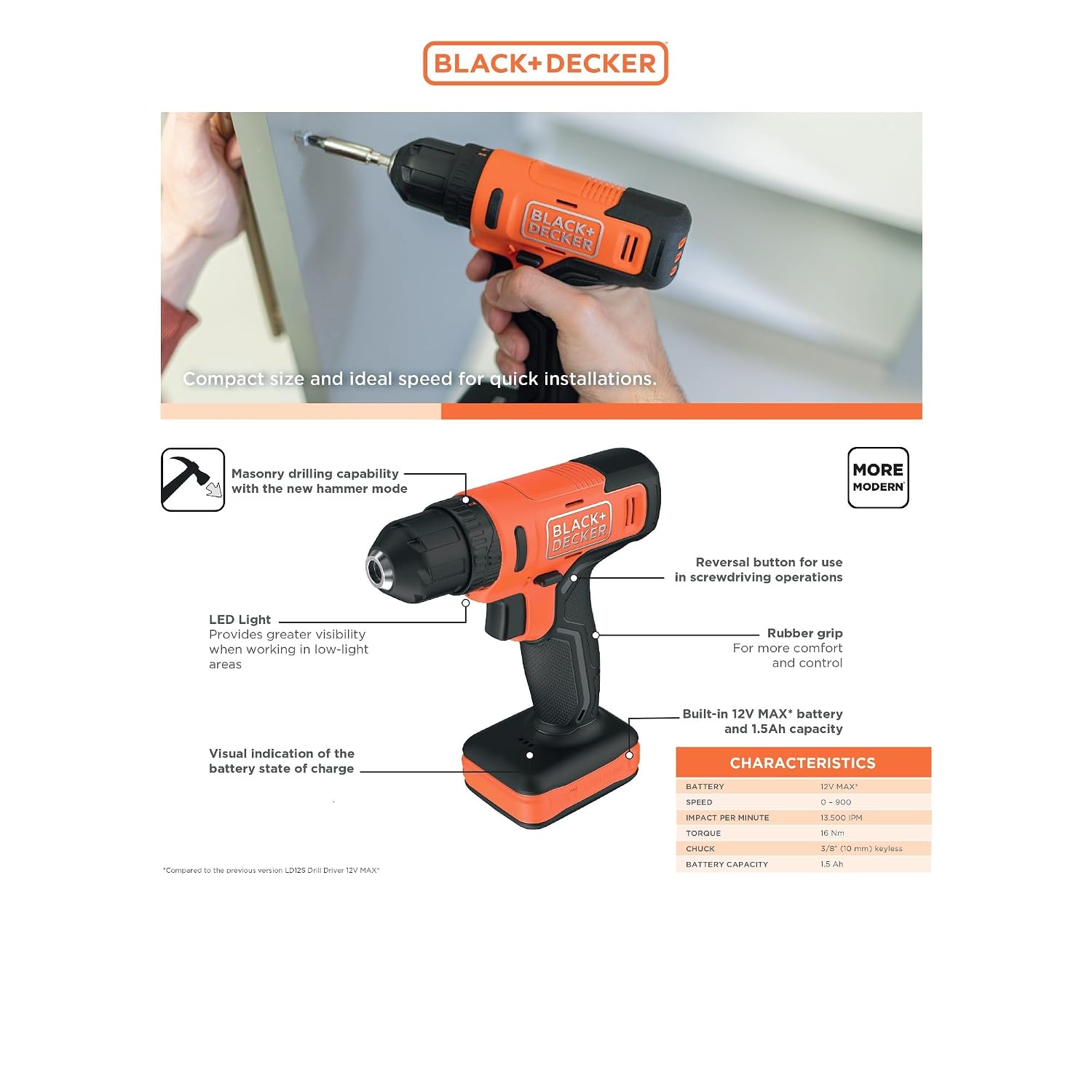
Image: A user operating the BLACK+DECKER BCD712VHD-IN drill to drive a screw into a wall mount.

Image: A user demonstrating the hammer drilling capability of the BLACK+DECKER BCD712VHD-IN drill on a masonry surface.

Image: The BLACK+DECKER BCD712VHD-IN drill in use, with its integrated LED light providing illumination to the work area.
5. Maintenance
Regular maintenance ensures optimal performance and extends the life of your tool.
- Cleaning: Keep the ventilation slots of the tool clean to prevent overheating. Use a soft, damp cloth to clean the exterior. Do not use harsh chemicals or abrasive cleaners.
- Storage: Store the tool and accessories in a dry, secure place out of reach of children. Ensure the battery is partially charged before long-term storage.
- Bit Care: Keep drill bits and screwdriving bits sharp and clean for efficient operation. Replace worn or damaged bits.
6. Troubleshooting
| Problem | Possible Cause | Solution |
|---|---|---|
| Drill does not start | Battery is discharged | Charge the battery fully. |
| Forward/reverse switch is in the center (locked) position | Move the switch to the forward or reverse position. | |
| Reduced power or speed | Battery is low | Recharge the battery. |
| Incorrect mode or torque setting | Adjust the mode selector and torque collar for the task. | |
| Bit slips in chuck | Chuck not tightened sufficiently | Ensure the chuck is tightened securely around the bit. |
7. Specifications
| Feature | Specification |
|---|---|
| Model Number | BCD712VHD-IN |
| Power Source | Battery Powered |
| Voltage | 12 Volts (10.8V nominal) |
| Battery Capacity | 1.5 Amp Hours (Li-Ion) |
| Maximum Rotational Speed | 900 RPM |
| Impacts Per Minute (IPM) | 0–13,500 IPM |
| Maximum Torque | 16 Newton Meters |
| Maximum Chuck Size | 10 Millimeters (3/8") Keyless |
| Drilling Capacity (Wood) | 19 Millimeters |
| Drilling Capacity (Metal) | 6.5 Millimeters |
| Drilling Capacity (Masonry) | 6 Millimeters |
| Product Dimensions (L x W x H) | 16.5 x 6.5 x 18.5 Centimeters |
| Item Weight | 0.91 Kilograms |
| Material | Metal, Plastic, Rubber |
8. Warranty and Support
8.1 Limited Warranty
This BLACK+DECKER BCD712VHD-IN Cordless Impact Hammer Drill Kit comes with a 1 Year Limited Warranty provided by the manufacturer from the date of purchase. This warranty covers manufacturing defects only. Please retain your purchase receipt as proof of purchase for warranty claims.
8.2 Customer Support
For sales, after-sales support, original parts, or any inquiries, please contact BLACK+DECKER customer care:
- Phone: 1800-203-0644 (Monday - Saturday, 09:00 AM - 06:00 PM IST, except government holidays)
- Email: sbd-customercommunications@sbdinc.com
- WhatsApp: +91 96060 55835
- Authorized Service Centers: 500+ locations available.

Image: Customer care contact details for BLACK+DECKER, including phone, email, and WhatsApp information.


