
Introduction
The HoneyGuaridan S25 Automatic Cat Feeder is designed to provide a convenient and reliable feeding solution for your pet. Featuring 2.4GHz/5GHz Wi-Fi connectivity and app control, this feeder allows you to manage your pet's meal schedule from anywhere. It includes both a stainless steel bowl and a slow feeder bowl to cater to different eating habits.
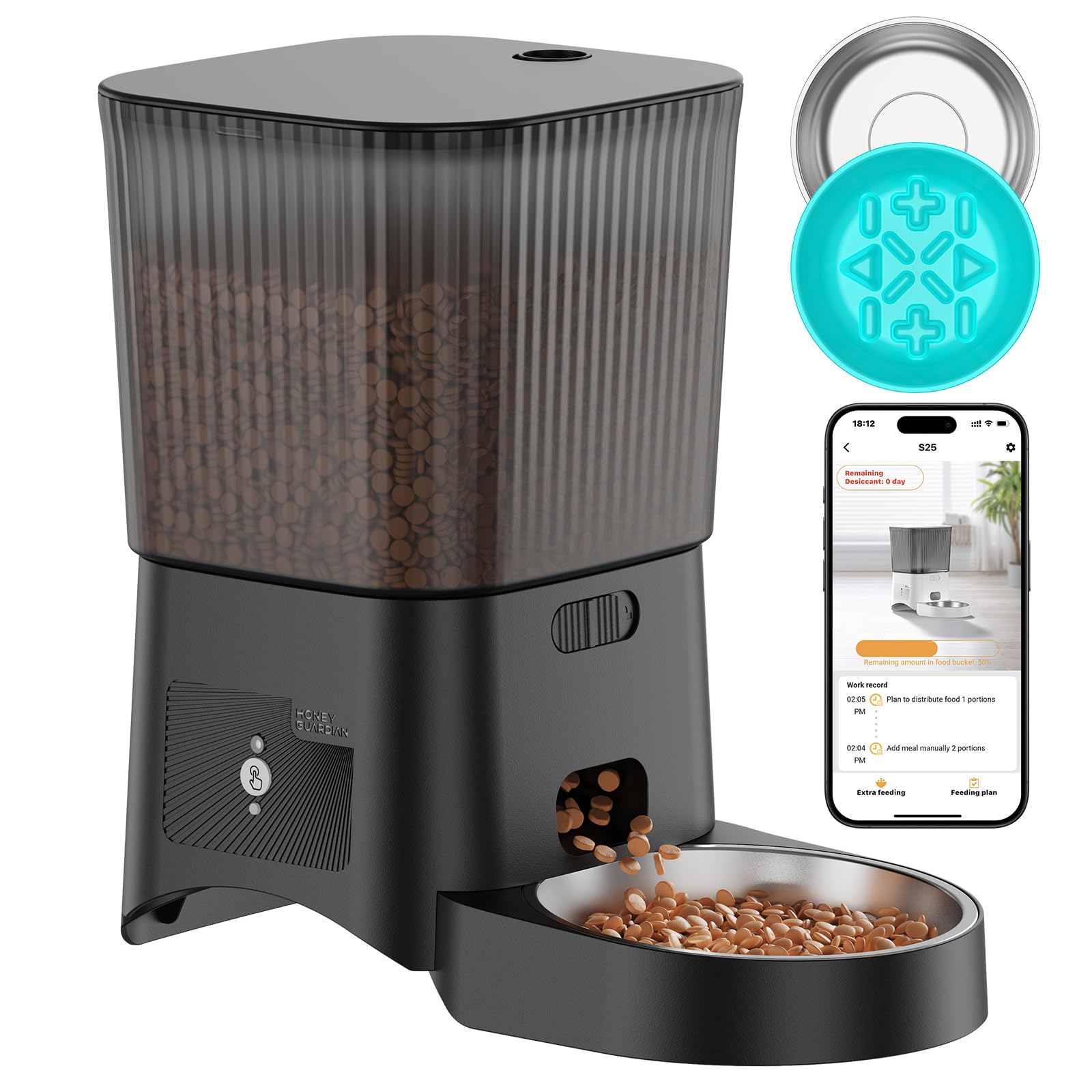
Image: HoneyGuaridan S25 Automatic Cat Feeder with a cat, illustrating its scheduling capabilities and dual bowl options.
What's Included
Please check the package contents to ensure all items are present:
- Automatic Cat Feeder Unit
- Stainless Steel Bowl
- Slow Feed Bowl Insert
- Desiccant Bag
- DC 5V Power Adapter
Setup
- Unpack and Assemble: Carefully remove all components from the packaging. Attach the food container to the base unit. Place your preferred feeding bowl (stainless steel or slow feeder) into the designated slot.
- Power Supply: Connect the DC 5V power adapter to the feeder and a wall outlet. For continuous operation during power outages, install 4 AA-size batteries (not included) in the battery compartment located at the bottom of the unit. Dual power supply is recommended.
- Fill with Food: Open the lid of the food container and pour dry pet food into the reservoir. Ensure the kibble size is between 2-15mm for optimal dispensing. Close the lid securely.
- Download the App: Download the "HGsmart" app from the Apple App Store or Google Play Store.
- Connect to Wi-Fi: Follow the in-app instructions to connect your feeder to your home's 2.4GHz or 5GHz Wi-Fi network.
Video: A demonstration of unboxing and assembling the HoneyGuaridan S25 Automatic Cat Feeder, showing how to put together the components.

Image: Instructions for downloading the HGsmart app, including QR codes for both Android and iOS devices. Android App Link | iOS App Link
Operating Instructions
App Control and Scheduling
Use the "HGsmart" app to remotely manage your pet's feeding schedule. You can set up to 6 meals per day, with each meal consisting of 1 to 24 portions. The app also allows you to view feeding records.

Image: The HGsmart app interface demonstrating how to schedule meal times and set portion sizes.
Personalized Voice Recording
Record a custom voice message (up to 10 seconds) through the app. This message will play automatically at each scheduled feeding time to call your pet to eat.

Image: The app interface for recording a personalized voice message, which plays during meal dispensing.
Dual Bowl System
The feeder comes with two interchangeable bowls: a standard stainless steel bowl and a slow feeder bowl. The slow feeder bowl is designed with ridges to encourage slower eating, aiding digestion and reducing the risk of bloat.

Image: Visual representation of how the slow feeder bowl aids digestion and promotes healthy eating habits.
Video: A demonstration of the HoneyGuaridan feeder with its two included bowls, highlighting their features.
Maintenance
Cleaning
- The stainless steel bowl and slow feeder bowl can be removed and washed with soap and water.
- Wipe the main feeder unit with a damp cloth. Do not submerge the main unit in water.
- Ensure all parts are completely dry before reassembly and refilling.
Food Freshness and Desiccant Bag
The feeder features a multi-seal design, including a silicone seal strip and a sealed revolving door, to keep food fresh and prevent pests. The desiccant bag helps absorb moisture. Replace the desiccant bag every 1-2 months for optimal freshness.

Image: Illustration of the feeder's sealing mechanisms, including the silicone seal, desiccant bag, and sealing rotor, designed to keep food fresh.
Video: A demonstration of how to refill the HoneyGuaridan S25 Automatic Cat Feeder and secure the lid.
Troubleshooting
- Feeder not dispensing food:
- Check if the food container is empty.
- Ensure the kibble size is within the recommended 2-15mm range to prevent blockages.
- Verify that the feeder is powered on and connected to Wi-Fi.
- Check the app for any error messages or to manually dispense a meal.
- Wi-Fi connection issues:
- Ensure your router is broadcasting a 2.4GHz or 5GHz network.
- Move the feeder closer to your Wi-Fi router.
- Restart your router and the feeder.
- Follow the in-app instructions for re-pairing the device.
- Voice recording not playing:
- Ensure the volume in the app is not muted.
- Re-record the voice message to ensure it was saved correctly.
- Feeder losing power:
- Verify the DC power adapter is securely plugged into both the feeder and the wall outlet.
- Check if the 4 AA-size backup batteries are installed and have sufficient charge.
Specifications
| Feature | Detail |
|---|---|
| Product Dimensions | 6.69 x 6.69 x 8.66 inches |
| Item Weight | 2.84 pounds |
| Model Number | S25 |
| Brand | HoneyGuaridan |
| Target Species | Cat |
| Connectivity Technology | 2.4GHz/5GHz WiFi |
| Operation Mode | Automatic |
| Power Supply | DC 5V Adapter, 4x AA Batteries (backup) |
| Food Capacity | 3.5L |
| Kibble Size | 2-15mm |
| Max Meals/Day | 6 |
| Max Portions/Meal | 24 |
Warranty and Support
For warranty information and customer support, please refer to the official HoneyGuaridan website or contact their customer service directly. Details are typically provided in the product packaging or on the manufacturer's official channels.
You can visit the HoneyGuaridan store on Amazon: HoneyGuaridan Store