
1. Product Overview
The Ultenic U18 Pro is a powerful cordless stick vacuum cleaner designed for efficient cleaning of various surfaces in your home and car. It features a robust 55kPa suction power, a long-lasting battery providing up to 80 minutes of runtime, and a flexible tube for enhanced maneuverability. This manual will guide you through its features, assembly, operation, and maintenance.
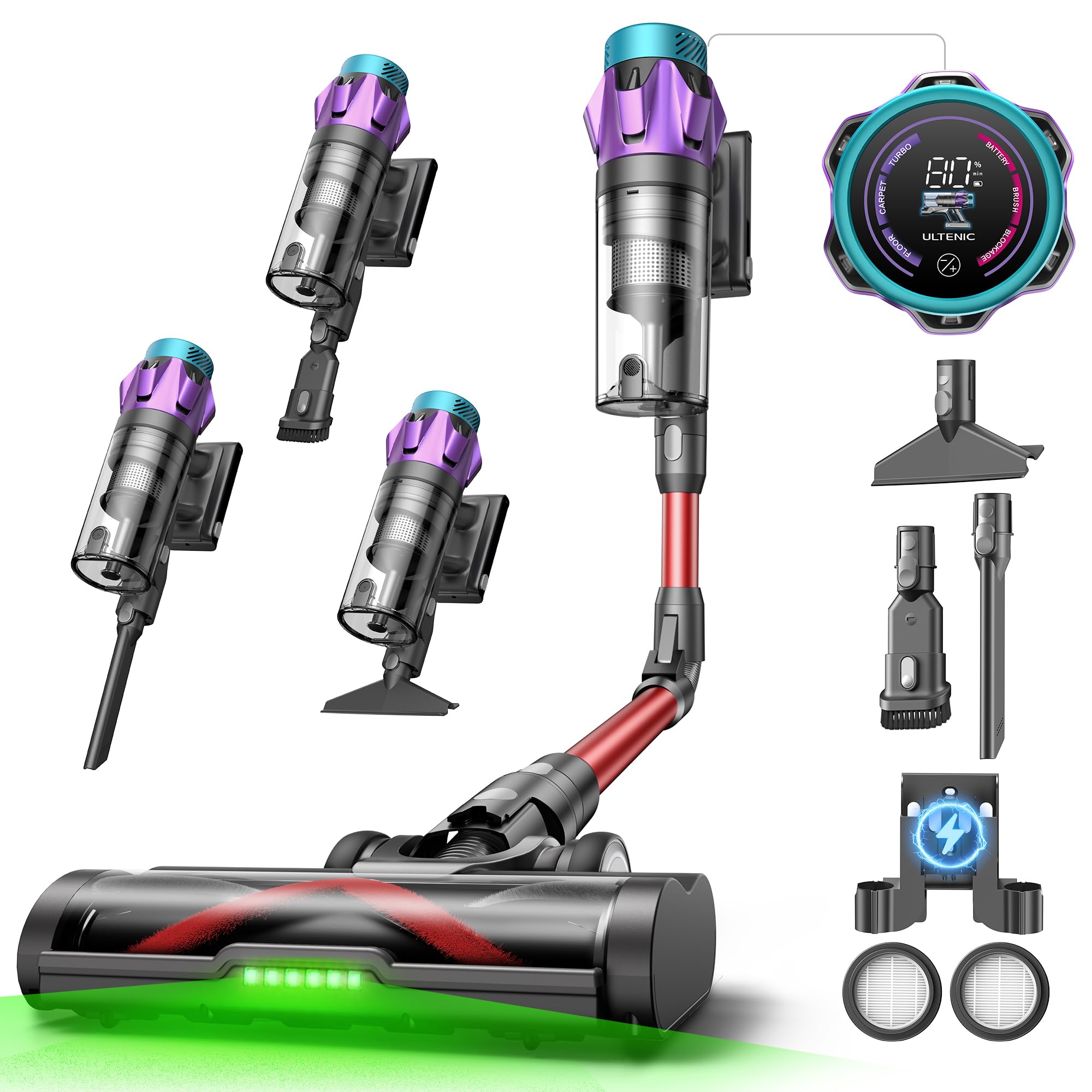
Image: The Ultenic U18 Pro Cordless Stick Vacuum Cleaner in use, highlighting its design and functionality.
2. What's in the Box
Before assembly, ensure all components are present in the packaging. The Ultenic U18 Pro comes with a comprehensive set of accessories to meet diverse cleaning needs.

Image: A visual representation of all components included with the Ultenic U18 Pro, such as the main unit, motorized brush, battery, various nozzles, wall mount, charger, cleaning brush, filters, and user manual.
- Main Vacuum Unit
- Motorized Floor Brush
- Rechargeable Battery
- Wide Flat Nozzle
- Standard Flat Nozzle
- Mini-Brush
- Flexible Tube
- HEPA Filters (x2)
- Wall Mount Support
- Power Adapter/Charger
- Cleaning Brush
- User Manual & Warranty Card
3. Setup
3.1 Assembly
- Attach the main vacuum unit to the extension tube.
- Connect the motorized floor brush to the other end of the extension tube.
- Insert the fully charged battery into the main unit until it clicks into place.
3.2 Charging and Wall Mount Installation
For convenient storage and charging, install the 2-in-1 wall mount in a suitable location near a power outlet.

Image: The Ultenic U18 Pro stored on its wall-mounted charging dock, connected to a power outlet.
- Select a wall location that is dry, stable, and within reach of a power outlet.
- Secure the wall mount to the wall using the provided screws and anchors.
- Connect the power adapter to the wall mount and plug it into the outlet.
- Place the vacuum cleaner onto the wall mount for charging. The battery indicator on the LED display will show charging status.
4. Operating Instructions
4.1 Power On/Off and Mode Selection
Press the power button to turn the vacuum on or off. Use the mode selection button on the handle to switch between cleaning modes.

Image: Close-up of the intelligent LED display on the Ultenic U18 Pro, showing battery level, current mode (Floor, Carpet, Turbo), and visual alerts.
- Floor Mode: Ideal for hard floors and light debris, offering up to 80 minutes of runtime.
- Carpet Mode: Increased suction for carpets and rugs, providing up to 45 minutes of runtime.
- Turbo Mode: Maximum suction for stubborn dirt and deep cleaning, with up to 25 minutes of runtime.

Image: Diagram illustrating the different suction modes (Floor, Carpet, Turbo) and their corresponding approximate runtimes.
4.2 Using Specialized Features
- GreenEye Technology: The motorized brush head features LED lights to illuminate dust and debris on the floor, making hidden dirt visible for thorough cleaning.

Image: The vacuum's brush head with GreenEye LED lights illuminating dust on a floor, demonstrating precise cleaning in corners.
- Flexible Tube: The ergonomic foldable tube allows you to easily reach under furniture and into tight spaces without bending or straining.
- Self-Standing Function: The vacuum can stand upright on its own, providing convenience for quick pauses during cleaning or when changing accessories.

Image: The Ultenic U18 Pro demonstrating its flexible tube for cleaning under a sofa and its self-standing capability.
4.3 Using Accessories
Attach the appropriate accessory directly to the main unit or the flexible tube for specialized cleaning tasks.
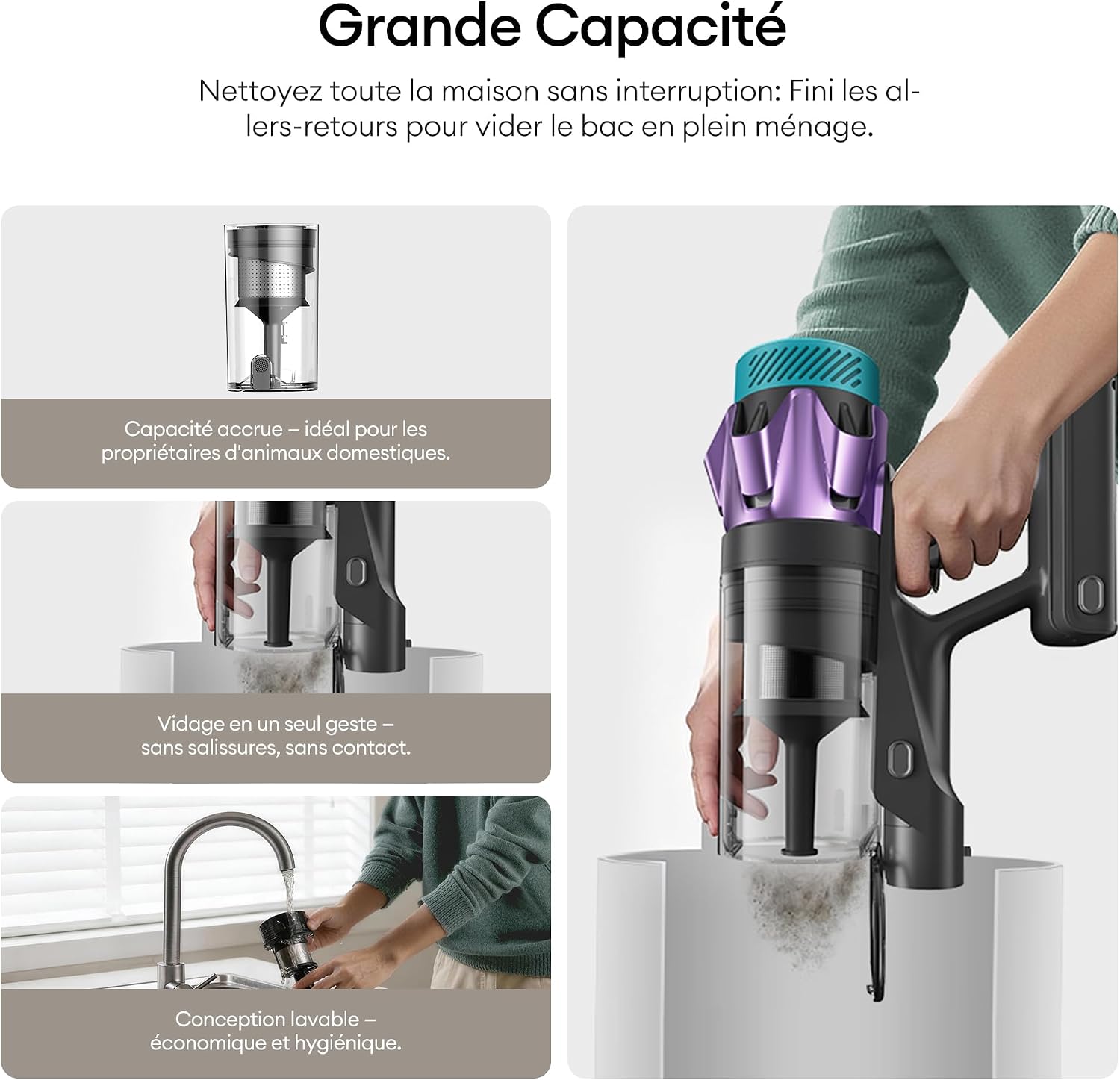
Image: Various accessories of the Ultenic U18 Pro, including the wide flat nozzle for mattresses, mini-brush for car interiors, and standard flat nozzle for crevices, shown in use.
- Wide Flat Nozzle: Excellent for cleaning mattresses, sofas, and other upholstered surfaces.
- Mini-Brush: Ideal for car seats, pet hair on upholstery, and smaller, intricate areas.
- Standard Flat Nozzle: Perfect for reaching into narrow gaps, corners, and edges.
5. Maintenance
Regular maintenance ensures optimal performance and extends the lifespan of your vacuum cleaner.
5.1 Emptying the Dustbin
The 1.6-liter dustbin capacity allows for extended cleaning sessions. Empty it regularly to maintain suction power.

Image: Steps for emptying the Ultenic U18 Pro dustbin with a single click, showing the dustbin capacity and washable design.
- Hold the main unit over a trash can.
- Press the dustbin release button to open the bottom flap and empty the contents.
- Close the flap securely after emptying.
5.2 Cleaning the Filters
The Ultenic U18 Pro features a 6-layer advanced filtration system, including a HEPA filter. Clean filters regularly to prevent clogging and maintain air quality.

Image: A four-step guide to cleaning the Ultenic U18 Pro, showing how to empty the dustbin, remove the HEPA filter, wash it under water, and allow it to air dry.

Image: Detailed diagram of the Ultenic U18 Pro's 6-level filtration system, including the dustbin, stainless steel filters, fine dust cyclonic filtration, sponge filters, HEPA filter, and exhaust HEPA filter.
- Twist and pull to remove the filter assembly from the main unit.
- Separate the HEPA filter and other filter components.
- Rinse the washable filters under running water until clean. Do not use detergents.
- Allow all filter components to air dry completely for at least 24 hours before reassembling and placing them back into the vacuum. Ensure they are completely dry to prevent damage.
5.3 Cleaning the Anti-Tangle Brush
The anti-tangle brush is designed to minimize hair entanglement, but occasional cleaning may still be necessary.

Image: Comparison showing a classic brush with tangled hair versus the Ultenic U18 Pro's Tangle-Free Technology brush, designed to prevent hair from getting stuck.
- Turn off the vacuum and detach the motorized floor brush.
- Locate the brush roll release mechanism (usually a latch or button) and remove the brush roll.
- Use the provided cleaning tool or scissors to carefully cut and remove any tangled hair or fibers from the brush roll.
- Reinsert the brush roll and secure it in place.
6. Troubleshooting
If you encounter issues with your Ultenic U18 Pro, refer to the following common troubleshooting steps:
| Problem | Possible Cause | Solution |
|---|---|---|
| Vacuum does not turn on | Battery not charged or improperly installed. | Ensure battery is fully charged and correctly inserted. Check power adapter connection. |
| Low suction power | Dustbin full, filters clogged, or blockage in the hose/brush. | Empty dustbin. Clean or replace filters. Check for and remove any blockages. |
| Brush roll not spinning | Hair/debris tangled in brush, or brush motor issue. | Clean brush roll of any obstructions. If problem persists, contact support. |
| Short runtime | Battery not fully charged, or operating in high power mode. | Ensure battery is fully charged. Use appropriate power mode for the task. Battery life naturally degrades over time. |
| Unusual noise | Blockage, loose part, or motor issue. | Check for blockages in the nozzle, tube, or brush head. Ensure all parts are securely assembled. If noise persists, discontinue use and contact support. |
For issues not covered here, please refer to the support section or contact customer service.
7. Specifications
| Brand | Ultenic |
| Model Number | U18 Pro |
| Color | Red |
| Product Dimensions (L x W x H) | 29 x 30 x 110 cm |
| Weight | 3.34 Kilograms |
| Capacity | 1.6 Liters |
| Power | 600 Watts |
| Voltage | 29.6 Volts |
| Material | Plastic |
| Noise Level | 62 Decibels |
| Runtime | Up to 80 minutes |
| Special Features | 55KPa Suction, 80Min Autonomy, Six-Layer Filtration, GreenEye Technology, Foldable and Flexible Tube |
| Filter Type | HEPA Filter |
| Surface Recommendation | All floors |
| Power Source | Battery Powered |
| Cordless | Yes |
| Batteries | 1 A - included |
| Country of Origin | China |
8. Warranty and Support
Ultenic is committed to providing reliable products and excellent customer service.

Image: Icons representing various customer support channels and warranty information provided by Ultenic.
- Warranty: Your product is covered by a warranty of up to 30 months. Please refer to the included warranty card for specific terms and conditions.
- Free Returns: Enjoy 30 days of free returns.
- Customer Support: For any questions or assistance, our customer service team is available via:
- App Live Chat
- 24/7 Email Assistance
- Europe / UK Service Center
- Benefits: Unlock additional benefits by registering your product.
For further details, please visit the official Ultenic website or contact our support team directly.


