
1. Introduction
Thank you for choosing the qimedo RD-101 Corded Stick Vacuum Cleaner. This manual provides essential information for the safe and efficient operation, maintenance, and troubleshooting of your new vacuum cleaner. Please read it thoroughly before first use and keep it for future reference.
2. Important Safety Instructions
When using an electrical appliance, basic precautions should always be followed, including the following:
- Read all instructions before using this vacuum cleaner.
- Do not leave the appliance when plugged in. Unplug from outlet when not in use and before servicing.
- Do not use outdoors or on wet surfaces.
- Do not allow to be used as a toy. Close attention is necessary when used by or near children.
- Use only as described in this manual. Use only manufacturer's recommended attachments.
- Do not use with damaged cord or plug. If appliance is not working as it should, has been dropped, damaged, left outdoors, or dropped into water, return it to a service center.
- Do not pull or carry by cord, use cord as a handle, close a door on cord, or pull cord around sharp edges or corners. Do not run appliance over cord. Keep cord away from heated surfaces.
- Do not unplug by pulling on cord. To unplug, grasp the plug, not the cord.
- Do not handle plug or appliance with wet hands.
- Do not put any object into openings. Do not use with any opening blocked; keep free of dust, lint, hair, and anything that may reduce airflow.
- Keep hair, loose clothing, fingers, and all parts of body away from openings and moving parts.
- Do not pick up anything that is burning or smoking, such as cigarettes, matches, or hot ashes.
- Do not use to pick up flammable or combustible liquids, such as gasoline, or use in areas where they may be present.
- Do not use without dust cup and/or filters in place.
- Turn off all controls before unplugging.
- Use extra care when cleaning on stairs.
- Store your appliance indoors in a cool, dry area.
3. Package Contents
Verify that all components are present in the package:
- Corded Stick Vacuum Cleaner Main Unit
- Extension Tube
- Floor Nozzle
- Crevice Nozzle
- 2-in-1 Brush Head
- User Manual
4. Setup and Assembly
Follow these steps to assemble your qimedo RD-101 vacuum cleaner:
- Attach the Extension Tube: Insert the extension tube into the main vacuum unit until it clicks securely into place.
- Attach the Floor Nozzle: Connect the floor nozzle to the other end of the extension tube, ensuring it locks firmly. For handheld use, you can attach accessories directly to the main unit.
- Select Desired Attachment: Choose the appropriate attachment (floor nozzle, crevice nozzle, or 2-in-1 brush head) based on your cleaning needs and attach it to the extension tube or directly to the main unit for handheld operation.
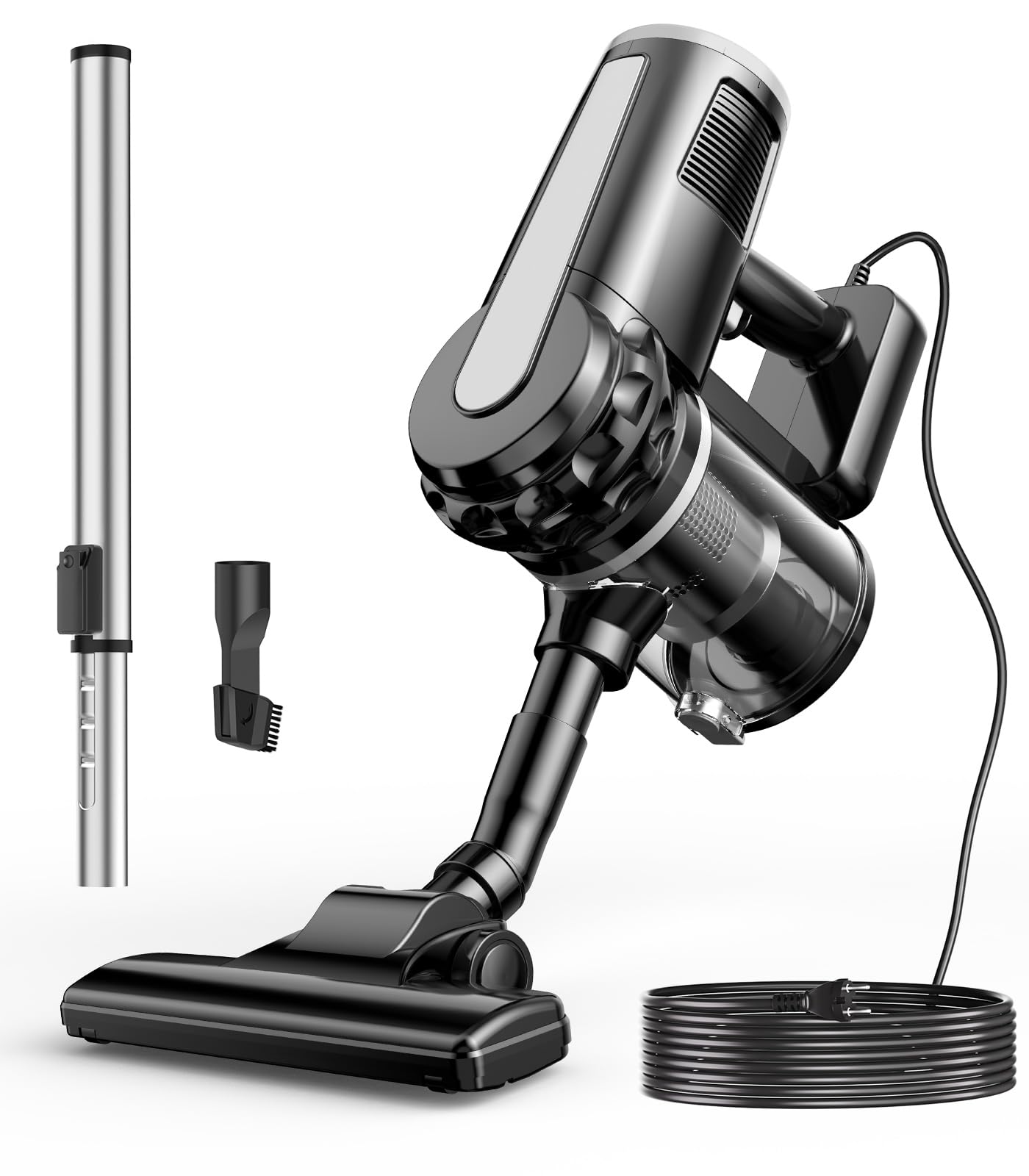
Figure 4.1: Assembled qimedo RD-101 Corded Stick Vacuum Cleaner in use, highlighting its features.
5. Operating Instructions
The qimedo RD-101 offers versatile cleaning modes for various surfaces.
5.1 Powering On/Off
- Plug the 13.12-foot power cord into a standard 110-120V electrical outlet.
- Press the power button located on the main unit to turn the vacuum cleaner on.
- Press the power button again to turn the vacuum cleaner off.
5.2 Using Attachments and Extension Modes
The vacuum cleaner comes with three attachments and an extension tube for various cleaning tasks:
- Floor Nozzle: Ideal for cleaning hard floors, carpets, and rugs. Attach it to the extension tube for upright cleaning.
- Crevice Nozzle: Designed for reaching tight spaces, corners, and edges. Can be attached directly to the main unit or the extension tube.
- 2-in-1 Brush Head: Suitable for upholstery, curtains, and delicate surfaces. Use it with or without the extension tube.
The 23-inch extension tube allows for extended reach, making it easy to clean high windows, ceilings, or under furniture without excessive bending.

Figure 5.1: Demonstrating the use of floor nozzle, crevice nozzle, extended crevice nozzle, and crevice nozzle brush for various cleaning tasks.

Figure 5.2: The vacuum cleaner configured in handheld mode and with the extension tube, illustrating its adaptability and lightweight design.
6. Maintenance
Regular maintenance ensures optimal performance and extends the lifespan of your vacuum cleaner.
6.1 Emptying the Dust Cup
The 500ml dust cup should be emptied regularly, especially when it appears full, to maintain strong suction.
- Ensure the vacuum cleaner is unplugged from the power outlet.
- Press the dust cup release button and detach the dust cup from the main unit.
- Open the dust cup lid and empty the contents into a trash bin.
- Close the lid and reattach the dust cup to the main unit, ensuring it clicks into place.
6.2 Cleaning the Washable Filter
The HEPA filter is washable and should be cleaned periodically to prevent clogging and maintain suction power.
- Unplug the vacuum cleaner.
- Remove the dust cup as described above.
- Carefully remove the filter cartridge from the dust cup.
- Rinse the filter cartridge under running water until clean. Do not use detergent or hot water.
- Important: Allow the filter to air dry completely for at least 24 hours before reinstalling. Do not use the vacuum cleaner with a wet filter.
- Once completely dry, reinsert the filter cartridge into the dust cup, ensuring it is properly aligned.
- Reattach the dust cup to the main unit.
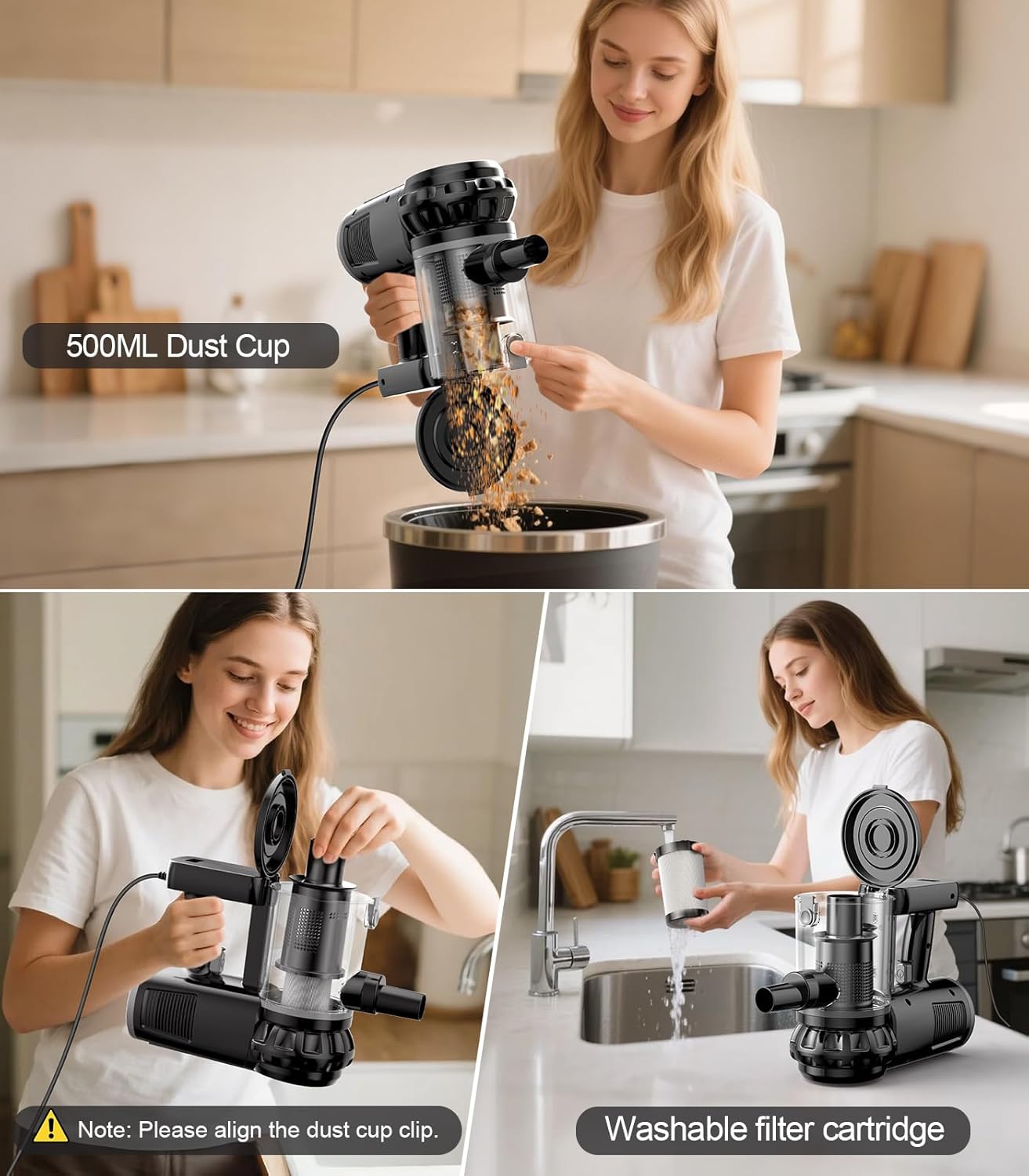
Figure 6.1: Steps for emptying the dust cup and cleaning the washable filter cartridge.
7. Troubleshooting
If you encounter issues with your vacuum cleaner, refer to the following table for common problems and solutions.
| Problem | Possible Cause | Solution |
|---|---|---|
| Vacuum cleaner does not turn on. | Not plugged in; power outlet malfunction; damaged cord/plug. | Ensure plug is securely in outlet. Test outlet with another appliance. Inspect cord and plug for damage. Contact support if damaged. |
| Reduced suction power. | Dust cup full; filter clogged; blockage in nozzle/tube. | Empty dust cup. Clean or replace filter. Check for and remove any blockages in the floor nozzle, extension tube, or main unit intake. |
| Vacuum cleaner overheats and shuts off. | Clogged filter; full dust cup; prolonged use; motor obstruction. | Turn off and unplug the vacuum. Empty dust cup and clean filter. Allow the unit to cool down for at least 30 minutes. Ensure there are no obstructions in the airflow path. Avoid continuous long-term operation. |
| Unusual noise during operation. | Blockage; loose part; motor issue. | Check for blockages in the nozzle, tube, and dust cup. Ensure all parts are securely assembled. If noise persists, contact customer support. Note: The vacuum is powerful and may produce significant operating noise. |
8. Specifications
| Feature | Detail |
|---|---|
| Brand | qimedo |
| Model Name | RD-101 |
| Power Source | Corded Electric |
| Voltage | 110-120V AC |
| Wattage | 600W |
| Suction Power | 20Kpa |
| Cord Length | 13.12 feet (approx. 4 meters) |
| Extension Tube Length | 23 inches (approx. 58 cm) |
| Dust Cup Capacity | 500ml |
| Filter Type | HEPA Filter (Washable) |
| Recommended Uses | Pet Hair, All Floors (Hardwood, Carpet, Tile) |
| Included Attachments | Floor Nozzle, Crevice Nozzle, 2-in-1 Brush Head |
| Item Weight | 16 ounces (approx. 0.45 kg) |
| Item Dimensions (L x W x H) | 6" x 6" x 40" (approx. 15.24cm x 15.24cm x 101.6cm) |
9. Warranty Information
The qimedo RD-101 Corded Stick Vacuum Cleaner is covered by a 2-Year Warranty from the date of purchase. This warranty covers manufacturing defects and malfunctions under normal use. It does not cover damage caused by misuse, neglect, accident, alteration, or unauthorized repair. Please retain your proof of purchase for warranty claims.
10. Customer Support
For any questions, technical assistance, or warranty claims, please contact qimedo customer support. You can find more information and contact details by visiting the official qimedo store on Amazon:
Our customer support team is available to assist you with any product-related inquiries.