
1. Introduction
This manual provides essential information for the safe and efficient use of your EONON UX7SJ-PLUS 10.1-inch Android Car Navigation System. Please read this manual thoroughly before installation and operation, and keep it for future reference.
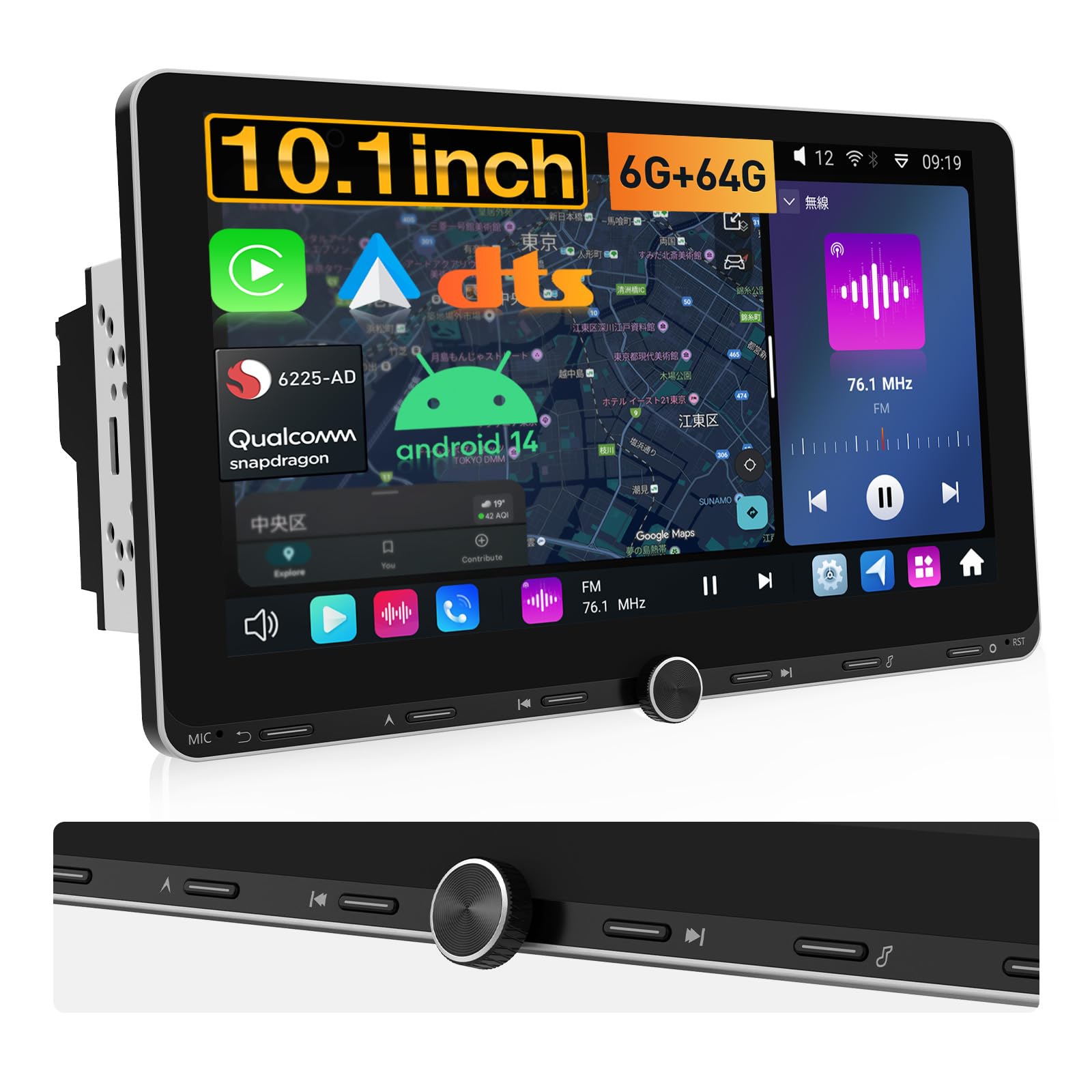
Figure 1.1: EONON UX7SJ-PLUS 10.1-inch Android Car Navigation System
The EONON UX7SJ-PLUS is a 2DIN car navigation system featuring a 10.1-inch QLED display, powered by a Qualcomm Snapdragon 6225-AD processor and running Android 14. It supports CarPlay, Android Auto, 4G/WiFi connectivity, and Bluetooth 5.1, offering a comprehensive in-car entertainment and navigation experience.
2. Safety Information
- Professional Installation Recommended: Installation should be performed by a qualified technician to prevent damage to the unit or vehicle.
- Power Supply: Ensure the unit is connected to a 12V DC power supply with negative grounding.
- Driving Safety: Do not operate the system in a way that distracts you from driving. Always prioritize road safety.
- Temperature: Avoid exposing the unit to extreme temperatures or direct sunlight for prolonged periods.
- Moisture: Keep the unit away from water and moisture to prevent electrical hazards.
- Cleaning: Use a soft, dry cloth for cleaning. Do not use abrasive cleaners or solvents.
3. Package Contents
Verify that all items listed below are included in your package:
- EONON UX7SJ-PLUS Head Unit
- AV Conversion Cable (x1)
- Audio Cable (x1)
- CarPlay USB Cable (x1)
- USB Cable (80mm) (x1)
- Backup Camera Input Cable (x1)
- Power Cable (x1)
- GPS Antenna (2m) (x1)
- 4G Antenna (2m) (x1)
- Microphone (3m) (x1)
- Power Cable Conversion Cable (x1)
- Installation Screws (x10)
- SIM Card Holder (x1)
- Spare Fuse (x1)
- Instruction Manual (x1)

Figure 3.1: Included Accessories
4. Product Overview
4.1. Physical Buttons and Knob
The unit features physical buttons and a rotary knob for convenient operation while driving. These include controls for navigation, volume, track skipping, and home/back functions.

Figure 4.1: Physical Controls and QLED Display
4.2. Display Features
The 10.1-inch QLED display offers vibrant colors and clarity with a resolution of 1280x720. It supports 2.5D full-touch operation and provides a 178° wide viewing angle. Video playback up to 1080P is supported.
5. Installation
5.1. Screen Connection
The UX7SJ-PLUS features a newly designed embedded screen connection structure, eliminating the need for complex power cable connections between the screen and the main unit. This simplifies installation and removal, enhancing stability and reliability.
Figure 5.1: Screen Connection Mechanism
5.2. Wiring Diagram
Refer to the detailed wiring diagram for proper connection of all cables. Ensure all connections are secure before powering on the unit.

Figure 5.2: Wiring Diagram
5.3. Panel Size and Installation Dimensions
The panel dimensions are 254mm (width) x 155mm (height). The main unit dimensions are 178mm (width) x 100mm (height) x 97mm (depth). The unit does not include an SD card slot.
Figure 5.3: Panel and Installation Dimensions
5.4. Angle Adjustment
The display panel can be adjusted for tilt (front/back), swivel (left/right), and vertical position to optimize viewing angles and avoid obstructing vehicle controls.


Figure 5.4: Display Angle and Position Adjustments
6. Operating Instructions
6.1. Processor and Performance
The UX7SJ-PLUS is equipped with a Qualcomm Snapdragon 6225-AD 6nm processor, offering improved CPU performance by 30% and GPU performance by 20% compared to previous models (QCM6125). This ensures smooth and efficient operation for various applications.

Figure 6.1: Processor Specifications and Performance
6.2. Operating System and Connectivity
Running on Android 14, the system provides a fast and stable user experience. It includes a built-in WiFi/4G module, allowing internet access via Wi-Fi hotspot from a smartphone or by inserting a SIM card (purchased separately). Supported frequency bands for SIM card are: GSM 900, 1800; WCDMA B1, B3, B6, B8, B19; TDD-LTE B41; FDD-LTE B1, B3, B8, B18, B19, B26.

Figure 6.2: Android 14 Interface and Connectivity Options
6.3. Audio Features
The unit features DTS Surround Sound and a powerful DSP chip (SI47925 radio module, ST TDA7850 amplifier) for enhanced audio quality. It supports FM/AM radio with wide FM compatibility, ensuring stable reception even during emergencies.
6.4. CarPlay and Android Auto
Connect your smartphone easily via CarPlay (for iPhone 5 and later) or wireless Android Auto (requires 5GHz Wi-Fi compatible smartphone and latest Android Auto app) to access navigation, calls, music, and voice assistants directly from the unit.

Figure 6.3: CarPlay and Android Auto Integration
6.5. Video Output and Multi-Window
With optional adapters (EONON A506/A0595/A0596/A509), the unit supports RCA/HDMI video output, allowing full-screen sharing to rear monitors. It also supports displaying different content on front and rear screens. The multi-window feature allows simultaneous display of two applications (e.g., map and music) in a 5:5 split screen, though some services like CarPlay and Bluetooth may not support multi-window.
Figure 6.4: Video Output and Multi-Window Functionality
6.6. Bluetooth 5.1
Equipped with a Qualcomm WCN3988 module, Bluetooth 5.1 enables music playback and hands-free calling. Note that Bluetooth functionality is limited to smartphones and OBD adapters (EONON V0056); it does not support Bluetooth earphones, speakers, remotes, or tethering. Ensure the included camera cable is connected for clear audio during calls.
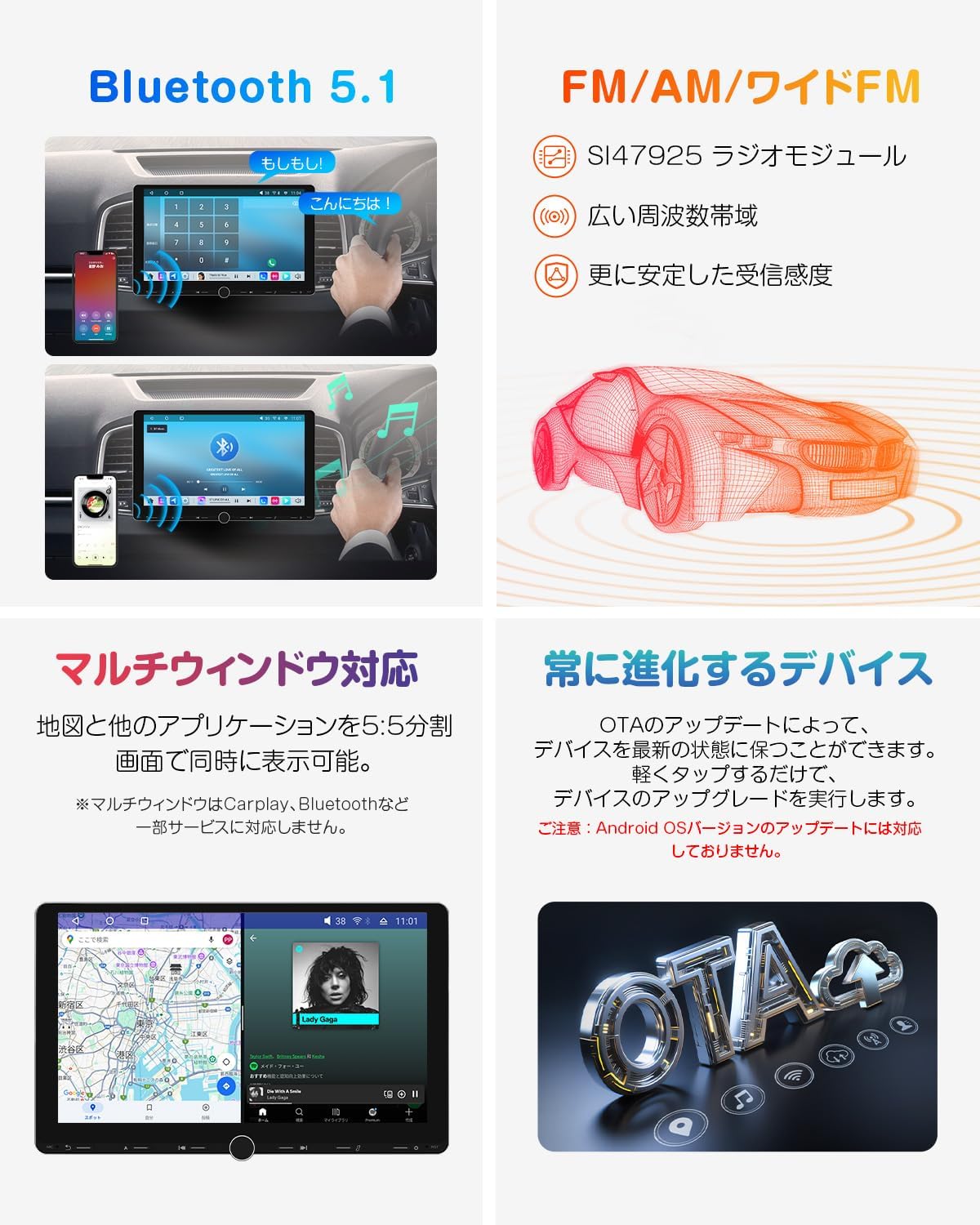
Figure 6.5: Bluetooth 5.1 Features
6.7. Steering Wheel Control
The unit supports analog SWC signals. For digital SWC signals, a separate conversion cable is required. This feature allows you to control frequently used functions directly from your steering wheel for safer driving.
6.8. OTA Updates
The device supports Over-The-Air (OTA) updates to keep the system software current. Simply tap to perform device upgrades. Note that Android OS version updates are not supported.

Figure 6.6: OTA Update Feature
6.9. Product Overview Video
Video 6.1: General overview of the EONON UX7SJ-PLUS features and interface.
7. Optional Accessories
Enhance your driving experience with compatible EONON accessories:
- TV Tuner (EONON V0051): For in-car TV viewing.
- Backup Camera (EONON A0119J, A0127): For improved rear visibility.
- Drive Recorder (EONON A100): For recording driving footage.
- OBD2 Adapter (EONON V0056): For vehicle diagnostics.
- USB to RCA/HDMI Adapters (EONON A506/A0595/A0596/A509): For video output.

Figure 7.1: Compatible Optional Accessories
8. Troubleshooting (Q&A)
- Q1: Does the backup camera display when shifting to reverse in a manual car?
A: Yes, it is possible. The unit obtains power and reverse signals from the vehicle's backup lamp. It can be used if the car has a backup lamp. - Q2: Is the A0127 backup camera compatible with UX7SJ-PLUS?
A: Yes, the A0127 is compatible with UX7SJ-PLUS. - Q3: Can I open specific apps with physical buttons?
A: You cannot customize specific apps to physical buttons. However, you can set specific apps to the quick launch bar for one-touch activation. (Settings → General → Navigation App Settings → Select App) - Q4: How can I enable video display while driving?
A: You can enable this setting from the menu. (System Settings → General → Do not display video while moving → On/Off) - Q5: Can I hide the 'Backup Monitor Camera' text and date/time on the backup camera screen?
A: Yes, you can. Open the Drive Recorder app → Settings → Time Stamp → Off.
9. Specifications
| Feature | Specification |
|---|---|
| Brand | Eonon |
| Model Number | UX7SJ-PLUS |
| Screen Size | 10.1 inches |
| Display Type | QLED |
| Resolution | 1280x720 |
| Operating System | Android 14 |
| Processor | Qualcomm Snapdragon 6225-AD (8-core) |
| RAM | 6GB |
| ROM | 64GB |
| Connectivity | Bluetooth 5.1, USB, Wi-Fi, 4G |
| Compatible Devices | Camera, Smartphone |
| Control Method | Touch, Voice |
| GPS | Supported |
| Product Dimensions (L x W x H) | 17.8 x 8 x 10 cm |
| Mounting Type | Dashboard Mount |
| Origin | China |
10. Warranty and Support
This product comes with a 1-year manufacturer's warranty. For technical support, troubleshooting assistance, or warranty claims, please contact Eonon customer service through their official channels. Please have your model number (UX7SJ-PLUS) and purchase information ready.
11. Technical Compliance Information
This product has obtained technical standards compliance certification based on Japan's Radio Law. The certification number is 222-254737, ensuring reliable wireless communication and safe use within Japan.

Figure 11.1: Technical Standards Compliance Certificate


