
Introduction
Thank you for choosing the BKXCHA Electric Dust Blower. This device is designed for efficient and convenient cleaning of various electronics and surfaces. Featuring a high-speed brushless motor, adjustable speed settings, and an integrated LED light, it provides a powerful and precise cleaning solution. Please read this manual thoroughly before use to ensure proper operation and maintenance.
Safety Instructions
- Keep the device away from water or other liquids. Do not operate with wet hands.
- Do not point the air blower directly at eyes, ears, or other sensitive body parts.
- Ensure the charging cable and adapter are compatible with the device's specifications.
- Do not attempt to disassemble or repair the device yourself. Contact customer support for assistance.
- Keep out of reach of children.
- Avoid blocking the air intake or outlet during operation.
- Store the device in a cool, dry place when not in use.
Package Contents
Verify that all items are present in your package:
- BKXCHA Electric Dust Blower Unit
- USB Type-C Charging Cable
- Various Nozzles (e.g., narrow, wide)
- Accessory Brushes (e.g., for keyboards)
- User Manual
Product Overview
The BKXCHA Electric Dust Blower features a compact design with a powerful motor and integrated LED light for enhanced visibility during cleaning. It includes multiple nozzles and brushes for versatile applications.
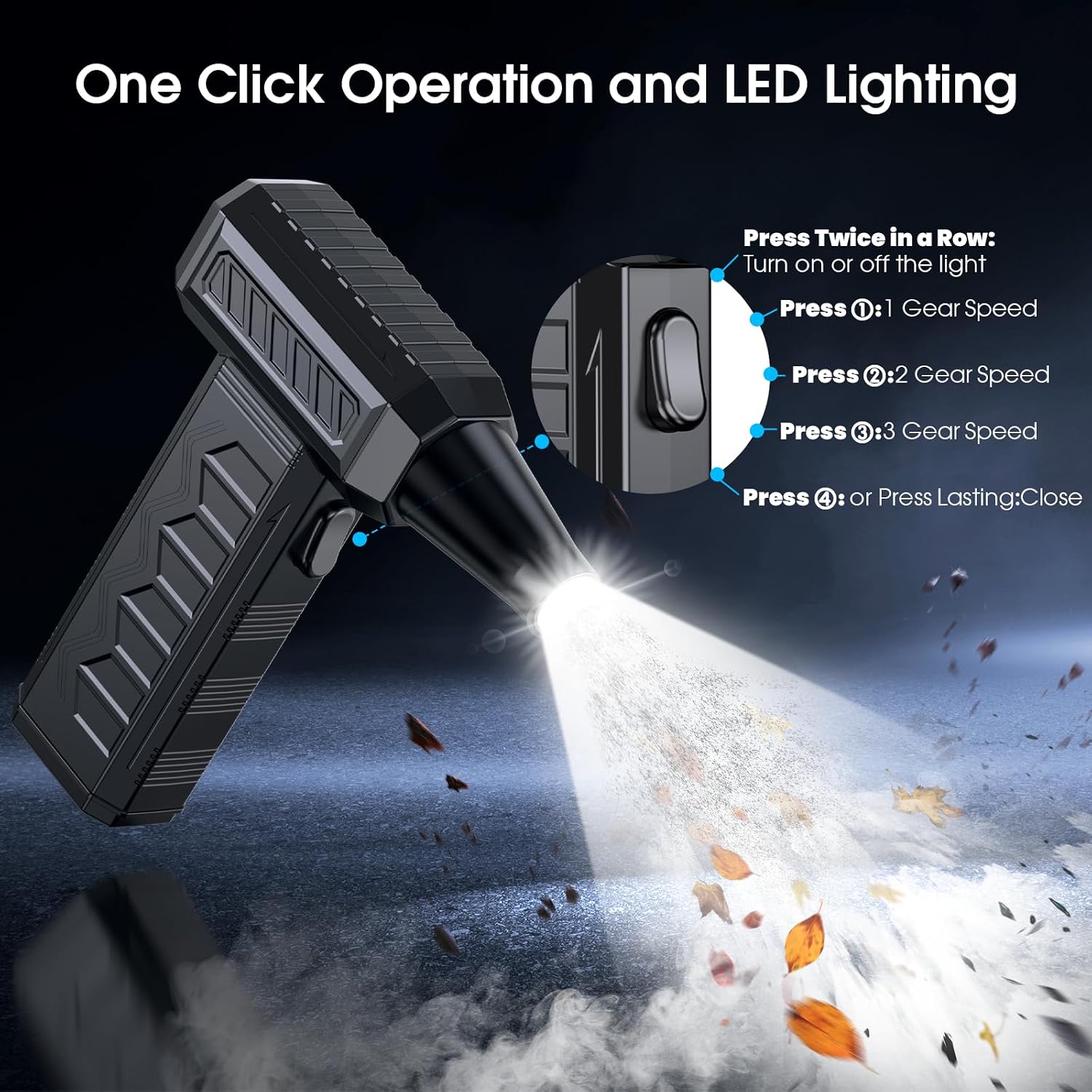
Image: The electric dust blower showing its main body, nozzle with integrated LED light, and control buttons for power and speed adjustment.
Setup
1. Charging the Device
Before first use, fully charge the dust blower. Connect the provided USB Type-C charging cable to the device's charging port and plug the other end into a compatible USB power adapter (not included).
- The device is equipped with a 6,000mAh battery.
- Charging time is approximately 2.5 hours for a full charge using a Type-C fast charger.
- Indicator lights will show charging status and battery level.

Image: Illustration of the 6000mAh high-capacity battery, Type-C charging port, and charging time details for the electric dust blower.
2. Attaching Nozzles and Brushes
Select the appropriate nozzle or brush for your cleaning task. Align the accessory with the air outlet and push firmly until it clicks into place. To remove, gently pull the accessory off.
Operating Instructions
1. Power On/Off
Press the power button once to turn on the device. Press and hold the power button to turn it off.
2. Adjusting Air Speed
The dust blower features three adjustable speed settings:
- Press 1: Activates 1st Gear (40,000 RPM)
- Press 2: Activates 2nd Gear (90,000 RPM)
- Press 3: Activates 3rd Gear (150,000 RPM)
Pressing the button a fourth time, or pressing and holding, will turn off the device.

Image: Diagram illustrating the three adjustable speed settings (40,000 RPM, 90,000 RPM, 150,000 RPM) of the electric dust blower and their typical uses.
3. Using the LED Light
To activate the integrated LED light, press the dedicated light button (usually located near the nozzle). Press it again to turn off the light. The LED light assists in illuminating dark areas for precise cleaning.
4. Application Examples
The dust blower is suitable for a wide range of cleaning tasks:
- Cleaning computer keyboards, laptops, and internal components.
- Dusting cameras and sensitive optical equipment.
- Cleaning car interiors, including seats and dashboards.
- Removing dust from blinds and air conditioners.
- Assisting with charcoal fires or clearing fallen leaves.

Image: Collage showing the electric dust blower being used to clean a keyboard, computer case, car, charcoal fire, air conditioner, and fallen leaves.
Maintenance
Cleaning the Device
Wipe the exterior of the dust blower with a soft, dry cloth. Do not use harsh chemicals or abrasive cleaners. Ensure the device is powered off and unplugged before cleaning.
Storage
Store the device in a cool, dry place, away from direct sunlight and extreme temperatures. Keep all accessories organized to prevent loss.
Troubleshooting
| Problem | Possible Cause | Solution |
|---|---|---|
| Device does not turn on | Battery is depleted | Charge the device fully. |
| Weak airflow | Low battery or incorrect speed setting | Charge the device. Select a higher speed setting. |
| LED light not working | Light button not pressed or device off | Ensure the device is on and press the light button. |
| Nozzle falls off easily | Nozzle not properly attached | Push the nozzle firmly onto the air outlet until it clicks. |
Specifications
- Brand: BKXCHA
- Model: B0G4TS7KK9
- Motor Speed: Up to 150,000 RPM (3 adjustable speeds)
- Battery Capacity: 6000mAh
- Charging Port: USB Type-C
- Charging Time: Approximately 2.5 hours (with fast charger)
- Operating Time: Up to 100 minutes (low speed), 15 minutes (high speed)
- Weight: Approximately 0.43 Kilograms (286g as per image)
- Dimensions: Approximately 10 x 3.5 x 13.5 cm (as per product description)
- Features: Integrated LED Light

Image: The electric dust blower shown with its compact dimensions (10 x 3.5 x 13.5 cm) and weight (237g/286g), highlighting its portability.
Warranty and Support
For warranty information or technical support, please refer to the product packaging or contact the manufacturer directly through their official website or customer service channels. Keep your purchase receipt as proof of purchase.