
1. Introduction
The Mysa Smart Thermostat for Heating & Cooling is designed to provide efficient and intelligent control over your home's climate. This programmable Wi-Fi thermostat is Energy Star certified, offering features like 7-day scheduling, geofencing, and vacation mode to help reduce energy consumption and enhance comfort. This manual provides essential information for installation, operation, and maintenance of your Mysa Smart Thermostat.
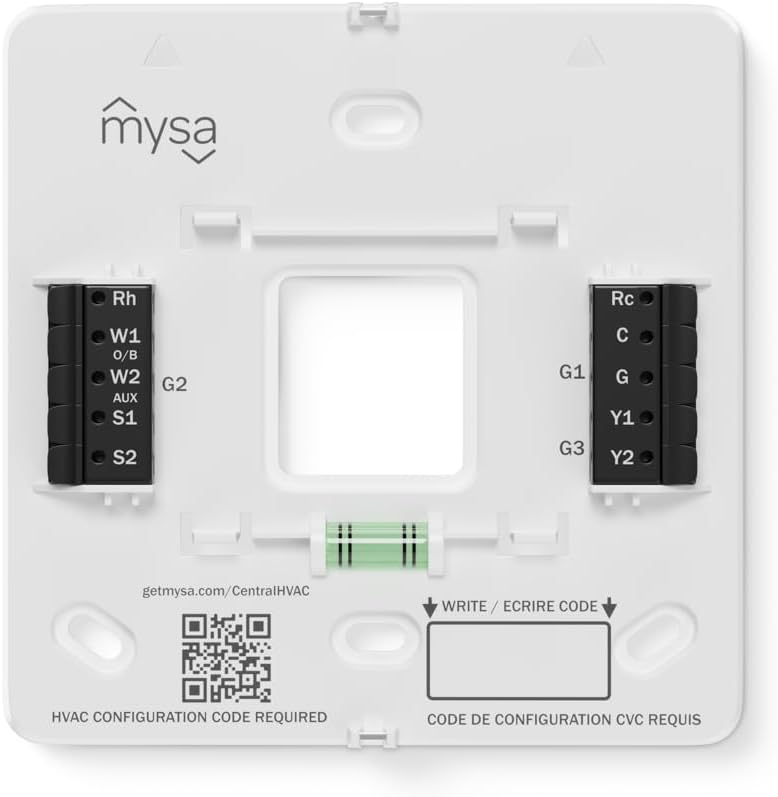
Figure 1: Front view of the Mysa Smart Thermostat, showcasing its sleek, minimalist design.
2. Setup and Installation
The Mysa Smart Thermostat is designed for DIY installation. Please follow these steps carefully. If you are unsure about any part of the installation, consult a qualified electrician or HVAC technician.
2.1 Compatibility Check
The Mysa Smart Thermostat works with most 24V Central HVAC systems, including:
- Central Heating (Gas, Oil, or Electric Furnace)
- Central Cooling / AC
- Heat Pumps (with and without Auxiliary Heat)
- Boilers (24V)
Important: A C-Wire (Common Wire) is required for constant power. If your current system does not have a C-Wire, it must be purchased separately.

Figure 2: Compatibility details for the Mysa Smart Thermostat, indicating support for various HVAC systems.
For detailed compatibility verification, visit getmysa.com.
2.2 What's in the Box
Before starting, ensure all components are present:
- Mysa Smart Thermostat
- Wall Mounting Plate
- Mounting Screws & Anchors
- Wire Label Stickers
- Quick Start Guide

Figure 3: Contents of the Mysa Smart Thermostat package, including the thermostat, mounting hardware, and documentation.
2.3 Wiring and Mounting
- Power Off: Turn off power to your HVAC system at the circuit breaker before beginning installation.
- Remove Old Thermostat: Carefully remove your old thermostat from the wall. Take a picture of the wiring for reference.
- Label Wires: Use the provided wire label stickers to label each wire connected to your old thermostat.
- Mount Wall Plate: Secure the Mysa Wall Mounting Plate to your wall using the provided screws and anchors. A built-in bubble level assists with alignment.
- Connect Wires: Connect the labeled wires to the corresponding terminals on the Mysa Wall Mounting Plate. Ensure the C-Wire is connected. Refer to the in-app video guidance for step-by-step instructions for every wire.
- Attach Thermostat: Snap the Mysa Smart Thermostat onto the mounted wall plate.
- Power On: Restore power to your HVAC system at the circuit breaker.

Figure 4: The backplate of the Mysa Smart Thermostat showing wiring terminals (Rh, W1, W2, S1, S2, Rc, C, G, Y1, Y2) and a QR code for installation guidance. The QR code links to getmysa.com/CentralHVAC.
HVAC Configuration Code: After wiring, you will need to enter an HVAC configuration code. This code is specific to your system type and can be found using the Mysa app's compatibility helper or by consulting the Mysa support resources.
2.4 App Download and Pairing
- Download the Mysa App from the Apple App Store or Google Play Store.
- Create an account or log in.
- Follow the in-app instructions to pair your Mysa Smart Thermostat with your Wi-Fi network and complete the setup process.
3. Operation
The Mysa Smart Thermostat can be controlled via the device itself or through the Mysa mobile application.
3.1 Device Controls
The thermostat features an adaptive LED display and touch controls. The display glows softly when touched and shows the current temperature. Touch controls around the edges (up, down, left, right) allow for quick temperature adjustments and basic mode changes.

Figure 5: The Mysa Smart Thermostat's LED display, which activates upon approach for quick adjustments and fades when not in use.
3.2 Mysa App Features
The Mysa app (available for iOS and Android) provides comprehensive control and advanced features:
- Remote Control: Adjust temperatures and settings from anywhere.
- 7-Day Scheduling: Create customized heating and cooling schedules to optimize comfort and energy savings.
- Geofencing: Automatically adjusts temperature based on your proximity to home, ensuring you don't heat or cool an empty house.
- Vacation Mode: Set specific temperature ranges for extended periods away from home to save energy.
- Energy Charting: Monitor your energy usage with detailed in-app reports.
- Humidity Monitoring: Built-in sensors track relative humidity and temperature, providing alerts for extreme conditions.
- Shared Access: Grant control to family members or guests.

Figure 6: A user interacting with the Mysa mobile app to control the thermostat, demonstrating remote climate management.
3.3 Smart Home Integration
The Mysa Smart Thermostat is designed to integrate with popular smart home platforms:
- Matter Certified: Future support for Matter will enable seamless integration with Apple HomeKit, Google Home, Amazon Alexa, Home Assistant, Smart Things, and more.
- Voice Control: Adjust your home's climate using simple voice commands through compatible smart assistants.

Figure 7: The Mysa Smart Thermostat displayed in a smart home environment, highlighting its Matter certification and compatibility with various smart home ecosystems.
4. Maintenance
The Mysa Smart Thermostat requires minimal maintenance to ensure optimal performance.
- Cleaning: Gently wipe the thermostat's surface with a soft, dry cloth. Avoid using abrasive cleaners or solvents.
- Software Updates: Ensure your Mysa app and thermostat firmware are kept up-to-date for the latest features and security enhancements. Updates are typically managed through the Mysa app.
- Filter Reminders: The Mysa app can provide reminders for HVAC filter changes, contributing to system efficiency and air quality.
5. Troubleshooting
If you encounter issues with your Mysa Smart Thermostat, refer to the following common problems and solutions:
| Problem | Possible Cause | Solution |
|---|---|---|
| Thermostat not powering on | No power from HVAC system; C-Wire not connected or faulty; circuit breaker tripped. | Check your circuit breaker. Ensure the C-Wire is correctly installed and connected. Verify power to your HVAC system. |
| Wi-Fi connection drops frequently | Weak Wi-Fi signal; router issues; network interference. | Ensure your thermostat is within range of your Wi-Fi router. Restart your router. Check for other devices causing interference. If issues persist, try re-pairing the thermostat with the app. |
| Incorrect temperature readings | Thermostat placed near heat sources or drafts; sensor calibration needed. | Ensure the thermostat is not exposed to direct sunlight, drafts, or heat-emitting appliances. Check the Mysa app for sensor calibration options. |
| HVAC system not responding to thermostat | Incorrect wiring; incorrect HVAC configuration code; system fault. | Double-check all wiring connections. Verify that the correct HVAC configuration code has been entered in the app. Consult your HVAC system's manual or a professional if the issue persists. |
| App not connecting to thermostat | Thermostat offline; app outdated; phone network issues. | Ensure your thermostat is connected to Wi-Fi. Update the Mysa app to the latest version. Check your phone's internet connection. |
For further assistance, please contact Mysa Support (see Section 7).
6. Specifications
| Feature | Detail |
|---|---|
| Brand | Mysa |
| Model Name | Mysa Smart Thermostat for Central HVAC |
| Model Number | MYSA ST-V1-0 |
| Dimensions (D x W x H) | 1.8D x 11W x 11H centimetres (0.7D x 4.3W x 4.3H inches) |
| Weight | 0.33 kg |
| Colour | White |
| Controller Type | Amazon Alexa, Apple HomeKit, Google Assistant, Matter (coming soon), iOS & Android App |
| Connectivity Technology | Bluetooth, Wi-Fi |
| Voltage | 24 volts |
| Display Type | LED |
| Control Method | App, Touchpad Control |
| Mounting Type | Wall Mount |
| Special Features | Energy Star Certified, Energy Usage Reports, Geofence Technology, Lockable, Temperature/Humidity Alert |
| Compatible Systems | Central Heating (Gas/Oil/Electric Furnace), Central Cooling (AC), Heat Pumps (with/without Aux Heat), Boilers (24V) |

Figure 8: Dimensional diagram of the Mysa Smart Thermostat, showing its height, width, and depth.
7. Warranty and Support
7.1 Manufacturer Warranty
The Mysa Smart Thermostat is backed by a 5-Year Limited Manufacturer Warranty. This warranty covers hardware protection and ensures decades of service with continuous security updates. For full terms and conditions, please refer to the official Mysa website or contact support.

Figure 9: Visual representation of Mysa's 5-year hardware protection, emphasizing product longevity and reliability.
7.2 Customer Support
For technical assistance, troubleshooting, or warranty claims, please contact Mysa's customer support team. Mysa provides lifetime access to a team of experts in North America.
- Manufacturer: Empowered Homes Inc.
- Address: 5 Springdale Street Suite 500, St. John’s, NL A1E 0E4, Canada.
- Website: Visit getmysa.com for support resources, FAQs, and contact information.


