
1. Product Overview
The Garvee 24V 2-Seater Kids Electric Truck is designed to provide an engaging and safe driving experience for children. Featuring a robust 4WD system, dual 24V motors, and spring shock absorbers, it is built to handle various terrains. The truck includes a parent remote control for enhanced safety and supervision, along with realistic features like LED headlights and a music player.
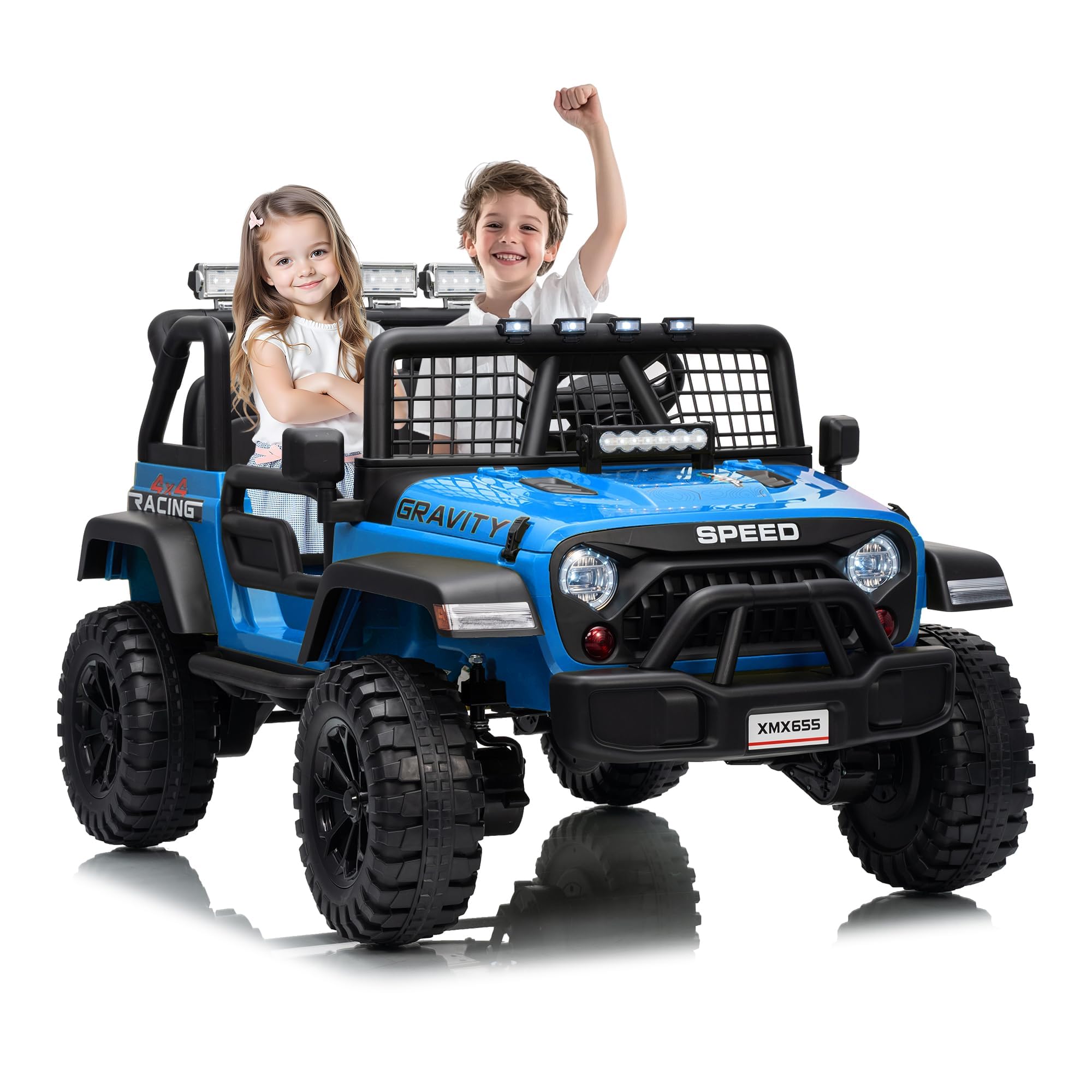
Figure 1: The Garvee 24V 2-Seater Kids Electric Truck in blue.
2. Safety Information
Always ensure children are supervised while operating the electric truck. Read and understand all safety warnings before use.
- Parent Control: Utilize the 2.4GHz remote control for supervision, offering Parent-Control, Kid-Independent, and Auto-Follow modes. This is crucial for younger children or when navigating complex environments.
- Seatbelts: Ensure both children are securely fastened with the provided seatbelts.
- Weight Limit: Do not exceed the maximum weight capacity of 110 pounds.
- Age Range: Suitable for children aged 37 to 96 months.
- Terrain: Operate on flat, dry surfaces. Avoid steep inclines, rough terrain, or wet conditions unless specifically designed for such use.

Figure 2: Illustrates the triple safety system, including the parent remote control and seatbelts, ensuring child safety during operation.
3. What's in the Box
The Garvee 24V 2-Seater Kids Electric Truck is shipped in two parcels. Please verify all components are present before assembly.
- Main vehicle body (pre-assembled chassis, dashboard, and wiring)
- 4 Wheels with wheel covers
- 2 Seats with seatbelts
- Steering wheel
- Front and rear bumpers
- Side roll bars
- Front and rear fenders
- Side mirrors
- 2.4GHz Parent Remote Control
- Charger
- Assembly hardware (screws, washers, lock nuts)
- Instruction Manual
4. Setup and Assembly
Assembly is required. Please follow the detailed instructions provided in the included manual. A Phillips head screwdriver is required (not included).
- Battery Connection: Locate the battery compartment, typically under the hood. Connect the battery terminals as indicated in the manual.
- Wheel Installation: Attach the wheels to the axles, ensuring all washers and lock nuts are securely fastened. Pay attention to the different screw sizes for various components (e.g., #4x16 screws for wheels, #4x12 screws for rear bumper).
- Front Axle Assembly: Install the front shock absorber springs and flat bearings onto the front axle bracket. Insert the front axle bracket into the axle holder and ensure the steering column passes through the steering linkage. Tighten M10 lock nuts.
- Body Components: Attach the front and rear bumpers, side roll bars, fenders, and side mirrors.
- Seats and Steering Wheel: Install the seats and steering wheel, ensuring all connections are secure.
- Initial Charge: Before first use, fully charge the battery for 8-12 hours.
Video 1: A detailed assembly guide for the Garvee 24V 2-Seater Kids Electric Truck, demonstrating the step-by-step process of putting together the vehicle components.
5. Operating Instructions
Familiarize yourself with the controls before allowing children to operate the truck.
5.1. Vehicle Controls
- Power Button: Located on the dashboard, press to turn the vehicle on/off.
- Speed Selection: Toggle between Low Speed (3 mph) for beginners and High Speed (5 mph) for experienced drivers.
- Forward/Reverse: Use the shifter to select driving direction.
- Accelerator Pedal: Press the foot pedal to move the vehicle. Release to brake.
- Steering Wheel: Turn left or right to steer. Includes horn and music controls.
- LED Headlights: Activate the bright LED headlights for visibility.
- Music Player: Built-in music player supports USB/AUX input for customizable audio.
5.2. Parent Remote Control
The 2.4GHz remote allows parents to fully control the vehicle's movement and speed, overriding manual controls for safety.
- Pairing: Follow the manual's instructions to pair the remote with the vehicle.
- Driving Modes: Select between Parent-Control, Kid-Independent, and Auto-Follow modes.
- Emergency Brake: The remote features an emergency brake function to stop the vehicle instantly.
Video 2: Demonstrates the functionality of the parent remote control, highlighting its use in guiding the electric truck and ensuring child safety.
6. Charging Instructions
Proper charging extends battery life and ensures optimal performance.
- Initial Charge: Charge the battery for 8-12 hours before the first use.
- Regular Charging: Recharge the battery after each use. Avoid completely draining the battery to prolong its lifespan.
- Charging Port: The charging port is located in a secure compartment, typically under the seat. Open the cover to access.
- Charger: Use only the provided charger.
- Battery Indicator: The dashboard features a battery indicator to show the current charge level.
7. Maintenance
Regular maintenance ensures the longevity and safe operation of your electric truck.
- Cleaning: Wipe the vehicle with a damp cloth. Avoid using harsh chemicals or abrasive cleaners.
- Storage: Store the vehicle in a dry, cool place away from direct sunlight and moisture. If storing for extended periods, charge the battery once a month.
- Battery Care: Do not overcharge the battery. Disconnect the charger once the battery is full.
- Inspections: Periodically check all screws, nuts, and electrical connections for tightness and wear.
8. Troubleshooting
If you encounter any issues, refer to the following common solutions:
- Vehicle not moving: Check battery connection, ensure battery is charged, and verify the power button is on. Confirm the forward/reverse switch is engaged.
- Remote control not working: Ensure the remote has fresh batteries and is properly paired with the vehicle.
- Reduced speed/power: The battery may be low, or the vehicle might be overloaded. Recharge the battery or reduce the load.
- Unusual noises: Inspect wheels and axles for obstructions or loose parts.
For persistent issues, please contact customer support.
9. Specifications
| Feature | Detail |
|---|---|
| Brand | Garvee |
| Model Number | hvBe-lqH_PIidhoZ-huqOApQBbg |
| Battery Voltage | 24V |
| Battery Average Life | 100 minutes |
| Speed Levels | 2 (3 mph, 5 mph) |
| Drive System | 4WD Dual Motor |
| Suspension | Spring Shock Absorber |
| Seating Capacity | 2-Seater |
| Maximum Weight Capacity | 110 Pounds |
| Recommended Age (Months) | 37 - 96 |
| Item Dimensions (L x W x H) | 47.2" x 31.5" x 29.1" |
| Item Weight | 66.8 Pounds |
| Material Type | Plastic |
| UPC | 800072570773 |
10. Warranty and Support
For warranty information or technical support, please refer to the contact details provided in your product packaging or visit the official Garvee website. Keep your purchase receipt for warranty claims.