
Introduction
Thank you for choosing the LD DARKEAGLE 8Pods RGB LED Rock Lights. This kit provides vibrant, customizable underglow lighting for various vehicles, enhancing visibility and aesthetic appeal. This manual provides detailed instructions for installation, operation, and maintenance to ensure optimal performance and longevity of your product.
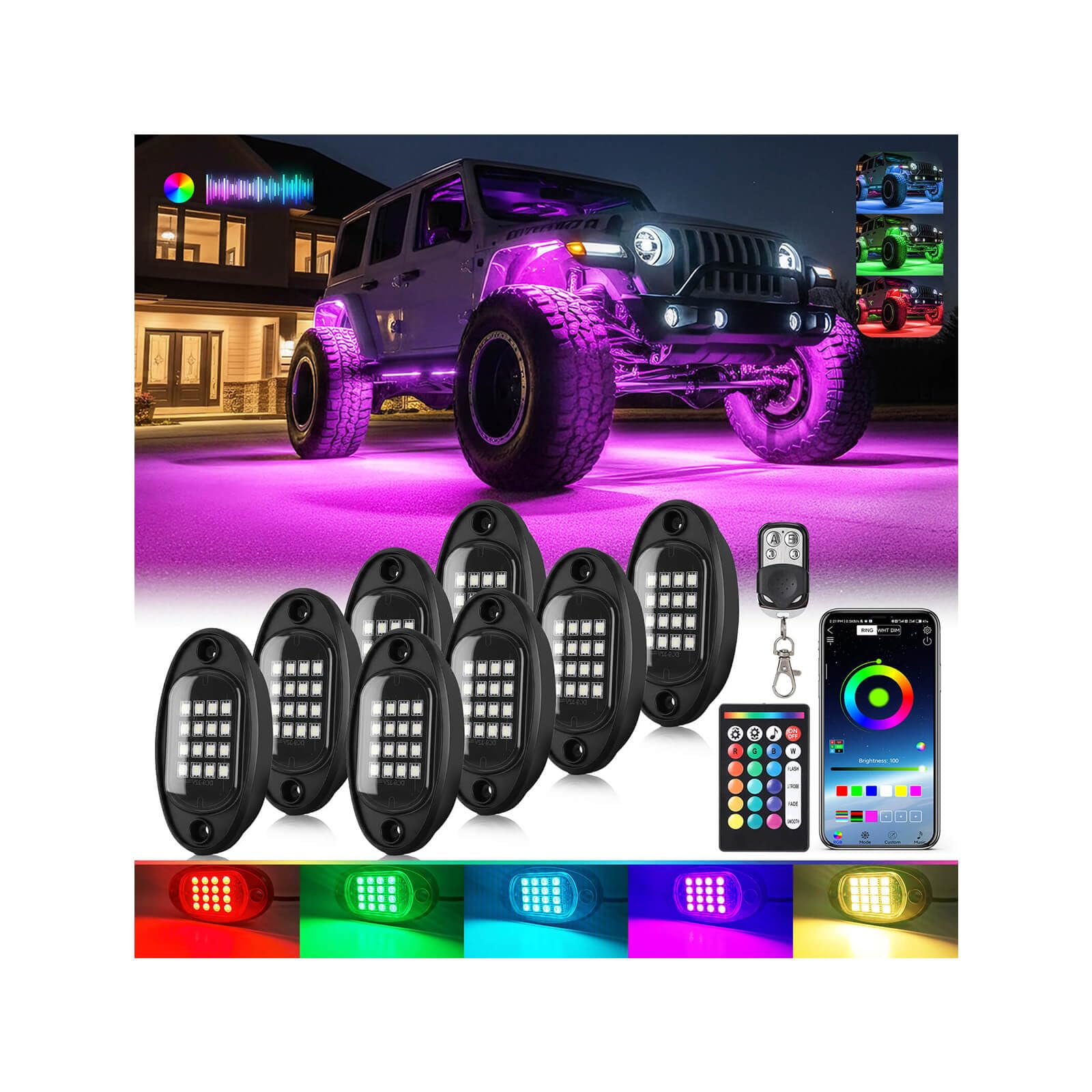
Image: The LD DARKEAGLE 8Pods RGB LED Rock Lights kit, showcasing the individual light pods and control components.
Package Contents
Verify that all components are present in your package:
- 8 x Multi Color RGB LED Rock Lights
- 1 x 24-key RF Remote
- 1 x 4-key RF Remote
- 2 x 4-Way Splitter
- 4 x Extension Cord (78.74-inch)
- 1 x Control Box
- 1 x Power Switch
- 1 x Instruction Manual (this document)
- Installation tools: Ties, Fuse, Self-tapping screws, Wire connectors
- 1 x Exquisite Packaging Box
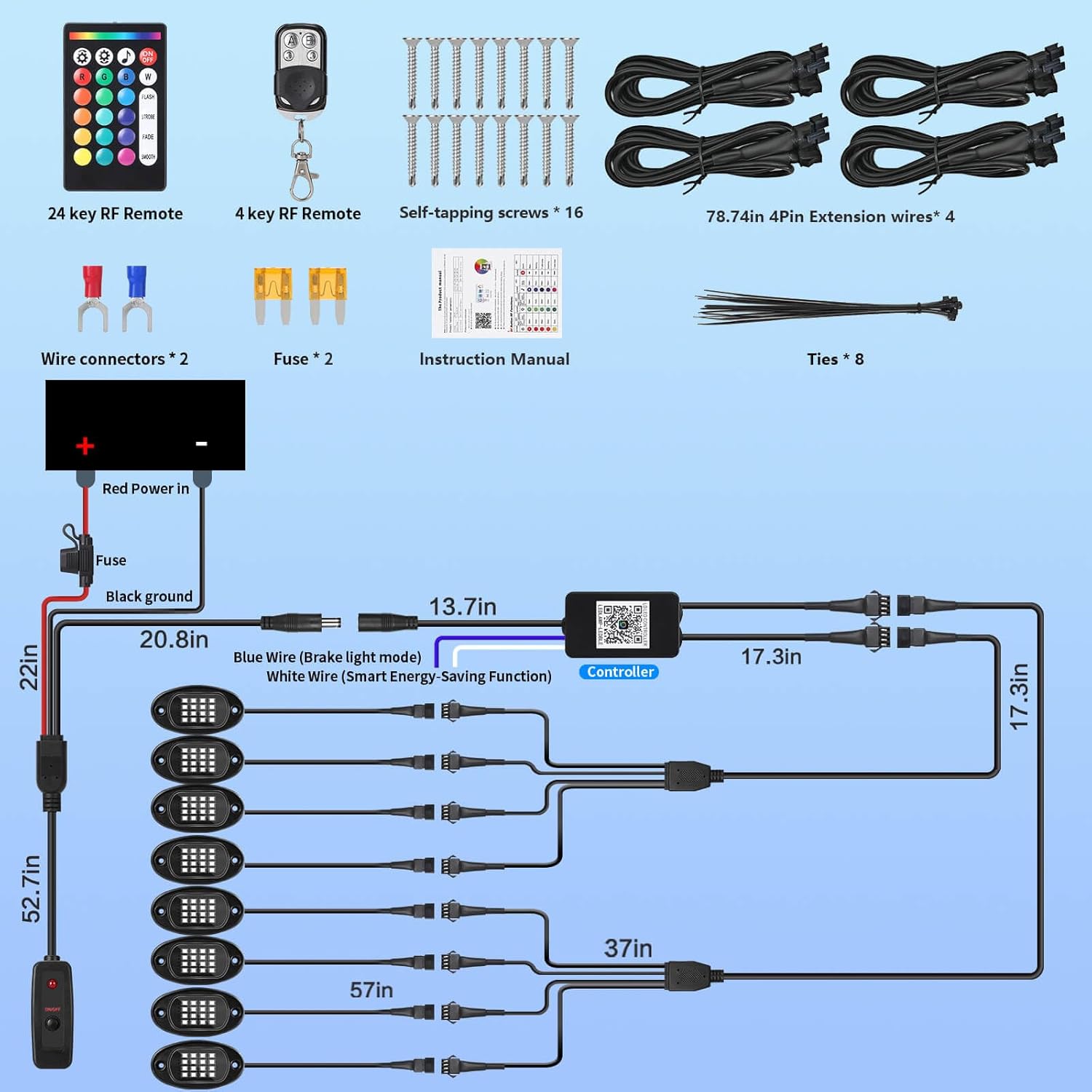
Image: A detailed diagram illustrating all included components and their connections for the RGB LED Rock Lights kit.
Safety Information
- Ensure the vehicle's power is disconnected before installation to prevent electrical shock.
- This product is designed for 12V DC power sources only. Do not connect to higher voltage systems.
- The lights are IP67 waterproof, suitable for outdoor use, but avoid prolonged submersion.
- Install wiring securely to prevent damage from vehicle movement or environmental factors.
- The kit includes an inline fuse for electrical system protection. Do not bypass or use an incorrect fuse rating.

Image: An illustration highlighting the IP67 waterproof rating of the rock lights, along with the safety protection fuse and power kill switch.
Installation Guide
Follow these steps for proper installation:
- Plan Placement: Determine the desired locations for each of the 8 rock lights on your vehicle's undercarriage or wheel wells. Consider areas that offer maximum light spread and protection from direct impact.
- Mount Lights: Secure each rock light using the provided self-tapping screws. Ensure they are firmly attached to a stable surface.
- Route Wiring: Carefully route the wiring from each light to the central control box location. Use the 78.74-inch extension cords as needed for longer distances. Secure all wiring with zip ties to prevent snagging or damage.
- Connect to Splitters: Connect the rock lights to the 4-way splitters. The kit includes two splitters to accommodate all 8 lights.
- Connect to Control Box: Connect the splitters to the control box. The control box is the central hub for power and signal.
- Install Power Switch: Connect the power switch to the control box. This switch allows you to manually turn the lights on or off. The switch has a red indicator light that illuminates when power is active.
- Connect Power: Connect the main power wire (red) to a 12V DC power source (e.g., vehicle battery positive terminal) and the ground wire (black) to a suitable ground point on the vehicle chassis. Ensure the inline fuse is properly installed on the positive power line for protection.
- Test System: Once all connections are secure, turn on the power switch and test the lights using the remote controls or mobile app.
This kit is designed for universal fit on 12V vehicles including Jeeps, Trucks, ATVs, UTVs, RZRs, Golf Carts, and more.

Image: Examples of different vehicles (truck, Jeep, UTV, ATV, SXS, golf cart) equipped with the RGB LED Rock Lights, illustrating the universal fit.
Operating Instructions & Control Methods
Your LD DARKEAGLE RGB LED Rock Lights can be controlled via a mobile application, a 24-key RF remote, or a 4-key RF remote.
Mobile App Control
The mobile app (compatible with iOS and Android) offers the most comprehensive control over your lighting system.
- Download App: Scan the QR code provided in the physical instruction manual or search for the designated app (e.g., "LED LAMP" or similar, as indicated in the video) on Google Play or the App Store. You can also try this link: http://url.szszjkj.com/79810915950
- Connect via Bluetooth: Ensure your phone's Bluetooth is enabled. Open the app, select the "+" icon to add a device, and choose your rock light system.
- Customize Lighting:
- 16 Million Colors: Select any color from the color wheel.
- 23 Dynamic Modes: Choose from various pre-programmed effects like breathing, flashing, and fading.
- Music Sync Mode: The lights will synchronize with music played through your phone's microphone or selected audio files.
- Voice Control Mode: Lights respond to voice commands.
- Brightness & Speed Adjustment: Adjust the intensity and speed of dynamic modes.
- Timer Setting: Schedule when the lights turn on or off.
- Shake to Change Color: A quick shake of your phone can change the light color.
Video: Demonstrates the process of connecting the rock lights to a smartphone via Bluetooth and controlling various lighting features through the mobile app.
Video: Illustrates the three control methods (App, 24-key RF remote, 4-key RF remote) and their functionalities for the RGB Rock Lights.

Image: Visual representation of the mobile app interface, 4-key remote, and 24-key remote, detailing their functions for controlling the rock lights.
RF Remote Control (24-key and 4-key)
The RF remotes provide convenient control without needing a smartphone.
- Power ON/OFF: Use the designated buttons to turn the lights on or off.
- Color Selection: The 24-key remote offers 16 preset colors. The 4-key remote allows cycling through colors.
- Dynamic Modes: Access various flashing, fading, and breathing patterns.
- Brightness Adjustment: Increase or decrease light intensity.
- Sound Active Mode: Lights react to ambient sounds (available on 24-key remote).
- Dual-Zone Control: Only available via the 24-key or 4-key RF remotes. See "Special Features" section for details.
Special Features
Dual-Zone Control
This feature allows independent control of the left/right or front/rear lighting zones, enabling different colors or modes on each side of your vehicle. This function is exclusively controlled via the 24-key or 4-key RF remotes.
- To enter Dual-Zone Control mode: Long press the "D" key on the 4-key remote for 3 seconds when the lights are powered on.
- To exit Dual-Zone Control mode: Long press the "D" key on the 4-key remote for 3 seconds again.
Video: Demonstrates the Dual-Zone Control feature, showing how to independently adjust lighting colors and modes for different sections of the vehicle using the remote.

Image: A vehicle illuminated with different colors on its left and right sides, illustrating the Dual-Zone Control capability of the RGB Rock Lights.
Smart Brake Warning
When connected to your vehicle's brake light circuit, the rock lights will automatically turn red when you apply the brakes, providing an additional safety alert to other drivers.
Intelligent Energy-Saving
The system is designed to automatically shut off the lights 30 seconds after the engine is turned off, preventing battery drain and extending battery life.
Maintenance
- Cleaning: Clean the light pods periodically with a soft, damp cloth to remove dirt and debris. Avoid abrasive cleaners.
- Wiring Inspection: Regularly check all wiring connections for signs of wear, corrosion, or damage. Secure any loose connections.
- Fuse Check: If lights fail to illuminate, check the inline fuse and replace it with a fuse of the same rating if blown.
- Water Exposure: While waterproof, it is recommended to avoid high-pressure washing directly on the light pods or control box.
Troubleshooting
| Problem | Possible Cause | Solution |
|---|---|---|
| Lights do not turn on. | No power, loose connection, blown fuse, faulty control box. | Check power connections to the battery. Ensure the power switch is ON. Inspect all wiring for secure connections. Check and replace the inline fuse if necessary. If issues persist, contact support. |
| Remote control not working. | Dead battery in remote, remote out of range, interference. | Replace the remote battery. Ensure you are within effective range of the control box. Minimize potential signal interference. |
| App cannot connect to lights. | Bluetooth off, app not paired, control box issue. | Ensure Bluetooth is enabled on your smartphone. Restart the app and attempt to re-pair. Verify the control box has power. |
| Lights flicker or display incorrect colors. | Loose wiring, power fluctuation, damaged light pod. | Check all wiring connections. Ensure stable 12V power supply. If a single pod is affected, it may require replacement. |
Specifications
| Brand | LD DARKEAGLE |
| Model Number | RGB rock lights |
| Color | Multi-Color (RGB 16 Million DIY Color Options) |
| Voltage | 12 Volts (DC) |
| Light Source Type | LED (128 high-intensity SMD 3528 chips per pod) |
| Water Resistance Level | IP67 Waterproof |
| Lifespan | 50,000 hours |
| Control Methods | Mobile App (iOS & Android), 24-key RF Remote, 4-key RF Remote |
| Dynamic Modes | 23 (including breathing, flashing, music sync, voice control) |
| Special Features | Dual-Zone Control, Smart Brake Warning, Intelligent Energy-Saving (Auto-off 30s after engine shutdown), Integrated Fuse Protection, Illuminated Power Switch |
| Fit Type | Universal Fit for 12V Vehicles |
| Number of Pieces | 8 (Rock Lights) |
Warranty and Support
LD DARKEAGLE offers a 1-year limited warranty on this product from the date of purchase. This warranty covers manufacturing defects and material flaws under normal use. It does not cover damage caused by improper installation, accidents, misuse, or unauthorized modifications.
For technical support, warranty claims, or any questions regarding your LD DARKEAGLE RGB LED Rock Lights, please contact our customer service team. Free lifetime technical support is available.
Contact information can typically be found on the product packaging or the official LD DARKEAGLE website.