
1. Introduction
Thank you for choosing the AVID POWER 20V Cordless Drill Set. This versatile and lightweight power tool is designed for home DIY tasks, furniture assembly, and various beginner projects. This manual provides essential information for safe operation, proper setup, maintenance, and troubleshooting to ensure optimal performance and longevity of your drill.
2. Safety Information
Always read and understand all safety warnings, instructions, illustrations, and specifications provided with this power tool. Failure to follow all instructions listed below may result in electric shock, fire, and/or serious injury.
- Work Area Safety: Keep your work area clean and well-lit. Cluttered or dark areas invite accidents.
- Electrical Safety: Do not expose power tools to rain or wet conditions. Water entering a power tool will increase the risk of electric shock.
- Personal Safety: Always wear eye protection. Use hearing protection when operating for extended periods. Dress properly; avoid loose clothing or jewelry.
- Power Tool Use and Care: Do not force the power tool. Use the correct power tool for your application. Disconnect the battery pack from the power tool before making any adjustments, changing accessories, or storing power tools.
- Battery Safety: This drill can only use the battery from AVID POWER. Do not use a battery from another brand or a battery with a larger capacity. Regardless of whether you use it immediately, please fully charge the battery after receiving the product. When the machine is out of use, remove the battery from the drill and recharge it every 3 months for longer life.
3. Package Contents
Your AVID POWER 20V Cordless Drill Set includes the following items:
- 1 x AVID POWER 20V Cordless Drill
- 1 x Lithium-ion Battery Pack
- 1 x Battery Charger
- 10 x Drill Bits (various sizes)
- 10 x Driver Bits (various types)
- 1 x Flexible Shaft
- 1 x Extension Bar
- 1 x Instruction Manual

Image: The complete set of 22 practical accessories included with the AVID POWER 20V Cordless Drill, neatly arranged.
4. Product Features
The AVID POWER 20V Cordless Drill is equipped with features designed for efficiency and ease of use:
- 20V Lithium-ion Battery: Features a real-time battery level display to monitor charge status.
- 15+1 Torque Settings: Provides 280 In-lbs of torque for precise control, preventing stripping of screws and allowing drilling into various materials.
- Variable Speed (0-550 RPM): Offers control for different applications.
- 3/8" Keyless Chuck: Enables quick and tool-free bit changes.
- Ergonomic & Lightweight Design: Compact 2.5 lb build with a rubberized grip reduces fatigue during prolonged use.
- Built-in LED Light: Illuminates dark workspaces for improved visibility and precise operation.
- Forward/Reverse Switch: Easily change drilling direction.
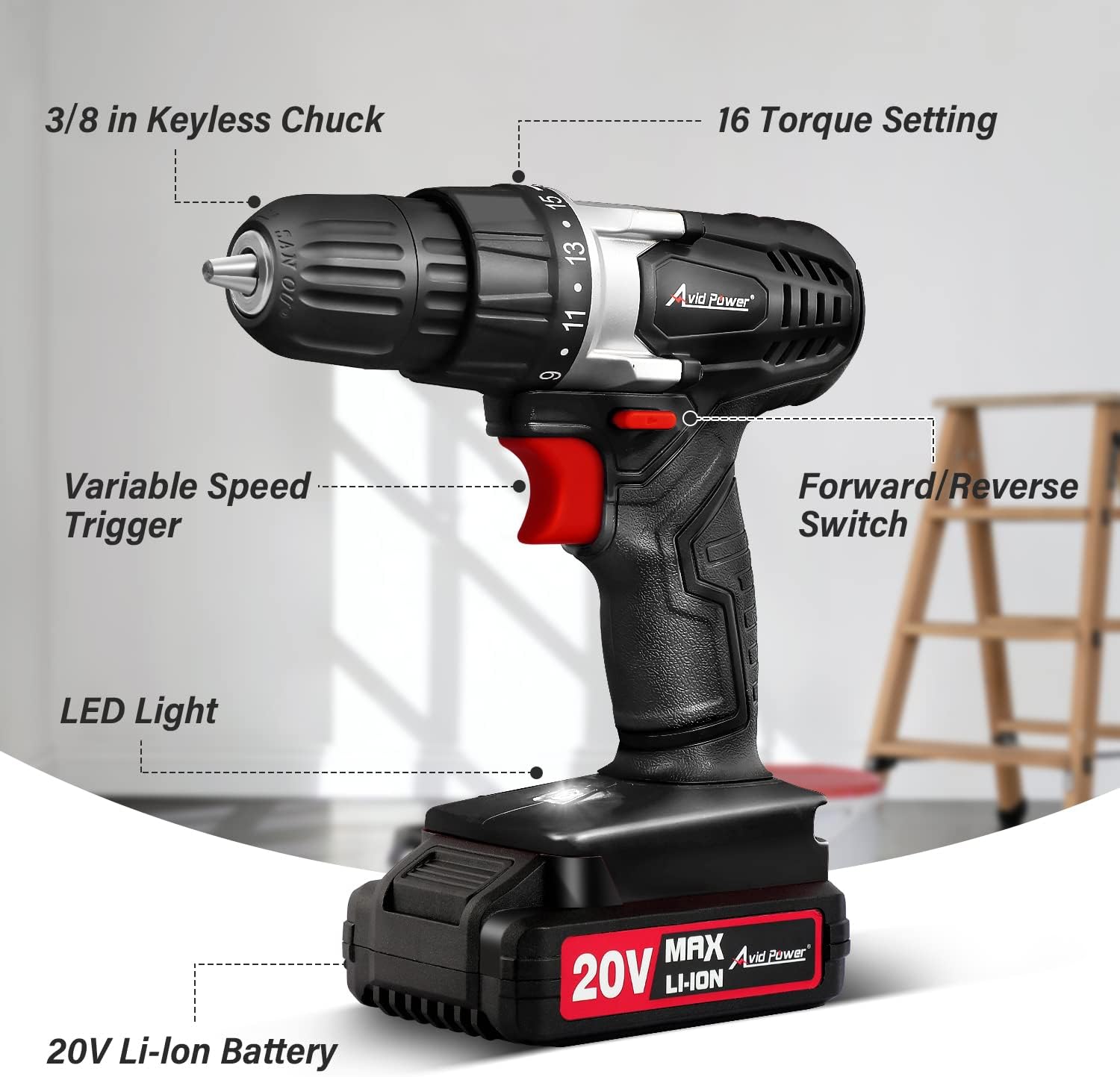
Image: An annotated diagram illustrating the key components and features of the AVID POWER 20V Cordless Drill.

Image: A detailed view of the 15+1 torque settings on the drill, indicating its capability for precise adjustments.
5. Setup
5.1 Charging the Battery
Upon receiving your drill, fully charge the battery before first use. The battery pack features a real-time battery level display.
- Remove the battery pack from the drill by pressing the release button and sliding it out.
- Connect the charger to a power outlet.
- Slide the battery pack onto the charger. The charger will indicate charging status (e.g., red for charging, green for fully charged).
- Once fully charged, remove the battery from the charger.
Video: A demonstration on how to properly charge the AVID POWER drill battery using the provided charger. The video shows the battery being inserted into the charger and the indicator lights changing to show charging status.

Image: Visual guide to the battery's power indicator and the charger's status lights (red for charging, green for fully charged).
5.2 Installing/Removing the Battery Pack
- To Install: Align the battery pack with the base of the drill and slide it in until it clicks securely into place.
- To Remove: Press the battery release button located on the side of the battery pack and slide the battery out from the drill.
Video: A short video demonstrating the correct method to remove the battery pack from the AVID POWER drill.
5.3 Installing Drill/Driver Bits
- Twist the front part of the 3/8" keyless chuck counter-clockwise to open the jaws.
- Insert the desired drill or driver bit into the chuck.
- Twist the chuck clockwise to tighten the jaws securely around the bit. Ensure the bit is centered and firmly held.
6. Operating Instructions
6.1 Variable Speed Trigger
The drill features a variable speed trigger. Press the trigger gently for slower speeds and apply more pressure for higher speeds. This allows for precise control depending on the material and task.
6.2 Forward/Reverse Switch
Located above the trigger, the forward/reverse switch allows you to change the rotation direction of the chuck. Push it to the left for forward rotation (drilling/driving screws in) and to the right for reverse rotation (removing screws). Center position locks the trigger for safety.
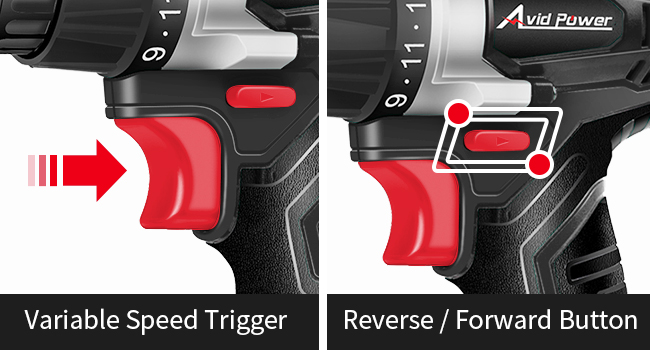
Image: A visual guide to the variable speed trigger and the forward/reverse switch for directional control.
6.3 Torque Settings
Adjust the torque collar (numbered 1-15, plus a drill setting) to match the material and screw size. Lower settings are for smaller screws and softer materials, while higher settings are for larger screws and harder materials. The drill setting is for drilling holes.
- Max torque for drilling into wood: 13/16-Inch.
- Max torque for drilling into steel plate: 3/8-Inch.
- Note: This drill is not suitable for drill bits larger than 25mm and is not for concrete/masonry walls.

Image: A visual representation of the 15+1 torque settings, demonstrating appropriate settings for various screw sizes and materials.
6.4 Using the Flexible Shaft
For hard-to-reach areas, attach the flexible shaft to the drill chuck and then insert your desired bit into the end of the flexible shaft. This allows you to work around obstacles.

Image: The flexible shaft in action, demonstrating its utility for accessing narrow spaces during drilling or screwdriving tasks.
7. Maintenance
- Cleaning: Keep the drill's ventilation openings clean to prevent overheating. Use a soft, damp cloth to clean the exterior. Do not use harsh chemicals.
- Battery Care: Remove the battery from the drill when not in use. Recharge the battery every 3 months to maintain its lifespan, even if not actively used.
- Bit Care: If drill bits get wet, dry them thoroughly to prevent rust. Store all bits in their provided case.
- Storage: Store the drill and accessories in a dry, secure place away from direct sunlight and extreme temperatures.
8. Troubleshooting
If you encounter issues with your AVID POWER 20V Cordless Drill, refer to the following common troubleshooting tips:
- Drill Not Starting: Ensure the battery is fully charged and properly installed. Check that the forward/reverse switch is not in the center (locked) position.
- Loss of Power During Use: The battery may be low. Check the battery level indicator and recharge if necessary.
- Bit Slipping in Chuck: Ensure the chuck is tightened securely around the bit. The bit may be worn and need replacement.
- Overheating: Stop using the drill and allow it to cool down. Ensure ventilation openings are clear of debris.
For persistent issues or problems not listed here, please contact AVID POWER customer support.
9. Specifications
| Feature | Specification |
|---|---|
| Brand | AVID POWER |
| Model Number | ACD316 |
| Power Source | Battery Powered (20V Lithium-ion) |
| Maximum Rotational Speed | 550 RPM |
| Maximum Torque | 280 Inch Pounds |
| Torque Settings | 15+1 |
| Maximum Chuck Size | 0.38 Inches |
| Battery Capacity | 1.5 Amp Hours |
| Item Dimensions (L x W x H) | 18.5"L x 13.7"W x 9.7"H |
| Material Type | Plastic, Rubber |
10. Warranty and Support
For warranty information, please refer to the documentation included with your purchase or visit the official AVID POWER website. If you require technical assistance, have questions about product operation, or need to report a defect, please contact AVID POWER customer support directly.
Manufacturer: AVID POWER

