
Introduction
Thank you for purchasing the RAF R5295 Digital Air Fryer. This appliance utilizes advanced hot air technology to cook your favorite foods with little to no oil, providing a healthier alternative to traditional frying. With its 8-liter capacity, digital touch screen, and Wi-Fi connectivity, this air fryer offers convenience and versatility for modern kitchens. Please read this manual thoroughly before first use to ensure safe and optimal operation.
Important Safety Instructions
- Always place the air fryer on a stable, heat-resistant surface, away from walls and other appliances, to allow adequate air circulation.
- Do not immerse the appliance, cord, or plug in water or any other liquid.
- Keep children and pets away from the appliance during operation.
- Do not block the air inlet or outlet vents.
- Unplug the air fryer from the outlet when not in use and before cleaning.
- Do not operate the appliance if the cord or plug is damaged, or if the appliance malfunctions or has been damaged in any way.
- The outer surfaces may become hot during use. Use oven mitts when handling hot components.
- Ensure the food basket is properly inserted before operating.
Product Overview
The RAF R5295 Digital Air Fryer features a sleek design with intuitive controls and smart connectivity. Familiarize yourself with its components for efficient use.
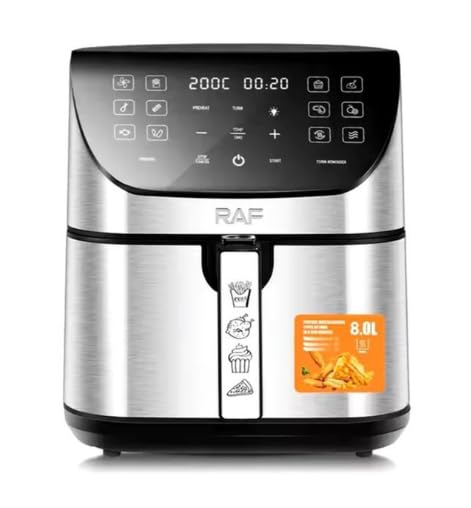
Figure 1: RAF R5295 Digital Air Fryer with mobile app interface.
The air fryer includes a digital touch screen for manual control and Wi-Fi connectivity for remote operation via a mobile application.

Figure 2: Product dimensions (approximately 30cm W x 29cm D x 34cm H).
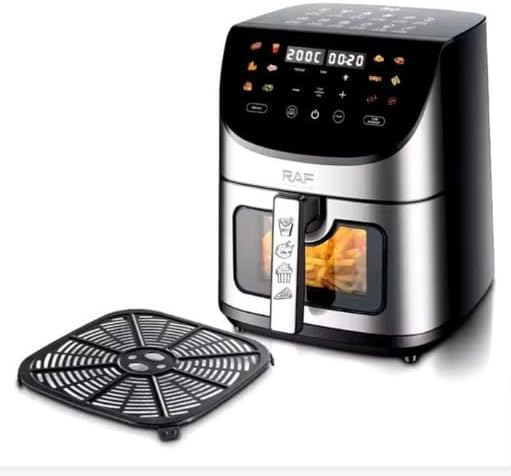
Figure 3: The air fryer with its removable crisper plate, designed for optimal air circulation.

Figure 4: Interior view of the air fryer basket, showing the non-stick coating.

Figure 5: Detail of the handle with the safety release button for detaching the basket.
Setup
- Unpacking: Carefully remove all packaging materials and any promotional labels from the air fryer.
- Initial Cleaning: Wash the food basket and crisper plate with hot water, dish soap, and a non-abrasive sponge. Rinse thoroughly and dry completely. Wipe the interior and exterior of the appliance with a damp cloth.
- Placement: Place the air fryer on a stable, level, and heat-resistant surface. Ensure there is at least 10 cm (4 inches) of clear space around the back and sides, and above the appliance, for proper ventilation.
- Power Connection: Plug the power cord into a grounded electrical outlet (220V).
- First Use (Burn-in): It is recommended to run the air fryer empty for about 10-15 minutes at 180°C (350°F) before cooking food for the first time. This helps to burn off any manufacturing residues and odors. A slight odor may be present during this process; this is normal.
Operating Instructions
Manual Operation
- Prepare Food: Place your ingredients into the air fryer basket. Do not overfill the basket to ensure even cooking.
- Insert Basket: Slide the food basket back into the air fryer until it clicks securely into place.
- Power On: Press the power button on the digital touch screen.
- Set Temperature and Time: Use the temperature and time control buttons (usually '+' and '-' icons) to adjust to your desired settings. The digital display will show the current temperature and remaining time.
- Start Cooking: Press the start/pause button to begin the cooking cycle. The air fryer will automatically shut off when the timer reaches zero.
- Shake/Flip Food: For many recipes, especially fries or smaller items, it is recommended to shake or flip the food halfway through the cooking time. Pull out the basket, shake or flip the contents, and then reinsert the basket. The air fryer will resume cooking automatically.
- Check Doneness: Carefully pull out the basket to check if the food is cooked to your preference. If more cooking time is needed, reinsert the basket and adjust the timer.
- Remove Food: Once cooking is complete, carefully remove the basket from the air fryer. Use tongs to transfer the cooked food to a plate.
Wi-Fi Smart Control
The RAF R5295 Air Fryer can be controlled remotely via a mobile application. Follow these steps to connect:
- Download App: Download the compatible smart home application (e.g., Tuya Smart or similar, check product packaging for specific app name) from your smartphone's app store.
- Register/Log In: Create an account or log in to the application.
- Add Device: Follow the in-app instructions to add a new device. Select 'Air Fryer' or 'Small Home Appliance'.
- Connect to Wi-Fi: The app will guide you through connecting the air fryer to your home Wi-Fi network. Ensure your phone is connected to a 2.4GHz Wi-Fi network during setup.
- Remote Operation: Once connected, you can use the app to power on/off, set temperature and time, select pre-set programs, and monitor cooking progress from your smartphone.
Pre-set Programs
The digital display features several icons representing common food types (e.g., fries, chicken, fish, cake). These are pre-set programs with optimized temperature and time settings. To use:
- Place food in the basket.
- Press the power button.
- Tap the icon corresponding to your food type. The air fryer will automatically set the recommended temperature and time.
- Press the start/pause button to begin cooking. You can manually adjust the time or temperature even after selecting a pre-set program.
Maintenance and Cleaning
Regular cleaning ensures optimal performance and extends the life of your air fryer.
- Unplug and Cool: Always unplug the air fryer and allow it to cool completely before cleaning.
- Clean Basket and Crisper Plate: The food basket and crisper plate have a non-stick coating and are dishwasher safe. Alternatively, wash them with hot water, dish soap, and a non-abrasive sponge. Do not use metal scouring pads or harsh abrasive cleaners.
- Clean Interior: Wipe the interior of the air fryer with a damp cloth. For stubborn food residues, use a mild dish soap solution. Avoid using abrasive materials.
- Clean Exterior: Wipe the exterior of the air fryer with a damp cloth. Do not use abrasive cleaners or immerse the main unit in water.
- Heating Element: Gently clean the heating element with a cleaning brush to remove any food debris.
- Storage: Ensure all parts are clean and dry before storing the air fryer in a cool, dry place.
Troubleshooting
| Problem | Possible Cause | Solution |
|---|---|---|
| Air fryer does not turn on. | Not plugged in; power outlet malfunction; basket not fully inserted. | Ensure the power cord is securely plugged into a working outlet. Check if the food basket is fully pushed in until it clicks. |
| Food is not cooked evenly. | Basket is overcrowded; food not shaken/flipped. | Cook food in smaller batches. Shake or flip food halfway through cooking. |
| White smoke coming from the appliance. | Grease residue from previous use; fatty food being cooked. | Clean the basket and crisper plate thoroughly after each use. For fatty foods, add a small amount of water to the bottom of the outer pan to prevent smoke. |
| Food is not crispy. | Too much moisture in food; insufficient oil (if recipe requires); incorrect temperature/time. | Pat food dry before air frying. Lightly brush or spray with oil if desired. Adjust temperature or increase cooking time. |
| Wi-Fi connection issues. | Incorrect Wi-Fi password; router too far; 5GHz network used. | Ensure correct Wi-Fi password. Move air fryer closer to router. Connect to a 2.4GHz Wi-Fi network. Reset Wi-Fi on air fryer and re-pair via app. |
Specifications
| Feature | Detail |
|---|---|
| Model Number | R5295 (SHA-R5295) |
| Brand | RAF |
| Capacity | 8 Liters |
| Power | 1700 Watts |
| Voltage | 220 Volts |
| Control Method | Digital Touch Control, Mobile App (Wi-Fi) |
| Special Features | Wi-Fi Connectivity, Hot Air Technology, Easy to Clean, Digital Display |
| Material | Stainless Steel |
| Non-stick Coating | Yes |
| Dishwasher Safe Parts | Basket, Crisper Plate |
| Item Weight | 6 Kilograms |
| Dimensions (D x W x H) | 25cm x 25cm x 30cm (Note: Product description states 30x29x34cm, please refer to physical product for exact measurements) |
Warranty and Support
Warranty Information
This RAF R5295 Digital Air Fryer comes with a one-year warranty from the date of purchase. This warranty covers manufacturing defects under normal household use. It does not cover damage resulting from misuse, accident, alteration, neglect, commercial use, or unauthorized repair.
Customer Support
For technical assistance, warranty claims, or any questions regarding your RAF R5295 Digital Air Fryer, please contact your retailer or the manufacturer's customer service department. Keep your proof of purchase for warranty validation.


