
Important Safety Information
Please read all instructions carefully before using the treadmill. Retain this manual for future reference.
- Ensure the treadmill is placed on a flat, stable surface.
- Keep children and pets away from the treadmill during operation.
- Wear appropriate athletic footwear.
- Do not use the treadmill if you feel dizzy, faint, or experience any pain. Consult a physician.
- Unplug the treadmill when not in use or before cleaning/maintenance.
- Do not operate the treadmill with a damaged power cord or plug.
- Maximum user weight capacity: 350 lbs.
Package Contents
Verify that all items are present in the package:
- KALWOL X382PT Treadmill
- Power Cord
- Remote Control
- Tool Kit
- User Manual (this document)
- Lubricant
Setup and Assembly
The KALWOL X382PT treadmill is designed for minimal assembly and is ready to use out of the box. Follow these steps for initial setup:
1. Unpacking and Placement
Carefully remove the treadmill from its packaging. Place it on a level, stable surface with adequate space around it for safe operation.
2. Unfolding the Handlebar (Optional)
The treadmill can be used in two configurations: flat (walking pad mode) or with the handlebar raised (treadmill mode). To raise the handlebar:
- Locate the red locking mechanism on the side of the treadmill base.
- Release the lock and carefully lift the handlebar until it clicks into place.
- Ensure the handlebar is securely locked before use.
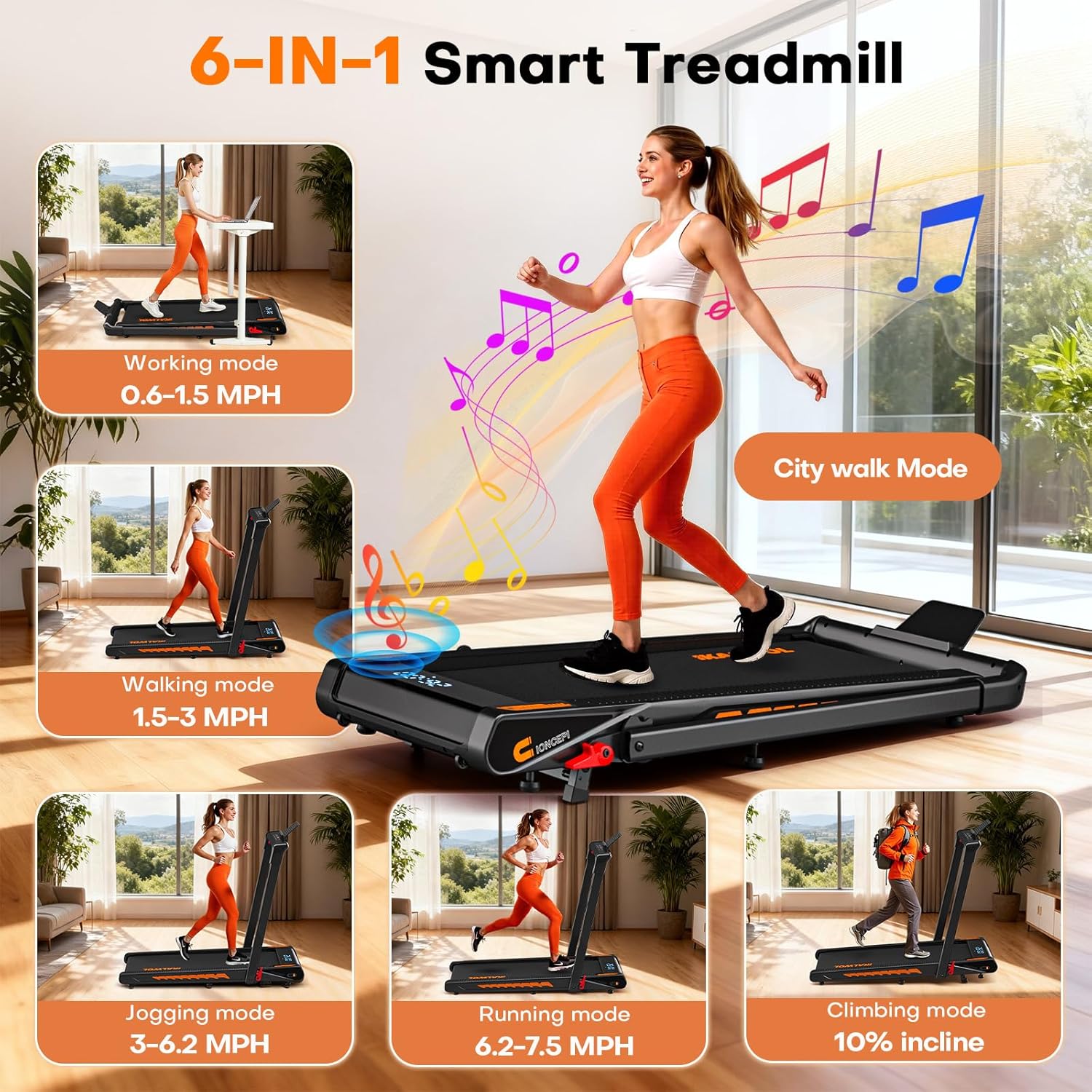
Image: The KALWOL X382PT treadmill shown folded for storage and unfolded for use, highlighting its compact design and dimensions.

Image: A user demonstrating how to unfold the handlebar of the KALWOL X382PT treadmill, securing it for upright use.
3. Power Connection
Connect the power cord to the treadmill and then to a grounded electrical outlet. The LED display will illuminate.
Operating Instructions
1. Starting and Stopping the Treadmill
To start the treadmill, press the 'Start/Stop' button on the console or the remote control. To stop, press the 'Start/Stop' button again. For safety, always attach the safety key to your clothing and the treadmill console before starting your workout.

Image: Close-up of the KALWOL X382PT treadmill's control panel, showing the LED display, speed buttons, and start/stop control.
2. Adjusting Speed
Use the '+' and '-' buttons on the console or remote control to adjust the speed. The treadmill offers a speed range of 0.6 to 7.5 MPH.
- Working Mode: 0.6-1.5 MPH (ideal for use under a standing desk)
- Walking Mode: 1.5-3 MPH
- Jogging Mode: 3-6.2 MPH
- Running Mode: 6.2-7.5 MPH

Image: Visual representation of the 6-in-1 smart treadmill modes, including working, walking, jogging, running, and climbing, with corresponding speed ranges.
3. Manual Incline Adjustment
The treadmill features a 10% manual incline. To adjust the incline, lift the rear of the treadmill and secure the support legs into the desired position. Ensure both sides are evenly adjusted before use.

Image: A graphic demonstrating the 0% to 10% manual incline feature, showing how it can increase calorie burn and how to adjust it.
4. App Compatibility and Speaker
The treadmill is compatible with fitness apps like FITSHOW, KINOMAP, and ZWIFT. To connect:
- Download the desired fitness app on your smartphone or tablet.
- Enable Bluetooth on your device.
- Search for the treadmill (Model X382PT) in the app's device connection settings.
- Pair your device.
The built-in speaker allows for immersive audio during workouts. Once connected via Bluetooth, audio from your device will play through the treadmill's speaker.

Image: A user pairing their smartphone with the KALWOL X382PT treadmill via Bluetooth to enjoy music through the integrated speaker during a workout.

Video: This video demonstrates the setup and various features of the KALWOL X382PT treadmill, including unfolding, connecting to apps, and using the speaker. It highlights the ease of use and versatility for different workout modes.
5. Pre-set Programs and Countdown Modes
The treadmill includes 12 pre-set HIIT programs and 3 countdown modes (time, distance, calories). Use the 'P/M' button on the console or remote to cycle through programs and modes. Refer to the display for program details and progress.
Maintenance
Regular maintenance ensures the longevity and optimal performance of your treadmill.
1. Lubrication
Lubricate the running belt every 3-6 months, or after every 100 hours of use, using the provided lubricant. Lift the edge of the running belt and apply a small amount of lubricant to the center of the deck.
2. Cleaning
Wipe down the treadmill surfaces with a damp cloth after each use. Avoid using abrasive cleaners or solvents. Keep the area around the treadmill clean and free of dust.
3. Belt Adjustment
If the running belt becomes misaligned or too loose/tight, refer to the detailed instructions in the full user manual for adjustment procedures using the included tool kit.
Troubleshooting
If you encounter issues with your treadmill, refer to the following common solutions:
| Problem | Possible Cause | Solution |
|---|---|---|
| Treadmill does not start | Power cord not connected, safety key not in place, power switch off. | Ensure power cord is securely plugged in, safety key is attached, and power switch is on. |
| Running belt slips or stops | Belt too loose, insufficient lubrication, motor overload. | Adjust belt tension, lubricate the deck, reduce user weight or speed. |
| Unusual noise during operation | Loose parts, belt friction, motor issue. | Check for loose screws, lubricate belt, contact support if noise persists. |
| Bluetooth connection issues | Bluetooth off on device, treadmill not in pairing mode, interference. | Ensure Bluetooth is on, restart treadmill and device, try pairing again. |
Specifications
- Brand: KALWOL
- Model Name: X382PT
- Product Dimensions: 50.59"D x 22.6"W x 5.04"H
- Item Weight: 22.3 Kilograms (approx. 49.16 lbs)
- Material: Acrylonitrile Butadiene Styrene (ABS), Alloy Steel
- Maximum Speed: 7.5 Miles per Hour
- Minimum Speed: 0.6 Miles per Hour
- Maximum Horsepower: 3.0 HP Brushless Motor
- Maximum Incline Percentage: 10% (Manual)
- Maximum Weight Recommendation: 350 Pounds
- Special Features: 6-in-1 design, Foldable Handle, APP Compatible, 12 HIIT Programs, LED Display, Remote Control, Wider Running Belt, Low Noise (< 40 dB)
- UPC: 716151427893
Warranty and Support
The KALWOL X382PT Treadmill comes with a 1-Year Warranty from the date of purchase.
For warranty claims, technical support, or any questions regarding your product, please contact KALWOL customer service. Refer to your purchase documentation or the official KALWOL website for contact details.
Our professional team aims to provide helpful responses within 16 hours.