
1. Introduction
This manual provides detailed instructions for the safe and efficient operation of your VEVOR Computing Digital Platform Scale. Please read this manual thoroughly before use and retain it for future reference. This scale is designed for accurate weighing of various items, including packages, luggage, and other goods, with a maximum capacity of 220 lbs (100 kg) and an accuracy of 0.04 lbs (20 g).
2. Product Components
The VEVOR Computing Digital Platform Scale includes the following main components:
- Weighing Platform (Carbon Steel with Stainless Steel surface)
- Display Unit with Control Panel (LCD/LED display)
- Support Pole (Foldable)
- Adjustable Leveling Feet
- AC/DC Power Adapter with Cable
- Built-in Rechargeable Lead-Acid Battery

Image 2.1: Overview of the VEVOR Computing Digital Platform Scale.
3. Setup Instructions
- Unpacking: Carefully remove all components from the packaging. Inspect for any damage.
- Assemble the Scale:
- Place the weighing platform on a flat, stable surface.
- Unfold the support pole to its upright position. Ensure it is securely locked.
- Attach the display unit to the top of the support pole.

Image 3.1: The scale's foldable pole design for convenient setup and storage.
- Leveling: Adjust the four leveling feet at the base of the platform until the scale is perfectly level and stable. This is crucial for accurate measurements.
- Power Connection:
- Connect the provided AC/DC power adapter to the scale's power input and then to a standard electrical outlet.
- The scale also features a built-in rechargeable battery for portable use. Ensure the battery is charged before initial use.

Image 3.2: The scale can be powered by a DC adapter or its built-in rechargeable battery.
4. Operating Instructions
4.1 Basic Weighing
- Power On: Press the 'ON/OFF' button on the control panel to turn on the scale. The display will show '0.00' when ready.
- Place Item: Carefully place the item to be weighed in the center of the weighing platform.
- Read Measurement: The weight will be displayed on the LCD/LED screen. Wait for the reading to stabilize.
- Power Off: Press the 'ON/OFF' button again to turn off the scale when not in use.

Image 4.1: The scale accurately measures items up to 220 lbs with 0.04 lbs precision.
4.2 Unit Switching (KG/LB/LB:OZ)
To switch between weighing units (kilograms, pounds, or pounds:ounces), press the 'KG/LB' button on the control panel. The display will cycle through the available units.
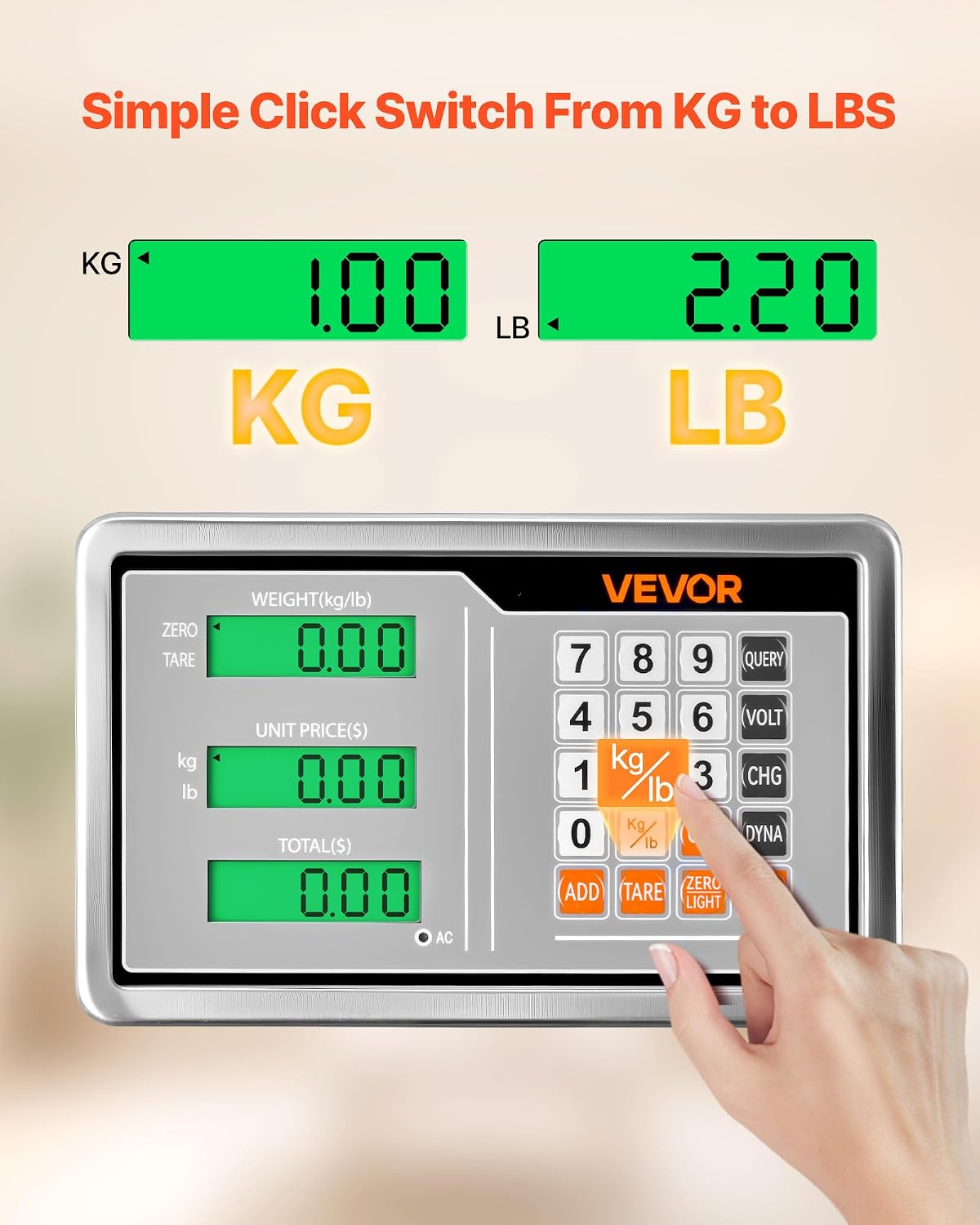
Image 4.2: The control panel allows easy switching between KG and LB units.
4.3 Tare Function
The Tare function allows you to subtract the weight of a container or packaging, so only the net weight of the contents is measured.
- Place the empty container on the weighing platform.
- Press the 'TARE' button. The display will reset to '0.00'.
- Add the items to be weighed into the container. The display will show the net weight of the items.
4.4 Price Calculator
This scale includes a price calculation feature. Refer to the specific instructions on the control panel for entering unit prices and calculating total costs.
4.5 Overload Alert
If the weight on the platform exceeds the maximum capacity (220 lbs / 100 kg), an overload alert will activate. Remove the excess weight immediately to prevent damage to the scale.
4.6 Record Query and Counting
The scale supports record query and counting functions. Consult the display unit's interface for specific button presses and procedures to utilize these features.

Image 4.3: The multi-function display unit with various operational features.
5. Maintenance
- Cleaning: Wipe the scale's platform and display unit with a soft, damp cloth. Do not use abrasive cleaners or immerse the scale in water.
- Storage: When not in use, the scale's pole can be folded down for compact storage. Store in a dry, clean environment.
- Battery Care: Recharge the built-in battery regularly, especially if the scale will not be used for an extended period, to maintain battery life.
- Inspection: Periodically check the power cable for any signs of damage. Ensure the leveling feet are intact and the platform is stable.

Image 5.1: The scale's foldable design allows for convenient storage under shelves or in tight spaces.
6. Troubleshooting
| Problem | Possible Cause | Solution |
|---|---|---|
| Scale does not turn on | No power, discharged battery, faulty adapter | Check power connection. Charge battery. Replace adapter if necessary. |
| Inaccurate readings | Scale not level, unstable surface, calibration needed, overload | Adjust leveling feet. Place on stable surface. Remove excess weight. |
| Overload alert displayed | Weight exceeds maximum capacity | Remove items from the platform until the weight is within limits. |
| Display is dim or flickering | Low battery | Connect the scale to the AC adapter to charge the battery. |
7. Specifications
- Item Model Number: TCS-100A11B
- Material: Powder-Coated Carbon Steel (frame), Stainless Steel (platform surface)
- Maximum Weighing Capacity: 220 lbs / 100 kg
- Minimum Weighing: 0.22 lbs / 100 g
- Accuracy: 0.04 lbs / 20 g
- Weighing Units: kg, lb, lb:oz
- Power Mode: AC/DC Adapter, Built-in Lead-Acid Battery
- Product Weight: 15.2 lbs / 6.9 kg
- Product Size (L x W x H): 21.5 x 11.8 x 29.1 in / 545 x 300 x 740 mm
- Display Type: LCD, LED
- Special Features: Price Calculator, Overload Alert, Tare, Pricing, Measuring, Record Query
- Included Components: 1 x Adapter with Cable

Image 7.1: Key dimensions and specifications of the scale.
8. Warranty and Support
For information regarding product warranty, please refer to the warranty card included with your purchase or visit the official VEVOR website. For technical support, troubleshooting assistance beyond this manual, or spare parts, please contact VEVOR customer service directly through their official channels.