
Introduction
This manual provides detailed instructions for the IMIKI Xplorer Pro GPS Smart Watch. Please read this guide thoroughly to ensure proper use and to maximize the benefits of your device. The IMIKI Xplorer Pro features a 1.6-inch AMOLED display, Bluetooth calling, over 170 sports modes, and comprehensive health monitoring capabilities.
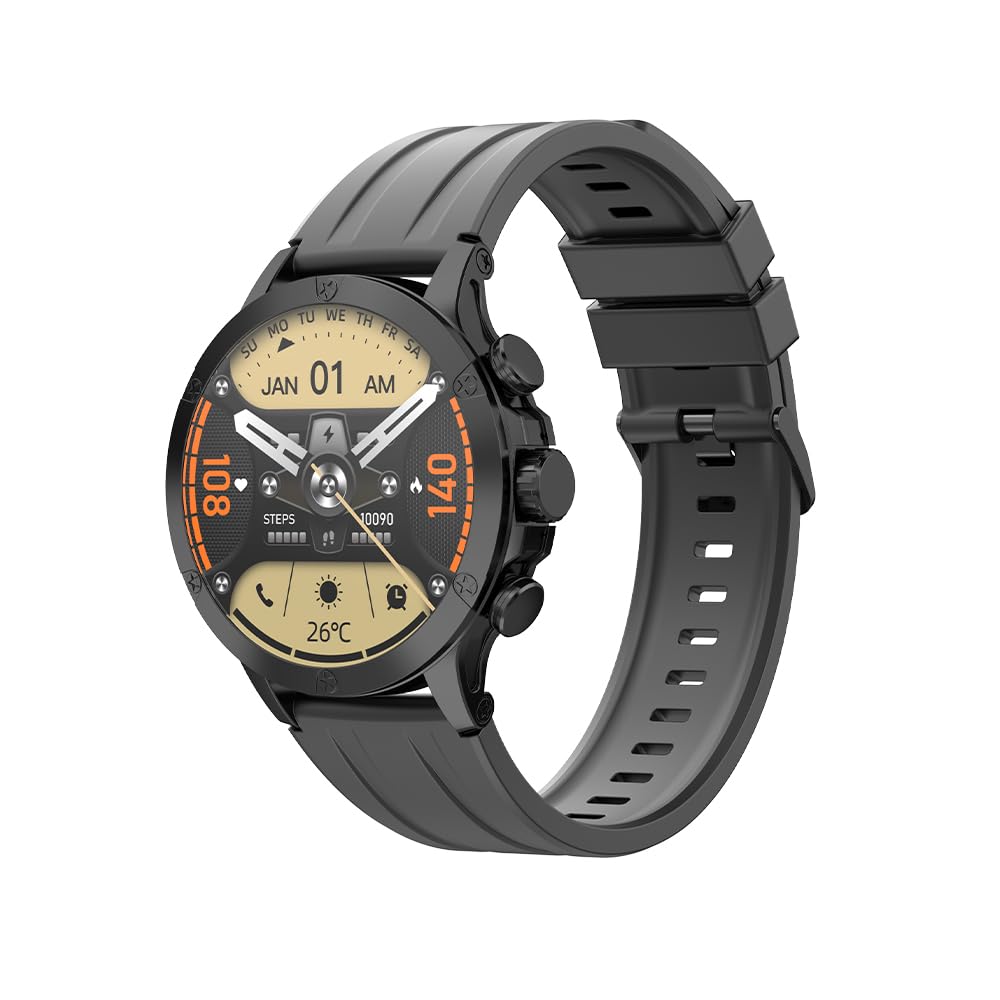
The IMIKI Xplorer Pro Smart Watch, showcasing its sleek design and vibrant display.
What's in the Box
Upon unboxing, ensure all components are present:
- IMIKI Xplorer Pro Smart Watch
- Charging Cable
- User Manual (this document)
Setup
1. Initial Charging
Before first use, fully charge your IMIKI Xplorer Pro. Connect the magnetic charging cable to the charging points on the back of the watch and plug the USB end into a power adapter (not included) or a computer's USB port. A full charge typically takes approximately 2 hours.

The watch displaying its charging status, indicating a 450mAh battery capacity and magnetic charging.
2. App Installation and Pairing
- Download the IMIKI LIFE App: Search for "IMIKI LIFE" in your smartphone's app store (iOS or Android) and install it.
- Create an Account: Open the app and follow the on-screen instructions to create a new user account or log in if you already have one.
- Pair the Watch:
- Ensure Bluetooth is enabled on your phone.
- Open the IMIKI LIFE app and navigate to the device pairing section.
- Select "Add Device" and choose "IMIKI Xplorer Pro" from the list of available devices.
- Confirm the pairing request on both your smartphone and the watch.

The IMIKI LIFE App interface, demonstrating real-time route analytics and health goal tracking, essential for seamless phone integration.
Operating Instructions
Display and Navigation
The IMIKI Xplorer Pro features a 1.6-inch AMOLED touchscreen with a 480x480 pixel resolution. Navigate the watch interface by swiping across the screen and tapping icons. The watch also includes physical buttons for additional control.

Close-up of the 1.6-inch AMOLED display, highlighting its 480x480 pixel resolution and vibrant colors.
Bluetooth Calling and Notifications
Once paired with your smartphone, the watch allows you to make and receive calls directly from your wrist. You will also receive notifications for messages, emails, and other app alerts. Ensure the Bluetooth connection is stable for optimal performance.

The smartwatch displaying its Bluetooth call functionality, allowing users to answer calls and access contacts directly from the wrist.
Sports Modes and GPS Tracking
The IMIKI Xplorer Pro supports over 170 sports modes. Select your desired activity from the watch menu to track your performance. The built-in GPS provides precise tracking for outdoor activities such as running, walking, and cycling, recording data like distance, speed, and calories.

The watch displaying GPS motion tracking, showing a map and real-time activity data like heart rate and speed.

Examples of various sports activities tracked by the watch, including cycling, mountaineering, and running, demonstrating its 170+ sports modes.
Health Monitoring
The watch continuously monitors your heart rate, blood oxygen (SpO2) levels, and sleep patterns. Access these insights through the IMIKI LIFE app to understand your daily recovery and overall well-being. Note: This device is for wellness tracking only and is not intended as a medical device.

Visual representation of the watch's health tracking capabilities, including heart rate, SpO2, sleep monitoring, and women's health features.
Customization
Personalize your watch with over 100 custom watch faces available through the IMIKI LIFE app. You can also customize functional components and utilize the Always On Display (AOD) feature to keep key information visible.
The watch displaying various customizable watch faces and functional components, allowing users to tailor the display to their preferences.
Maintenance
Cleaning
Regularly clean your watch and strap to prevent skin irritation and maintain device functionality. Use a soft, lint-free cloth. If necessary, dampen the cloth with a small amount of water. Avoid harsh chemicals or abrasive materials.
Water Resistance
The IMIKI Xplorer Pro is water-resistant with an IP68 rating, allowing it to withstand sweat, rain, and shallow water immersion up to 3.3 feet (1 meter). It is suitable for daily use and light water activities. Avoid prolonged submersion, hot water, or high-pressure water jets, as these can compromise the water resistance.

The IMIKI Xplorer Pro Smart Watch being splashed with water, illustrating its water-resistant design suitable for various conditions.
Battery Care
To prolong battery life, avoid fully discharging the watch frequently. Charge it when the battery level is low. Store the watch in a cool, dry place when not in use for extended periods. The typical usage time is 5-7 days, with a standby time of up to 15 days.
Troubleshooting
- Watch not turning on: Ensure the watch is fully charged. Connect it to the charger and wait a few minutes before attempting to power it on again.
- Cannot pair with smartphone:
- Ensure Bluetooth is enabled on your phone and the watch is discoverable.
- Restart both your phone and the watch.
- Clear the Bluetooth cache on your phone (if applicable) and try again.
- Ensure the IMIKI LIFE app has necessary permissions.
- Inaccurate health data: Ensure the watch is worn snugly on your wrist, not too tight or too loose. Clean the sensor on the back of the watch. Environmental factors and movement can affect accuracy.
- Notifications not appearing: Check app permissions on your smartphone for the IMIKI LIFE app. Ensure notifications are enabled within the app settings and on the watch. Verify a stable Bluetooth connection.
- Short battery life: Reduce screen brightness, disable Always On Display if not needed, limit background app refresh, and ensure no apps are excessively draining power.
Specifications
| Feature | Detail |
|---|---|
| Model Name | XPLORER Pro |
| Display Type | 1.6" AMOLED |
| Display Resolution | 480x480 Pixels |
| Peak Brightness | 1000 Nits |
| Memory Storage Capacity | 4 GB |
| Connectivity | Bluetooth |
| Battery Capacity | 450 mAh (Lithium Polymer) |
| Charging Time | 2 Hours (Magnetic Charging) |
| Typical Usage Time | 5-7 Days |
| Standby Time | Up to 15 Days |
| Water Resistance | IP68 (Water Resistant up to 3.3 feet) |
| Sports Modes | 170+ |
| Health Monitoring | Heart Rate, SpO2, Sleep, Women's Health |
| Built-in GPS | Yes |
| Bluetooth Calling | Yes |
| Compatible Devices | Smartphone (iOS & Android) |
| Weight | 64.45 Grams |
| Case Material | Durable Plastic |
| Human Interface | Touchscreen |
Warranty Information
The IMIKI Xplorer Pro GPS Smart Watch comes with a 1-Year Limited Manufacturer Warranty. This warranty covers defects in materials and workmanship under normal use. It does not cover damage caused by misuse, accidents, unauthorized modifications, or normal wear and tear. Please retain your proof of purchase for warranty claims.
Customer Support
For further assistance, technical support, or warranty inquiries, please visit the official IMIKI website or contact their customer service. You can also refer to the IMIKI Store on Amazon for additional product information.


