
1. Introduction
This manual provides detailed instructions for the installation, operation, and maintenance of your BXLIYER Android 14 Car Radio. Please read this manual thoroughly before using the product to ensure proper functionality and to prevent damage. Keep this manual for future reference.
2. Safety Information
- Always operate the device safely and responsibly. Distracted driving can lead to accidents.
- Do not attempt to disassemble or modify the unit. This may cause damage, electric shock, or fire.
- Ensure all wiring is correctly connected to prevent short circuits or electrical hazards.
- Consult a professional for installation if you are unsure about any steps.
- Keep the unit away from water and excessive moisture.
- Use only specified accessories and parts.
3. Package Contents
Verify that all items listed below are included in your package:
- BXLIYER Android Car Radio Unit
- Power Cable
- RCA Output Socket A
- RCA Output Socket B
- USB Cables (2x)
- GPS Antenna
- Radio Antenna
- External Microphone
- 4LED Rearview Camera
- Frame Kit (for specific vehicle models)
- CANBUS Decoder (if applicable for vehicle model)
- User Manual (this document)

Image: Overview of included components and wiring connections.
4. Setup and Installation
This car radio is designed for specific vehicle models: Opel Insignia and Buick Regal (2009-2013). The unit comes with a plug-and-play wiring harness for simplified installation. However, professional installation is highly recommended to ensure correct wiring and optimal performance.
4.1 Pre-Installation Check
- Confirm vehicle compatibility.
- Disconnect the vehicle's battery before starting installation.
- Ensure all included components are present.
4.2 Wiring Diagram
Refer to the diagram below for connecting the power, audio, and accessory cables.
Image: Detailed wiring connections for the car radio unit.
- Power Socket (1): Connect the main power harness to your vehicle's wiring. Ensure ACC, B+, GND, ILL, REVERSE, and speaker wires (FL+, FL-, RR+, RR-, FR+, FR-) are correctly matched.
- RCA Output Socket A (2): Connect for AUX IN (L/R), AUX OUT (L/R), FRONT CAMERA, SUB-WOOFER, and RCA-FR.
- RCA Output Socket B (3): Connect for AUX VIDEO IN 1 and EXTERNAL MIC.
- USB Cable (4): Connect the provided USB cables for external storage or device charging.
- GPS Antenna (5): Connect the GPS antenna and mount it in a location with a clear view of the sky for optimal signal reception.
- Radio Antenna (6): Connect your vehicle's radio antenna.
4.3 Installation Steps
- Carefully remove the original car radio and dashboard trim.
- Connect all necessary wiring harnesses and antennas to the new BXLIYER unit as per the wiring diagram.
- Install the new car radio into the dashboard opening, securing it with the provided frame kit.
- Reconnect the vehicle's battery.
- Test the unit's functionality before reassembling the dashboard trim.

Image: Visual comparison of the dashboard before and after the car radio installation in a Buick Regal (2009-2013).
5. Operating Instructions
Your BXLIYER car radio runs on Android 14, offering a wide range of features and customization options.
5.1 Basic Operation
- Power On/Off: Press and hold the power button (if physical) or use the vehicle's ignition. The Fast Boot feature allows system access in less than 2 seconds.
- Touchscreen: Navigate the interface by tapping, swiping, and pinching on the 9.7-inch IPS display.
- Volume Control: Adjust volume using the on-screen controls or steering wheel controls.
5.2 System Features
- Operating System: Android 14.
- Processor: Octa-Core Rockchip AC8257 A53 (up to 2.0 GHz).
- Memory: 6GB RAM + 128GB ROM for smooth operation and ample storage.
- Multi-color Light Effects: Customize the button illumination colors.
- Split-Screen: Run two applications simultaneously on the screen.
5.3 Audio and Radio
- Audio Output: 4 x 50W max power output.
- Radio Tuner: Built-in AM/FM tuner with RDS (Radio Data System) for displaying station information.
- DAB+ Support: Connect an optional DAB+ adapter (e.g., B083Q7YG4F) for digital radio reception with enhanced sound quality.
- DSP (Digital Sound Processor): The unit is advertised with DSP functionality for sound optimization. This typically includes features like equalization, time alignment, and crossover settings to enhance the audio experience. If advanced DSP features are not accessible, please refer to the troubleshooting section or contact support.
5.4 Connectivity
- Bluetooth 5.0: For hands-free calling and audio streaming.
- Dual Band WiFi (2.4G/5G): Connect to Wi-Fi hotspots for internet access.
- 4G Support: Requires an optional 4G dongle for mobile data connectivity.
- USB & MicroSD: Connect external storage devices (up to 500GB) for media playback.
5.5 Navigation and Multimedia
- GPS Navigation: Supports online and offline GPS navigation apps with 3D maps and voice guidance.
- Video Playback: Supports 4K (3840 × 2160 pixels) and 1080P HD video formats.
5.6 Smartphone Integration
- Wireless CarPlay: Connect your iPhone wirelessly for navigation, music, calls, and messages.
- Wireless Android Auto: Connect your Android phone wirelessly for navigation, music, calls, and messages.
- Mirror-Link: Mirror your iOS or Android phone screen to the car radio display via Wi-Fi or USB.
5.7 Camera Support
- Rearview Camera: Supports AHD rearview cameras. The display automatically switches to the rearview camera view when the vehicle is in reverse gear. A 4LED rearview camera is included.
- 360° Panoramic Camera: Supports optional 360° panoramic camera systems (requires 4 separate AHD cameras) for a comprehensive view around the vehicle.
5.8 Steering Wheel Control
The unit supports your vehicle's original steering wheel controls, allowing you to manage audio, calls, and other functions without taking your hands off the wheel.
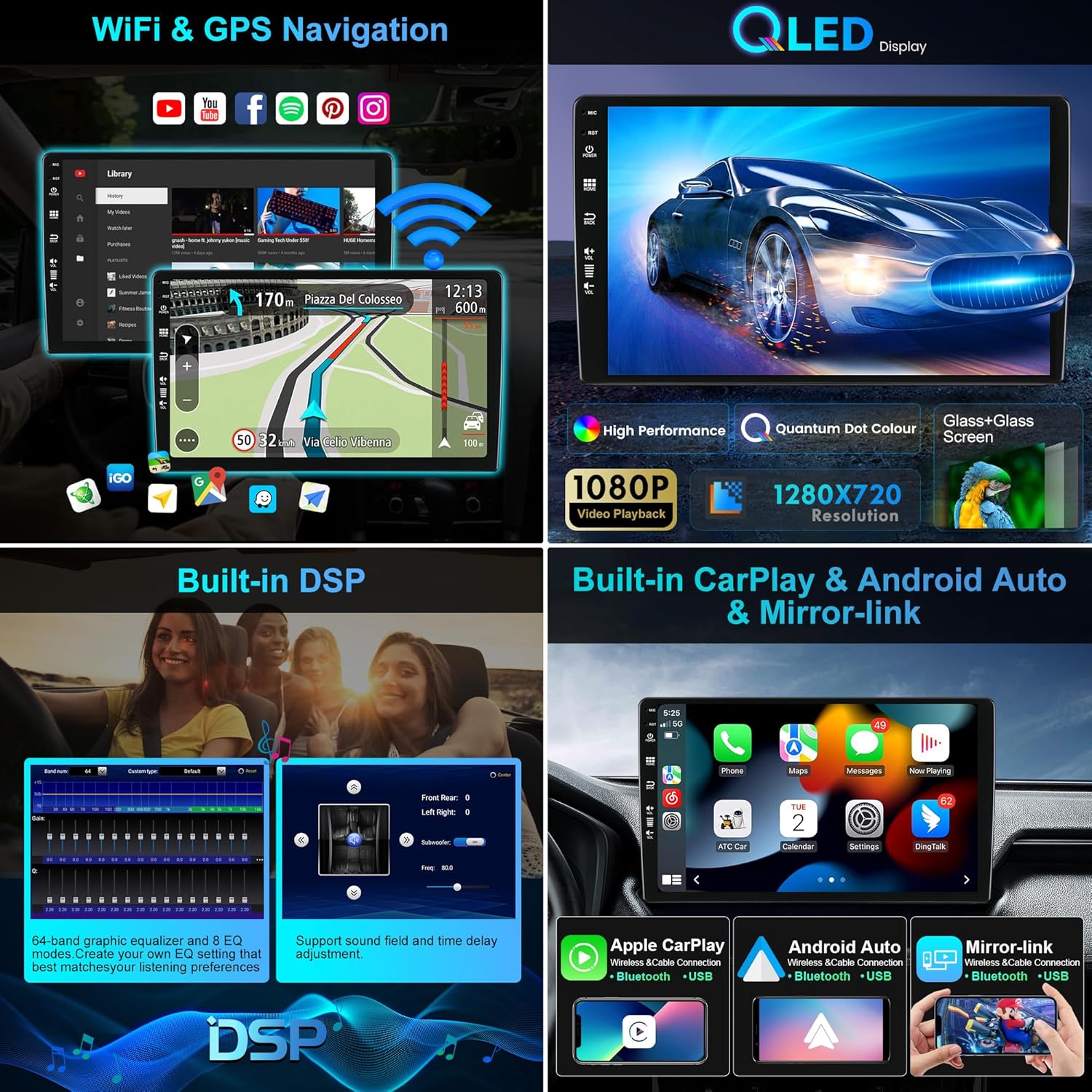
Image: Features including WiFi, GPS Navigation, QLED Display, DSP, CarPlay, Android Auto, and Mirror-link.

Image: Features including IPS Screen, DSP, 360 Camera, 4G/WiFi, Mirror-Link, Split-Screen, Steering Wheel Control, Fastboot, and Quick Reversing Mode.
6. Maintenance
- Cleaning: Use a soft, dry cloth to clean the screen and unit. Avoid abrasive cleaners or solvents.
- Software Updates: Periodically check for software updates to ensure optimal performance and access to new features. Updates can usually be found on the manufacturer's website or through the unit's system settings.
- Temperature: Avoid exposing the unit to extreme temperatures.
7. Troubleshooting
If you encounter issues with your car radio, refer to the following common problems and solutions:
| Problem | Possible Cause | Solution |
|---|---|---|
| Unit does not power on. | Incorrect wiring, blown fuse, vehicle battery disconnected. | Check power connections, inspect fuses, ensure battery is connected. |
| No sound. | Volume too low, speaker wires disconnected, incorrect audio settings. | Increase volume, check speaker wiring, verify audio output settings. |
| GPS signal lost or inaccurate. | GPS antenna not properly connected or obstructed. | Ensure GPS antenna is securely connected and mounted in a clear location. |
| Bluetooth/Wi-Fi connectivity issues. | Device not paired, Wi-Fi signal weak, incorrect settings. | Restart Bluetooth/Wi-Fi, re-pair devices, check signal strength. |
| Steering wheel controls not working. | Incorrect CANBUS connection or settings. | Verify CANBUS wiring and configure steering wheel controls in the unit's settings. |
| Advanced DSP features (e.g., high-pass/low-pass filters, time alignment) are not available as advertised. | Potential software limitation or misrepresentation of features. | Ensure the latest software is installed. If the issue persists, contact BXLIYER customer support for clarification or assistance. |
If the problem persists after trying these solutions, please contact customer support.
8. Specifications
| Feature | Specification |
|---|---|
| Operating System | Android 14 |
| CPU | Rockchip AC8257 A53 Octa-Core, 2.0 GHz |
| RAM | 6GB DDR3 |
| ROM | 128GB |
| Display | 9.7-inch IPS Touchscreen |
| Audio Output | 4*50W Max |
| Radio Tuner | AM/FM with RDS (TDA7786 IC) |
| Amplifier IC | TDA7851 |
| Bluetooth | Bluetooth 5.0 |
| Wi-Fi | Dual Band (2.4G/5G) |
| Connectivity | USB, MicroSD (up to 500GB) |
| Video Support | 4K (3840 × 2160 pixels), 1080P HD |
| Special Features | Wireless CarPlay, Wireless Android Auto, Mirror-Link, GPS Navigation, DAB+ Support (adapter required), Steering Wheel Control, Fast Boot, AHD Camera Support, 360° Camera Support (optional) |
| Dimensions (Package) | 26 x 20 x 17 cm |
| Weight (Item) | 2.3 kg |
| Model Number | BXLIYER-5449-H04-BXF |
9. Warranty Information
This BXLIYER car radio comes with a 2-year warranty from the date of purchase. This warranty covers manufacturing defects and malfunctions under normal use. It does not cover damage caused by improper installation, misuse, accidents, or unauthorized modifications. Please retain your proof of purchase for warranty claims.
10. Customer Support
For technical assistance, troubleshooting, or warranty inquiries, please contact BXLIYER customer support through your retailer or the official BXLIYER website. Provide your product model number (BXLIYER-5449-H04-BXF) and proof of purchase when contacting support.