Introduction
Welcome to the world of effortless homemade bread with your new MERIOR 25-in-1 Automatic Bread Maker. This appliance is designed to simplify the bread-making process, offering a wide variety of programs and customizable settings to suit your preferences. Please read this manual thoroughly before first use to ensure safe and optimal operation.
Product Features
- 25-in-1 Multifunctionality: Offers 14 bread varieties, 2 cake recipes, 4 special menus, 4 baking modes, and a custom option for diverse baking needs.
- 2-Lb Capacity with Adjustable Settings: Choose from 1lb, 1.5lb, or 2lb loaf sizes and light, medium, or dark browning levels.
- Intuitive Touchscreen Display & Visible Lid: Easy one-touch program selection and real-time monitoring of the baking process through the transparent lid.
- 13-Hour Delay Timer: Program your bread maker to have fresh bread ready at your desired time.
- Automatic Nut Dispenser: Ensures fruits and nuts are added at the optimal kneading stage for perfect distribution.
- Food-Grade Materials & Easy Cleaning: Features an aluminum inner bucket and blades with a certified food-grade non-stick coating. Detachable, lightweight bucket is dishwasher-safe.

The MERIOR 25-in-1 Bread Maker showcasing its automatic nut dispenser, 25-in-1 versatility, 13-hour delay timer, visible lid, touchscreen display, and food-grade materials.
Package Contents
Upon unboxing, ensure all items listed below are present:
- 1 x Bread Machine (Model BM901)
- 1 x Bread Pan (Non-stick)
- 2 x Kneading Paddles
- 1 x Measuring Cup
- 1 x Measuring Spoon
- 1 x Paddle Removing Hook
- 1 x Automatic Nut Dispenser
- 1 x User Manual
- 1 x Recipe Booklet

All components included in the MERIOR Bread Maker package, laid out for easy identification.
Setup
- Unpack: Carefully remove all parts from the packaging.
- Clean: Wash the bread pan, kneading paddles, measuring cup, and measuring spoon with warm, soapy water. Rinse thoroughly and dry all parts. Wipe the exterior of the bread maker with a damp cloth.
- Position: Place the bread maker on a stable, flat, heat-resistant surface, away from direct sunlight and heat sources. Ensure adequate ventilation around the appliance.
- Install Bread Pan: Insert the clean bread pan into the baking chamber. Press down firmly and twist clockwise until it locks into place. Attach the kneading paddles onto the shafts at the bottom of the bread pan.
- Connect Power: Plug the power cord into a grounded electrical outlet. The display will light up, indicating the machine is ready for use.
Operating Instructions
Basic Bread Making Steps
- Add Ingredients: Place all ingredients into the bread pan in the order specified by your recipe (typically liquids first, then dry ingredients, with yeast last).
- Select Program: Press the 'Menu' button to cycle through the 25 available programs until you reach your desired setting.
- Adjust Loaf Size & Crust Color: Use the 'Loaf Size' button to select 1lb, 1.5lb, or 2lb. Use the 'Crust Color' button to choose light, medium, or dark.
- Set Delay Timer (Optional): If you wish to delay the start of baking, use the 'Time+' or 'Time-' buttons to set the desired delay time (up to 13 hours).
- Start Baking: Press the 'Start/Stop' button to begin the baking process. The machine will automatically mix, knead, rise, and bake the bread.
- Automatic Nut Dispenser: If your recipe includes fruits or nuts, load them into the automatic dispenser. The machine will release them at the appropriate time during the kneading cycle.
- Remove Bread: Once baking is complete, the machine will beep. Use oven mitts to carefully remove the bread pan. Invert the pan onto a wire rack to release the bread. If the kneading paddles remain in the bread, use the paddle removing hook to extract them.
- Cool: Allow the bread to cool on a wire rack for at least 20-30 minutes before slicing to ensure proper texture.

Simplified steps for beginners to make bread using the MERIOR bread maker.
Understanding the Control Panel
The intuitive touchscreen interface allows for easy program selection and customization.
- Menu: Cycles through the 25 preset programs.
- Loaf Size: Adjusts the bread weight (1lb, 1.5lb, 2lb).
- Crust Color: Selects the desired crust browning (light, medium, dark).
- Time +/-: Sets the delay timer for deferred baking.
- Start/Stop: Initiates or cancels the selected program.
- Visible Lid: Allows observation of the bread-making process without opening the lid.

Detailed view of the intelligent touch panel, highlighting the LCD display and various control buttons.
Programs and Settings
Your bread maker offers 25 versatile programs. Refer to the included recipe booklet for specific ingredient quantities for each program and loaf size.
| Program No. | Program Name | Description |
|---|---|---|
| 1 | Basic Bread | For white and mixed breads, mainly using bread flour. |
| 2 | Quick Bread | For quick preparation without a long rising time. |
| 3 | Sweet Bread | For breads with high sugar content, such as brioche. |
| 4 | Whole Wheat | For whole wheat breads, typically denser. |
| 5 | French Bread | For light breads made from fine flour, with a crispy crust. |
| 6 | Gluten-Free | For gluten-free recipes, suitable for dietary restrictions. |
| 7 | Sugar-Free | For breads with reduced or no sugar. |
| 8 | Cake | For baking cakes and quick breads. |
| 9 | Dough | Prepares dough for rolls, pizza, or pastries to be baked in a conventional oven. |
| 10 | Knead | Only kneads ingredients without rising or baking. |
| 11 | Jam | For making homemade jams and marmalades. |
| 12 | Yogurt | For preparing homemade yogurt. |
| 13 | Defrost | For defrosting frozen dough. |
| 14 | Bake | For baking pre-made dough or for additional baking time. |
| 15 | Homemade | Allows custom settings for kneading, rising, and baking times. |

Customize your bread with options for loaf size and crust color.

The 13-hour delay timer allows for fresh bread at your convenience.
Maintenance & Cleaning
Proper cleaning and maintenance will extend the life of your bread maker.
- Always unplug the appliance and allow it to cool completely before cleaning.
- Bread Pan & Kneading Paddles: These are detachable and feature a non-stick coating. They are dishwasher-safe for easy cleaning. For stubborn residue, soak in warm, soapy water for 15-20 minutes before washing.
- Exterior: Wipe the exterior of the bread maker with a soft, damp cloth. Do not use abrasive cleaners or immerse the unit in water.
- Interior: Wipe the interior of the baking chamber with a damp cloth. Ensure no crumbs or residue are left behind.
- Automatic Nut Dispenser: Remove and clean the dispenser after each use, especially if sticky ingredients were used.
- Storage: Store the bread maker in a dry, clean place when not in use.

The non-stick bread pan is easy to clean by hand or in a dishwasher.
Troubleshooting
If you encounter any issues, please consult the following common troubleshooting tips before contacting customer support.
- Bread does not rise: Check yeast expiration date, ensure water temperature is correct (lukewarm), and verify correct program selection.
- Bread is too dense: Too much flour or not enough liquid. Ensure accurate measurements.
- Bread is too sticky: Too much liquid or not enough flour. Adjust measurements accordingly.
- Kneading paddles stuck in bread: Use the provided paddle removing hook after the bread has cooled slightly.
- Machine not starting: Ensure the power cord is securely plugged in and the bread pan is correctly locked into place.
For further assistance, refer to the detailed troubleshooting section in your user manual or contact MERIOR customer support.
Specifications
| Feature | Detail |
|---|---|
| Brand | MERIOR |
| Model Number | BM901 |
| Color | Black |
| Material | Stainless Steel |
| Capacity | 2 Pounds |
| Number of Programs | 25 |
| Product Dimensions | 13.76"D x 14.39"W x 11.42"H |
| Item Weight | 15.18 pounds |
| Voltage | 120 Volts |
| Product Care Instructions | Hand Wash Only (for certain parts) |
| UPC | 797507320709 |
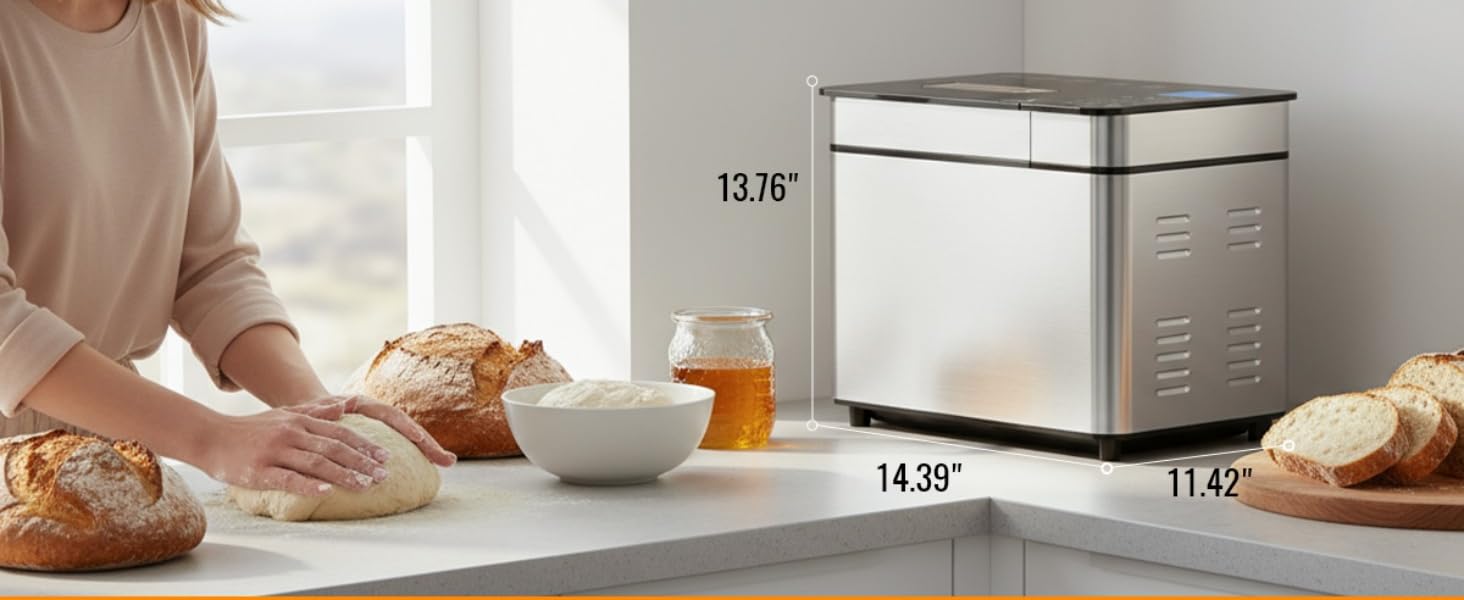
Product dimensions of the MERIOR Bread Maker for easy placement in your kitchen.
Warranty & Support
The MERIOR BM901 Bread Maker comes with a manufacturer's warranty. Please refer to the warranty card included in your package for detailed terms and conditions. For technical support, troubleshooting, or warranty claims, please contact MERIOR customer service through the contact information provided in your user manual or on the official MERIOR website.
