
1. Introduction
Thank you for choosing the Monstrum Beast 6-24x50 Rifle Scope. This manual provides detailed instructions for the proper setup, operation, and maintenance of your new rifle scope. Please read this manual thoroughly before using the product to ensure optimal performance and safety.
The Monstrum Beast 6-24x50 Rifle Scope is a long-range optic designed for precision. It features a 6-24x magnification range and a 50mm objective lens for enhanced light transmission and a wide field of view. This model includes the FIB04-MIL reticle, a second focal plane design, and a side focus parallax adjustment dial. It comes with a 30mm tube configuration and a Monstrum one-piece cantilever scope mount.

Image 1.1: Top view of the Monstrum Beast 6-24x50 Rifle Scope with adjustment turrets and magnification ring.

Image 1.2: Side view of the Monstrum Beast 6-24x50 Rifle Scope, showing the objective lens and side focus dial.
2. Setup and Mounting
2.1 Mounting the Scope
Your Monstrum Beast scope comes with a one-piece cantilever scope mount designed for 30mm tube configurations. Ensure the mount is securely attached to your rifle's Picatinny or Weaver rail. Position the scope to achieve proper eye relief, then tighten the mount rings evenly to secure the scope without over-tightening.
2.2 Initial Zeroing
After mounting, it is essential to zero your scope. This process involves adjusting the windage and elevation turrets to align the point of impact with the reticle's aiming point at a specific distance. Consult your rifle's manual for recommended zeroing procedures and distances. Always ensure your firearm is unloaded and pointed in a safe direction during adjustments.
3. Operating Instructions
3.1 Magnification Adjustment
The scope features a variable magnification range from 6x to 24x. Rotate the magnification ring, located near the eyepiece, to adjust the desired power. The second focal plane (SFP) FIB04-MIL reticle maintains its size relative to the target image at all magnification levels, ensuring consistent subtensions.

Image 3.1: Comparison of field of view at 6x and 24x magnification at 100 yards, demonstrating the effect of magnification on target size.
3.2 Side Focus Parallax Adjustment
Parallax refers to the apparent shift in the reticle's position relative to the target when the shooter's eye moves. Your scope is equipped with a side focus parallax adjustment dial to eliminate this effect and sharpen the target image.

Image 3.2: Diagram explaining parallax and the function of an adjustable objective (side focus) to eliminate it for sharper focus and accurate shooting.
To adjust parallax:
- Estimate Distance: Estimate the distance to your target.
- Set Side Focus: Rotate the side focus dial to the corresponding yardage marking.
- Fine-Tune: Look through the scope and fine-tune the dial until the target image appears sharp and clear, and the reticle does not appear to shift when you move your eye slightly.
Important: If the side focus setting is significantly different from the actual target distance, the image may appear blurry and out of focus.
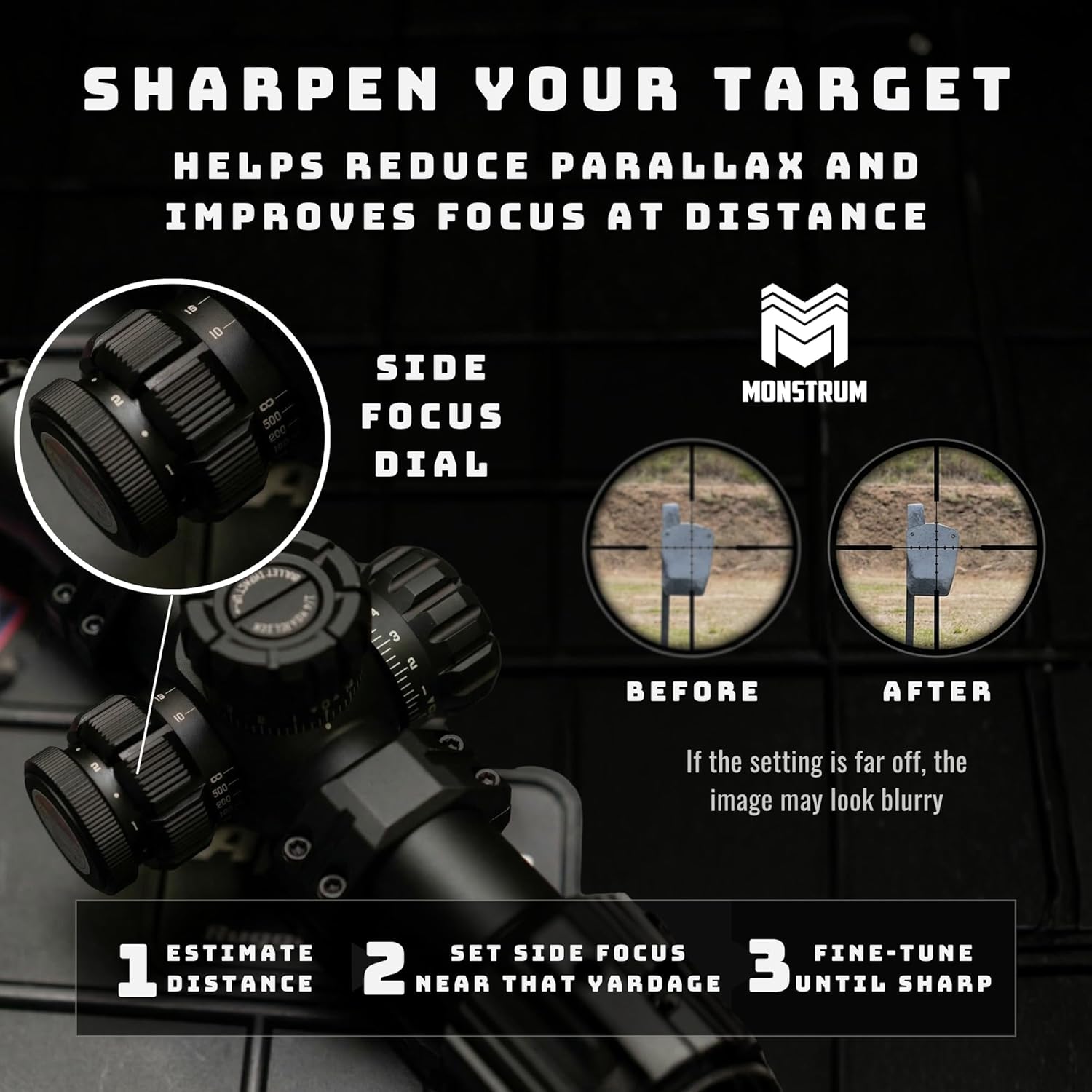
Image 3.3: Visual guide demonstrating the three steps to sharpen target focus using the side focus dial: estimate distance, set side focus, and fine-tune.
3.3 Fiber Optic Reticle
The FIB04-MIL reticle features a fiber optic illumination system. Unlike traditional etched or wire reticles, the fiber optic filament channels light from an LED source to the center of the reticle, producing a daylight-bright center dot. This enhances visibility in various lighting conditions.

Image 3.4: Explanation of a fiber optic reticle, highlighting its ability to generate a daylight bright center dot compared to traditional illuminated reticle systems.
4. Maintenance
4.1 Cleaning the Lenses
Use a soft, lint-free cloth or a lens brush to remove dust and loose debris from the objective and eyepiece lenses. For smudges or fingerprints, use a specialized lens cleaning solution and a clean microfiber cloth. Avoid using harsh chemicals or abrasive materials, as these can damage the lens coatings.
4.2 General Care and Storage
Keep your scope protected from extreme temperatures, humidity, and direct impact. Store it in a dry, cool place, preferably in a padded case. Ensure all caps and covers are in place when not in use. Regularly check all mounting screws for tightness to maintain zero.
5. Troubleshooting
- Blurry Image: If the image appears blurry, adjust the side focus parallax dial (refer to Section 3.2). Also, ensure the eyepiece diopter is correctly set for your vision.
- Reticle Not Clear: Adjust the eyepiece diopter by rotating it until the reticle appears sharp.
- Inconsistent Point of Impact: Check that the scope mount and rings are securely tightened. Ensure the rifle and ammunition are consistent.
- No Reticle Illumination: Check the battery if your model includes an illuminated reticle. Ensure the illumination dial is turned on.
6. Specifications
| Feature | Specification |
|---|---|
| Brand | Monstrum |
| Model Number | SBA62450B-FIB04-MIL |
| Magnification | 6-24x |
| Objective Lens Diameter | 50 mm |
| Reticle Style | FIB04-MIL (Second Focal Plane) |
| Tube Diameter | 30 mm |
| Parallax Adjustment | Side Focus |
| Mounting Type | Cantilever Mount (Included) |
| Compatible Devices | Rifle |
| UPC | 810198401837 |
7. Warranty and Support
For warranty information, technical support, or any inquiries regarding your Monstrum Beast 6-24x50 Rifle Scope, please contact Monstrum Tactical directly. You can find more information and contact details on the official Monstrum Tactical store page.
Visit the Monstrum Store: Monstrum Tactical Store