
HEINPRO Replacement Spool for HP-DST30A-0DB, HP-DST30A-0WR
HEINPRO Trimmer Line Replacement Spool Instruction Manual
For Models HP-DST30A-0DB, HP-DST30A-0WR
Introduction
This manual provides essential instructions for the safe and effective installation and use of your HEINPRO Trimmer Line Replacement Spools. Please read this manual thoroughly before installation to ensure proper function and safety.
Important Safety Information
Always observe the following safety precautions:
- Always wear eye protection and sturdy shoes when operating any power trimming tool.
- Keep bystanders, especially children and pets, at a safe distance from the operating area.
- Do not trim in reverse near people or pets.
- Always unplug or turn off the trimming tool and remove the battery (if applicable) before performing any maintenance, cleaning, or replacing parts, including the trimmer line spool.
Product Contents
Your HEINPRO Trimmer Line Replacement Spool package includes:
- 7 x Trimmer Line Spools
- 1 x Trimmer Cap

Compatibility
These replacement spools are specifically designed for use with the following HEINPRO cordless weed edger/grass trimmer models:
- HP-DST30A-0DB
- HP-DST30A-0WR
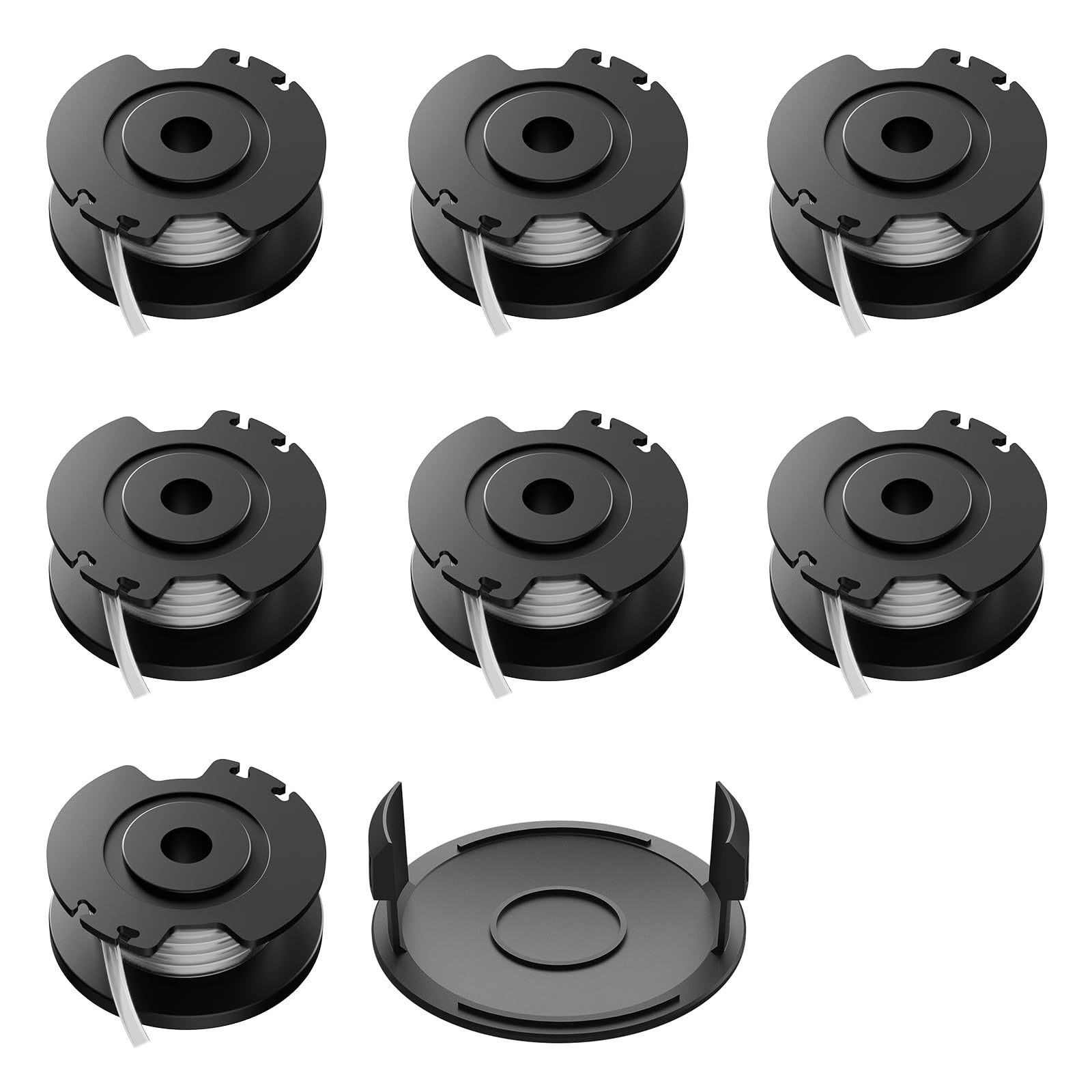
Installation Instructions (Replacing the Spool)
- Ensure Safety: Before beginning, ensure your trimmer is turned OFF and the battery pack is removed to prevent accidental starting.
- Remove Old Spool Cap: Locate the spool cap on the trimmer head. Press the tabs or twist the cap (depending on your specific trimmer model) to remove it.
- Remove Old Spool: Carefully lift out the empty or damaged trimmer line spool from the trimmer head.
- Prepare New Spool: Take a new HEINPRO replacement spool. Ensure the line is properly wound and secured in the spool's retaining slots.
- Insert New Spool: Feed the end of the trimmer line through the eyelet on the trimmer head. Align the new spool with the housing and place it firmly into position. Ensure it sits correctly and does not wobble.
- Reattach Spool Cap: Place the new or existing trimmer cap back onto the trimmer head, aligning any tabs or grooves. Press or twist until it securely locks into place.
- Trim Excess Line: If the line is too long, use the built-in line cutter on the trimmer's guard (if available) or a suitable cutting tool to trim the line to the appropriate length.
- Test: Reinsert the battery pack and briefly turn on the trimmer in a safe area to ensure the line feeds correctly.
Note: Refer to your specific HEINPRO trimmer's user manual for detailed instructions on removing and installing the spool cap if you encounter difficulties.
Operating Considerations
While this manual focuses on the replacement spool, proper operation of your trimmer is essential for optimal performance and safety. Always:
- Maintain a firm grip on the trimmer.
- Keep the trimmer head away from hard objects like rocks, fences, and concrete to prevent premature line wear or damage to the trimmer.
- Use a sweeping motion to cut grass and weeds.
- Avoid overworking the trimmer; allow it to maintain its speed.
- Regularly check the line length and advance it as needed (most trimmers have an automatic feed or bump-feed mechanism).
Maintenance
To ensure the longevity of your trimmer line spools and the trimmer itself:
- Storage: Store unused spools in a cool, dry place away from direct sunlight to prevent the line from becoming brittle.
- Cleaning: After each use, clean any grass clippings or debris from the trimmer head and spool area. Ensure the cap and spool housing are free of obstructions.
- Inspection: Periodically inspect the trimmer cap for cracks or wear. Replace if damaged to ensure proper line feeding.
Troubleshooting
| Problem | Possible Cause | Solution |
|---|---|---|
| Trimmer line not feeding | Line tangled or stuck; spool incorrectly installed; cap not secured; line too short. | Remove spool, untangle line, re-install correctly. Ensure cap is locked. Replace spool if line is too short. |
| Line breaks frequently | Hitting hard surfaces; old/brittle line; incorrect line diameter; excessive force. | Avoid hard objects. Ensure spools are stored correctly. Use only specified 0.055-inch line. Reduce cutting force. |
| Spool cap falls off | Cap not securely attached; damaged cap. | Ensure cap is fully locked into place. Replace cap if tabs or locking mechanism are damaged. |
Specifications
| Feature | Detail |
|---|---|
| Product Type | Trimmer Line Replacement Spool |
| Line Diameter | 0.055 inches |
| Line Length per Spool | 16.4 feet |
| Quantity | 7 Spools + 1 Cap |
| Compatible Trimmer Models | HEINPRO HP-DST30A-0DB, HP-DST30A-0WR |
Ask a question about this manual
Ask about setup, troubleshooting, compatibility, parts, safety, or missing instructions. Manuals+ will review the question and use this page’s manual context to help answer it.