
1. Getting Started
1.1 Package Contents
Verify that all items listed below are included in your package. If any items are missing or damaged, please contact customer support.

Image: JETO H88 Mini Body Camera and included accessories.
- JETO H88 Mini Body Camera
- Waterproof Case
- Magnetic Pendant
- 360° Rotating Back Clip
- Helmet Mounts
- Bike Mounts
- USB Charging Cable
- 128GB MicroSD Card (pre-installed or included separately)
1.2 Camera Overview
The JETO H88 Mini Body Camera is a compact and versatile device designed for hands-free video recording. It features a 1080P HD lens, 150° wide-angle view, and various mounting options.
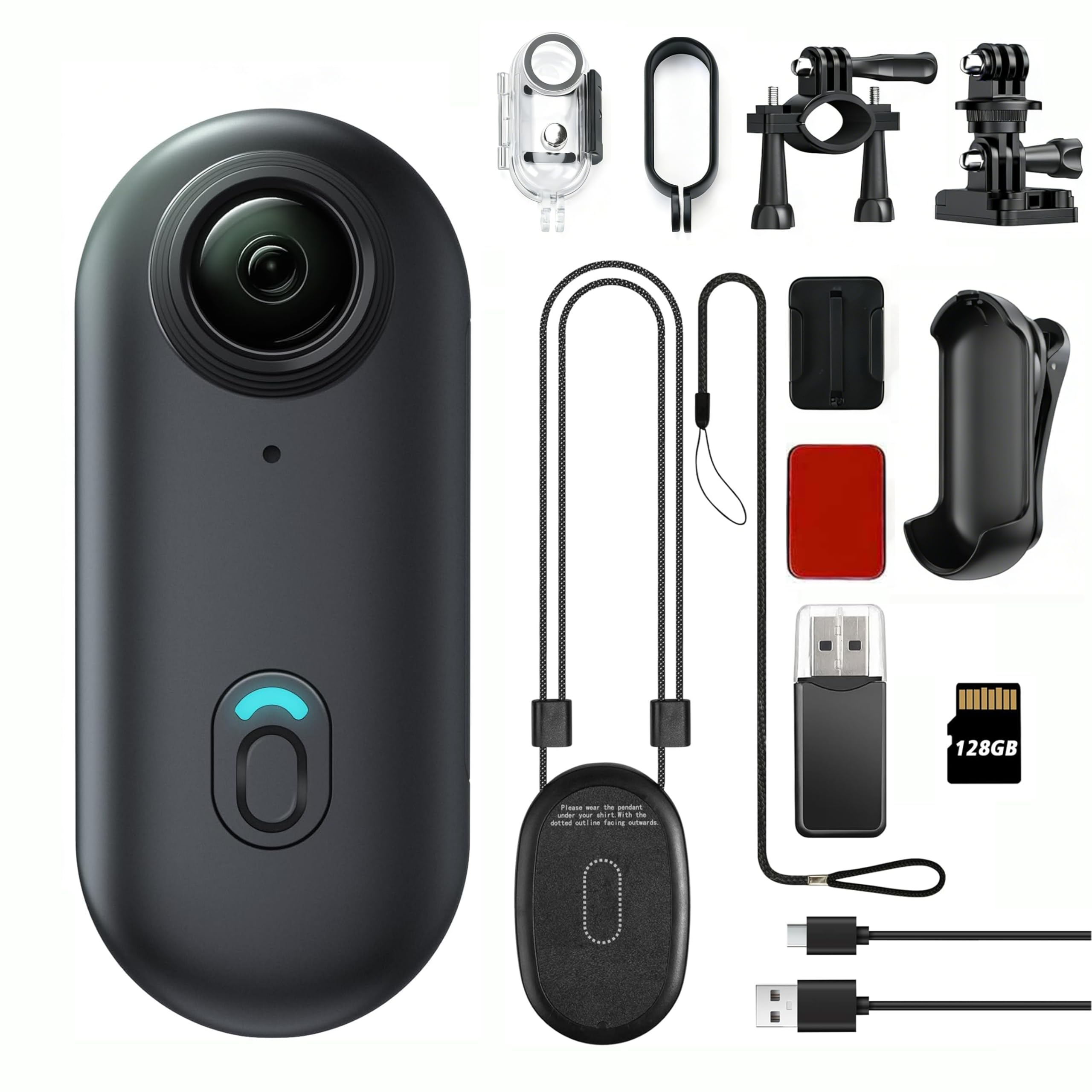
Image: Front view of the JETO H88 Mini Body Camera.
2. Setup
2.1 Inserting the MicroSD Card
The camera requires a MicroSD card for storing recordings. A 128GB MicroSD card is included with your purchase. Ensure the camera is powered off before inserting or removing the card.
- Locate the MicroSD card slot on the side of the camera.
- Gently insert the MicroSD card with the gold contacts facing the back of the camera until it clicks into place.
- To remove, push the card in slightly until it springs out.
Video: Demonstrates how to insert and format an SD card for the H88 camera.
2.2 Powering On/Off
To power on or off the camera, use the main button located on the front.
- Power On: Long-press the home button for 3 seconds. The blue LED will illuminate.
- Power Off: Long-press the home button for 3 seconds. The LED will turn off.

Image: Camera powered on with blue LED.
2.3 Connecting to the Mobile App (Wi-Fi)
The JETO H88 camera can be controlled and monitored via a mobile application on your smartphone (iOS & Android).
- Ensure the camera is powered on.
- Double-press the home button to activate Wi-Fi. The green LED will flash.
- On your smartphone, go to Wi-Fi settings and connect to the camera's Wi-Fi network (e.g., "CAMH88-xxxx").
- Open the designated mobile application (e.g., "Sports DV").
- The app will connect to the camera, allowing for real-time preview, remote control, and file management.
Video: Demonstrates the Wi-Fi connection process for the H88P camera.

Image: Camera with green LED indicating Wi-Fi activation.
3. Operation
3.1 Basic Video Recording
The JETO H88 camera supports one-press recording for quick and easy capture.
- Start Recording: With the camera powered on, press the home button once. The LED indicator will change to red and blink, indicating recording is in progress.
- Stop Recording: Press the home button once again. The LED indicator will return to blue, indicating recording has stopped.

Image: One-press recording functionality.
3.2 Live View and Remote Control
Once connected to the mobile app via Wi-Fi, you can access live preview and remote control features.
- Live Preview: View real-time footage from the camera directly on your smartphone screen.
- Remote Control: Start/stop recording, adjust settings, and capture photos directly from the app.
- File Transfer: Easily download recorded videos and photos to your phone for quick backup and sharing.

Image: Instant viewing and management of recordings via the app.
3.3 Mounting the Camera
The JETO H88 offers multiple mounting options for versatile use.
- Magnetic Pendant: Wear the camera around your neck for hands-free POV recording. Ensure the dotted outline on the pendant faces outwards.
- 360° Rotating Back Clip: Attach the camera to shirts, jackets, backpacks, or hats. The clip allows for flexible angle adjustments.
- Helmet & Bike Mounts: Use the included mounts to secure the camera to helmets or bicycle handlebars for action shots.

Image: Various mounting accessories for the camera.

Image: Magnetic pendant and easy clip usage examples.
3.4 Using the Waterproof Case
The camera itself is not waterproof. For underwater or wet conditions, it must be used inside the provided waterproof case.
- Insert the camera securely into the waterproof housing.
- Ensure all latches and seals are properly closed before submerging.
- The case allows for underwater shooting up to 30 meters (100 feet).

Image: Camera in waterproof case for underwater use.
4. Maintenance
4.1 Charging the Camera
To charge the camera, use the included USB charging cable.
- Connect the USB cable to the camera's charging port and to a power source (e.g., computer, USB wall adapter).
- The LED indicator will show charging status (e.g., solid red while charging, off when fully charged).
- The camera supports recording while charging.
4.2 Formatting the MicroSD Card
Regularly formatting the MicroSD card can help maintain optimal performance and prevent data corruption. This can be done via the mobile app.
- Connect the camera to the mobile app via Wi-Fi (refer to Section 2.3).
- Navigate to the settings menu within the app.
- Select the "Format SD Card" option. Confirm your choice when prompted.
Video: Demonstrates how to format an SD card using the mobile app.
4.3 Cleaning and Storage
- Use a soft, dry cloth to clean the camera body.
- For the lens, use a specialized lens cleaning cloth and solution to avoid scratches.
- Store the camera in a cool, dry place away from direct sunlight and extreme temperatures.
5. Troubleshooting
5.1 Common Issues and Solutions
- Camera not powering on: Ensure the battery is charged. Connect the camera to a power source and try again.
- Wi-Fi connection issues: Double-check that the camera's Wi-Fi is activated (green LED flashing). Ensure you are within range of the camera's Wi-Fi signal. Try restarting both the camera and your smartphone.
- App not connecting: Verify that you have downloaded the correct app ("Sports DV"). Ensure your phone's Wi-Fi is connected to the camera's network.
- Recording problems (e.g., no footage, corrupted files): Ensure a MicroSD card is properly inserted and formatted. Check if the card has sufficient storage space.
- Poor video quality: Ensure the lens is clean. Check lighting conditions.
6. Specifications
| Feature | Detail |
|---|---|
| Brand | JETO |
| Model Number | H88 |
| Video Capture Resolution | 1080p |
| Photo Sensor Technology | CMOS |
| Viewing Angle | 120 Degrees |
| Flash Memory Installed Size | 128 GB |
| Battery Average Life | 2 Hours |
| Water Resistance Level | Not Water Resistant (Waterproof case included) |
| Connectivity Technology | USB, Wi-Fi |
| Item Weight | 35.7 Milligrams |
| Item Dimensions (D x W x H) | 7.68"D x 4.92"W x 2.17"H |
7. Warranty and Support
7.1 Warranty Information
This product comes with a standard manufacturer's warranty. Please refer to the warranty card included in your package for specific terms and conditions. Keep your proof of purchase for warranty claims.
7.2 Customer Support
For technical assistance, troubleshooting, or warranty inquiries, please contact JETO customer support through the retailer where you purchased the product or visit the official JETO website for contact details.