1. Introduction and Product Overview
This manual provides essential instructions for the assembly, operation, and maintenance of your GAOMON 360° Swivel Jewelry Cabinet. This multifunctional unit combines jewelry storage, a makeup mirror, a full-length mirror, and additional storage shelves and a drawer into one compact design. Please read this manual thoroughly before use to ensure proper functionality and longevity of your product.

Image 1.1: The GAOMON 360° Swivel Jewelry Cabinet, showcasing its open and closed configurations in a typical room environment. The cabinet features a full-length mirror on one side and an organized interior with LED lighting on the other.
2. Safety Information
- Ensure the cabinet is placed on a flat, stable surface to prevent tipping.
- Do not allow children to climb on or play with the cabinet.
- Keep keys out of reach of children.
- Avoid exposing the cabinet to excessive moisture or direct sunlight.
- Do not overload the shelves or drawers, as this may affect stability.
- Handle mirrors with care to prevent breakage.
3. Package Contents
Please verify that all components are present before beginning assembly:
- Jewelry Cabinet Body (with pre-installed mirrors and interior organizers)
- Base Stand Components
- Rolling Wheels (x4)
- Hardware Pack (screws, Allen wrench, etc.)
- Keys (x2) for the lockable door
- Instruction Manual
4. Assembly Instructions
Assembly of the GAOMON Jewelry Cabinet is designed to be straightforward. Follow these general steps:
- Unpack Components: Carefully remove all parts from the packaging and lay them out on a clean, soft surface to prevent scratches.
- Assemble the Base: Attach the base stand components together using the provided hardware. Ensure all connections are secure.
- Attach Wheels: Securely fasten the four rolling wheels to the bottom of the assembled base.
- Mount the Cabinet Body: Carefully lift the main jewelry cabinet body and align it with the designated mounting points on the base. Secure it using the provided screws. It is recommended to have two people for this step due to the cabinet's weight and size.
- Final Checks: Ensure all screws are tightened and the cabinet is stable on its base.

Image 4.1: A detailed diagram illustrating the dimensions and various components of the GAOMON Swivel Jewelry Cabinet, useful for assembly reference.
5. Operating Instructions
5.1. 360° Swivel Function
The cabinet is equipped with high-quality rolling wheels and a swivel base, allowing for 360-degree rotation. To rotate the cabinet, gently push or pull it from either side. The wheels are designed to glide smoothly on various floor surfaces, enabling easy access to the full-length mirror, makeup mirror, or storage areas as needed.
5.2. LED Lights Operation
The interior makeup mirror area features integrated LED lights. To activate the lights, locate the touch sensor or switch, typically near the makeup mirror. A single touch will turn the lights on or off, providing illumination for your beauty routines.
5.3. Locking Mechanism
The cabinet door is lockable for enhanced security of your valuables. Insert one of the provided keys into the lock on the side of the cabinet door and turn to lock or unlock. Ensure the door is fully closed before attempting to lock it.
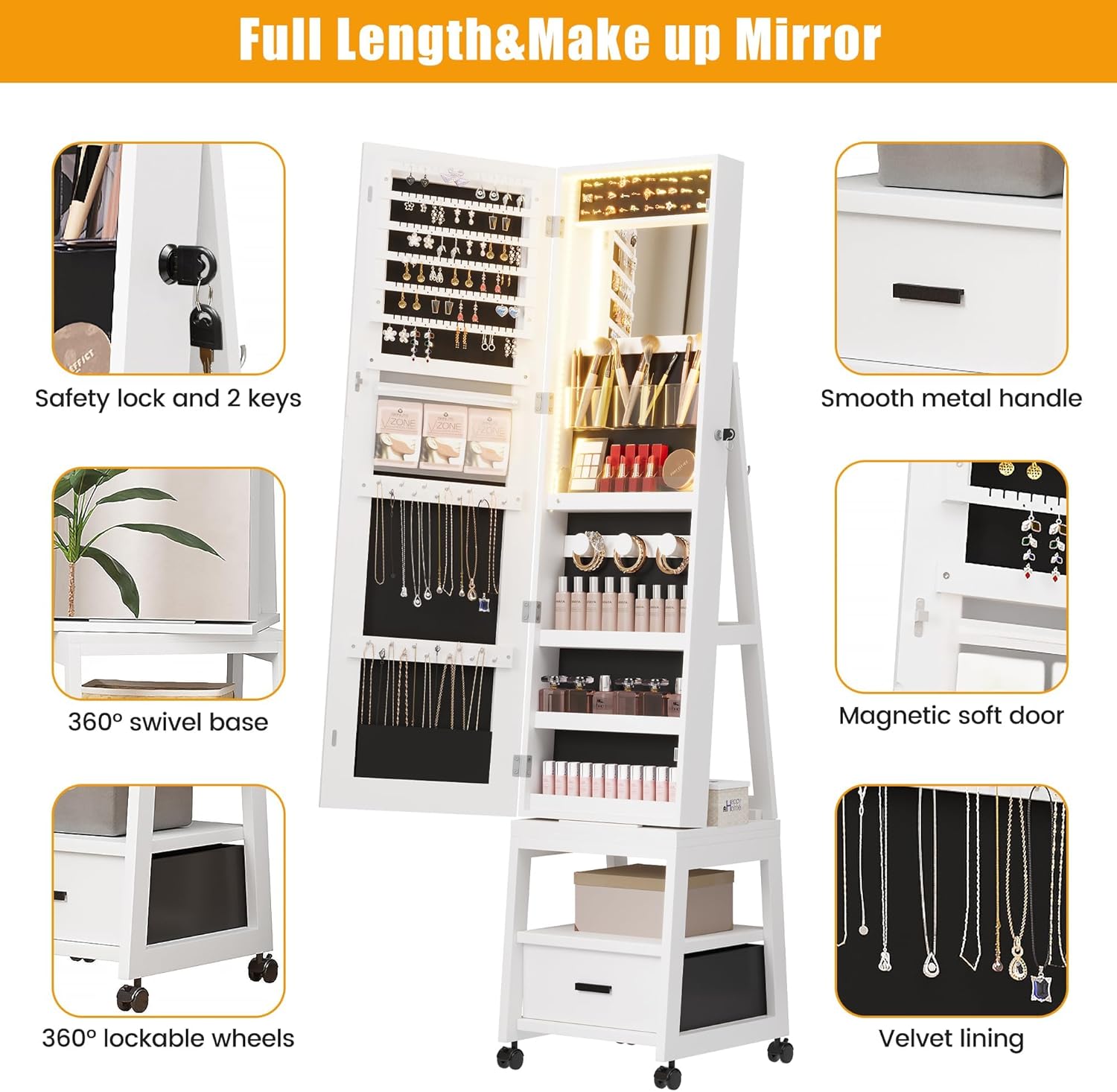
Image 5.1: An overview of key operational features, including the safety lock, 360° swivel base, LED light strip, and magnetic soft door closure.
6. Storage Features
The GAOMON Jewelry Cabinet offers a comprehensive storage solution for various accessories:
- 108 Earring Slots: Dedicated slots for organizing a large collection of earrings.
- 30 Ring Slots: Cushioned slots to keep rings secure and protected.
- 24 Necklace Hooks: Hooks designed to prevent necklaces from tangling.
- 3 Bracelet Hooks: For hanging bracelets and larger chains.
- Makeup Mirror: An interior mirror for detailed makeup application.
- 3 Cosmetic Brush Boxes: Containers for organizing makeup brushes and tools.
- Makeup Shelves: Multiple shelves for storing cosmetics, perfumes, and other beauty products.
- Velvet Pocket: A soft pocket for delicate items or small accessories.
- Storage Drawer: A pull-out drawer at the base for additional storage.
- 3 Rear Storage Rack: Shelves located on the back of the cabinet for extra items.
- Glasses Storage Rack: A dedicated area for hanging glasses.
- Scarf Rack: A bar for hanging scarves or ties.

Image 6.1: An illustrative diagram highlighting the optimal structure and extensive storage capacity of the GAOMON Swivel Jewelry Cabinet, labeling each organizational feature.
7. Maintenance and Care
- Cleaning the Cabinet: Wipe the exterior and interior surfaces with a soft, damp cloth. Avoid abrasive cleaners or harsh chemicals that could damage the finish.
- Mirror Care: Clean mirrors with a glass cleaner and a lint-free cloth. Do not spray cleaner directly onto the mirror; apply it to the cloth first.
- Wheel Maintenance: Periodically check the wheels for any debris or hair that might impede smooth rotation. Clean as necessary.
- Lock Maintenance: If the lock becomes stiff, a small amount of graphite lubricant can be applied to the keyhole.
8. Troubleshooting
| Issue | Possible Cause | Solution |
|---|---|---|
| Cabinet does not swivel smoothly. | Wheels are obstructed or dirty. | Check wheels for debris and clean them. Ensure the floor surface is clear. |
| LED lights are not working. | Power source issue or faulty connection. | Ensure the power cable is securely connected. If battery-operated, check battery levels. Contact customer support if the issue persists. |
| Cabinet door does not close properly. | Obstruction or misalignment. | Check for items blocking the door. Ensure the cabinet is on a level surface. Verify hinges are secure. |
| Lock is stiff or difficult to operate. | Lack of lubrication or minor obstruction. | Apply a small amount of graphite lubricant to the keyhole. Ensure the key is fully inserted. |
9. Specifications
| Feature | Detail |
|---|---|
| Brand | GAOMON |
| Model Number | GMMWT-PHO_134C |
| UPC | 199914714711 |
| Color | White |
| Product Dimensions (D x W x H) | 15" x 15" x 66.1" |
| Item Weight | 54.5 Pounds |
| Special Features | 360° Swivel, LED Lights, Full-Length Mirror, Lockable, Bottom Storage Drawer & Shelves |
10. Warranty and Customer Support
Your GAOMON Jewelry Cabinet is backed by our commitment to quality. While specific warranty details are not provided in this manual, please retain your proof of purchase for any warranty claims.
For any questions regarding assembly, usage, maintenance, or troubleshooting, our dedicated customer support team is available to assist you. We guarantee a response within 24 hours.
Contact Customer Support: Please refer to the contact information provided with your purchase or visit the official GAOMON website for support options.


