
1. Introduction
This manual provides essential information for the installation, operation, maintenance, and troubleshooting of the Generic Carburetor designed for the Cummins Onan QG 5500 RV Generator, specifically model 5.5HGJAB-1038. Proper understanding and adherence to these instructions will ensure optimal performance and longevity of your generator's fuel system component.
A carburetor is a device that mixes air and fuel for internal combustion engines. This replacement unit is engineered to meet the specifications required for the listed generator model, facilitating efficient fuel delivery and engine operation.
2. Product Overview
The Generic Carburetor is a direct replacement component, manufactured to match factory specifications for the Cummins Onan QG 5500 RV Generator 5.5HGJAB-1038. It is designed for straightforward installation and aims to restore the generator's fuel system to proper working order.
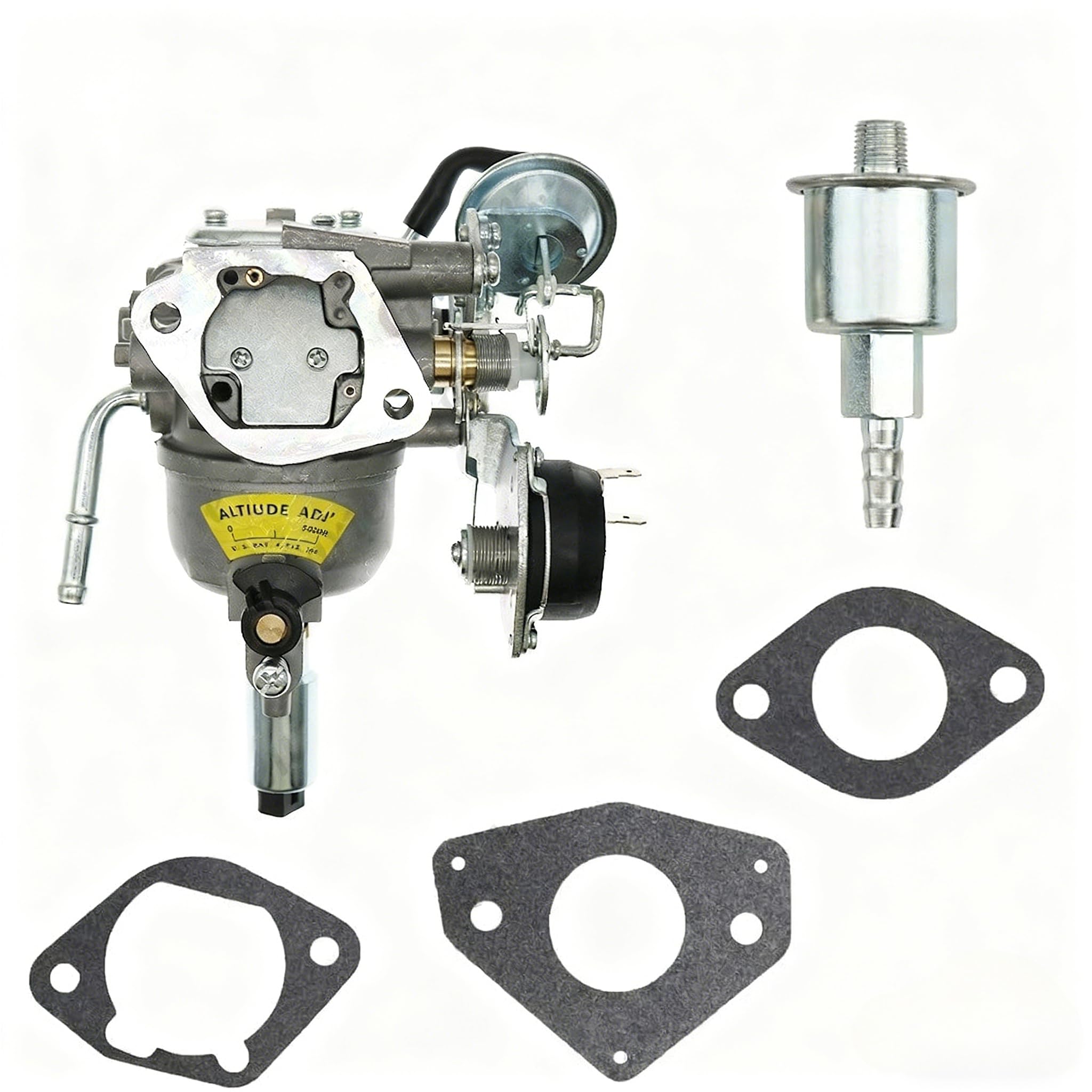
Figure 2.1: Image of the Generic Carburetor. This image displays the complete carburetor assembly, including the main body, fuel inlet, and choke mechanism, as it appears in the package.
Key Features:
- Direct Replacement: Engineered to fit Cummins Onan QG 5500 RV Generator 5.5HGJAB-1038 without modifications.
- Factory Specification Compliance: Meets original carburetor dimensions and performance standards for reliable operation.
- Complete Assembly: Package includes the full carburetor unit as depicted in product images, ready for installation.
- Quality Assurance: Manufactured to specified standards for dependable performance and durability.
- Ready to Install: Designed for quick restoration of generator performance with no additional parts required.
3. Setup and Installation
Safety First: Before beginning any installation or maintenance, ensure the generator is turned off, cooled down, and disconnected from any power source. Disconnect the battery to prevent accidental starting. Wear appropriate personal protective equipment, including gloves and eye protection.
Installation Steps:
- Prepare the Generator: Ensure the generator is in a well-ventilated area. Turn off the fuel supply valve.
- Drain Fuel: Carefully drain any remaining fuel from the fuel tank and fuel lines to prevent spills.
- Remove Air Filter Assembly: Disconnect and remove the air filter housing and any associated ducting to access the carburetor.
- Disconnect Fuel Line: Loosen the clamp and carefully disconnect the fuel line from the old carburetor. Be prepared for residual fuel leakage.
- Disconnect Linkages and Wires: Detach any throttle linkages, choke linkages, and electrical connections (if present) from the old carburetor. Note their positions for reassembly.
- Remove Old Carburetor: Unbolt the old carburetor from the engine manifold. Keep track of any gaskets or spacers.
- Clean Mounting Surface: Thoroughly clean the engine manifold mounting surface to ensure a proper seal with the new carburetor. Remove any old gasket material.
- Install New Gaskets: Place new gaskets (typically included with the replacement carburetor) onto the mounting studs.
- Mount New Carburetor: Carefully position the new carburetor onto the mounting studs, ensuring it aligns correctly with the gaskets. Secure it with the bolts, tightening them evenly to prevent warping.
- Reconnect Linkages and Wires: Reattach all throttle and choke linkages, and any electrical connections, ensuring they operate smoothly without binding.
- Reconnect Fuel Line: Attach the fuel line to the new carburetor's inlet and secure it with the clamp.
- Reinstall Air Filter Assembly: Reattach the air filter housing and any other components removed earlier.
- Refill Fuel and Test: Turn on the fuel supply. Allow the carburetor bowl to fill. Check for any fuel leaks. Start the generator and allow it to warm up. Adjust idle speed and mixture if necessary, according to the generator's service manual.
4. Operating Instructions
After successful installation of the new carburetor, the generator should operate as per its original specifications. Refer to your Cummins Onan QG 5500 RV Generator's owner's manual for specific operating procedures, including starting, stopping, and general usage guidelines.
General Operation Considerations:
- Fuel Quality: Always use fresh, clean fuel of the recommended octane rating for your generator. Stale or contaminated fuel can lead to carburetor issues.
- Choke Usage: Use the choke mechanism as instructed by your generator's manual for cold starts. Ensure it fully disengages once the engine warms up.
- Warm-up Period: Allow the generator to warm up for a few minutes before applying a load. This helps the carburetor and engine reach optimal operating temperature.
- Regular Use: Running your generator periodically, even when not needed, helps keep the fuel system components, including the carburetor, in good working condition.
5. Maintenance
Regular maintenance of your generator's fuel system, including the carburetor, is crucial for reliable performance. While the carburetor itself is largely a sealed unit, certain preventative measures can extend its lifespan.
Maintenance Tips:
- Fuel Stabilizer: If the generator will be stored for an extended period (more than 30 days), add a fuel stabilizer to the fuel tank to prevent fuel degradation and gumming in the carburetor.
- Drain Fuel: For very long storage periods, it is advisable to drain the fuel tank and run the engine until it runs out of fuel, ensuring the carburetor bowl is empty.
- Air Filter Inspection: Regularly inspect and clean or replace the air filter. A clogged air filter can restrict airflow, leading to a rich fuel mixture and poor engine performance.
- Fuel Filter Replacement: Check and replace the inline fuel filter as recommended by your generator's manufacturer. A dirty fuel filter can restrict fuel flow to the carburetor.
- External Cleaning: Keep the exterior of the carburetor clean from dirt, debris, and oil buildup.
6. Troubleshooting
This section addresses common issues that may arise after carburetor replacement or during general operation. Always refer to your generator's specific troubleshooting guide for detailed diagnostics.
| Problem | Possible Cause | Solution |
|---|---|---|
| Generator will not start or starts with difficulty. |
|
|
| Engine runs rough, surges, or stalls. |
|
|
| Fuel leaks from carburetor. |
|
|
7. Specifications
The following specifications are provided for reference. Please note that these are general specifications for the product as described.
| Attribute | Value |
|---|---|
| Brand | Generic |
| Model Compatibility | Cummins Onan QG 5500 RV Generator 5.5HGJAB-1038 |
| Part Type | Carburetor Replacement |
| Manufacturer Part Number | 1 |
| Condition | New |
8. Warranty and Support
For specific warranty information regarding this Generic Carburetor, please refer to the documentation provided at the time of purchase or contact the seller directly. Warranty terms and conditions may vary.
For technical support or further assistance with installation or troubleshooting, please reach out to the product seller or a qualified service technician. Always provide your product details and purchase information when seeking support.