
Introduction
Thank you for purchasing the Shahoo Gaming Chair with Footrest and Massage Lumbar Support. This manual provides detailed instructions for assembly, operation, and maintenance to ensure safe and optimal use of your new chair. Please read this manual thoroughly before assembly and use, and retain it for future reference.

Image: Shahoo Gaming Chair in Light Pink, featuring a high back, headrest, lumbar support, and footrest.
Safety Guidelines
- Ensure all components are securely fastened before use.
- Do not stand on the chair or use it as a step stool.
- Avoid placing heavy objects on the chair's backrest or armrests.
- Keep hands and fingers clear of moving parts during adjustment.
- Use the chair on a flat, stable surface to prevent tipping.
- Maximum weight capacity: 300 lbs.
Package Contents
Please verify that all parts are present before beginning assembly. If any parts are missing or damaged, please contact customer support.
- Gaming Chair Components (Backrest, Seat, Armrests, Base, Wheels, Gas Lift)
- Footrest Assembly
- Massage Lumbar Support Cushion
- Head Pillow
- Tool Kit (for assembly)
- Installation and Usage Manual (this document)
Assembly Instructions
Follow these steps carefully to assemble your Shahoo Gaming Chair. It is recommended to assemble the chair on a soft, clean surface to prevent damage.
- Attach Wheels to Base: Insert the five caster wheels into the holes on the chair base until they click securely into place.
- Install Gas Lift: Place the gas lift cylinder into the center hole of the chair base.
- Assemble Armrests: Attach the armrests to the seat cushion using the provided screws. Ensure they are firmly secured.
- Install Sliding Block and Footrest:
- Secure the sliding block and tighten the screws.
- Insert the footrest into the anchor hole of the sliding blocks.
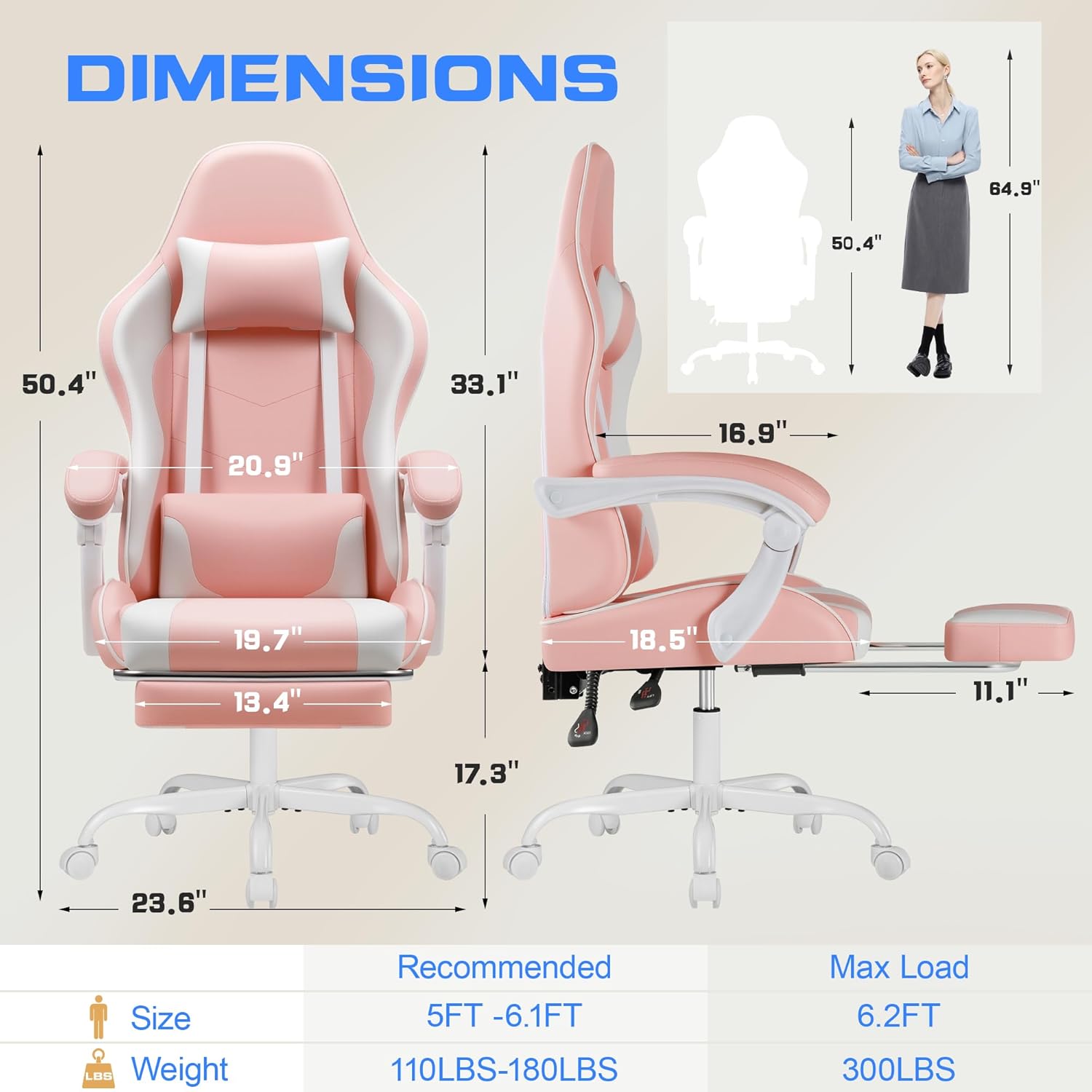
Image: Diagram illustrating the chair's dimensions and the footrest mechanism.
- Fix the Footrest: Ensure the footrest is properly aligned and secured.
- Attach Seat to Gas Lift: Align the seat assembly with the gas lift and firmly press down until it is securely seated.
- Attach Backrest: Connect the backrest to the seat assembly using the remaining screws.
- Install Head Pillow and Lumbar Support: Attach the head pillow and lumbar support cushion using their integrated straps. These are detachable and can be adjusted or removed based on preference.
For visual guidance, refer to the detailed diagrams in the included paper manual.
Operating Instructions
Your Shahoo Gaming Chair offers several adjustable features for personalized comfort.
- Height Adjustment: Use the lever located under the seat on the right side to adjust the chair's height. Pull the lever up to raise the chair; sit on the chair and pull the lever up to lower it. The adjustable height range is between 48.5 inches and 52 inches.
- Backrest Recline: Use the lever on the side of the chair to recline the backrest. The maximum adjustable angle is between 90° and 160°. Recline to your desired position and release the lever to lock it.
- 360° Swivel: The chair is designed with a 360° swivel function for easy movement and access.
- Retractable Footrest: Pull out the footrest from under the seat when desired. It can be extended for leg support, especially when reclining. Push it back in when not in use.
- Massage Lumbar Support: The lumbar support cushion includes a massage function. Connect the USB cable from the lumbar support to a power source (e.g., power bank, USB adapter) to activate the massage feature.
- Detachable Head Pillow and Lumbar Support: Both the head pillow and lumbar support are detachable. Adjust their position or remove them as per your comfort needs.

Image: Visual representation of the chair's adjustable recline angles (90° to 135°) and height adjustment mechanism.

Image: A person comfortably seated in the Shahoo Gaming Chair at a desk, demonstrating typical usage.
Maintenance
Proper care will extend the life and appearance of your gaming chair.
- Cleaning: Wipe clean with a damp cloth. Avoid harsh chemicals or abrasive cleaners that may damage the leather material.
- Inspection: Periodically check all screws and bolts to ensure they are tight. Re-tighten if necessary.
- Moving: When moving the chair, lift it rather than dragging it to prevent damage to the base or floor.
Troubleshooting
If you encounter any issues with your chair, refer to the following common problems and solutions:
- Chair does not adjust height:
- Ensure the gas lift lever is fully engaged.
- Check if the gas lift cylinder is properly installed in the base and seat mechanism.
- Chair is wobbly:
- Verify that all assembly screws are securely tightened.
- Ensure the wheels are fully inserted into the base.
- Footrest does not extend/retract smoothly:
- Check for any obstructions in the footrest mechanism.
- Ensure the sliding block is correctly installed and screws are tight.
- Massage function not working:
- Confirm the USB cable is securely connected to a working power source.
- Try a different USB power source.
Specifications
| Brand | Shahoo |
| Model Name | Gaming Chair with Footrest and Massage Lumbar Support |
| Item Model Number | SH-OCRC23 |
| Color | Light Pink |
| Material | Leather (exterior), Foam (fill) |
| Product Dimensions (D x W x H) | 18.5"D x 20.9"W x 52.4"H |
| Item Weight | 41 Pounds |
| Chair Backrest Width | 20.9 Inches |
| Adjustable Height Range | 48.5 inches to 52 inches |
| Adjustable Recline Angle | 90° to 160° |
| Special Feature | Adjustable, Footrest, Massage Lumbar Support, 360° Swivel, Headrest |
| Recommended Uses | Bedroom, Gaming, Office |
| Product Care Instructions | Wipe Clean |
Warranty and Support
For warranty information or technical support, please refer to the contact details provided with your purchase documentation or visit the official Shahoo website. Keep your purchase receipt for warranty claims.
For further assistance, you may contact Shahoo customer service directly.


