
1. Important Safety Information
Before operating your Ruitoo M5 Pro Electric Scooter, please read and understand all safety instructions. Failure to follow these instructions may result in serious injury or damage to the scooter.
- Always wear a helmet and appropriate protective gear (knee pads, elbow pads) when riding.
- Ensure all bolts and quick releases are securely fastened before each ride.
- Check brake functionality before each use.
- Obey all local traffic laws and regulations. In France, the scooter is limited to 24.5 km/h for legal use on cycle paths.
- Do not ride in heavy rain or through deep puddles. While the scooter has an IPX4 water resistance rating, it is not fully waterproof.
- The maximum load capacity for this scooter is 120 kg. Do not exceed this limit.
- This product is not intended for children.
- Maintain a safe distance from other vehicles and pedestrians.

2. Package Contents
Verify that all items are present in the package:
- Ruitoo M5 Pro Electric Scooter
- Charger
- Tool Kit
- User Manual (this document)
3. Setup and Assembly
Unfolding the Scooter
To unfold the scooter, locate the folding mechanism near the base of the steering column. Release the latch and carefully lift the steering column until it locks into place. Ensure it is securely locked before use.

Adjusting Handlebar Height
The handlebar height is adjustable to suit different rider preferences. Locate the quick-release lever on the steering column, open it, adjust the handlebar to the desired height, and then securely close the lever.

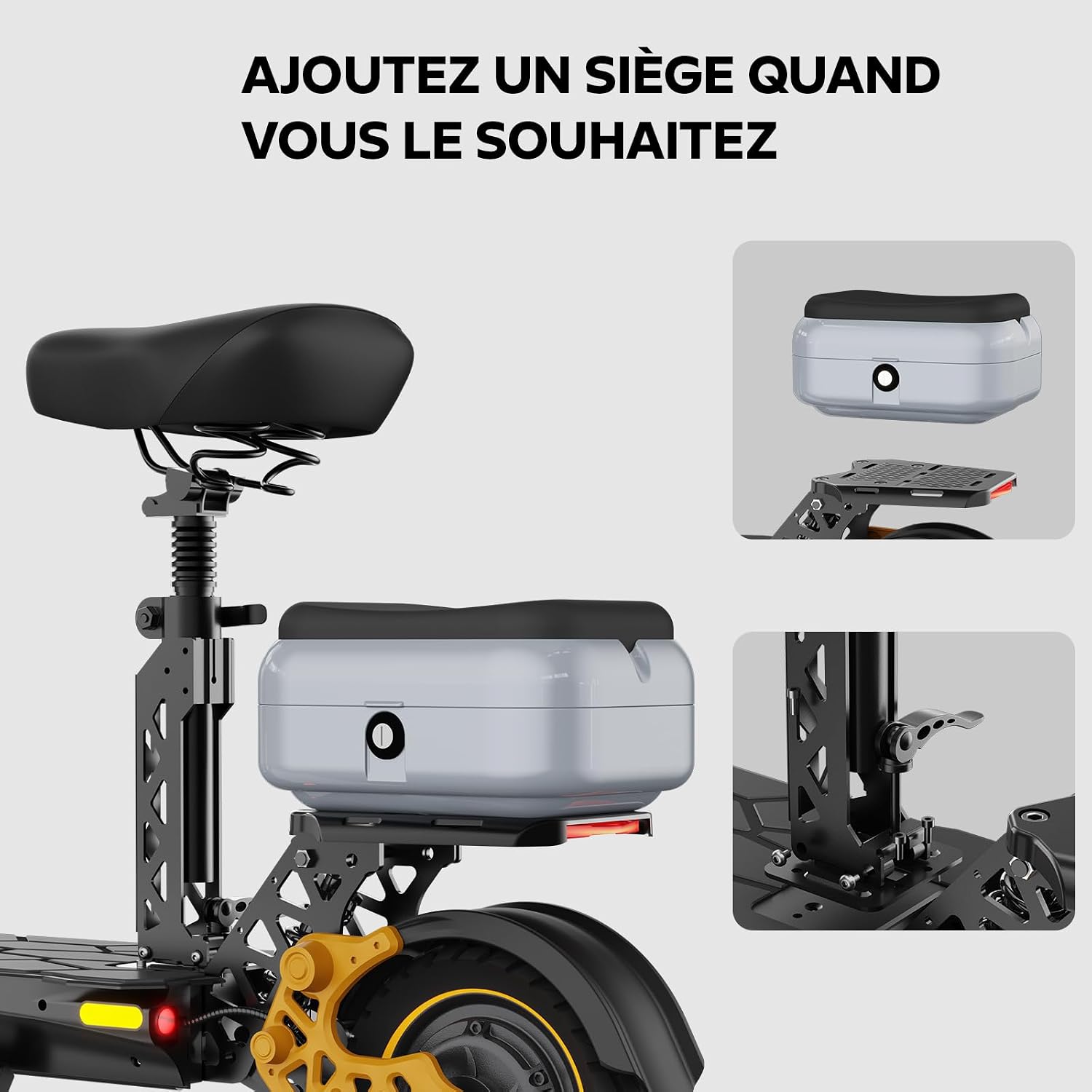
Seat Installation (Optional)
If your model includes a seat or you wish to install one, attach it to the designated mounting points on the rear of the scooter. Ensure all fasteners are tightened according to the separate seat installation guide, if provided.
4. Operating Instructions
Powering On/Off and Display
To power on the scooter, insert the key and turn it to the 'ON' position, then press the power button on the display. The intelligent LED display will show speed, battery level, and other riding information. To power off, turn the key to 'OFF' and press the power button.

Speed Modes
The scooter features 3 distinct speed modes, allowing you to adjust performance based on your riding environment and preference. Consult the display controls to switch between modes.
Braking System
The M5 Pro is equipped with front and rear disc brakes for reliable stopping power. The hydraulic suspension system enhances stability and comfort during braking.

Lighting and Horn
Activate the powerful LED headlight, front and rear turn signals, and LED brake light for visibility and safety, especially during low-light conditions. Use the horn to alert others when necessary.

Charging the Battery
Connect the charger to the scooter's charging port and then to a power outlet. The battery takes approximately 8 hours to fully charge. Do not overcharge the battery. The 48V/20.8Ah Lithium-ion battery provides a range of 70-80 KM on a single charge.

5. Maintenance
Tire Care
Regularly check the pressure of the 10-inch all-terrain tires. Proper tire pressure ensures optimal performance, range, and safety. Refer to the tire sidewall for recommended pressure.
Brake Inspection
Periodically inspect the front and rear disc brakes for wear and proper function. Adjust or replace brake pads as needed. If you notice reduced braking performance, have the system checked by a qualified technician.
Battery Maintenance
To prolong battery life, avoid fully discharging it frequently. Store the scooter in a cool, dry place and charge the battery at least once every three months if not in regular use.
Cleaning
Clean the scooter with a damp cloth. Avoid using high-pressure water jets directly on electrical components. Ensure the scooter is dry before charging or storing.
6. Troubleshooting
This section provides solutions to common issues. For problems not listed here, please contact customer support.
- Scooter not turning on: Ensure the battery is charged and the key is in the 'ON' position. Check all cable connections.
- Reduced range: This can be affected by rider weight, terrain, temperature, and riding mode. Ensure tires are properly inflated and the battery is fully charged.
- Braking issues: Inspect brake pads for wear. Ensure brake levers are properly adjusted and cables are not loose.
- Unusual noises: Stop riding immediately and inspect the scooter for loose parts or damage.
7. Specifications
| Feature | Specification |
|---|---|
| Brand | Ruitoo |
| Model Name | M5 Pro |
| Motor | Brushless Rear Motor |
| Battery | 48V 20.8Ah Lithium-ion |
| Max Range | 70-80 KM |
| Max Speed | 24.5 km/h (French regulation compliant) |
| Max Load Capacity | 120 KG |
| Tire Size | 11-inch (front), 10-inch (rear) All-Terrain Pneumatic |
| Braking System | Front and Rear Disc Brakes |
| Suspension Type | Full Hydraulic Suspension |
| Charging Time | Approximately 8 hours |
| Frame Material | Aluminum |
| Item Weight | 33 Kilograms |
| Special Features | Digital Display, Adjustable Handlebar, Foldable, Cruise Control, Dual Braking System, Full LED Lighting (Headlight, Turn Signals, Brake Light, Rear Light), Horn, Top-Case |
| Water Resistance | IPX4 |
8. Warranty and Support
Warranty Information
The Ruitoo M5 Pro Electric Scooter comes with a 1-year manufacturer's warranty. Please retain your proof of purchase for warranty claims. The warranty covers manufacturing defects but typically excludes wear and tear parts, misuse, or accidental damage.
Customer Support
For technical assistance, warranty claims, or any questions regarding your Ruitoo M5 Pro Electric Scooter, please contact the seller or manufacturer directly. Refer to your purchase documentation for contact details.
