
1. Introduction
Thank you for choosing the Uvital UV-1000 Big Button Corded Landline Phone. This manual provides essential information for the proper installation, operation, and maintenance of your new telephone. Please read it thoroughly to ensure optimal performance and a positive user experience. This phone is designed with ease of use in mind, featuring large buttons and adjustable audio settings, making it ideal for seniors and individuals with specific needs.

Image: Overview of the Uvital UV-1000 Big Button Phone, highlighting its large buttons and user-friendly design.
2. Box Contents
Upon opening the box, please verify that all the following items are included:
- 1 x Telephone Base
- 1 x Handset
- 1 x Handset Cord (1.5FT to 13FT coiled)
- 1 x Phone Line Cord
- 1 x User Manual (this document)
- Memory Key Covers (for photo buttons)

Image: All components included in the Uvital UV-1000 package: phone base, handset, coiled handset cord, phone line cord, and user manual.
3. Product Overview (Components)
Familiarize yourself with the key components of your Uvital UV-1000 telephone:
- Large Keypad: Oversized, high-contrast buttons for easy dialing.
- 3 One-Touch Photo Buttons (M1, M2, M3): Customizable buttons for quick dialing of important contacts.
- Hold Button: Temporarily places a call on hold.
- Store Button: Used for programming speed dial numbers.
- Auto Button: Used for programming speed dial numbers.
- Flash Button: Used for call waiting or transferring calls (if supported by your phone service).
- Redial Button: Dials the last number called.
- Speakerphone Button/Mic: Activates hands-free calling.
- Ringer Indicator (LED): Flashes to indicate an incoming call.
- Handset Volume Switch (LO-HI): Adjusts the volume of the handset.
- Speaker Volume Switch (LO-HI): Adjusts the volume of the speakerphone.
- Ringer Volume Switch (OFF-LO-HI): Adjusts the ringer volume or turns it off.
- Tone/Pulse (T/P) Switch: Selects dialing mode.

Image: The phone's large, high-contrast buttons and three customizable photo memory buttons for easy dialing.

Image: Key features of the Uvital UV-1000, including large buttons, one-touch memory, speakerphone, and non-slip feet.
4. Setup
4.1 Initial Connection
- Place the Phone: Position the telephone base on a flat, stable surface.
- Connect the Handset: Plug one end of the coiled handset cord into the left side of the telephone base (labeled "LO-HI HANDSET"), and the other end into the handset.
- Connect to Telephone Line: Plug one end of the straight phone line cord into the "TEL-LINE" jack on the side of the phone base. Plug the other end into your telephone wall socket.
- Verify Dial Tone: Pick up the handset. If you hear a dial tone, your phone is ready to use. If not, check all connections and try again.

Image: Step-by-step diagram illustrating the connection of the handset cord and telephone line to the phone base.
4.2 Wall Mounting (Optional)
The Uvital UV-1000 can be wall-mounted for convenience:
- Use a 6mm drill bit to drill a hole in the wall.
- Insert the wall anchor into the wall to securely hold the device.
- Adjust the plastic tab under the earpiece cradle to secure the handset when wall-mounted.
Video: This video demonstrates how to adjust the hook for wall-mounting the Uvital UV-1000 telephone, ensuring the handset is securely held when hung vertically.
5. Operating Instructions
5.1 Making and Receiving Calls
- To Make a Call: Pick up the handset or press the SPEAKER button. Dial the desired number using the large keypad.
- To End a Call: Hang up the handset or press the SPEAKER button again.
- To Receive a Call: When the phone rings and the LED indicator flashes, pick up the handset or press the SPEAKER button.
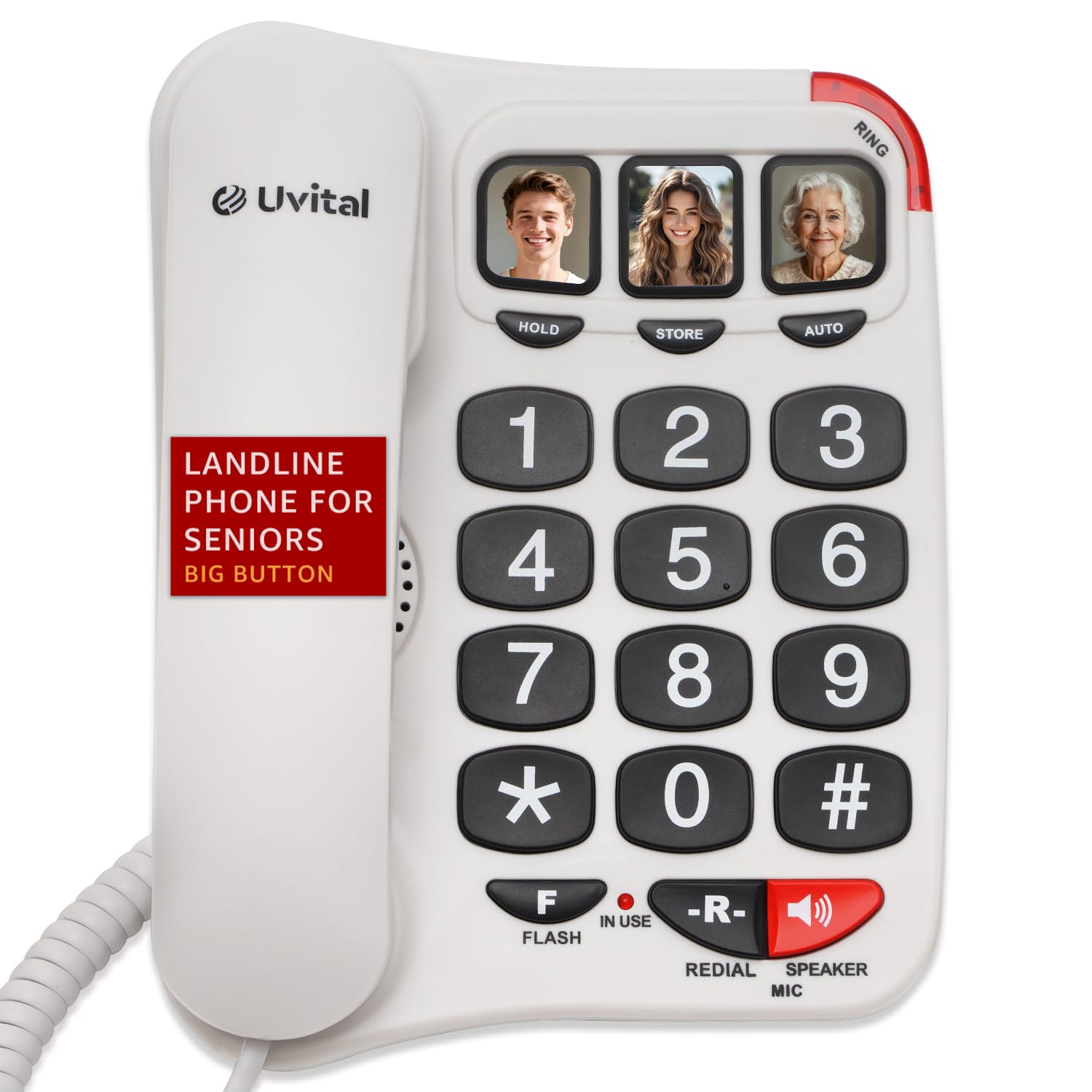
Image: The Uvital UV-1000 phone with its large, easy-to-read keypad and prominent speakerphone button.
5.2 Speed Dial Programming (One-Touch Photo Buttons)
The phone features three one-touch photo buttons (M1, M2, M3) for quick dialing of frequently called numbers. You can insert small photos or labels under the clear covers of these buttons.
- Pick up the handset.
- Press the STORE button.
- Dial the telephone number you wish to save (up to 16 digits).
- Press one of the three photo buttons (M1, M2, or M3) to assign the number.
- Hang up the handset to save the number.
- To dial a saved number, simply pick up the handset and press the corresponding photo button (M1, M2, or M3).

Image: Illustration of the three one-touch photo buttons, demonstrating their use for family, friends, and emergency contacts.
5.3 Volume Adjustment
The Uvital UV-1000 offers multiple volume controls:
- Handset Volume: Use the LO-HI HANDSET switch on the side of the phone base to adjust the volume during a call.
- Speakerphone Volume: Use the LO-HI SPEAKER VOLUME slider on the bottom of the phone base to adjust the volume of the speakerphone.
- Ringer Volume: Use the OFF-LO-HI RINGER switch on the bottom of the phone base to set the ringer volume to Off, Low, or High.

Image: Detailed view of the adjustable volume controls for speaker, ringer, and handset located on the phone base.

Image: The phone features an amplified ringer with up to 110dB volume and a flashing LED indicator for incoming calls.
5.4 Speakerphone Mode
To use the speakerphone function:
- To activate, press the SPEAKER button during a call or before dialing.
- To deactivate, press the SPEAKER button again or pick up the handset.

Image: The phone's hands-free speakerphone design, allowing for clear conversations without holding the handset.
5.5 Redial Last Number
To redial the last number called, pick up the handset and press the REDIAL button.
5.6 Dialing Mode (Tone/Pulse)
If your phone can receive calls but cannot make outgoing calls, the issue may be due to the dialing mode setting. In most cases, switching to Tone mode (“T”) will resolve the issue. Use the T/P switch on the bottom of the phone base to select between Tone (T) and Pulse (P) dialing modes.
6. Maintenance
- Cleaning: Clean the telephone with a soft, damp cloth. Do not use abrasive cleaners or solvents.
- Storage: Store the phone in a cool, dry place away from direct sunlight and extreme temperatures.
- Cord Care: Avoid tangling or stretching the cords excessively to prevent damage.
7. Troubleshooting
| Problem | Possible Cause | Solution |
|---|---|---|
| No dial tone | Phone line not connected properly. | Check all cable connections. Ensure the phone line is securely plugged into the wall jack and the "TEL-LINE" port on the phone base. |
| Cannot make outgoing calls | Incorrect dialing mode (Tone/Pulse). | Switch the T/P selector on the bottom of the phone base to "T" (Tone mode). |
| Ringer is too quiet or off | Ringer volume set to low or off. | Adjust the "OFF-LO-HI RINGER" switch on the bottom of the phone base to "LO" or "HI". |
| Handset volume is too low | Handset volume set to low. | Adjust the "LO-HI HANDSET" switch on the side of the phone base to "HI". |
| Speakerphone volume is too low | Speaker volume set to low. | Adjust the "LO-HI SPEAKER VOLUME" slider on the bottom of the phone base to "HI". |
| One-touch buttons not working | Number not programmed correctly. | Re-program the one-touch button following the instructions in Section 5.2. Ensure a dial tone is present before programming. |
8. Specifications
- Brand: Uvital
- Model: UV-1000
- Telephone Type: Corded
- Color: Button Black (variant shown in product images)
- Material: Acrylonitrile Butadiene Styrene (ABS)
- Power Source: Corded Electric (no batteries or external power required)
- Dialer Type: Single Keypad
- Item Dimensions (L x W x H): Approximately 1 x 1 x 1 inches (Note: This appears to be a placeholder dimension, actual dimensions are shown in image)
- Multiline Operation: Single-Line Operation
- Caller Identification: No (product does not feature a display screen)
- Answering System: Not included (does not have answering machine function or support voicemail/message recording)
- Hearing Aid Compatibility: Meets TIA-1083 standard, compatible with most Hearing Aid T-Coil.
- Ringer Volume: 3 adjustable levels (OFF-LO-HI), max 110dB.
- Handset Volume: 2 adjustable levels (LO-HI).
- Hands-Free Volume: 2 adjustable levels (LO-HI), max 100dB.

Image: The Uvital UV-1000 is hearing aid-compatible, ensuring clear conversations without interference.
9. Warranty and Support
The Uvital UV-1000 Big Button Corded Landline Phone comes with a 1-Year Warranty. For any support, shopping, and everything else related to your product, please contact Uvital via email at support@uvitaltop.com. You can also visit uvitaltop.com for more information.