
Introduction
Thank you for choosing the KEMEI Professional Hair Clippers and Trimmer Set. This manual provides essential information for the safe and effective operation, maintenance, and care of your KM-90-4 hair clipper and KM-90-5 T-blade trimmer. Please read these instructions thoroughly before first use and retain them for future reference.
Setup and Initial Charging
Unboxing and Inspection
Carefully remove all components from the packaging. Inspect the devices and accessories for any signs of damage. Ensure all listed items are present:
- KEMEI KM-90-4 Hair Clipper
- KEMEI KM-90-5 T-Blade Hair Trimmer
- Charging Base (x2)
- Charging Cable (Type-C, x2)
- Limiting Combs (8 for KM-90-4, 4 for KM-90-5)
- Cleaning Brush
- Lubricating Oil
Initial Charging
Before first use, fully charge both the hair clipper and the trimmer. The devices feature a high-performance battery designed for extended use.
- Connect the charging cable to the charging base or directly to the Type-C port on the device.
- Plug the other end of the charging cable into a suitable USB power source (e.g., PC, power bank, USB charger).
- Place the clipper/trimmer onto its respective charging base, ensuring proper contact. The LED display will indicate charging status.
Charging Times:
- KM-90-4 Hair Clipper: Approximately 2.5 hours for a full charge, providing up to 150 minutes of running time.
- KM-90-5 T-Blade Trimmer: Approximately 2.5 hours for a full charge, providing up to 300 minutes of running time.

Image: KEMEI KM-90-4 hair clipper demonstrating two charging methods: via charging base and direct Type-C cable connection.

Image: Comparison of charging and running times for the KEMEI KM-90-4 hair clipper and KM-90-5 T-blade trimmer, both featuring 2000 mAh batteries and 2.5-hour charge times.
Operating Instructions
Attaching Limiting Combs
To achieve desired hair lengths, attach the appropriate limiting comb to the blade. Ensure the comb is securely fastened before use.
- KM-90-4 Hair Clipper: Includes 8 limiting combs for various lengths (e.g., 1.5mm, 3mm, 4.5mm, 6mm, 9mm, 12mm, 16mm, 19mm).
- KM-90-5 T-Blade Trimmer: Includes 4 limiting combs for shorter lengths (e.g., 1.5mm, 3mm, 4.5mm, 6mm).

Image: Display of the various limiting comb sizes included with the KEMEI KM-90-4 hair clipper (8 combs) and KM-90-5 T-blade trimmer (4 combs).
Powering On/Off
Press the power button to turn the device on or off. The LED display on the KM-90-4 clipper will show the remaining power percentage.
Hair Cutting and Trimming
Ensure hair is clean and dry before cutting. Guide the clipper/trimmer against the direction of hair growth for best results. The KM-90-4 clipper features an 11500 RPM motor for efficient and smooth cutting without snagging.
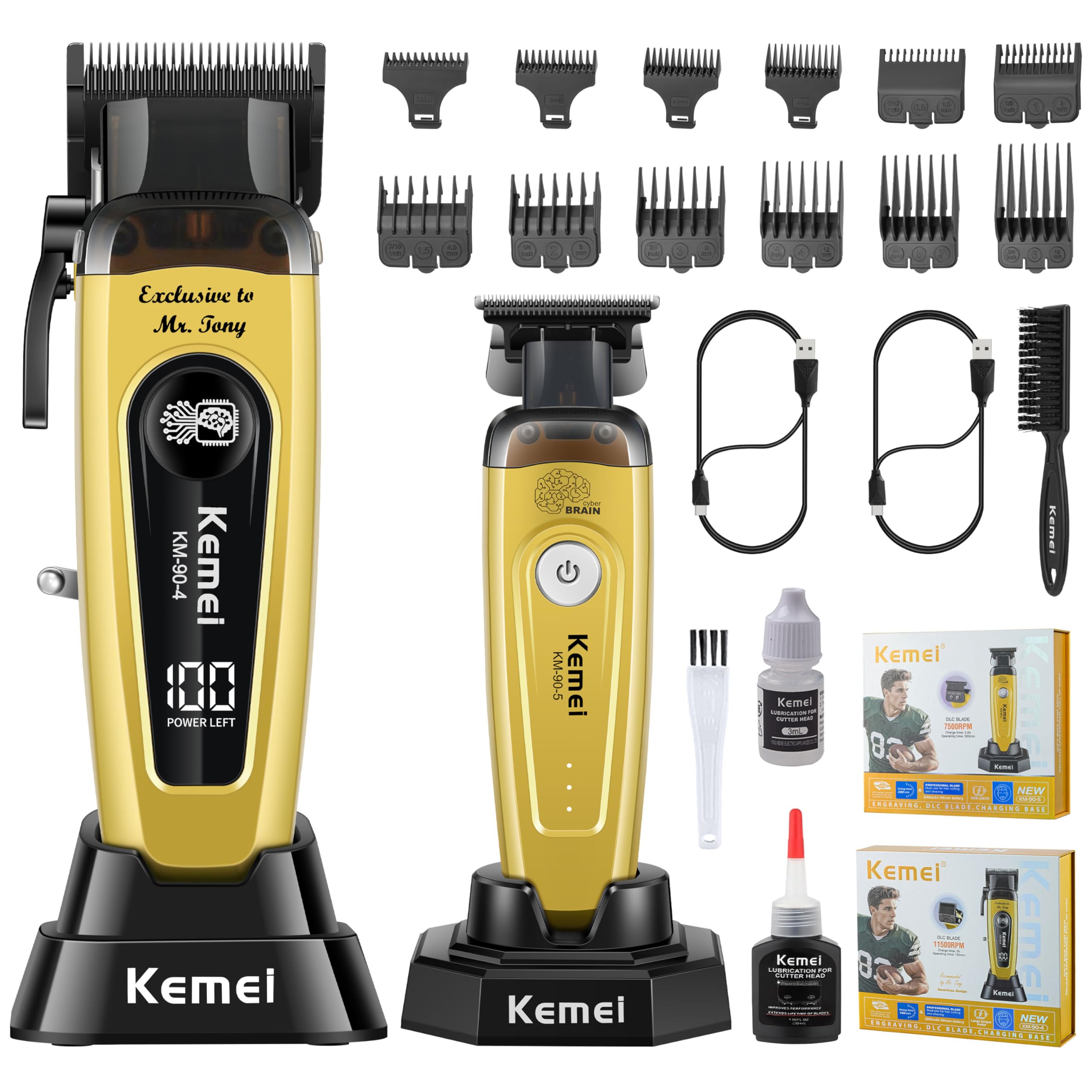
Image: Illustration highlighting the KEMEI hair clipper's high-speed 11500 RPM motor, designed for professional and efficient hair cutting.
Maintenance and Care
Cleaning the Blades
Regular cleaning ensures optimal performance and extends the life of your devices. After each use:
- Turn off the device.
- Use the provided cleaning brush to remove loose hairs from the blades.
- For thorough cleaning, the KM-90-4 clipper features a removable magnetic head cover. Gently snap off the cover to access the blade area for easier cleaning.
- Reattach the magnetic cover securely after cleaning.

Image: Demonstration of the KEMEI KM-90-4 hair clipper's magnetic head cover being removed, facilitating easy cleaning of trapped hair.
Lubricating the Blades
Apply a small drop of lubricating oil to the blades after every few uses or when the device feels sluggish. This helps maintain blade sharpness and smooth operation.
- Turn off the device.
- Apply 1-2 drops of the provided lubricating oil across the top of the blades.
- Turn on the device for a few seconds to distribute the oil.
- Wipe off any excess oil with a soft cloth.
Troubleshooting
| Problem | Possible Cause | Solution |
|---|---|---|
| Device does not turn on. | Battery is depleted. | Charge the device fully. |
| Device pulls or snags hair. | Blades are dull or dirty; insufficient lubrication. | Clean blades thoroughly and apply lubricating oil. Ensure blades are free of debris. |
| Reduced cutting performance. | Blades are dirty or not properly oiled. | Clean and oil the blades. |
| Device not charging. | Improper connection; faulty cable/adapter. | Ensure cable is securely connected to device, base, and power source. Try a different USB port or adapter. |
Specifications
| Feature | KM-90-4 Hair Clipper | KM-90-5 T-Blade Trimmer |
|---|---|---|
| Battery Capacity | 2000 mAh | 2000 mAh |
| Charging Time | Approx. 2.5 hours | Approx. 2.5 hours |
| Running Time | Up to 150 minutes | Up to 300 minutes |
| Motor Speed | 11500 RPM | Not specified (high performance) |
| Blade Type | DLC Blade | DLC Blade |
| Charging Interface | Charging Base / Type-C | Charging Base / Type-C |
Warranty and Support
For warranty information, product support, or to purchase replacement parts, please refer to the official KEMEI website or contact your retailer. Keep your purchase receipt as proof of purchase for warranty claims.
Online Support: Visit the KEMEI Store on Amazon