
1. Introduction
This manual provides essential information for the safe and effective operation of your JOROTO JV50/JV60 Vibration Plate. Please read all instructions carefully before use and retain this manual for future reference. The JOROTO vibration platform is designed to support various fitness routines through controlled vibrations.
2. Safety Information
- Consult a physician before starting any new exercise program, especially if you have pre-existing medical conditions.
- Ensure the platform is placed on a stable, level surface.
- Do not use the device if you are pregnant, have a pacemaker, or suffer from severe heart conditions, epilepsy, or acute thrombosis.
- Keep children and pets away from the device during operation.
- Do not exceed the maximum user weight of 150 kg.
- Always wear appropriate athletic footwear when using the platform.
- Unplug the device from the power outlet when not in use or before cleaning.
- Do not insert any objects into the device openings.
3. Package Contents
Verify that all components are present in the package:
- JOROTO JV50/JV60 Vibration Plate
- Wireless Remote Control
- Power Cord
- Resistance Bands (2)
- User Manual

Image: Contents of the JOROTO JV50/JV60 package, showing the vibration plate, remote control, power cord, and resistance bands.
4. Setup and Installation
- Unboxing: Carefully remove all components from the packaging.
- Placement: Place the vibration plate on a firm, level surface. Ensure there is sufficient space around the device for safe movement.
- Power Connection: Connect the power cord to the power input port on the side of the vibration plate, then plug it into a standard electrical outlet.
- Power On: Flip the main power switch located near the power cord input to the 'ON' position. The LED display should illuminate.
- Resistance Bands: Attach the resistance bands to the designated attachment points on the base of the platform if you plan to use them.
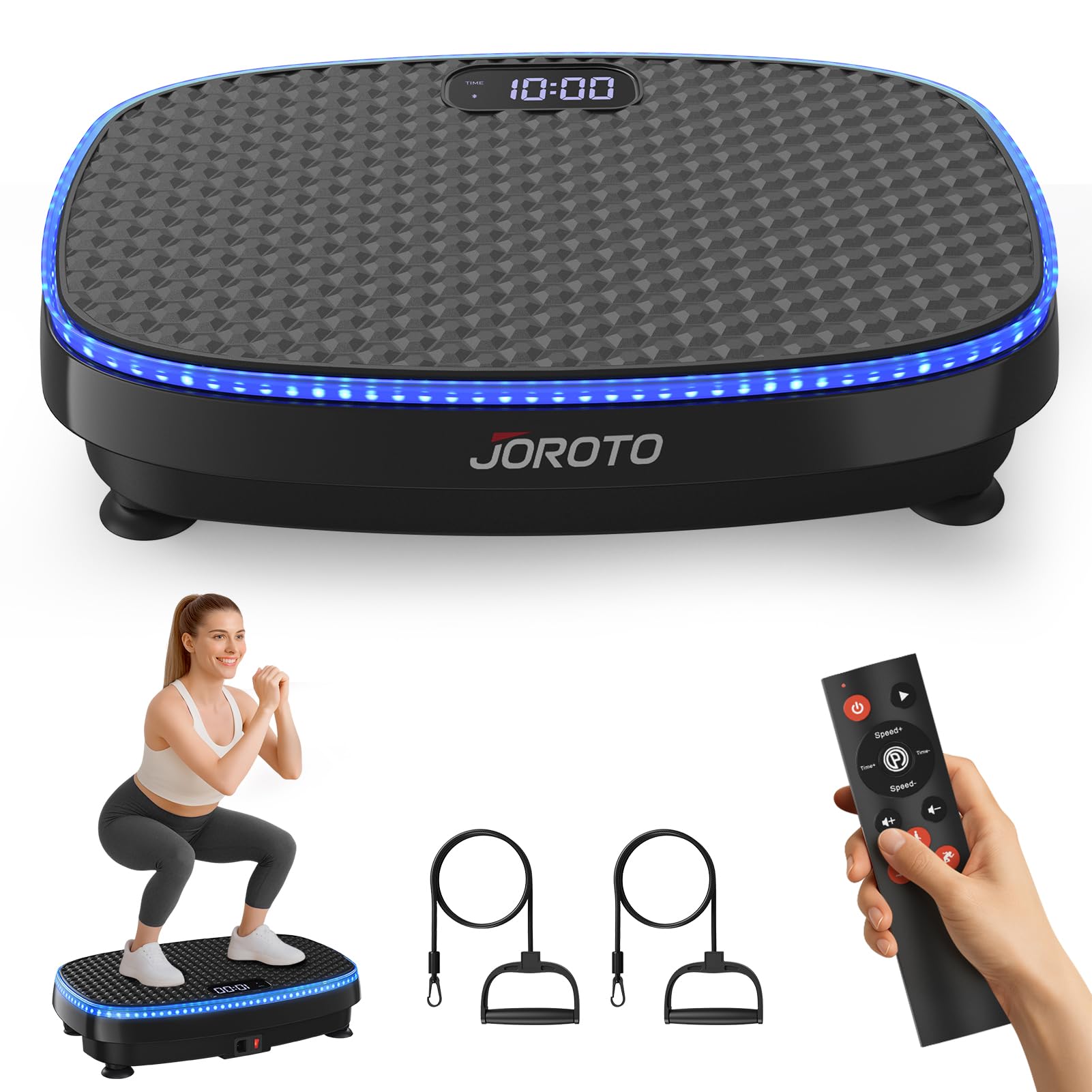
Image: The JOROTO JV50 Vibration Plate, ready for use.
5. Operating Instructions
5.1 Remote Control Functions
The wireless remote control allows for convenient adjustment of settings without bending down.

Image: Smart Remote Control for the JOROTO Vibration Plate.
- Power Switch: Turns the device on/off.
- Start/Pause: Initiates or pauses the vibration.
- Speed +/-: Adjusts the vibration intensity (1-120 levels).
- Time +/-: Sets the workout duration (1-15 minutes).
- Program (P): Cycles through 5 automatic programs (P1-P5).
- Sound +/-: Adjusts the volume of the Bluetooth speaker.
- Mode Selection: Buttons for Walking, Jogging, and Running modes.
5.2 LED Lighting
The platform features 6-color LED lighting that changes based on the vibration intensity level, providing visual feedback.
- Light Blue: Levels 1-20
- Green: Levels 21-40
- Orange: Levels 41-60
- Dark Blue: Levels 61-80
- Red: Levels 81-100
- Purple: Levels 101-120

Image: The 6-color LED lighting system indicating intensity levels.
5.3 Programs and Modes
The platform offers 120 intensity levels, 5 automatic programs (P1-P5), and 3 manual training modes.
- Manual Modes: Select Walking, Jogging, or Running to experience different vibration patterns and intensities.
- Automatic Programs: Use the 'P' button on the remote to cycle through pre-set programs designed for varied workout experiences.

Image: Overview of 120 levels, 3 zones, and 5 programs.
6. Bluetooth Connectivity
The JOROTO Vibration Plate includes an integrated Bluetooth speaker for audio playback.
- Activate Bluetooth: Ensure the vibration plate is powered on.
- Pair Device: On your smartphone or other Bluetooth-enabled device, search for available Bluetooth devices. Select "Vibration Platform Machines" to pair.
- Play Audio: Once paired, you can play music or other audio through the platform's speaker.
- Volume Control: Adjust the volume using the Sound +/- buttons on the remote control.

Image: Bluetooth music support for the JOROTO Vibration Plate.
7. Exercise Guidelines
The JOROTO Vibration Plate can be used for various exercises to engage different muscle groups. Use the included resistance bands to enhance your workout.

Image: Demonstrating full-body exercises on the vibration plate.

Image: Daily training positions for a toned body.
For optimal results, maintain a consistent routine. Start with shorter durations and lower intensities, gradually increasing as your body adapts.
8. Maintenance
8.1 Cleaning
Wipe the surface of the vibration plate with a soft, damp cloth. Do not use abrasive cleaners or solvents. Ensure the device is unplugged before cleaning.
8.2 Storage
The JOROTO Vibration Plate features a compact design for easy storage. Store it in a dry place, away from direct sunlight and extreme temperatures. Its slim profile allows it to be stored under beds, sofas, or against a wall.

Image: The compact design allows for easy storage under furniture.
9. Troubleshooting
If you encounter any issues with your JOROTO Vibration Plate, refer to the following common troubleshooting steps:
- Device not powering on: Ensure the power cord is securely plugged into both the device and the wall outlet. Check that the main power switch is in the 'ON' position. Verify the power outlet is functional.
- No vibration: Ensure the device is powered on and the 'Start' button has been pressed on the remote control. Check the selected program or intensity level.
- Remote control not working: Replace the batteries in the remote control. Ensure there are no obstructions between the remote and the device's sensor.
- Bluetooth not connecting: Ensure Bluetooth is enabled on your external device and the vibration plate is powered on. Try restarting both devices and attempting to pair again.
- Unusual noise: Discontinue use immediately and inspect the device for any loose parts or damage. Contact customer support if the issue persists.
10. Specifications
| Feature | Specification |
|---|---|
| Brand | JOROTO |
| Model Number | JV50 |
| Item Weight | 7 Kilograms |
| Material | Polypropylene (PP) |
| Maximum Weight Recommendation | 150 Kilograms |
| Control Type | Remote Control |
| Display | LED |
| Number of Resistance Levels | 120 |
| Operating Mode | Automatic |
| Power Source | Corded Electric |
| Number of Programs | 5 |
11. Warranty and Support
The JOROTO Vibration Plate comes with a 1-year warranty on spare parts. For any inquiries, technical assistance, or warranty claims, please contact JOROTO customer support. A professional support team is available to assist you.