
Introduction
Thank you for choosing the SpeedBoost AK23 16-in-1 Indoor Air Quality Monitor. This device is designed to provide real-time monitoring of various air quality parameters in your environment, including PM1.0, PM2.5, PM10, CO2, HCHO, TVOC, Temperature, and Humidity. This manual provides essential information for the safe and effective use of your monitor.
Package Contents:
- 1 x SpeedBoost AK23 Air Quality Monitor
- 1 x USB-C Charging Cable
- 1 x Charging Adapter
- 1 x User Manual
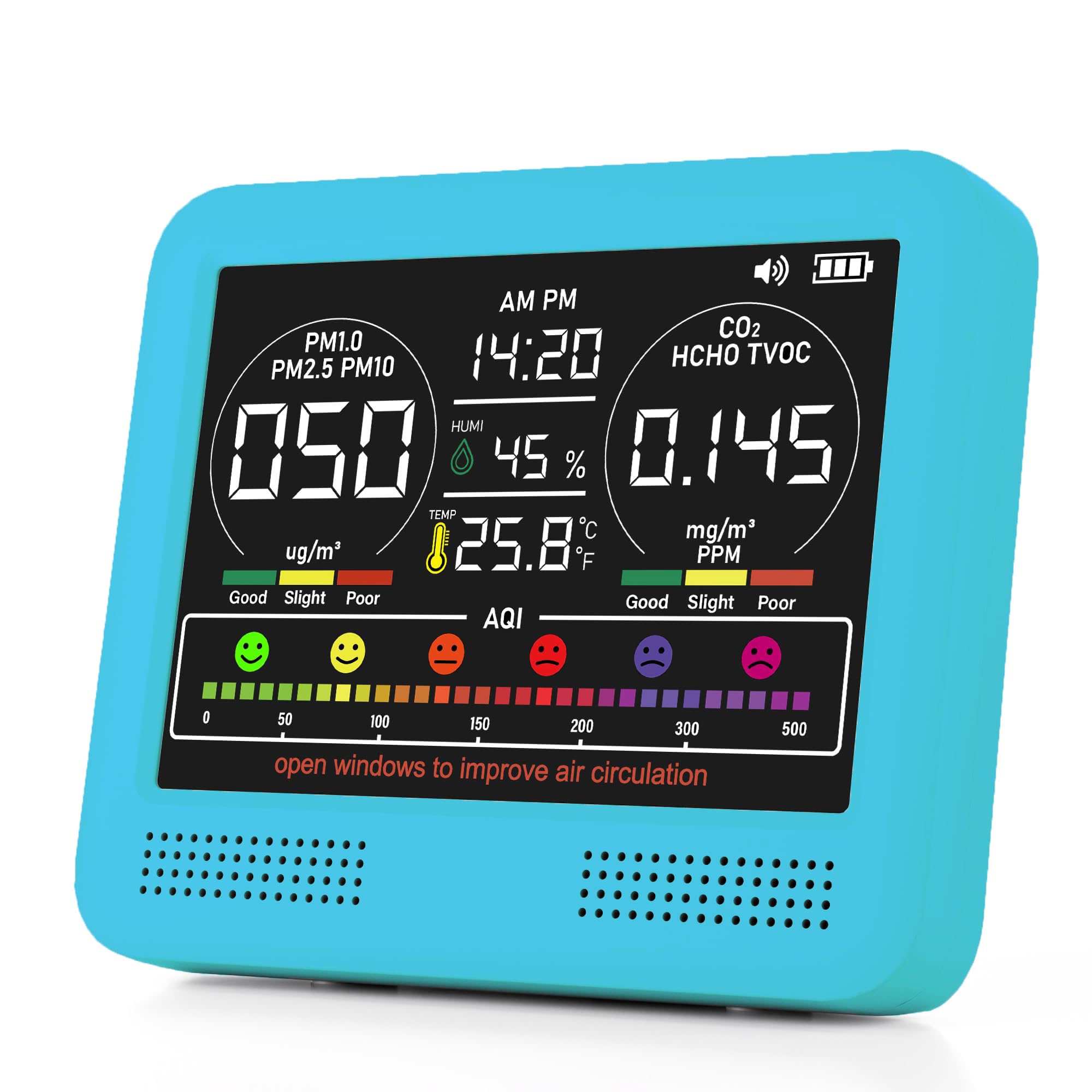
Image: The SpeedBoost AK23 Air Quality Monitor, illustrating its compact form factor and digital display.
Setup
1. Initial Charging
Before first use, fully charge the device. Connect the provided USB-C cable to the monitor's charging port and the other end to the charging adapter. Plug the adapter into a power outlet. The charging time is approximately 5.5 hours. A full charge provides approximately 12 hours of continuous operation.
2. Powering On/Off
- To Power On: Press and hold the power button for approximately 1.5 seconds. The device will emit a single beep, and the screen will illuminate. The sensors will enter a warm-up phase for about 120 seconds. During this countdown, parameter names and units will not be displayed. After the warm-up, all information will appear on the screen.
- To Power Off: While the device is powered on, press and hold the power button for approximately 1.5 seconds. The device will beep once to confirm shutdown, and then turn off.
3. Calibration and Zeroing
For optimal accuracy, especially for HCHO and TVOC sensors, it is recommended to perform calibration and zeroing in a fresh air environment (e.g., outdoors or near an open window) away from potential pollutants.
- Procedure: With the device powered off, press and hold the power button for 4 seconds without releasing. The device will beep twice, indicating entry into calibration and zeroing mode. This process takes approximately 10 to 15 seconds to complete.
Operating Instructions
Understanding the Display
The ultra-high definition color screen displays real-time readings for all monitored parameters. The display is designed for easy readability, showing values for PM1.0, PM2.5, PM10, CO2, HCHO, TVOC, Temperature, Humidity, and current time.
Image: Illustrative view of the monitor's display, showing multiple air quality parameters simultaneously.
Air Quality Index (AQI) Alarms
The device features 7 AQI alarms to alert you to changes in air quality. When certain pollutant levels exceed predefined thresholds, the monitor will emit an audible buzzer alert. Refer to the on-screen indicators for specific parameter warnings.
Energy Saving Mode
After 30 minutes of continuous operation, the monitor automatically enters an energy-saving mode to conserve battery life. This mode optimizes power consumption while maintaining continuous monitoring capabilities.
Maintenance
Cleaning the Device
To clean the monitor, gently wipe the exterior with a soft, dry cloth. Do not use abrasive cleaners, solvents, or immerse the device in water. Ensure no liquid enters the sensor openings.
Sensor Care
The sensors are delicate components. Avoid exposing the device to extreme temperatures, high humidity, or direct sunlight for prolonged periods. Do not attempt to clean the internal sensors directly.
Troubleshooting
| Problem | Possible Cause | Solution |
|---|---|---|
| Device does not power on. | Low battery or power button not pressed correctly. | Ensure the device is fully charged. Press and hold the power button for 1.5 seconds. |
| Readings appear inaccurate or fluctuate wildly. | Device not calibrated, or sensors are still warming up. | Perform calibration and zeroing in a fresh air environment. Allow 120 seconds for sensor warm-up after powering on. |
| Buzzer alarm sounds frequently. | High levels of detected pollutants. | Check the display for specific high readings. Ventilate the area by opening windows or doors. |
| Screen is blank or unresponsive. | Device may have crashed or battery is critically low. | Attempt to power off and on again. If unresponsive, connect to charger. If issue persists, contact support. |
Specifications
| Product Model | AK23 |
| Battery Capacity | 2500mAh/3.7V |
| Rated Voltage | 3.7V |
| Dimensions (L x W x H) | 106mm x 89mm x 49mm (approx. 4.16" x 3.5" x 1.92") |
| Charging Time | Approximately 5.5 hours |
| Battery Life | Up to 12 hours (continuous operation) |
| Power Source | Battery Powered (Lithium Ion) |
| Detected Parameters | PM1.0, PM2.5, PM10, CO2, HCHO, TVOC, Temperature, Humidity, Time Display |
| Alarm Type | Audible (7 AQI Alarms) |
| Item Weight | 8 ounces |
Warranty and Support
SpeedBoost products are manufactured to high-quality standards. For information regarding warranty coverage, please refer to the warranty card included with your purchase or visit the official SpeedBoost website.
If you encounter any issues or have questions about your SpeedBoost AK23 Air Quality Monitor, please do not hesitate to contact our customer support team. We are committed to resolving your inquiries within 24 hours.
Contact Information:
- Please refer to your product packaging or the official SpeedBoost website for the most current contact details.


