
1. Introduction
Thank you for choosing the SakerPlus G-Shaped LED Wireless Charging Speaker. This multifunctional device combines a 15W wireless fast charger, Bluetooth 5.2 speaker, alarm clock, and nightstand lamp with 13 lighting modes. This manual provides detailed instructions for setup, operation, and maintenance to ensure optimal performance and user satisfaction.
2. Key Features
- 15W Wireless Fast Charging: Provides efficient wireless charging for compatible devices, reducing cable clutter.
- Type-C Port: Additional wired charging option for various electronics.
- Bluetooth 5.2 Audio: Stable wireless audio streaming up to 10 meters.
- Multiple Playback Options: Supports TF card, USB playback, and AUX connection for versatile audio.
- 13 Lighting Modes: Customizable LED lighting effects to create desired ambiance.
- LED Digital Display: Clear display for time and settings with adjustable brightness.
- Dual Alarm Modes: Customizable alarm settings for personalized wake-up routines.
- FM Radio Function: Integrated radio for additional audio and wake-up options.
- Stable Non-Slip Base: Ensures secure placement on various surfaces.
- Intuitive Controls: Sensitive, well-marked buttons for easy operation.
3. Package Contents
Please ensure all items are present upon unboxing:
- SakerPlus G-Shaped LED Wireless Charging Speaker Unit
- USB Type-C Charging Cable
- User Manual
4. Product Overview
Familiarize yourself with the device's components and interfaces:

Figure 1: Front view of the SakerPlus G-Shaped LED Wireless Charging Speaker, showing the digital clock display, control buttons, and wireless charging pad.

Figure 2: Rear view illustrating the connectivity ports: TF card slot, AUX input, and USB-C power input.
Control Buttons:
- Power/Mode Button (M): Press to cycle through modes (Bluetooth, FM Radio, TF Card, USB, AUX). Long press to power on/off.
- Previous/Volume Down (<<): Short press for previous track/station. Long press to decrease volume.
- Next/Volume Up (>>): Short press for next track/station. Long press to increase volume.
- Play/Pause/Answer Call: Controls media playback and call functions.
- Clock Setting Button: Enters time setting mode.
- Alarm Setting Button: Enters alarm setting mode.
- Light Mode Button: Cycles through 13 lighting modes.
- Light Brightness Button: Adjusts light brightness.
5. Setup Instructions
- Power Connection: Connect the provided USB Type-C cable to the DC IN port on the back of the speaker and plug the other end into a compatible USB power adapter (not included). The device will power on automatically or can be powered on by long-pressing the Power/Mode button.
- Initial Clock Setting:
- Press the Clock Setting Button. The hour display will flash.
- Use the Previous (<<) and Next (>>) buttons to adjust the hour.
- Press the Clock Setting Button again to set the minutes. Use the Previous (<<) and Next (>>) buttons to adjust the minutes.
- Press the Clock Setting Button one more time to confirm the time.
- Bluetooth Pairing:
- Ensure the speaker is powered on and in Bluetooth mode (indicated by 'BT' on the display). If not, short press the Power/Mode Button (M) until 'BT' appears.
- On your mobile device, go to Bluetooth settings and search for available devices.
- Select 'G63' or 'SakerPlus Speaker' from the list to pair. A confirmation sound will indicate successful pairing.
6. Operating Instructions
6.1. Alarm Clock Function
- Setting an Alarm:
- Press the Alarm Setting Button. The hour display will flash.
- Use the Previous (<<) and Next (>>) buttons to adjust the alarm hour.
- Press the Alarm Setting Button again to set the alarm minutes. Use the Previous (<<) and Next (>>) buttons to adjust the minutes.
- Press the Alarm Setting Button one more time to confirm and activate the alarm. An alarm icon will appear on the display.
- Snooze Function: When the alarm sounds, press any button (except Power/Mode) to activate snooze. The alarm will sound again after 5 minutes.
- Disabling Alarm: To turn off the alarm completely, press and hold the Alarm Setting Button until the alarm icon disappears from the display.
6.2. Lighting Modes
The device offers 13 distinct lighting modes to suit your mood.
- Changing Modes: Short press the Light Mode Button to cycle through the available 13 lighting effects, including solid colors, bi-color, tri-color, and rainbow effects.
- Adjusting Brightness: Short press the Light Brightness Button to adjust the intensity of the light.
- App Control: For advanced customization, download the companion app (refer to the QR code in the package or app store). The app allows selection from 256 modes and over 16 million colors, as well as brightness adjustments.
Video 1: Demonstration of the G-Shaped LED Wireless Charging Speaker's various lighting modes and wireless charging function.
6.3. Bluetooth Speaker
- Pairing: After initial setup, the speaker will automatically attempt to reconnect to the last paired device. If pairing a new device, ensure the speaker is in Bluetooth mode and follow the steps in Section 5.3.
- Playing Audio: Once paired, play audio from your connected device. Use the Play/Pause button on the speaker or your device to control playback.
- Volume Control: Long press the Previous (<<) or Next (>>) buttons to adjust the volume.
6.4. 15W Wireless Fast Charging
Place your Qi-compatible smartphone on the designated wireless charging pad located on the top of the device. Ensure the phone is centered for optimal charging. The charging indicator on your phone will confirm charging has begun.

Figure 3: Illustrates a smartphone placed on the wireless charging pad, showing the charging status.
6.5. FM Radio Function
- Enter FM Mode: Short press the Power/Mode Button (M) until 'FM' appears on the display.
- Auto-Scan Stations: Long press the Play/Pause button to automatically scan and save available FM radio stations.
- Change Stations: Use the Previous (<<) and Next (>>) buttons to switch between saved stations.
6.6. TF Card & USB Playback
- Insert Media: Insert a TF card into the TF card slot or a USB drive into the USB port on the back of the device.
- Enter Playback Mode: The device should automatically switch to TF card or USB playback mode. If not, short press the Power/Mode Button (M) until the corresponding mode is displayed.
- Control Playback: Use the Play/Pause, Previous (<<), and Next (>>) buttons to control audio playback.
6.7. AUX Connection
Connect an external audio device using a 3.5mm AUX cable (not included) to the AUX IN port on the back of the speaker. The device will automatically switch to AUX mode. Control playback from your connected device.
7. Maintenance
- Cleaning: Use a soft, dry cloth to wipe the surface of the device. Avoid using abrasive cleaners or solvents.
- Storage: Store the device in a cool, dry place when not in use for extended periods.
- Avoid Water: Keep the device away from water and excessive moisture to prevent damage.
8. Troubleshooting
| Problem | Possible Cause | Solution |
|---|---|---|
| Device does not power on. | No power connection or insufficient power. | Ensure the USB-C cable is securely connected to a working power source. Use a 5V/2A or higher adapter. |
| Wireless charging not working. | Phone not Qi-compatible or not properly aligned. | Verify your phone supports Qi wireless charging. Reposition the phone on the charging pad to ensure proper alignment. Remove thick phone cases. |
| Bluetooth not connecting. | Device not in pairing mode or too far from the speaker. | Ensure the speaker is in Bluetooth mode ('BT' displayed). Check that Bluetooth is enabled on your device. Move your device closer to the speaker (within 10 meters). |
| Alarm does not sound. | Alarm not set or volume too low. | Verify the alarm is set and the alarm icon is visible on the display. Increase the device volume. |
| Poor FM radio reception. | Weak signal. | Try repositioning the device to improve signal reception. |
9. Specifications
| Feature | Detail |
|---|---|
| Brand | SakerPlus |
| Model Number | EC84979 |
| Color | Black |
| Display Type | Digital |
| Wireless Charging Output | 15W |
| Bluetooth Version | 5.2 |
| Connectivity Technology | AUX, USB-C |
| Input Voltage | 5 Volts |
| Product Dimensions | 6"W x 6"H |
| Item Weight | 9.8 ounces |
| Material | Plastic |
| Mounting Type | Tabletop |
| UPC | 703079385367, 703079384636 |
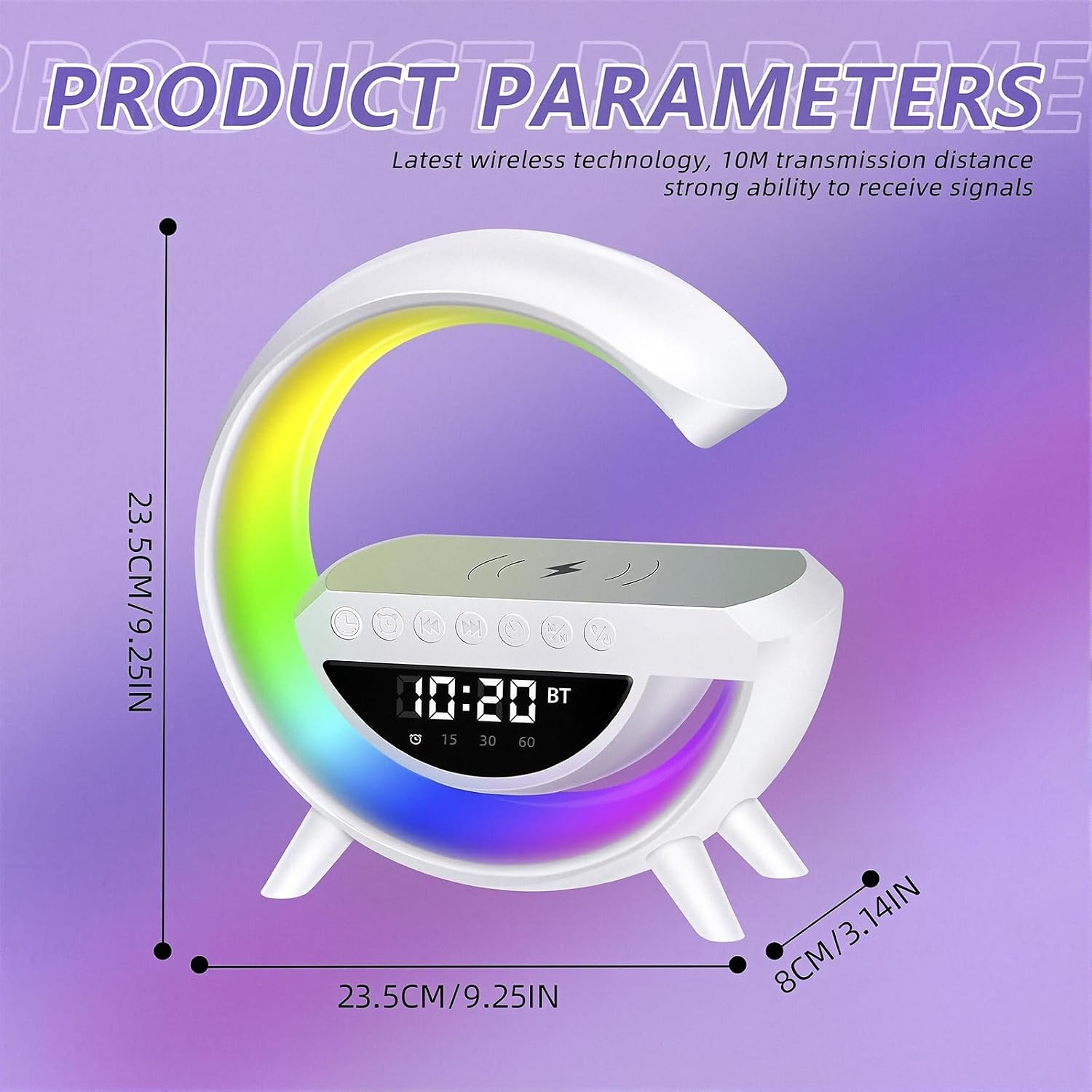
Figure 4: Product dimensions for the SakerPlus G-Shaped LED Wireless Charging Speaker.
10. Warranty and Support
For warranty information or technical support, please refer to the contact details provided with your purchase documentation or visit the official SakerPlus website. Keep your proof of purchase for any warranty claims.