
TOPZEE ECB-3L-B
TOPZEE Electric Compost Bin User Manual
Model: ECB-3L-B | Brand: TOPZEE
Introduction
Thank you for choosing the TOPZEE Electric Compost Bin. This smart countertop composter is designed to efficiently convert food waste into nutrient-rich fertilizer, reducing household waste by up to 90%. Featuring odorless auto-cleaning and low-noise operation, it's an ideal solution for indoor home use. Please read this manual thoroughly before operating the device to ensure safe and optimal performance.
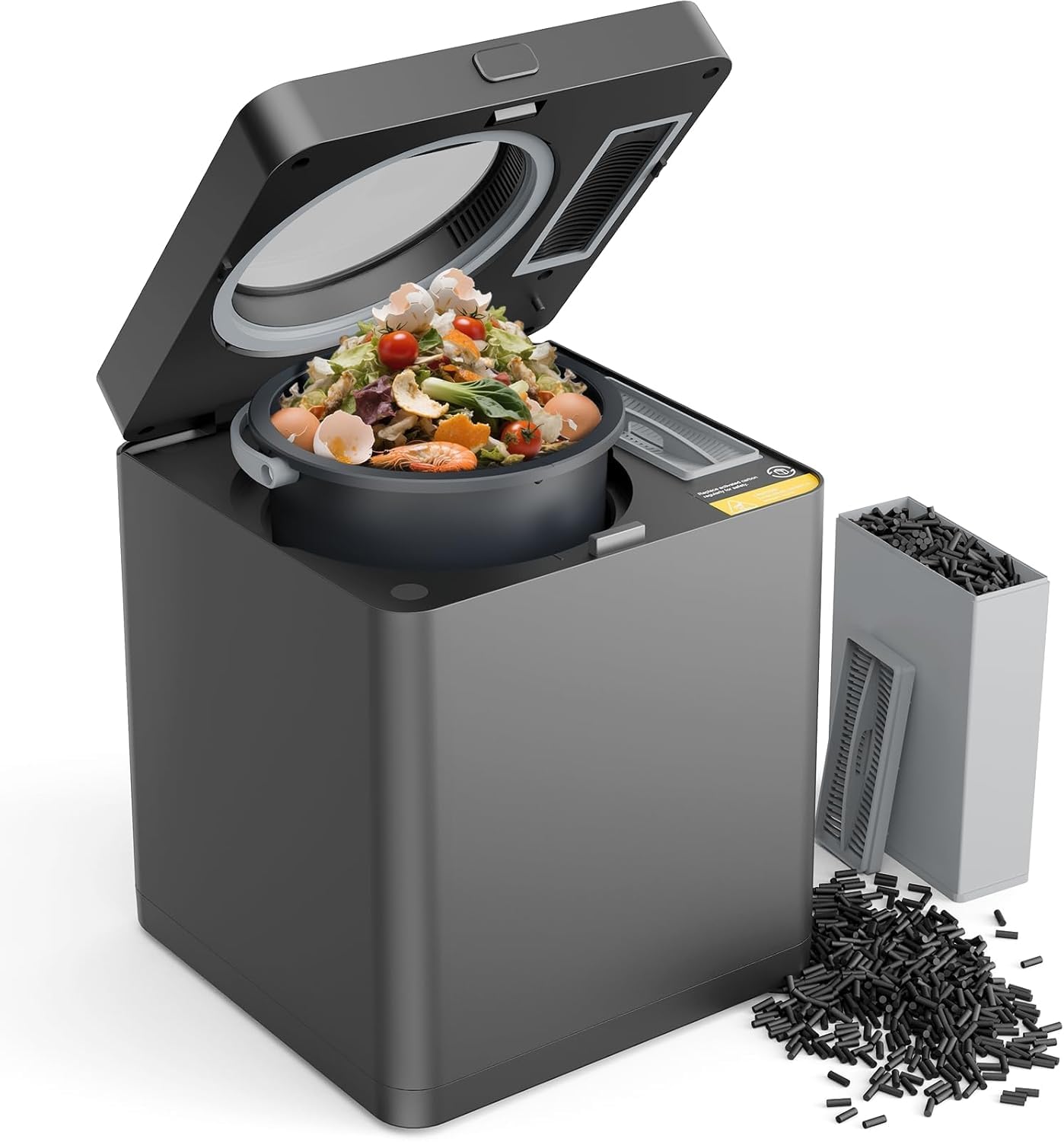
Figure 1: TOPZEE Electric Compost Bin (Model ECB-3L-B)
Important Safety Information
To ensure safe operation and prevent damage, please observe the following safety guidelines:
- Always use appropriate protective gear when handling food waste and compost.
- Keep the compost bin clean and well-ventilated to prevent the buildup of harmful microorganisms.
- Be cautious of sharp objects that may be present in the waste.
- Store the compost bin in a safe location to prevent accidental spills or damage.
- Do not immerse the main unit in water or other liquids.
- Ensure the lid is properly closed before starting any cycle.
- Keep out of reach of children and pets. The unit features a child lock function for added safety during operation.
- Do not attempt to open the unit or remove the processing bucket during operation.
- Unplug the device before cleaning or maintenance.

Figure 2: Child Lock feature for enhanced safety.
Setup
- Unpacking: Carefully remove all components from the packaging. Retain packaging for future transport or storage.
- Placement: Place the composter on a stable, flat, and heat-resistant surface in your kitchen or desired indoor location. Ensure adequate ventilation around the unit.
- Filter Installation: Ensure the activated charcoal filters are correctly installed in their designated compartment. Refer to the maintenance section for filter replacement instructions.
- Power Connection: Plug the power cord into a grounded electrical outlet.
- Initial Cleaning: Before first use, wipe down the exterior with a damp cloth. The non-stick coating bucket can be cleaned with mild soap and water. Ensure all parts are dry before assembly and use.
Operating Instructions
The TOPZEE Electric Compost Bin offers simple, one-touch operation to convert your food waste.
1. Adding Food Waste
- Open the lid of the composter.
- Add food scraps into the 3-liter capacity non-stick bucket. Avoid overfilling.
- Close the lid securely.

Figure 3: Suitable food waste for composting (e.g., bread, pasta, eggs, vegetables, coffee grounds, meat, fish, leaves). Note: Animal bones need to be chopped.
2. Starting a Cycle
- Press the Power button to turn on the unit.
- Select your desired mode using the Model button:
- Fast Mode: Approximately 4 hours.
- Standard Mode: Approximately 6 hours.
- Press the Start/Pause button to begin the composting cycle. The unit will operate quietly, typically below 40 decibels.
- To activate the child lock, press and hold the Model button for 3 seconds.

Figure 4: One-touch operation control panel.

Figure 5: Food waste reduction process, showing before and after a cycle.

Figure 6: The composter operates at a whisper-quiet level, below 40 decibels.
3. After the Cycle
- Once the cycle is complete, the unit will indicate that the process is finished.
- The processed material can be used as a natural, high-quality fertilizer for plants or disposed of.

Figure 7: Observe the composting process through the viewing window.
Maintenance
Regular maintenance ensures the longevity and optimal performance of your composter.
1. Automatic Cleaning
- The unit features a one-button automatic cleaning function. After emptying the bucket, you can initiate this cycle to clean the interior and ensure no residue is left.
- The non-stick coating on the bucket also simplifies manual cleaning.
2. Activated Charcoal Filter Replacement
- The large-capacity activated charcoal filters absorb odors during composting.
- Replace activated carbon filters every 3-6 months, or whenever you notice an odor.
- To replace: Locate the filter compartment, remove the old filters, and insert new ones. Ensure they are seated correctly.

Figure 8: Activated charcoal filter system for odor absorption.
Troubleshooting
If you encounter issues with your TOPZEE Electric Compost Bin, refer to the following table for common problems and solutions.
| Problem | Possible Cause | Solution |
|---|---|---|
| Unit does not power on. | Not plugged in; power outlet issue. | Ensure the power cord is securely plugged into a working outlet. Check the power switch. |
| Cycle does not start. | Lid not closed properly; child lock engaged. | Ensure the lid is fully closed and latched. If child lock is active, press and hold the Model button for 3 seconds to reset. |
| Unpleasant odor during operation. | Filters need replacement; certain food types. | Replace activated charcoal filters. Some food waste (e.g., cabbage) may naturally produce stronger odors. Ensure proper ventilation. |
| Food waste not fully processed. | Overfilling; incorrect mode selected; large items. | Do not overfill the bucket. Ensure appropriate mode (Fast/Standard) is selected. Chop larger items (like animal bones) before adding. |
| Unit is noisy. | Obstruction in grinding mechanism. | Unplug the unit and carefully check the grinding mechanism for any obstructions. Remove if safe to do so. |
Specifications
| Feature | Detail |
|---|---|
| Brand | TOPZEE |
| Model Number | ECB-3L-B |
| Capacity | 3 Liters (approx. 6.3 Pounds) |
| Product Dimensions (L x W x H) | 10.62" x 9.05" x 9.05" |
| Item Weight | 6.31 Kilograms |
| Material | High Temperature Resistant ABS Material, Aluminum alloy, Nonstick Coating Bucket |
| Color | Light Black |
| Noise Level | Below 40 dB |
| Energy Consumption | Approx. 0.51 kWh per use |
Warranty and Support
For warranty information, product support, or to purchase replacement parts (such as activated charcoal filters), please contact TOPZEE customer service. Refer to the product packaging or the official TOPZEE website for the most current contact details.
Online Support: Visit the TOPZEE Store on Amazon
Ask a question about this manual
Ask about setup, troubleshooting, compatibility, parts, safety, or missing instructions. Manuals+ will review the question and use this page’s manual context to help answer it.