
1. Product Overview
The PopBloom RL115 WiFi Reef LED Light is an advanced aquarium lighting system designed for optimal coral growth and marine tank environments. It features smart app control, full spectrum output, and various programmable modes to simulate natural light cycles.
- High-performance LED Lighting: Scientifically engineered for balanced PAR output and coverage, ensuring optimal brightness and photosynthetic active radiation.
- Remote Control & Group Management: Control up to 12 lights remotely via a Smart App (Android/iOS, 2.4GHz Wi-Fi only).
- Programmable Usage Modes: DIY mode allows free setting of start/end times, color, and brightness for each channel over 24 hours.
- Best Spectrum: Provides perfect Blue/UV pop bloom color, promoting coral calcium absorption and Vitamin D3 synthesis for healthy, vibrant growth. Includes a "Slow acclimation" mode for new tanks or corals.
- Natural Simulation: Simulates sunrise, sunset, 24-hour auto cycle, 4 seasons, lightning, and lunar cycles to mimic natural environments.

Image 1.1: PopBloom RL115 WiFi Reef LED Light, showcasing its compact design.

Image 1.2: Example of healthy coral growth supported by PopBloom RL115 lighting.
2. Package Contents
Verify that all items listed below are included in your package. If any items are missing or damaged, please contact customer support.
- 1 x RL115 Light
- 1 x Arm Mounting Kit (includes parallel bracket, vertical bracket, base & screws)
- 1 x Power Supply & Plug
- 1 x User Manual

Image 2.1: All components included in the PopBloom RL115 package.
3. Specifications
Detailed technical specifications for the PopBloom RL115 WiFi Reef LED Light.
| Feature | Specification |
|---|---|
| Model Number | RL115 |
| Product Dimensions | 4.8"D x 4.8"W x 2.2"H (12x12x5.5 cm) |
| Item Weight | 2.5 Pounds |
| Wattage | 115W (Note: Product title indicates 120W, but detailed specifications from manufacturer images state 115W for RL115 model.) |
| Light Source Type | LED (APP Group-control, 24hrs Auto on/off, 4 Seasons, Sunrise sunset, Lunar cycle, Lightning) |
| Control Method | App (Wi-Fi Connectivity) |
| Material Type | Glass-Aluminum Oxide |
| Mounting Type | Bracket Mount |
| Power Source | Corded Electric |
| PAR at Water Surface | 570 PAR |
| PAR at 60cm/24" Depth | 170 PAR |
| Channels | 4 Channels (CH1: 20W 12000K white, CH2: 5W Moonlight, CH3: 80W Reef-grow Blue, CH4: 10W Vivid Color) |

Image 3.1: Detailed specifications and channel breakdown for the RL115 light.

Image 3.2: PAR distribution and output for the RL115, showing coverage for various coral types.

Image 3.3: Visual representation of optimal PAR distribution provided by the RL115 LED light across an aquarium.

Image 3.4: The GaN Hybrid Power Adapter for the RL115, highlighting its compact size and multiple protection features.
4. Setup and Installation
Follow these steps to properly set up and install your PopBloom RL115 WiFi Reef LED Light.
4.1 Unboxing and Component Check
Before installation, carefully unbox the product and ensure all components listed in Section 2 are present and undamaged.

Video 4.1: Unboxing and overview of the PopBloom RL115 Reef LED Light and its components.
4.2 Mounting the Light
The RL115 comes with an adjustable arm mounting kit suitable for both rimless and rimmed tanks. The bracket allows for adjustable height and length.
- Attach the vertical bracket to the tank rim using the provided screws. Ensure it is securely fastened.
- Slide the parallel bracket into the vertical bracket.
- Attach the RL115 light fixture to the end of the parallel bracket.
- Adjust the length and height of the arm to position the light optimally over your aquarium. The adjustable length is approximately 12cm (4.8in) and adjustable height is approximately 12cm (4.8in).
- Ensure the glass/rim thickness is less than 3cm (1.18in) for proper fit.
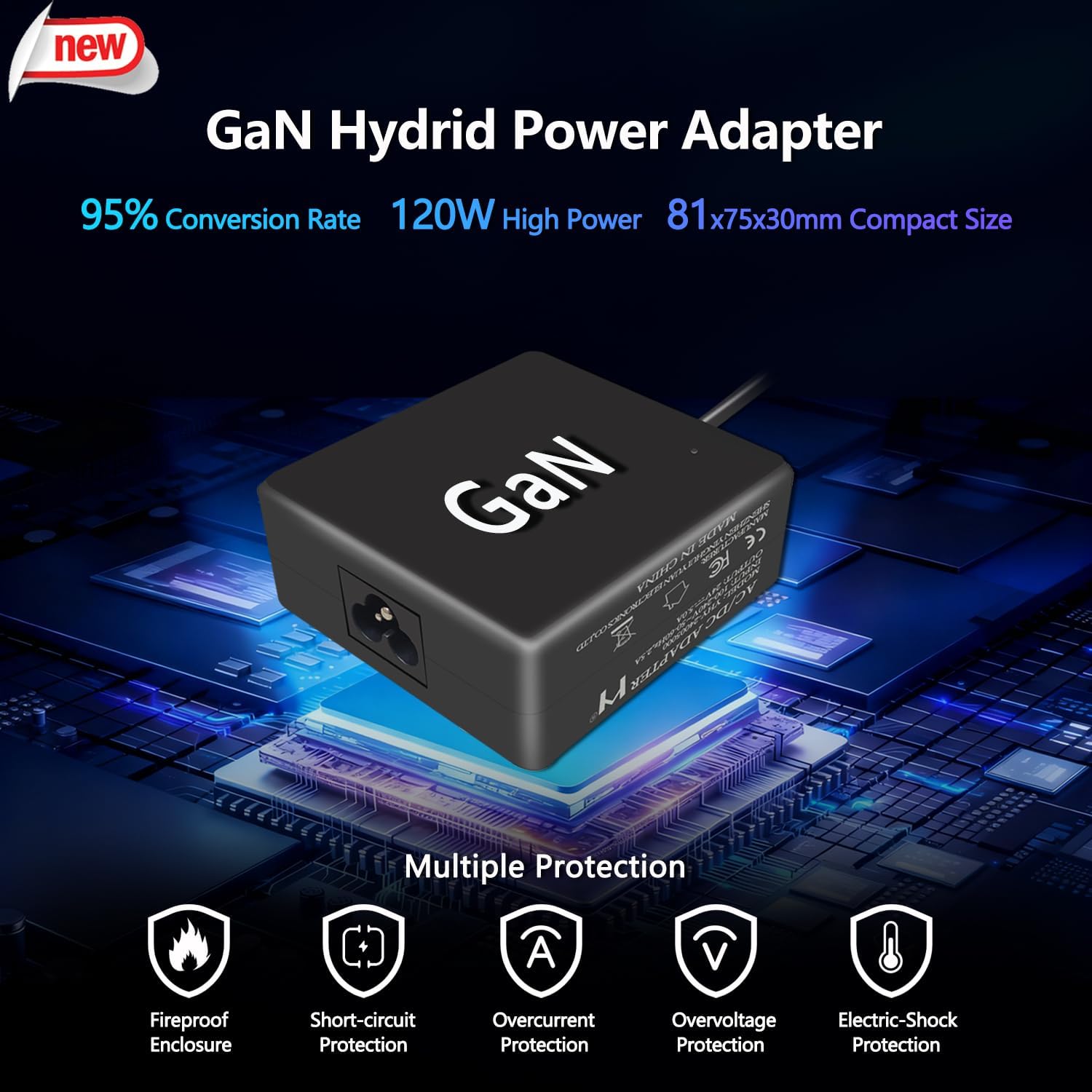
Image 4.1: Illustration of the adjustable mounting bracket, showing length and height adjustments for rimless and rimmed tanks.
4.3 Power Connection
Connect the power supply to the RL115 light fixture, then plug the power adapter into a suitable electrical outlet. Ensure all connections are secure.
4.4 App Download and Initial Connection
The RL115 is controlled via a smart application. Follow these steps to connect your light:
- Download and install the "Smart Life" app from your device's app store (Android/iOS). You can search for "Smart Life" or scan the QR code provided in the manual. Download Smart Life App
- Open the app and enable Wi-Fi and Bluetooth on your phone.
- Accept location permissions when prompted by the app.
- In the app, go to "Add Device".
- Connect your phone to your home's 2.4GHz Wi-Fi network. (5GHz networks are not supported).
- Follow the in-app instructions to add and connect to your RL115 light.

Image 4.2: Instructions for downloading the Smart Life app and connecting the RL115 via Wi-Fi.
5. Operating Instructions
The PopBloom RL115 offers various modes and customization options through the Smart Life app.
5.1 App Interface Overview
Once connected, the app provides a comprehensive interface to control your light. Key features include:
- Homepage: Quick access to light status and basic controls.
- Manual Mode: Adjust individual channel brightness in real-time.
- Program Library: Select from preset lighting programs.
- Lunar Cycle: Simulate moon phases.
- Acclimation: Gradually introduce new lighting to corals.
- Lightning: Simulate storm conditions.

Image 5.1: Overview of the PopBloom app interface, showing various control options.
5.2 Preset Modes (Beginner Friendly)
The app includes 16 preset modes for easy setup and a 24-hour auto cycle. These modes are designed for various coral types and tank conditions, providing a convenient starting point.

Image 5.2: The app's program library with various preset lighting modes for different aquarium needs.
5.3 DIY (Custom) Program
For advanced users, the DIY mode allows for precise customization of your lighting schedule:
- Set up to 16 time-points for programmable changes.
- Customize ramp-up and ramp-down times and brightness for each channel.
- Independently control the 4 available channels (CH1, CH2, CH3, CH4).
Image 5.3: Custom program interface in the app, demonstrating how to set time-points and adjust channel brightness.
5.4 Natural Simulation Features
The app allows you to simulate various natural phenomena to create a dynamic and healthy environment for your marine life:
- Sunrise/Sunset: Gradually increase and decrease light intensity.
- Lunar Cycle: Mimic the 29-day lunar cycle.
- Coral Acclimation: Slowly adjust light intensity for new corals or tank setups.
- Lightning: Simulate storm effects.
Image 5.4: App features for simulating natural light cycles and weather conditions.
5.5 Group Management and Sharing
You can group multiple RL115 lights (up to 12) for synchronized control. The app also allows you to share your custom settings with others.
Image 5.5: App interface demonstrating group control and sharing options for lighting settings.
6. Maintenance
Regular maintenance ensures the longevity and optimal performance of your PopBloom RL115 LED light.
- Cleaning: Periodically wipe the light fixture and lens with a soft, damp cloth to remove salt creep, dust, and water spots. Ensure the light is unplugged before cleaning. Do not use abrasive cleaners.
- Ventilation: Ensure the cooling fan and heat sinks are free from obstructions to maintain proper airflow and prevent overheating.
- Cable Inspection: Regularly check power cables and connections for any signs of wear or damage. Replace damaged cables immediately.
7. Troubleshooting
If you encounter issues with your PopBloom RL115, refer to the following common troubleshooting steps.
| Problem | Possible Cause | Solution |
|---|---|---|
| Light does not turn on. | No power, loose connection, faulty power adapter. |
|
| Cannot connect to the app. | Incorrect Wi-Fi band, app permissions, network issues. |
|
| Light intensity is too low/high. | Incorrect app settings, acclimation mode active. |
|
8. Warranty and Support
The PopBloom RL115 WiFi Reef LED Light comes with a 3-year normal warranty from the manufacturer.
For technical support, warranty claims, or further assistance, please contact PopBloom customer service or visit the official PopBloom store:
Official PopBloom Store: PopBloom Store on Amazon