
WantJoin WZBWIYZRGG5011SSUS-WH4
WantJoin Commercial Hot Dog Steamer (36L/38QT) Instruction Manual
Model: WZBWIYZRGG5011SSUS-WH4
Introduction
Thank you for choosing the WantJoin Commercial Hot Dog Steamer. This manual provides essential information for the safe and efficient operation, maintenance, and troubleshooting of your new appliance. Please read it thoroughly before use and retain it for future reference.
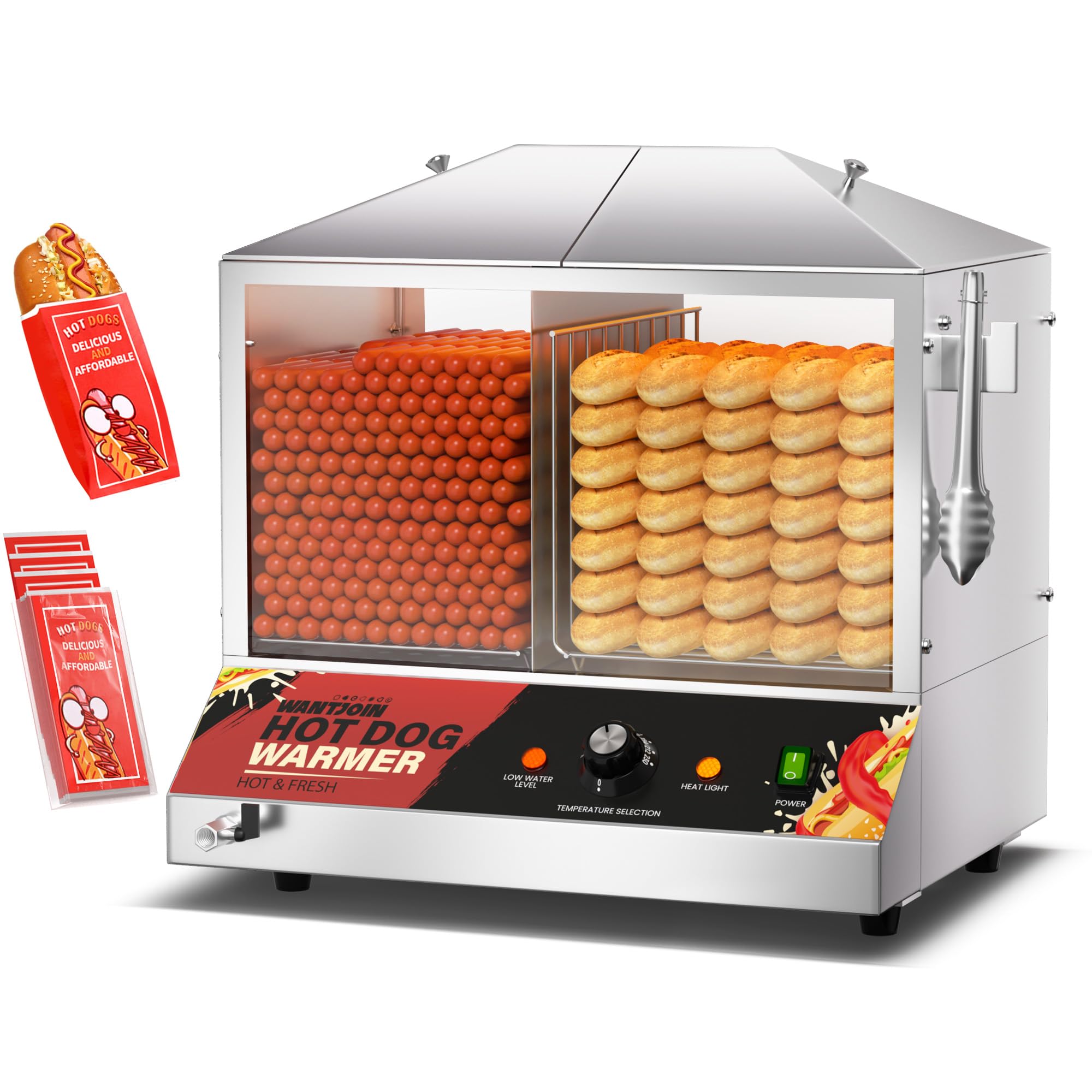
Image: The WantJoin Commercial Hot Dog Steamer, showcasing its dual compartments for hot dogs and buns.
Important Safety Precautions
To prevent injury or damage, always follow these basic safety precautions:
- Read all instructions before operating the appliance.
- Ensure the appliance is connected to a grounded power outlet with the correct voltage (110-120V).
- Do not immerse the appliance, cord, or plug in water or other liquids.
- Always supervise children when the appliance is in use.
- Unplug from the outlet when not in use and before cleaning. Allow to cool before handling parts.
- Do not operate any appliance with a damaged cord or plug, or after the appliance malfunctions or has been damaged in any manner.
- Use only manufacturer-recommended attachments.
- Do not use outdoors.
- Do not place on or near a hot gas or electric burner, or in a heated oven.
- Extreme caution must be used when moving an appliance containing hot oil or other hot liquids.
- Always ensure the water level is above the minimum line to prevent dry-burning. The appliance has a dry-burning prevention device.
- Do not touch hot surfaces. Use handles or knobs.
Setup and Assembly
Follow these steps to set up your hot dog steamer:
- Unpack the Appliance: Carefully remove all packaging materials and inspect the steamer for any damage. Retain packaging for future transport if needed.
- Position the Steamer: Place the steamer on a stable, heat-resistant, and level surface. Ensure adequate ventilation around the unit.
- Assemble Side Panels: Install the two stainless steel side panels onto the base and secure them with screws.
- Install Bottom Plate: Place the stainless steel bottom plate onto the base.
- Insert Food Racks: Place the two food racks into their respective compartments inside the steamer.
- Initial Cleaning: Before first use, clean all removable parts and the interior of the steamer with warm, soapy water. Rinse thoroughly and dry.
Video: This video demonstrates the installation process for the WantJoin Hot Dog Steamer, showing how to assemble the side panels and place the internal components.

Image: An illustration highlighting key components such as the dual doors, low water indicator, U-shaped heating element, and temperature control.
Operating Instructions
Follow these steps to operate your hot dog steamer:
- Add Water: Lift the top lid and pour clean water into the water tank. Ensure the water level is between the minimum and maximum fill lines. The appliance has an 11L capacity water tank.
- Load Food: Place hot dogs in the left compartment (perforated bottom) and buns in the right compartment (solid bottom). The left compartment holds approximately 110-125 hot dogs (4.8" length), and the right compartment holds 40-45 buns (6" length).
- Close Lid: Securely close the top lid to retain steam.
- Connect Power: Plug the power cord into a suitable electrical outlet.
- Turn On: Press the power switch to turn on the appliance. The power indicator light will illuminate.
- Set Temperature: Use the temperature control knob to select the desired temperature, ranging from 86°F to 230°F (30°C to 110°C). The heat light will indicate when the heating element is active.
- Preheat: Allow the steamer to preheat for a few minutes until the desired temperature is reached.
- Serve: Once hot dogs and buns are heated to your preference, use the provided food clip to serve.
Video: This video provides an overview of the WantJoin Hot Dog Steamer in operation, demonstrating temperature adjustment and the steaming process for hot dogs and buns.

Image: A visual guide illustrating the four main steps for using the steamer: adding water, loading food, setting temperature, and serving.

Image: Detail of the user-friendly control panel, showing the temperature selection knob and indicator lights.
Care and Maintenance
Proper cleaning and maintenance will extend the life of your hot dog steamer:
- Unplug and Cool: Always unplug the appliance from the power outlet and allow it to cool completely before cleaning.
- Drain Water: Open the drain valve located at the bottom of the unit to empty the water tank. This allows for easy water replacement without tilting the machine.
- Remove Components: The lid and food racks are removable for easy cleaning.
- Clean Interior and Exterior: Wipe down the stainless steel casing and tempered glass doors with a damp cloth and mild detergent. For stubborn stains, use a non-abrasive cleaner.
- Clean Removable Parts: Wash the food racks and lid with warm, soapy water. Rinse thoroughly and dry completely before reassembling or storing.
- Descaling (Periodically): Depending on water hardness, mineral deposits may accumulate in the water tank. Periodically descale the unit using a commercial descaling solution or a mixture of water and white vinegar. Follow the descaling product's instructions, then rinse the tank thoroughly.
- Storage: Store the clean and dry appliance in a cool, dry place.

Image: The bottom drainage outlet, designed for convenient water removal.

Image: The top lid opened, demonstrating easy access for loading, unloading, and cleaning.
Troubleshooting
Refer to this section for common issues and their solutions:
| Problem | Possible Cause | Solution |
|---|---|---|
| Appliance does not turn on. | No power, loose plug, or power switch off. | Check power outlet, ensure plug is secure, and power switch is in the "ON" position. |
| No steam or insufficient heating. | Low water level, incorrect temperature setting, or heating element issue. | Check water level and refill if necessary. Adjust temperature knob to a higher setting. If problem persists, contact support. |
| Low water indicator light is on. | Water level is below the safety line. | Add water to the tank. The appliance will automatically resume operation once refilled. |
| Appliance automatically shuts off. | Dry-burning prevention activated due to extremely low water level. | This is a safety feature. Add water to the tank. The appliance will restart once the water level is restored. |
| Buns are not warming effectively. | Insufficient steam circulation to the bun compartment. | Ensure the water level is adequate and the temperature is set correctly. The bun compartment has a solid bottom to prevent excess moisture, but still relies on ambient steam. |

Image: Visual representation of the safety features, including the low water indicator and overheat protection mechanism.
Specifications
| Feature | Detail |
|---|---|
| Model Number | WZBWIYZRGG5011SSUS-WH4 |
| Capacity | 36L / 38 Quarts (approx. 110-125 hot dogs, 40-45 buns) |
| Voltage | 110-120V |
| Power | 1200W |
| Temperature Range | 86-230°F (30-110°C) |
| Material | Stainless Steel, Tempered Glass |
| Product Dimensions (L x W x H) | 19.7" x 15.2" x 23" (50cm x 38.6cm x 58.4cm) |
| Internal Size (L x W x H) | 17.7" x 11" x 11" (45cm x 28cm x 28cm) |
| Weight | 12.4 kg |
| Included Components | Hot Dog Steamer, 2 Food Racks, Food Clip, 10 Hot Dog Bags |
Warranty and Support
Warranty: This WantJoin Commercial Hot Dog Steamer comes with a one-year warranty from the date of purchase. This warranty covers manufacturing defects under normal use.
Technical Support: For any inquiries, technical assistance, or warranty claims, please contact our professional after-sales technical support team. Refer to your purchase documentation for contact details or visit the official WantJoin website.
Related Documents - WZBWIYZRGG5011SSUS-WH4
 |
WantJoin Hot Dog Warmer User Manual Comprehensive user manual for the WantJoin Hot Dog Warmer, covering safety warnings, cleaning and maintenance, troubleshooting, installation, and usage instructions. Features a detailed parts list for this commercial hot dog steaming unit. |
 |
WantJoin Hot Dog Warmer User Manual User manual for the WantJoin Hot Dog Warmer, providing instructions for safe operation, installation, cleaning, maintenance, and troubleshooting. |
Ask a question about this manual
Ask about setup, troubleshooting, compatibility, parts, safety, or missing instructions. Manuals+ will review the question and use this page’s manual context to help answer it.