
Introduction
Thank you for choosing the BLACK+DECKER BXICHCPB4FZT 4-Burner Induction Cooktop. This manual provides essential information for the safe installation, operation, maintenance, and troubleshooting of your new appliance. Please read this manual thoroughly before using the cooktop and keep it for future reference.
Important Safety Instructions
To reduce the risk of fire, electric shock, injury to persons, or damage when using the cooktop, follow basic precautions, including the following:
- Read all instructions before using the appliance.
- Ensure the cooktop is installed by a qualified technician in accordance with local codes and the provided installation kit.
- Do not touch hot surfaces. Use handles or knobs.
- To protect against electric shock, do not immerse cord, plugs, or the appliance in water or other liquid.
- Close supervision is necessary when any appliance is used by or near children.
- Unplug from outlet when not in use and before cleaning. Allow to cool before putting on or taking off parts.
- Do not operate any appliance with a damaged cord or plug or after the appliance malfunctions or has been damaged in any manner.
- The use of accessory attachments not recommended by the appliance manufacturer may cause injuries.
- Do not use outdoors.
- Do not let cord hang over edge of table or counter or touch hot surfaces.
- Do not place on or near a hot gas or electric burner, or in a heated oven.
- Extreme caution must be used when moving an appliance containing hot oil or other hot liquids.
- Always attach plug to appliance first, then plug cord into the wall outlet. To disconnect, turn any control to "off", then remove plug from wall outlet.
- Do not use appliance for other than intended use.
- Use only suitable cookware for induction cooking.
- Keep magnetic objects away from the cooktop surface during operation.
- The cooktop surface remains cool, but residual heat from cookware can make it hot. Exercise caution.
Product Overview
The BLACK+DECKER BXICHCPB4FZT is a high-performance 4-burner induction cooktop designed for efficiency and modern kitchens. It features a ceramic glass top, digital display, and advanced cooking functions.
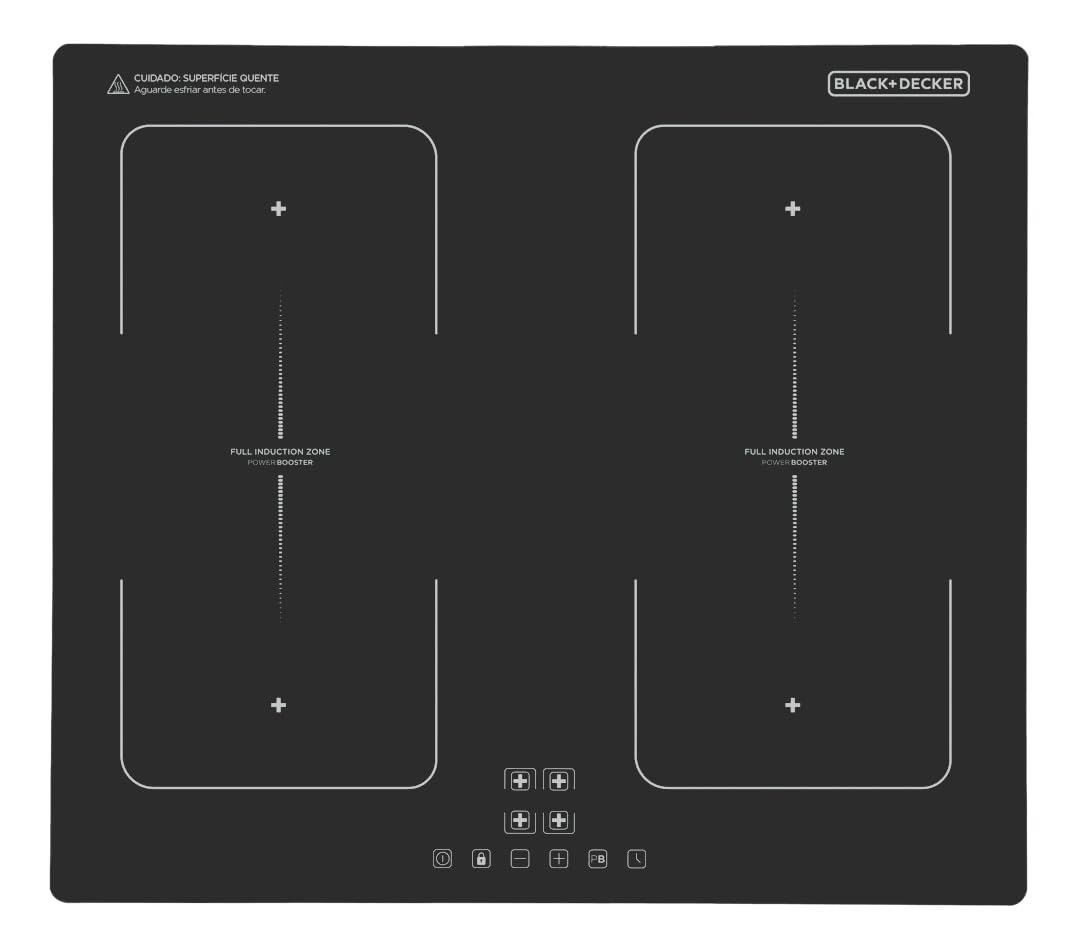
Figure 1: Top-down view of the BLACK+DECKER BXICHCPB4FZT Induction Cooktop, showing the four cooking zones and digital control panel.
Key Features:
- Induction Technology: Ensures rapid and precise heating with full temperature control.
- Power Booster Function: Temporarily increases power for faster cooking, ideal for boiling water quickly.
- Full Zone Expanded Cooking Area: Allows for the use of larger or elongated cookware by combining cooking zones.
- Ceramic Glass Top: Durable, elegant, and easy to clean surface.
- Digital Display: Intuitive touch control panel for easy operation and feedback.
- Safety Lock: Prevents accidental operation, especially useful in households with children.
- Automatic Pan Detection: The cooktop only heats when suitable cookware is placed on the zone.
- Timer Function: For precise cooking control.

Figure 2: Visual representation of key features including high power, energy efficiency, digital display, touch control, ceramic glass top, timer, child safety lock, and automatic pan detection.
Installation Instructions
The BLACK+DECKER BXICHCPB4FZT is a built-in induction cooktop. Professional installation is highly recommended to ensure proper function and safety. Refer to the included installation kit and detailed manual for specific instructions.
Pre-Installation Checklist:
- Power Supply: Ensure a dedicated 220V electrical circuit is available. The total power consumption is 7200W.
- Countertop Cutout: The required cutout dimensions for installation are approximately 56 cm (width) x 49 cm (depth) x 5.5 cm (height).
- Ventilation: Ensure adequate ventilation space around and below the cooktop as specified in the full installation manual.
- Clearances: Maintain minimum clearances from adjacent surfaces and overhead cabinets.
Installation Steps (Summary):
- Prepare the countertop cutout according to the specified dimensions.
- Carefully lower the cooktop into the cutout, ensuring it sits flush with the countertop.
- Secure the cooktop using the provided mounting brackets and screws from the installation kit.
- Connect the electrical wiring to the dedicated 220V power supply, following all local electrical codes. This step must be performed by a qualified electrician.
- Test the cooktop for proper operation before final use.

Figure 3: Side view of the cooktop, illustrating its built-in design and the frame for countertop integration.
Operating Instructions
The cooktop features a touch-sensitive control panel. Ensure your hands are clean and dry when operating the controls.
Suitable Cookware:
Only use cookware made of ferromagnetic material (e.g., cast iron, enameled steel, stainless steel with a magnetic base) with a flat bottom. Cookware must be of appropriate size for the cooking zone.
Basic Operation:
- Power On/Off: Touch the Power symbol to turn the cooktop on or off.
- Select Cooking Zone: Place suitable cookware on the desired cooking zone. Touch the corresponding zone selection button.
- Adjust Power Level: Use the '+' and '-' symbols to adjust the heat level from 1 (low) to 9 (high).
- Power Booster Function: For rapid heating, select a cooking zone and then touch the Booster symbol (often indicated by 'P' or a similar icon). This function temporarily increases the power beyond level 9.
- Full Zone Function: To combine two adjacent cooking zones for larger cookware, select both zones and activate the Full Zone function (refer to the detailed manual for specific button). This allows for even heating across an expanded area.
- Timer Function: Touch the Timer symbol and use '+' and '-' to set the desired cooking time. The cooktop will automatically turn off the selected zone when the timer expires.
- Safety Lock: To activate the safety lock, touch and hold the Lock symbol for a few seconds. This prevents accidental changes to settings. Repeat the action to deactivate.
Product in Action:
The following videos demonstrate key features and operation of the BLACK+DECKER Induction Cooktop. Please note that video content may vary slightly from your specific model.
Video 1: Demonstration of the cooktop's rapid heating capabilities and digital controls.
Video 2: Overview of the Full Zone function and how to use it with larger pots or pans.
Video 3: Guide to activating the Power Booster and Safety Lock features.
Maintenance and Cleaning
Regular cleaning and maintenance will ensure the longevity and optimal performance of your cooktop.
General Cleaning:
- Always ensure the cooktop is turned off and completely cool before cleaning.
- Wipe the ceramic glass surface with a soft cloth and a mild detergent or a specialized ceramic cooktop cleaner.
- For stubborn stains, use a ceramic hob scraper, holding it at a shallow angle.
- Avoid abrasive cleaners, scouring pads, or harsh chemicals that can scratch or damage the surface.
- Dry the surface thoroughly after cleaning to prevent water spots.
Care for the Control Panel:
- Wipe the touch control panel with a soft, damp cloth.
- Do not use excessive water or spray cleaners directly onto the controls.
Troubleshooting
If you encounter issues with your cooktop, refer to the following common problems and solutions before contacting customer service.
| Problem | Possible Cause | Solution |
|---|---|---|
| Cooktop does not turn on. | No power supply; Safety lock activated; Cooktop not properly connected. | Check circuit breaker; Deactivate safety lock; Ensure proper electrical connection (consult electrician if needed). |
| Cooking zone not heating. | Unsuitable cookware; Cookware not centered; Pan detection error. | Use induction-compatible cookware; Center the pan on the zone; Ensure pan base covers at least 70% of the zone. |
| Display shows an error code (e.g., 'E' followed by numbers). | Internal malfunction; Overheating; Voltage fluctuation. | Turn off the cooktop, wait a few minutes, then restart. If the error persists, consult customer support. |
| Cooktop makes humming or buzzing noise. | Normal operation with certain types of cookware; Fan operation. | This is usually normal for induction cooktops and is not a fault. |
Specifications
Detailed technical specifications for the BLACK+DECKER BXICHCPB4FZT Induction Cooktop.
| Feature | Specification |
|---|---|
| Brand | Black+Decker |
| Model Number | BXICHCPB4FZT |
| Installation Type | Built-in |
| Product Dimensions (LxWxH) | 59 cm x 52 cm x 4.5 cm |
| Cutout Dimensions (LxWxH) | 56 cm x 49 cm x 5.5 cm |
| Weight | 7.8 kg |
| Voltage | 220 Volts |
| Total Power | 7200W |
| Burner Power Distribution | 2 zones x 2100W, 2 zones x 1500W |
| Number of Burners | 4 |
| Burner Type | Induction |
| Material | Ceramic Glass |
| Color | Black |
| Special Features | Power Booster Function, Tactile Digital Panel, Resistant Ceramic Glass Top, Safety Lock, Expanded Induction Zone (Full Zone) |
| Components Included | Induction Cooktop, Installation Kit, User Manual |
Warranty and Support
For detailed warranty information, please refer to the warranty card included with your product or visit the official Black+Decker website. For technical support or service inquiries, please contact Black+Decker customer service using the contact information provided in your product documentation.
