
Transformers TF-T93
Contents
Transformers TF-T93 Ear-Clip True Wireless Bluetooth Earbuds User Manual
Model: TF-T93 | Brand: Transformers
Introduction
This manual provides comprehensive instructions for the setup, operation, and maintenance of your Transformers TF-T93 Ear-Clip True Wireless Bluetooth Earbuds. Please read this manual thoroughly before use to ensure optimal performance and longevity of your device.
What's in the Box
- T93 Charging Case
- T93 Wireless Bluetooth Earbuds
- Type-C Charging Cable
- 5” Long Rubber Lace for Charging Case
- User Manual

Image: All components included in the Transformers TF-T93 Earbuds package.
Product Features
- Secure Ear-Clip Ergonomic Design: Lightweight ear-clip structure ensures a stable, pressure-free fit for various activities without ear fatigue.
- Bluetooth 6.0 Stable Connection: Advanced wireless technology delivers faster pairing, stronger signal, and smooth audio transmission within a 28–32 ft (8.5–9.8 m) range.
- Powerful 12mm Dynamic Drivers: Enjoy immersive high-fidelity sound with rich bass, detailed mids, and crisp highs across a full 20Hz–20kHz frequency range.
- Low-Latency Game Mode: Dedicated gaming mode reduces audio delay for synchronized audio cues, ideal for mobile and handheld gaming.
- Dual Modes for Music & Calls: Switch between Hi-Fi Music Mode for enhanced clarity and Game Mode for responsive audio performance.
- Clear Calls with Built-In Mic: Enhanced voice pickup ensures smooth, noise-reduced communication for phone calls, meetings, and gaming chat.
- Zinc Alloy Armor Charging Case: Premium metal case design provides durability, impact protection, and a stylish modern look for everyday carry.
- 24 Hours Total Playtime: Up to 5–6 hours on a single charge plus additional charges from the 300mAh USB-C case for all-day listening.
- Fast Type-C Charging: Convenient USB-C port fully recharges the case in approximately 1.5 hours, keeping your earbuds powered at all times.
- Designed for All Lifestyles: Perfect for music listening, workouts, gaming, travel, commuting, and hands-free calls with comfortable all-day wear.
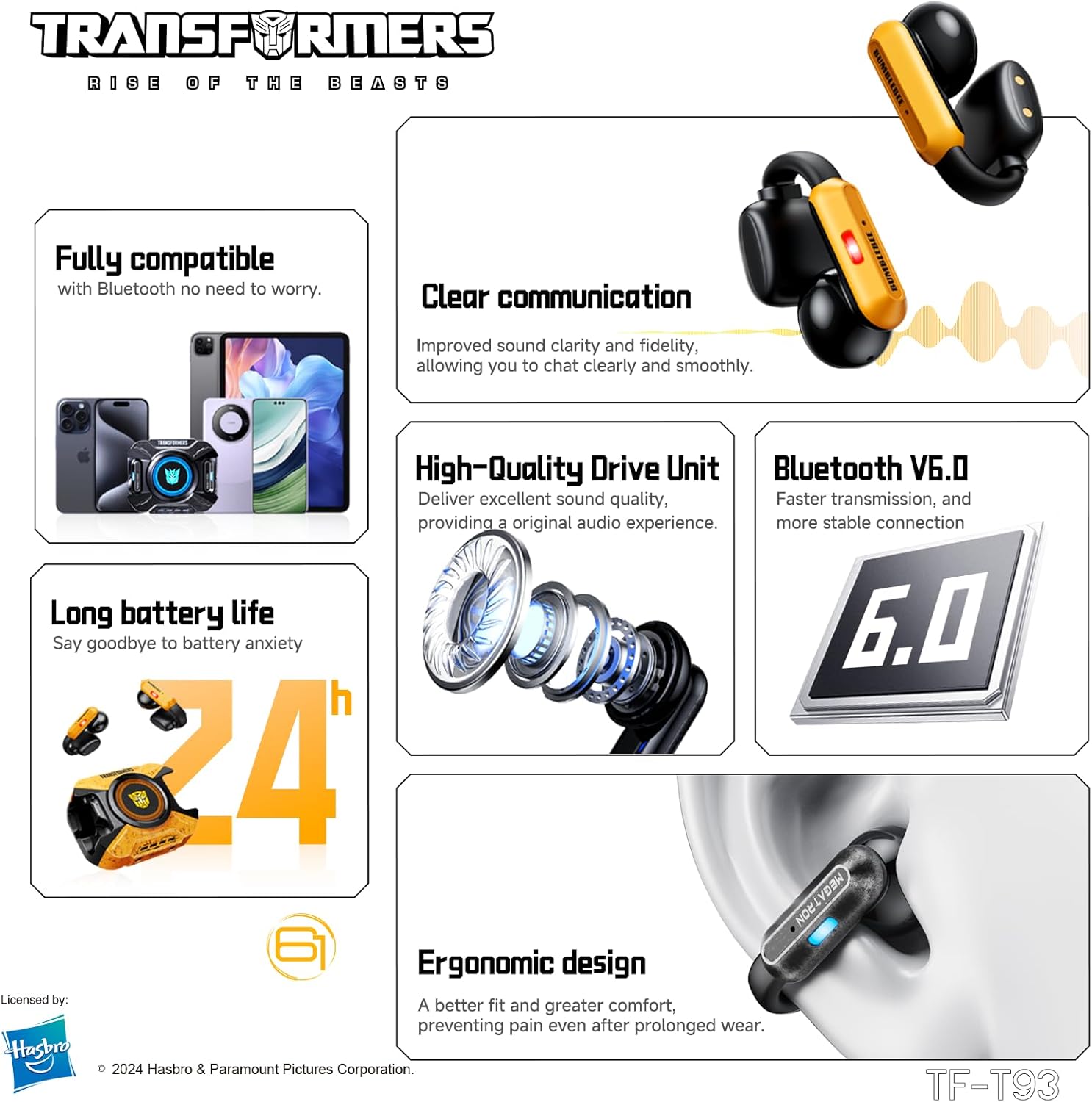
Image: Visual representation of the TF-T93 Earbuds' main features.
Setup
1. Charging the Earbuds and Case
- Place the earbuds into the charging case. Ensure they are properly seated; the indicator lights on the earbuds will illuminate to confirm charging.
- Connect the provided Type-C charging cable to the charging port on the case and a compatible USB power source.
- The charging case will fully recharge in approximately 1.5 hours. The earbuds will charge simultaneously when placed inside the powered case.
2. Initial Pairing with a Device
- Ensure the earbuds are fully charged.
- Open the charging case. The earbuds will automatically enter pairing mode, indicated by flashing lights (refer to specific light patterns in the included user manual for details).
- On your device (smartphone, tablet, laptop), navigate to the Bluetooth settings.
- Search for available devices and select "TF-T93" from the list.
- Once connected, a voice prompt will confirm successful pairing. The earbuds are now ready for use.
Note: After initial pairing, the earbuds will automatically connect to the last paired device when removed from the case, provided Bluetooth is enabled on the device.
Operating Instructions
Touch Controls
The TF-T93 earbuds feature intuitive touch controls on each earbud. The functions may vary slightly depending on the operating system of your connected device.
| Action | Function |
|---|---|
| Single Tap (Left/Right Earbud) | Play/Pause Music, Answer/End Call |
| Double Tap (Right Earbud) | Next Track |
| Double Tap (Left Earbud) | Previous Track |
| Triple Tap (Right Earbud) | Volume Up |
| Triple Tap (Left Earbud) | Volume Down |
| Long Press (2 seconds) | Activate Voice Assistant (Siri, Google Assistant) |
| Long Press (2 seconds during incoming call) | Reject Call |
| Long Press (3 seconds on both earbuds) | Switch between Game Mode and Music Mode |
Power On/Off
- Power On: The earbuds will automatically power on when removed from the charging case.
- Power Off: Place the earbuds back into the charging case to automatically power them off and begin charging.
Wearing the Earbuds
The TF-T93 earbuds feature an ear-clip design for a secure and comfortable fit. Follow these steps for proper placement:
- Identify the Left (L) and Right (R) earbuds.
- Gently place the earbud into your ear canal.
- Adjust the ear-clip portion to rest securely around the outer part of your ear. This ensures stability during movement and reduces pressure on the ear canal.
- Ensure a snug fit to optimize sound quality and passive noise cancellation.

Image: Proper wearing of the TF-T93 Ear-Clip Earbuds for comfort and stability.
Maintenance
- Cleaning: Regularly clean the earbuds and charging case with a soft, dry, lint-free cloth. Avoid using harsh chemicals or abrasive materials.
- Storage: When not in use, always store the earbuds in their charging case to protect them from dust, damage, and to keep them charged.
- Water Resistance: The earbuds are water resistant. However, they are not waterproof. Avoid submerging them in water or exposing them to heavy rain. Dry thoroughly if they get wet.
Troubleshooting
- Earbuds not pairing: Ensure both earbuds are charged and removed from the case. Turn off and on your device's Bluetooth, then try pairing again. If issues persist, reset the earbuds (refer to the included user manual for specific reset instructions).
- Only one earbud working: Place both earbuds back into the charging case, close the lid, wait a few seconds, then open the lid and remove them. This often re-syncs them.
- Low volume or poor sound quality: Ensure the earbuds are properly seated in your ears. Check the volume levels on both your device and the earbuds. Clean any debris from the earbud speakers.
- Charging issues: Ensure the charging cable is securely connected to both the case and the power source. Check if the charging port is clean and free of debris.
Specifications
| Feature | Detail |
|---|---|
| Model Name | TF-T93 |
| Connectivity Technology | Bluetooth, Wireless |
| Bluetooth Version | 6.0 |
| Bluetooth Range | Up to 9.8 meters (32 feet) |
| Audio Driver Type | Dynamic Driver (12mm) |
| Frequency Response | 20Hz - 20kHz |
| Battery Life (Earbuds) | 5-6 Hours (single charge) |
| Total Playtime (with case) | Up to 24 Hours |
| Charging Case Material | Zinc Alloy Armor Case |
| Charging Port | USB-C |
| Charging Time (Case) | Approx. 1.5 Hours |
| Noise Control | Passive Noise Cancellation |
| Control Type | Touch Control |
| Water Resistance Level | Water Resistant |
| Item Weight | 5.3 Ounces |
Warranty and Support
For warranty information, technical support, or customer service inquiries, please refer to the official Transformers product website or contact the retailer where you purchased the product. Keep your proof of purchase for warranty claims.
Documents and downloads
Ask a question about this manual
Ask about setup, troubleshooting, compatibility, parts, safety, or missing instructions. Manuals+ will review the question and use this page’s manual context to help answer it.