
1. Overview
The SANUS Preferred SLT4 Advanced Tilt Premium TV Wall Mount is designed to provide maximum tilt for large TVs, extending 5.7 inches from the wall for increased tilt range and reduced glare. This extension also facilitates easy access to cables and wires for initial setup and future adjustments. Its open wall plate design allows mounting directly over electrical outlets for a clean installation. The mount supports side-to-side TV centering, and offers fine-tuning for height and level after installation. For added security, the TV can be padlocked to the mount (padlock sold separately).

An installed TV using the SANUS Preferred Extendable Tilt TV Wall Mount, showcasing its sleek appearance in a living room.
2. Features
- Universal Compatibility: Built to support all major TV brands, this wall mount fits 42”–90” TVs and accommodates VESA patterns ranging from 200x100 to 600x415.
- Optimal Viewing: Tilt 12 degrees down and 5 degrees up to reduce glare, improve comfort, and achieve the perfect viewing angle. 5.7 inches of extension allows even the largest screens to reach maximum tilt and provides easy access to cables.
- Durable Construction: Made from premium steel and UL Listed for safety, this TV mount is rigorously tested to securely hold TVs up to 150lbs.
- Easy Installation: Features a streamlined 3-step installation process, an included drill template for accurate placement, and an extensive pre-sorted hardware kit for universal mounting.
- Precision Positioning: Easily center your TV, even with off-center studs, thanks to 9” of lateral shift, 1” of height adjustment, and post-install leveling for a fine-tuned finish.
- Enhanced Security: The mount allows for securing the TV with a padlock (sold separately) for additional safety in various settings.
3. What's in the Box
- Wall Plate
- Vertical Brackets
- Drilling Template
- Hardware Kit
- Instruction Manual
4. Tools Needed
Standard Tools:
- Phillips Screwdriver
- Tape Measure
- Pencil
- Level
- Tape
- Electric Drill
- 7/32 inch Wood Drill Bit
- 1/2 inch Socket Wrench
- Stud Finder
- Awl
Additional Tools for Concrete Installation:
- Hammer
- 3/8 inch Drill Bit
5. Setup and Installation
Follow these steps carefully for a secure and proper installation. It is recommended to have assistance when lifting and mounting the TV.
Official installation video for the SANUS Preferred Extendable Tilt TV Wall Mount. This video provides a visual guide for each step of the installation process.
- Unpack Components: Place the product package on a flat, stable surface or floor. Carefully remove all parts and ensure nothing is missing.
- Attach Brackets to TV: Secure the vertical brackets to the back of your TV using the provided hardware. Ensure they are firmly attached and aligned correctly with your TV's VESA pattern.

Attaching the vertical brackets to the back of the TV using a screwdriver.
- Find and Mark Studs: Use a stud finder to accurately locate and mark the center of the wall studs where the mount will be installed. This is crucial for secure mounting.
- Position Template: Hold the drilling template over the marked stud locations. Use a level to ensure the template is perfectly horizontal, then secure it to the wall with tape.
- Mark Holes and Drill: Mark the drill points through the template. Use an electric drill with the appropriate drill bit (7/32 inch for wood studs, 3/8 inch for concrete) to drill pilot holes at the marked locations.
- Secure Wall Plate: Align the wall plate with the drilled holes and secure it to the wall using the provided lag bolts and a 1/2 inch socket wrench. Tighten firmly to ensure stability.

The open wall plate design allows mounting over electrical outlets for a clean finish.
- Hang TV on Wall Plate: With the help of another person, extend the TV brackets and carefully lift the TV. Hook the brackets onto the wall plate. Listen for a distinct click to confirm the TV is securely engaged on the mount.
- Adjust Level and Height (ProSet™): Use the integrated ProSet™ adjustment feature to fine-tune the TV's level and height after installation. This allows for minor corrections without removing the TV.

Adjusting the TV's level and height after installation using the ProSet™ feature.
- Adjust Tilt Tension: Adjust the tilt tension to achieve your desired viewing angle and reduce glare. The mount allows for tilting up to 12 degrees down and 5 degrees up.
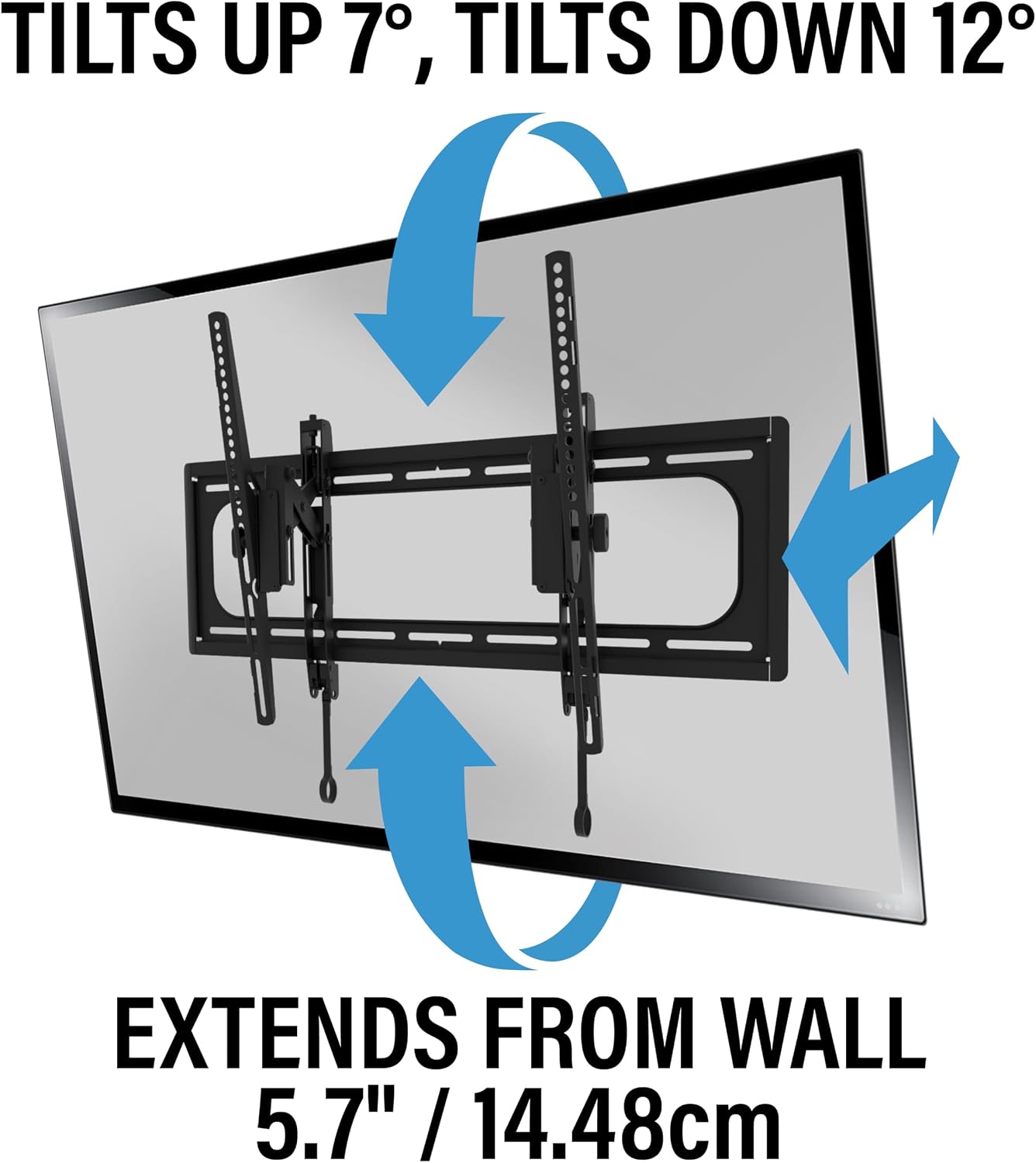
Illustrates the tilt range (up 7°, down 12°) and 5.7 inches of extension from the wall.

Demonstrates the maximum tilt range achievable for large TVs.
- Side-to-Side Positioning: Utilize the side-to-side shift feature to perfectly center your TV on the wall, even if the wall studs are not ideally positioned.

Sliding the TV horizontally for precise positioning on the wall.
- Cable Access: The 5.7-inch extension allows easy access to cables and ports behind the TV for connecting or disconnecting devices.
A hand connecting a cable to the TV, demonstrating easy access due to the mount's extension.
- Security (Optional): For additional security, a padlock can be used to secure the TV to the mount (padlock sold separately).

A padlock securing the TV mount to the wall for enhanced safety.
6. Operating the Mount
Once installed, the SANUS Preferred Extendable Tilt TV Wall Mount offers flexible viewing options and convenient access.
- Tilt Functionality: The mount allows for tilting the TV 12 degrees downwards and 5 degrees upwards. This helps in reducing glare from windows or lights and optimizing the viewing angle, especially for above-eye-level installations. Gently push or pull the top or bottom of the TV to adjust the tilt.
- Extension for Access: The mount extends 5.7 inches from the wall. This feature is crucial for easily accessing the TV's rear ports for connecting or disconnecting cables without needing to remove the TV from the mount. Gently pull the TV forward from the wall to extend it.
- Post-Installation Adjustments:
- Leveling: Use the ProSet™ feature to adjust the TV's level after it has been mounted.
- Height Adjustment: Small height adjustments can also be made post-installation using the ProSet™ system.
- Side-to-Side Shift: The TV can be slid horizontally along the wall plate to achieve perfect centering.
Official features video for the SANUS Extendable Tilt TV Wall Mount. This video highlights the key operational aspects and benefits of the mount.
7. Maintenance
Proper maintenance ensures the longevity and optimal performance of your TV wall mount.
- Cleaning: Regularly wipe the mount and TV with a soft, dry cloth to remove dust. Avoid abrasive cleaners or solvents, as these can damage the finish.
- Inspection: Periodically check all screws and bolts to ensure they remain tight and secure. Do not overtighten. If any components appear damaged or worn, contact customer support.
- Movement: When adjusting the TV's tilt or extension, do so gently and smoothly to prevent undue stress on the mount or TV. Avoid sudden or forceful movements.
8. Troubleshooting
If you encounter any issues with your SANUS TV wall mount, refer to the following common solutions:
- TV Not Level: If your TV appears unlevel after installation, use the ProSet™ height and leveling adjustments on the mount to correct its horizontal alignment.
- Difficulty Tilting/Extending: Check for any obstructions behind the TV or on the mount's arms that might be impeding movement. Ensure the tilt tension is not overtightened. Loosen the tension slightly if movement is too stiff.
- Mount Feels Loose: Re-check all lag bolts securing the wall plate to the wall studs and the screws attaching the vertical brackets to the TV. Ensure they are tightened securely. If the issue persists, consult a professional installer or customer support.
- Cables Not Reaching: The 5.7-inch extension is designed for cable access. If your cables are still too short, consider purchasing longer cables or exploring alternative cable management solutions.
9. Specifications
| Brand | Sanus |
| Model | SLT4-B1 |
| TV Size Range | 42" to 90" |
| Weight Capacity | Up to 150 lbs |
| VESA Compatibility | 200x100 to 600x415 |
| Tilt Range | 12 degrees down, 5 degrees up |
| Extension from Wall | 5.7 inches |
| Lateral Shift | 9 inches |
| Height Adjustment | 1 inch |
| Material | Metal |
| Color | Black |
| UL Certified | Yes |
| UPC | 793795535511 |
10. Warranty
This SANUS product is backed by a 10-year warranty, ensuring peace of mind regarding its quality and durability. For detailed warranty terms and conditions, please refer to the official SANUS website or contact customer support.
11. Support
For technical assistance, installation support, or any questions regarding your SANUS Preferred Extendable Tilt TV Wall Mount, please contact our U.S.-based customer care team. They are available 7 days a week to assist you.
- Phone: 1-800-359-5520
- Email: Refer to product packaging or the official SANUS website for the most current email address.


