
1. Introduction
The adorcam D5 is a wireless 4G LTE solar-powered security camera designed for outdoor surveillance in locations without traditional WiFi or power infrastructure. It features a 2K resolution sensor, 355° pan and 90° tilt capabilities, full-color night vision, and active deterrence functions. The integrated solar panel and 9000mAh battery provide continuous operation, making it ideal for remote areas such as farms, ranches, job sites, cabins, and RVs.

Image 1.1: The adorcam D5 4G Solar Security Camera, showcasing its solar panel, 4G connectivity, and weather-resistant design. It highlights features like solar power, 5-minute setup, and IP66 rating for extreme conditions.

Image 1.2: Examples of suitable environments for the adorcam D5 camera, such as farms, construction sites, remote cabins, and RVs, emphasizing its versatility for off-grid security.
2. Setup and Installation
The adorcam D5 camera is designed for quick and easy installation, typically within 5 minutes, requiring no special tools or complex wiring.
2.1 What's in the Box
- adorcam D5 Camera Unit
- Solar Panel
- Mounting Bracket and Screws
- User Manual
- Pre-installed SIM Card
2.2 Initial Charging and Power
The camera is powered by a 9000mAh built-in battery, continuously charged by a 3W high-efficiency solar panel. For optimal performance, ensure the solar panel is positioned to receive maximum direct sunlight. Approximately 30 minutes of direct sunlight can provide enough charge for 24 hours of operation.
2.3 SIM Card Activation and Data Plan
The camera comes with a ready-to-use SIM card for 4G LTE connectivity. A data plan is required for the camera to function. Plans are available starting from $19.99/month, with options for 6-month ($99.99) and annual ($169.99) subscriptions. A 14-day free trial is typically included to verify functionality in your specific location.

Image 2.1: Illustrates the simplicity of the adorcam D5 setup, highlighting the 5-minute installation process and transparent data plan options for 4G connectivity.
2.4 App Installation and Pairing
- Download the "Adorbee" app from your smartphone's app store (available for iOS and Android).
- Create an account or log in if you already have one.
- Follow the in-app instructions to add your new adorcam D5 camera. This typically involves scanning a QR code on the camera.
2.5 Mounting the Camera
The camera is designed for wall mounting. Choose a location that provides the desired viewing angle and ensures the solar panel receives ample sunlight throughout the day. Use the provided mounting bracket and screws to securely attach the camera to a stable surface.
- Ensure the mounting surface is strong enough to support the camera.
- Position the solar panel to face the sun for maximum charging efficiency.
- Adjust the camera's angle after mounting to cover the desired surveillance area.
3. Operating Instructions
Once set up, the adorcam D5 camera can be fully controlled and monitored through the "Adorbee" smartphone application.
3.1 Live View and Remote Monitoring
- Open the "Adorbee" app on your smartphone.
- Select your camera from the device list to access the live video feed.
- Monitor your property in real-time from anywhere with cellular service.
3.2 Pan, Tilt, and Zoom (PTZ) Control
The camera features motorized pan (355°), tilt (90°), and 4x digital zoom capabilities, allowing you to adjust the viewing area remotely.
- Use the directional controls within the "Adorbee" app to pan and tilt the camera lens.
- Pinch-to-zoom on the live feed to digitally zoom in up to 4x.

Image 3.1: Demonstrates the camera's 2K full-color night vision, 355° pan, 90° tilt, and active deterrence features like spotlight, siren, and two-way talk, providing comprehensive coverage for areas like job sites.
3.3 Night Vision
The adorcam D5 provides 2K full-color night vision up to 32 feet. When motion is detected at night, the integrated spotlight activates to illuminate the area, enabling color recording.
3.4 Motion Detection and Alerts
The camera is equipped with PIR motion detection. When motion is detected:
- You will receive instant alerts on your smartphone via the "Adorbee" app.
- The camera can trigger a spotlight and a 95dB siren to deter intruders.
- Recordings are initiated and saved to storage.
3.5 Two-Way Audio
Utilize the built-in microphone and speaker for two-way communication. This allows you to listen to the camera's surroundings and speak through the camera from your smartphone.
3.6 Video Storage
The camera supports two storage methods for recorded footage:
- MicroSD Card: Supports up to 256GB microSD cards (not included). Footage is recorded locally.
- Cloud Backup: A 30-day free trial of cloud storage is provided. Cloud backup ensures your footage is safe even if the camera is physically compromised.

Image 3.2: Illustrates the dual storage solution of the adorcam D5, offering both local microSD card storage (up to 256GB) and secure cloud backup with a 30-day free trial.
4. Maintenance
Proper maintenance ensures the longevity and optimal performance of your adorcam D5 camera.
4.1 Cleaning
- Regularly wipe the camera lens and solar panel with a soft, damp cloth to remove dust, dirt, or debris. This ensures clear image quality and efficient solar charging.
- Avoid using harsh chemicals or abrasive materials that could damage the camera's surface or lens.
4.2 Weather Resistance
The camera is IP66-rated, making it waterproof and dustproof. It is designed to operate reliably in extreme temperatures ranging from -4°F to 131°F (-20°C to 55°C). No special weather-proofing maintenance is typically required beyond ensuring secure mounting.
4.3 Battery and Solar Panel Performance
- Periodically check the battery level via the "Adorbee" app.
- Ensure the solar panel remains unobstructed by foliage, snow, or other objects to maximize charging efficiency.
- In prolonged periods of low sunlight, the battery may deplete faster. Consider temporary manual charging if necessary, though the system is designed for 365-day non-stop solar power under normal conditions.
5. Troubleshooting
This section addresses common issues you might encounter with your adorcam D5 camera.
5.1 Camera Not Connecting / No Signal
- Check 4G Coverage: Ensure there is adequate cellular signal in the camera's location. The camera operates on AT&T, Verizon, and T-Mobile networks.
- SIM Card: Verify the SIM card is correctly inserted and activated with an active data plan.
- Battery Level: Confirm the camera battery has sufficient charge. If low, ensure the solar panel is receiving direct sunlight.
- Restart Camera: Power cycle the camera if possible.
5.2 Poor Image Quality / Blurry Video
- Clean Lens: Gently clean the camera lens with a soft, dry cloth.
- Network Signal: A weak 4G signal can sometimes affect video streaming quality.
5.3 Motion Detection Not Working
- App Settings: Check the motion detection settings within the "Adorbee" app to ensure it is enabled and sensitivity levels are appropriate.
- Obstructions: Ensure there are no physical obstructions blocking the PIR sensor.
5.4 Solar Panel Not Charging Effectively
- Sunlight Exposure: Re-position the solar panel to ensure it receives maximum direct sunlight throughout the day.
- Clean Panel: Clean any dirt, dust, or debris from the solar panel surface.
5.5 Two-Way Audio Issues
- App Volume: Check the volume settings on your smartphone and within the "Adorbee" app.
- Microphone/Speaker Obstruction: Ensure the camera's microphone and speaker are not blocked.
- Network Latency: Poor 4G signal can cause delays or interruptions in two-way audio.
6. Specifications
| Feature | Specification |
|---|---|
| Model Name | D5 |
| Brand | adorcam |
| Connectivity Technology | 4G LTE Cellular |
| Video Capture Resolution | 2K |
| Night Vision | Full-Color Night Vision (up to 32 ft) |
| Pan/Tilt/Zoom | 355° Pan, 90° Tilt, 4x Digital Zoom |
| Power Source | Solar Powered (3W Solar Panel) & 9000mAh Rechargeable Battery |
| Weather Resistance | IP66 Waterproof Rating |
| Operating Temperature | -4°F to 131°F (-20°C to 55°C) |
| Storage Options | MicroSD Card (up to 256GB, not included), Cloud Storage |
| Audio | Two-Way Audio (Built-in Microphone & Speaker) |
| Alert Type | Audio and Motion (PIR) |
| Control Method | Smartphone App ("Adorbee") |
| Mount Type | Wall Mount (Screw In) |
| Item Dimensions | 7.9 x 5.5 x 5.35 inches |
| Item Weight | 0.94 Pounds |
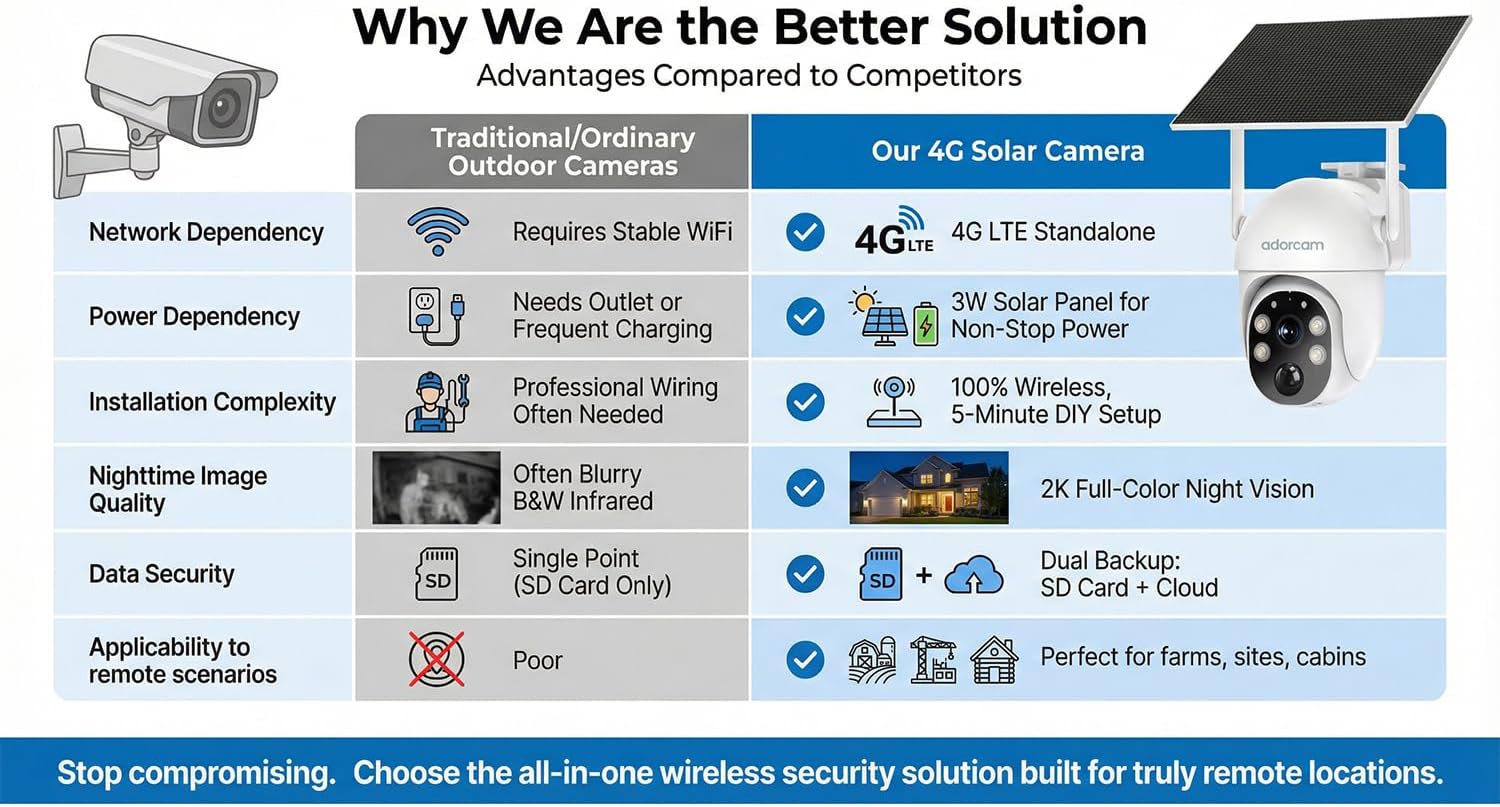
Image 6.1: A comparative table highlighting the superior features of the adorcam 4G Solar Camera, such as 4G LTE standalone operation, solar power, 5-minute DIY setup, 2K full-color night vision, and dual backup, compared to traditional cameras.
7. Warranty Information
The adorcam D5 4G Solar Security Camera is backed by a 2-year manufacturer's warranty. This warranty covers defects in materials and workmanship under normal use. For warranty claims or detailed terms and conditions, please refer to the official adorcam website or contact customer support.
8. Customer Support
For further assistance, technical support, or inquiries regarding your adorcam D5 camera, please contact adorcam customer service. You can typically find contact information on the official adorcam website or within the "Adorbee" application.
Manufacturer: AdorcamTechnology Co.,Ltd