
Introduction
This manual provides instructions for the setup, operation, maintenance, and troubleshooting of your VALDUS VG46 Pro Smart Watch. Please read this manual thoroughly before using the device to ensure proper function and longevity.
Package Contents
- 1 x VALDUS VG46 Pro Smart Watch
- 1 x Magnetic Charging Cable
- 1 x User Manual
Setup
1. Charging the Device
Before first use, fully charge the smart watch. Connect the magnetic charging cable to the charging contacts on the back of the watch and to a USB power source. The watch display will indicate charging status.

Image: VALDUS VG46 Pro Smart Watch on its charging stand.
2. Installing the GloryFitPro App
The VALDUS VG46 Pro Smart Watch requires the GloryFitPro application for full functionality. Download the app from your smartphone's app store (available for Android and iOS devices).
3. Pairing with Your Smartphone
- Ensure Bluetooth is enabled on your smartphone.
- Open the GloryFitPro app and follow the on-screen instructions to create an account or log in.
- In the app, navigate to the device pairing section and select the VG46 Pro from the list of available devices.
- Confirm the pairing request on both your smartphone and the watch.
Operating Instructions
Basic Navigation
- Touchscreen: Swipe left, right, up, or down to navigate through menus and features. Tap to select.
- Side Buttons: The watch features multiple side buttons (e.g., "POWER", "CUSTOM", "GPS", "SPORT") for quick access to specific functions or to return to the home screen. Refer to the watch's on-screen prompts for specific button assignments.
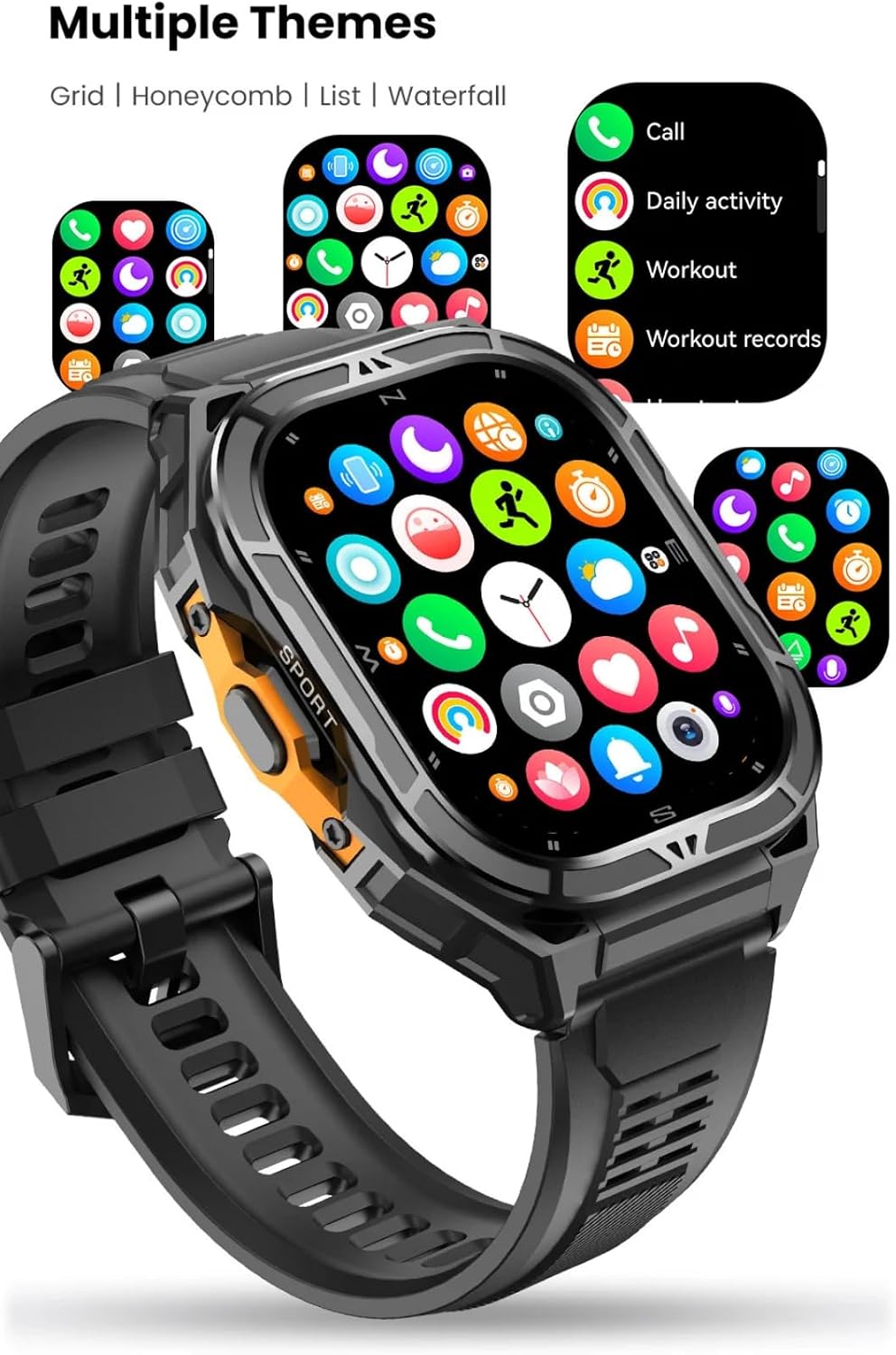
Image: VALDUS VG46 Pro Smart Watch showing various interface themes.
Health Monitoring
The VG46 Pro monitors various health metrics:
- Heart Rate: Continuous heart rate monitoring using the VC30F-S sensor. View real-time data on the watch or in the GloryFitPro app.
- Blood Oxygen (SpO2): Measure your blood oxygen saturation levels.
- Sleep Tracking: Automatically tracks sleep patterns, including deep sleep, light sleep, and wake times.
- Sedentary Reminder: The watch can alert you when you have been inactive for too long, encouraging movement.

Image: Smart Watch displaying health metrics on a user's wrist.
Sport Modes and GPS
The watch supports over 100 sport modes. Select your activity to track specific metrics. The built-in dual-band GPS (L1 + L5) provides accurate positioning and route tracking for outdoor activities.
- To start a workout: Navigate to the "Sport" menu, select your desired activity, and press start.
- GPS tracking: Ensure you are in an open area for optimal GPS signal acquisition. The watch will display GPS status.
- Route Return: The watch supports both Same-Route and Straight-Line Return functions for navigation back to your starting point.

Image: Smart Watch interface showing available sport modes.

Image: Smart Watch displaying GPS navigation, compass, altitude, and barometric pressure.
Outdoor Sensors (Compass, Altimeter, Barometer)
The watch integrates a compass, altimeter, and barometer for outdoor data:
- Compass: Provides real-time directional data.
- Altimeter: Measures current altitude.
- Barometer: Records atmospheric pressure changes.

Image: Smart Watch displaying compass and other metrics.
Bluetooth Calling and Notifications
With Bluetooth 5.3, the watch supports making and receiving calls directly from your wrist when connected to your smartphone. It also displays notifications from your paired phone.
- Answering Calls: Tap the green icon on the watch screen when a call comes in.
- Making Calls: Use the dialer or contact list on the watch (synced via the app).
- Notifications: Enable desired app notifications in the GloryFitPro app settings.
SOS Emergency Call
The watch features an SOS emergency call function. Configure emergency contacts within the GloryFitPro app. In an emergency, activate the SOS function (refer to app settings for specific activation method) to call your designated contacts.
Maintenance
Cleaning the Watch
- Wipe the watch and strap with a soft, damp cloth.
- Avoid using harsh chemicals or abrasive materials.
- Ensure the charging contacts are clean and dry before charging.
Water Resistance (5ATM)
The VG46 Pro is 5ATM water resistant, suitable for swimming, rain, and sweat. It is not recommended for diving or high-pressure water activities.
Water Drainage Function
After exposure to water, use the watch's water drainage function to expel water from the speaker and microphone holes. This function typically involves vibrating the watch to clear water. Refer to the watch's settings or the GloryFitPro app for how to activate this feature.

Image: Smart Watch demonstrating 5ATM water resistance and water drainage feature.
Troubleshooting
Watch Not Turning On
- Ensure the watch is fully charged. Connect it to the magnetic charger and allow it to charge for at least 30 minutes.
- Press and hold the power button for several seconds.
Cannot Pair with Smartphone
- Make sure Bluetooth is enabled on your smartphone and the watch.
- Ensure the GloryFitPro app is installed and running.
- Restart both your smartphone and the watch.
- Try unpairing and re-pairing the device through the GloryFitPro app.
- Ensure the watch is not already paired with another device.
Inaccurate GPS Readings
- Ensure you are in an open outdoor area with a clear view of the sky.
- Avoid areas with tall buildings, dense foliage, or strong electromagnetic interference.
- Allow the watch sufficient time to acquire a GPS signal before starting an activity.
Short Battery Life
- Frequent use of GPS, continuous heart rate monitoring, and high screen brightness can reduce battery life.
- Adjust settings in the GloryFitPro app to optimize battery usage.
- Ensure the watch is fully charged each time.
Specifications
| Feature | Detail |
|---|---|
| Model | VG46 Pro |
| Display | 1.96-inch AMOLED, 410x520 pixel resolution |
| GPS | Dual-Band (L1 + L5) |
| Bluetooth | Version 5.3 |
| Water Resistance | 5ATM |
| Battery Capacity | 530 mAh Lithium Ion |
| Battery Life | Up to 15 days (active use), 30 days (standby) |
| Heart Rate Sensor | VC30F-S |
| G-Sensor | STK8321 (for step tracking) |
| Internal Storage Capacity | 256 MB |
| Compatible App | GloryFitPro |
| Compatible Phone OS | Android & iOS |
| Dimensions (Package) | 19.9 x 17.6 x 5.5 cm |
| Weight (Product) | 250 g |
| Certifications | CE, RoHS, FCC |
Note: Specifications are subject to change without prior notice.
Warranty and Support
Warranty Information
The VALDUS VG46 Pro Smart Watch comes with a 1-year warranty from the date of purchase. This warranty covers manufacturing defects. It does not cover damage caused by misuse, accidents, unauthorized modifications, or normal wear and tear. Please retain your proof of purchase for warranty claims.
Customer Support
For technical assistance, troubleshooting, or warranty inquiries, please contact VALDUS customer support through the contact information provided on the official VALDUS website or through your retailer.
