
1. Product Overview
The Garvee 8000BTUs Portable Air Conditioner is a versatile unit designed to provide cooling, dehumidification, and fan functions for spaces up to 350 sq. ft. Its portable design with caster wheels allows for easy relocation, making it suitable for various rooms such as kitchens, bedrooms, home offices, and small studios. The unit features user-friendly controls, including a remote control and an LED panel, along with a 24-hour programmable timer and an adjustable thermostat (62°F–86°F). Operating at a low noise level of 48 dB, it also includes a sleep mode for quiet, energy-saving operation. With a CEER rating of 6.2, this appliance is designed for energy efficiency.
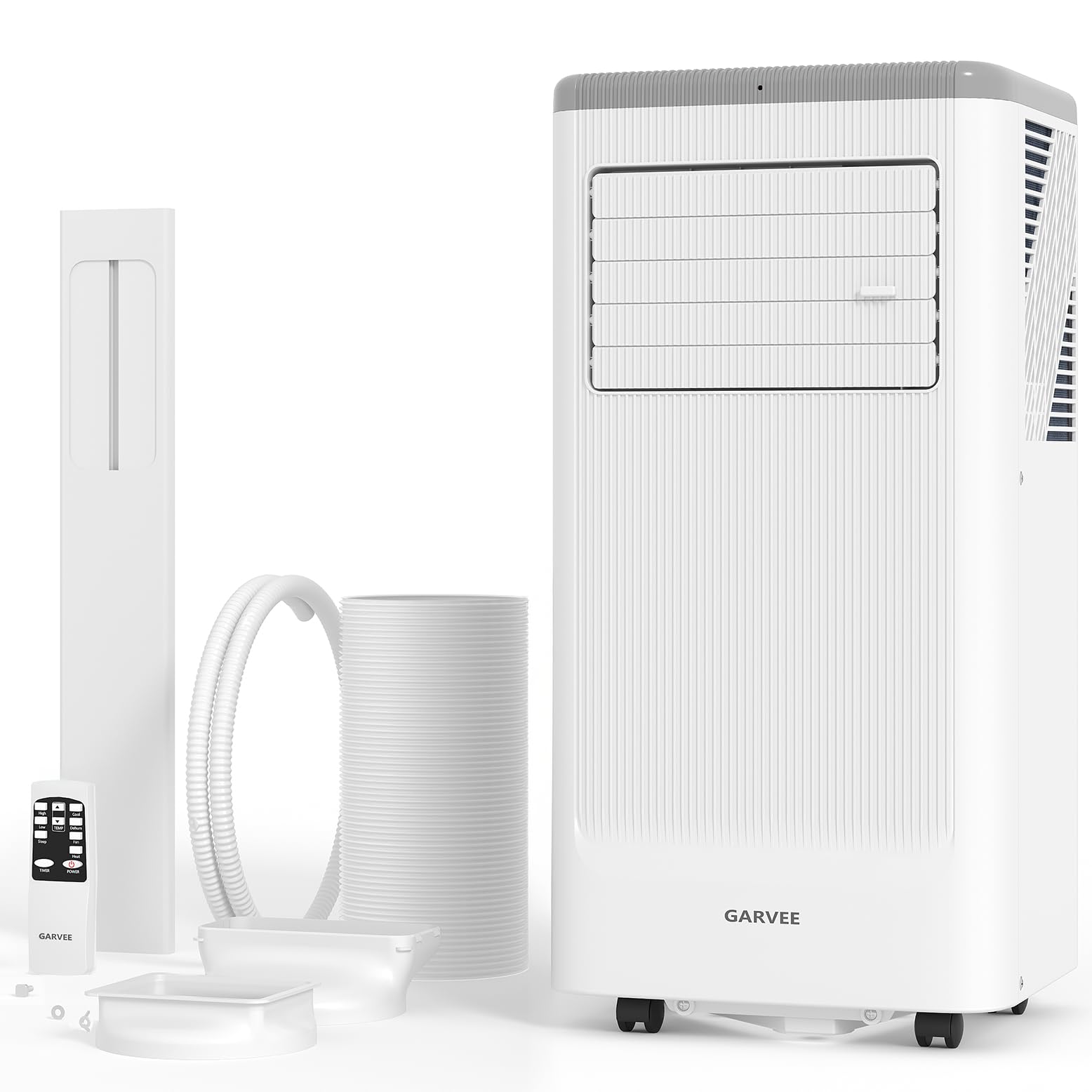
Figure 1: Front view of the Garvee 8000BTUs Portable Air Conditioner.
2. What's in the Box
Your Garvee Portable Air Conditioner package includes all necessary components for quick setup and operation. Please ensure all items are present before beginning installation.
- AC Unit
- Windows Boards (1 set)
- Hose
- Drainage Pipe
- Hose Coupler To Machine
- Hose Coupler
- Remote Control
- Filters

Figure 2: All components included in the Garvee Portable AC package.
3. Setup and Installation
The Garvee Portable Air Conditioner is designed for quick and easy installation without professional assistance. Follow these steps to set up your unit:
- Assemble Exhaust Hose: Attach the air outlet adapter and the window slider adapter onto either end of the exhaust hose.
- Connect to Unit: Insert the air outlet adapter into the back of the appliance by placing it over the air exhaust and then pushing in the direction of the arrow to lock into place.
- Install Window Slider Kit: Adjust the window slider kit to fit your window opening (compatible with both double-hung and sliding windows). Secure it in place.
- Connect Exhaust Hose to Window Kit: Attach the other end of the exhaust hose (with the window slider adapter) to the opening in the window kit.
- Position Unit: Place the unit on a flat, leveled surface at least 50cm (approximately 20 inches) away from walls and other objects to ensure proper airflow.
- Power On: Plug the unit into a standard 115V electrical outlet.

Figure 3: Visual guide for installing the window kit and exhaust hose for the portable AC.

Figure 4: Detailed steps for connecting the hose and window kit for optimal setup.
Video 1: Official Garvee demonstration of the Portable AC unit, including setup overview.
4. Operating Instructions
The Garvee Portable Air Conditioner offers multiple operating modes and user-friendly controls via its LED panel and remote control.
Control Panel and Remote Control
The unit features an intuitive LED display panel on top and comes with a remote control for convenient operation from a distance. Both allow you to adjust settings such as temperature, fan speed, and operating mode.

Figure 5: The unit's top control panel and included remote control for easy adjustments.
Operating Modes
- Cooling Mode: Provides efficient cooling with precise temperature control (62°F–86°F).
- Dehumidifier Mode: Reduces humidity in the air, with a capacity of up to 50 pints/day.
- Fan Mode: Circulates air with two-speed settings (low/high) without cooling.
- Sleep Mode: Turns off display lights and operates at a quieter, energy-saving level for undisturbed rest.

Figure 6: The four versatile operating modes of the Garvee Portable AC.
Timer Function
Utilize the 24-hour programmable timer to set the unit to automatically turn on or off according to your schedule, optimizing energy use and convenience.

Figure 7: The 24-hour timer allows for preset cooling and automatic shut-off.
5. Maintenance
Regular maintenance ensures optimal performance and longevity of your Garvee Portable Air Conditioner.
Cleaning the Air Filter
The unit is equipped with a removable and washable mesh air filter. Regularly clean the filter to ensure efficient air purification and maintain strong cooling performance. Simply slide out the filter, wash it with mild soap and water, let it dry completely, and reinsert it.

Figure 8: The removable and washable air filter helps maintain fresh and clean air.
Draining Condensate
In high humidity conditions, the internal tank may fill. The unit will indicate 'WATER FULL' on the display and shut off. Open the drain plug and place a container to empty the tank. For continuous drainage, connect the provided drainage hose to the middle port.
6. Specifications
| Feature | Specification |
|---|---|
| Brand | Garvee |
| Model Name | portable |
| Model Number | PHO_3568-WhiteGrey |
| Cooling Power | 8000 British Thermal Units (ASHRAE) / 5000 BTU (DOE) |
| Coverage Area | Up to 350 sq. ft. |
| Noise Level | 48 Decibels |
| Dehumidification Capacity | 50 pints/day |
| Energy Efficiency (CEER) | 6.2 |
| Annual Energy Consumption | 585 Kilowatt Hours |
| Product Dimensions | 11.81"D x 13.39"W x 27.32"H |
| Item Weight | 41 Pounds |
| Voltage | 115 Volts |
| Refrigerant | R-32 |
| Control Method | Remote, Touch |
| Filter Type | Mesh Filter |
7. Warranty and Support
The Garvee Portable Air Conditioner comes with a 2-year manufacturer's limited warranty. For support, claims, or more detailed information, please refer to the user manual or visit the official Garvee website.
Manufacturer: Garvee
Warranty Description: 2 Year Manufacturer
Support Link: Visit the Garvee Store