
1. Product Overview
The Audio Array AM-W23 is a magnetic wireless microphone system designed for high-quality audio recording with smartphones, tablets, laptops, and other compatible devices. It features 24-bit/48kHz audio capture, AI noise reduction, a magnetic clip for versatile wearing, and a portable charging pouch for extended battery life. This manual will guide you through the setup, operation, and maintenance of your AM-W23 microphone system.
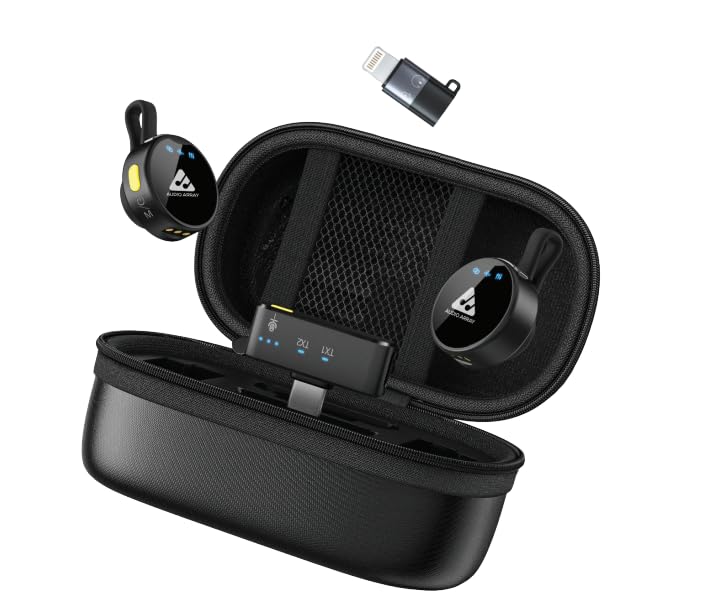
Image: The Audio Array AM-W23 wireless microphone system, including two microphones, a USB-C receiver, and a charging pouch.
2. Package Contents
Verify that all items are present in your package:
- 1x Charging Pouch
- 2x Wireless Microphones (Transmitters)
- 1x USB-C Receiver
- 1x USB A to C Charging Cable
- 1x USB-C to Lightning Adapter
- 1x User Manual (this document)
3. Setup Guide
3.1. Initial Charging
Before first use, fully charge the charging pouch and microphones. Connect the USB A to C charging cable to the charging pouch and a power source (e.g., USB wall adapter, computer USB port). The indicator lights on the pouch and microphones will show charging status.

Image: The AM-W23 charging pouch with microphones inserted, illustrating the charging process. The system offers up to 50 hours of total battery life, with 10 hours from the dual mics and 40 hours from the charging case.
3.2. Connecting the Receiver
The AM-W23 receiver is designed for plug-and-play convenience.
- For USB-C Devices (Android, iPad, Laptop): Plug the USB-C receiver directly into your device's USB-C port.
- For Lightning Devices (iPhone): Attach the USB-C to Lightning adapter to the USB-C receiver, then plug the assembly into your iPhone's Lightning port.
The receiver does not require a separate power source and will draw power from your connected device.

Image: Illustration showing the USB-C receiver and the Lightning adapter, demonstrating compatibility with various devices including iPhones, Android phones, iPads, and laptops.
3.3. Automatic Pairing
Once the microphones are removed from the charging pouch and the receiver is connected to your device, the system will automatically pair within approximately 1 second. No manual pairing steps are required. A successful connection is indicated by a solid blue light on the microphone(s) and receiver.
4. Operating Instructions
4.1. Wearing the Microphone
The AM-W23 microphones feature a magnetic clip for easy attachment. Securely attach the microphone to your clothing, ensuring it is positioned close to your mouth for optimal sound capture. The magnetic design allows for flexible wearing styles.

Image: A person wearing the AM-W23 microphone clipped to their shirt collar using its magnetic attachment, demonstrating a flexible wearing style.
4.2. Noise Cancellation
The AM-W23 features dual noise cancellation for clear audio in various environments. To activate or deactivate noise cancellation, press the yellow side button on the microphone. The integrated chip provides double noise reduction for pristine voice clarity.

Image: Visual representation of the AM-W23 microphone's one-tap noise cancelling feature, showing a reduction in ambient noise from 70dB to 45dB, resulting in a 25dB noise reduction.
4.3. Recording Audio
Once connected and paired, open your preferred audio or video recording application on your device. The AM-W23 will be recognized as the external audio input. Begin recording as you normally would within your application. The microphone captures audio at 48 kHz/24-bit for professional quality.

Image: Diagram illustrating the internal components of the AM-W23 microphone, highlighting its 48kHz/24-bit high-resolution audio quality, 65dB signal-to-noise ratio clarity, and 115dB maximum sound pressure level.
4.4. Wireless Range
The AM-W23 utilizes advanced 2.4 GHz digital transmission, providing a reliable wireless range of up to 230 feet (approximately 70 meters) in open environments. Maintain a clear line of sight between the microphone and receiver for optimal performance.

Image: A visual depicting the AM-W23 microphone's wireless range, showing a smartphone recording a skier from a distance of up to 70 meters.
5. Maintenance
To ensure the longevity and optimal performance of your Audio Array AM-W23 microphone system, follow these maintenance guidelines:
- Cleaning: Use a soft, dry cloth to clean the microphones, receiver, and charging pouch. Avoid using liquid cleaners or abrasive materials.
- Storage: When not in use, store the microphones in the charging pouch to protect them and keep them charged. Store the entire system in a cool, dry place away from direct sunlight and extreme temperatures.
- Battery Care: Avoid fully discharging the batteries frequently. For long-term storage, charge the batteries to about 50-70% to preserve battery health.
- Avoid Moisture: Do not expose the devices to water or high humidity.
6. Troubleshooting
If you encounter issues with your AM-W23 microphone system, refer to the following common problems and solutions:
| Problem | Solution |
|---|---|
| No Sound/Microphone Not Detected |
|
| Poor Audio Quality/Static |
|
| Microphone Not Charging |
|
| Intermittent Connection |
|
7. Specifications
| Feature | Detail |
|---|---|
| Model | AM-W23: Duo (USB-C Rx) |
| Audio Quality | 24-bit/48kHz |
| Frequency Response | 20000 Hz |
| Noise Cancellation | AI Noise Cancellation (Dual) |
| Connectivity | 2.4 GHz Wireless, USB-C Receiver, Lightning Adapter |
| Maximum Operating Distance | 230 Feet (approx. 70 meters) |
| Battery Life (Mics) | Up to 10 hours (per mic) |
| Battery Life (with Charging Pouch) | Up to 50 hours total |
| Item Weight | 270 Grams |
| Product Dimensions (L x W x H) | 9 x 5 x 5 Centimeters |
| Compatible Devices | iPhone, Android, iPad, Laptop, DSLR Camera |
| Special Features | AI Noise Cancellation, Lightweight, Magnetic Clips |
8. Warranty and Support
Warranty: Your Audio Array AM-W23 Magnetic Wireless Microphone comes with a 12-month limited warranty from the date of purchase. This warranty covers manufacturing defects and ensures your product performs as expected under normal use. Please retain your proof of purchase for warranty claims.
Customer Support: For technical assistance, troubleshooting, or warranty inquiries, please contact Audio Array customer support:
- Phone: +91 7996135111
- Email: support@audioarray.in
- Manufacturer: Audio Array, Cambium Retail Private Limited, 109 Hubtown Solaris, Professor NS Phadke Rd, Andheri East, Mumbai, Maharashtra 400069
Our support team is dedicated to providing responsive assistance to ensure your satisfaction with Audio Array products.


