
Introduction
Thank you for choosing the BROTTAR 71" Tall Display Cabinet. This cabinet is designed to showcase your collectibles and decorative items with its spacious 6-tier layout, adjustable glass shelves, and integrated 3-color LED lighting system. It also features a convenient human body motion sensor for automatic light activation and a handle-free pop-up glass door design. This manual provides detailed instructions for assembly, operation, maintenance, and troubleshooting to ensure optimal use and longevity of your product.

Image: Overall view of the BROTTAR 71" Tall Display Cabinet.
Safety Information
Please read and understand all safety instructions before assembling or using the display cabinet. Failure to follow these instructions may result in injury or damage to the product.
- Always assemble and use the cabinet with care.
- Be aware of the human body sensor, which may cause the lights to activate unexpectedly.
- Handle glass shelves and the door with caution to prevent injury. Tempered glass is used for safety, but it can still break if subjected to extreme force.
- Ensure the cabinet is placed on a stable, level surface to prevent tipping.
- Utilize the included anti-tipping device to secure the cabinet to a wall, especially in households with children or pets.
- Do not overload shelves beyond their recommended weight capacity (30-40 lbs per shelf).
Setup and Assembly
The BROTTAR display cabinet is designed for straightforward assembly. A detailed manual and all necessary tools are included in the packaging. It is recommended to have two people for certain steps, especially when handling glass components.
Before You Begin:
- Unpack all components and verify against the parts list in the included manual.
- Clear a spacious area for assembly.
- Keep children and pets away from the assembly area.
Key Assembly Steps:
- Assemble the main frame structure according to the provided diagrams.
- Install the back panels. Note that these are typically made of acrylic for lighter weight and safety.
- Insert the adjustable glass shelf supports into the desired positions. Each shelf can be adjusted by 2.5 inches.
- Carefully place the glass shelves onto the supports. Ensure they are seated securely.
- Attach the pop-up glass door hinges and install the door. This step may require two people.
- Install the LED light strips and connect them to the power source and motion sensor module.
- Secure the anti-tipping device to the top of the cabinet and to a wall stud.

Image: Adjustable and removable glass shelves for flexible display options.

Image: Visual guide for adjusting shelf height.

Image: Sturdy bottom support for cabinet stability.
Operating Instructions
3-Color LED Lights:
The display cabinet is equipped with LED lights offering three color options: white, warm, and blue. These lights enhance the visibility and ambiance of your displayed items.
- Changing Colors: Short press the light control button (usually located on the side or front panel) to cycle through white, warm, and blue light settings.
- Adjusting Brightness: Long press the light control button to adjust the brightness level. Release the button when the desired brightness is achieved.

Image: Display cabinet showcasing 3-color LED light options (blue, warm, white).

Image: Instructions for adjusting LED light colors.

Image: Instructions for adjusting LED light brightness.
Human Body Motion Sensor:
The intelligent human body sensor automatically turns the lights on when it detects movement within approximately 1 meter and turns them off when no presence is detected for a period. This feature provides convenience and energy efficiency.

Image: Human body sensing feature activating the cabinet lights.

Image: Illustration of the intelligent human body sensing module.
Pop-Up Glass Door:
The cabinet features a handle-free pop-up glass door. To open, gently press on the door, and it will release from its latch, allowing you to pull it open. To close, push the door firmly until it latches securely.
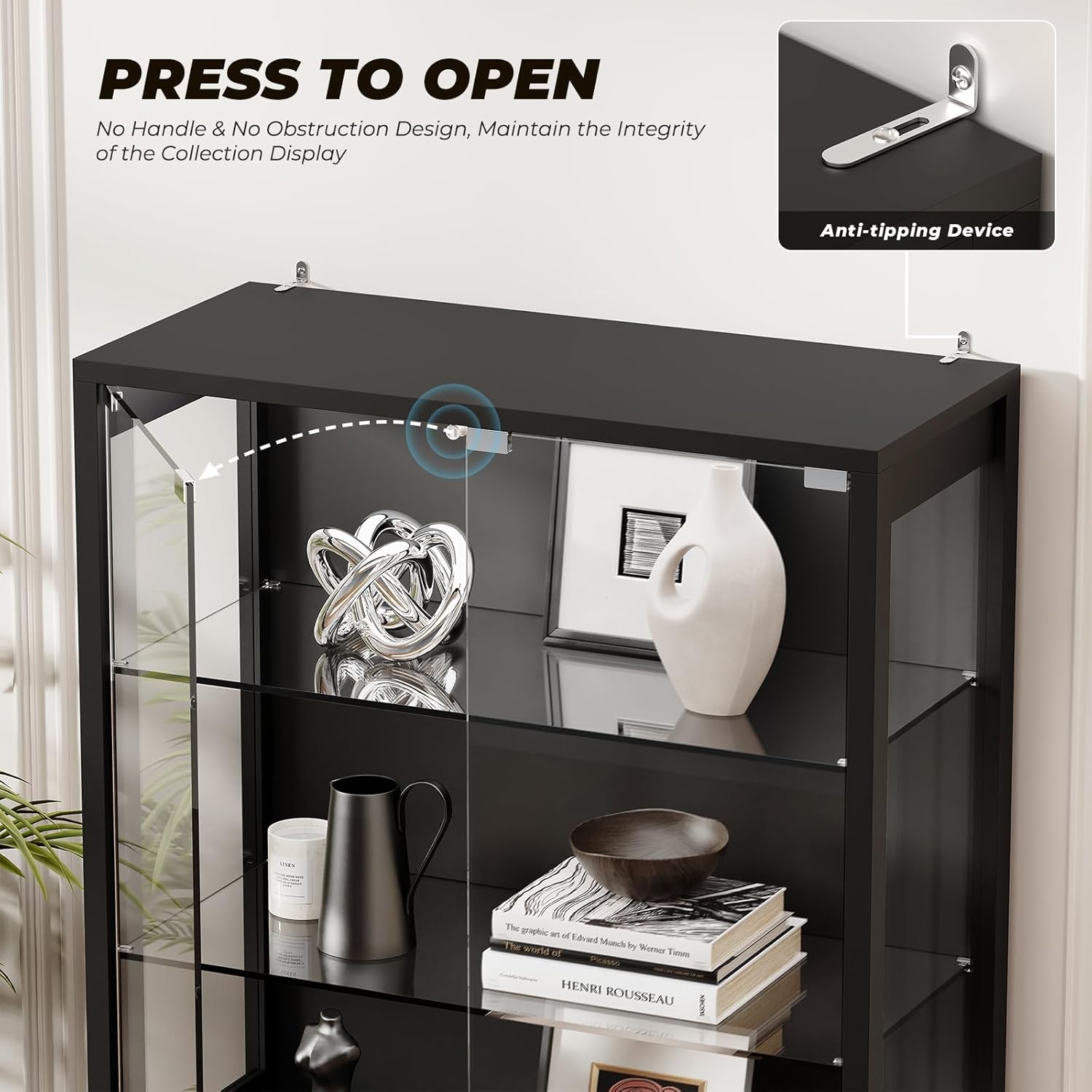
Image: Detail of the 'Press to Open' door mechanism.

Image: Durable rebounder equipment for the push-to-open door.
Maintenance
Proper maintenance ensures the longevity and appearance of your display cabinet.
- Cleaning Glass Surfaces: Use a soft, lint-free cloth and a non-abrasive glass cleaner. Spray the cleaner onto the cloth, not directly onto the glass, to avoid streaks and drips into the frame.
- Cleaning Wood Surfaces: Wipe wood surfaces with a soft, damp cloth. Avoid harsh chemicals or abrasive cleaners that can damage the finish. Dry immediately with a clean cloth.
- Dusting: Regularly dust all surfaces with a soft, dry cloth to prevent dust buildup.
- LED Lights: The LED lights are designed for long-term use and generally do not require maintenance. If a light strip malfunctions, contact customer support for assistance.
- Hinges and Mechanisms: Periodically check hinges and door mechanisms for smooth operation. Do not apply excessive force when opening or closing the door.

Image: Tempered glass doors and stable hinges for durability.

Image: Transparent glass door for clear display and protection.
Troubleshooting
| Problem | Possible Cause | Solution |
|---|---|---|
| LED lights do not turn on. | Power adapter not connected, faulty power adapter, loose connection. | Ensure the power adapter is securely plugged into both the cabinet and a working wall outlet. Check all cable connections. If lights still do not work, try a different compatible power adapter. |
| Motion sensor not working. | Sensor obstructed, sensor not properly connected, ambient light too bright. | Ensure the sensor is not blocked. Check its connection. The sensor may be less sensitive in very bright environments. |
| Door does not open/close smoothly. | Hinges misaligned, debris in mechanism, latch issue. | Check hinge alignment and adjust if necessary. Clean any debris from the door mechanism. Ensure the latch is clear and functioning. |
| Cabinet feels unstable. | Uneven floor, anti-tipping device not installed. | Ensure the cabinet is on a level surface. Install and properly secure the anti-tipping device to a wall stud. |
Specifications
- Brand: BROTTAR
- Model Number: BD019B
- Dimensions (D x W x H): 13.8" x 31.5" x 71" (35cm x 80cm x 180cm)
- Material: Engineered Wood (Frame), Tempered Glass (Doors, Shelves), Acrylic (Side Panels)
- Color: Black
- Number of Shelves: 6 (Adjustable)
- Shelf Weight Capacity: 30-40 lbs per shelf
- Lighting: 3-Color LED (White, Warm, Blue), Adjustable Brightness
- Special Features: Human Body Motion Sensor, Pop-Up Glass Door, Anti-Tipping Device
- Assembly: Required (Instructions and tools included)
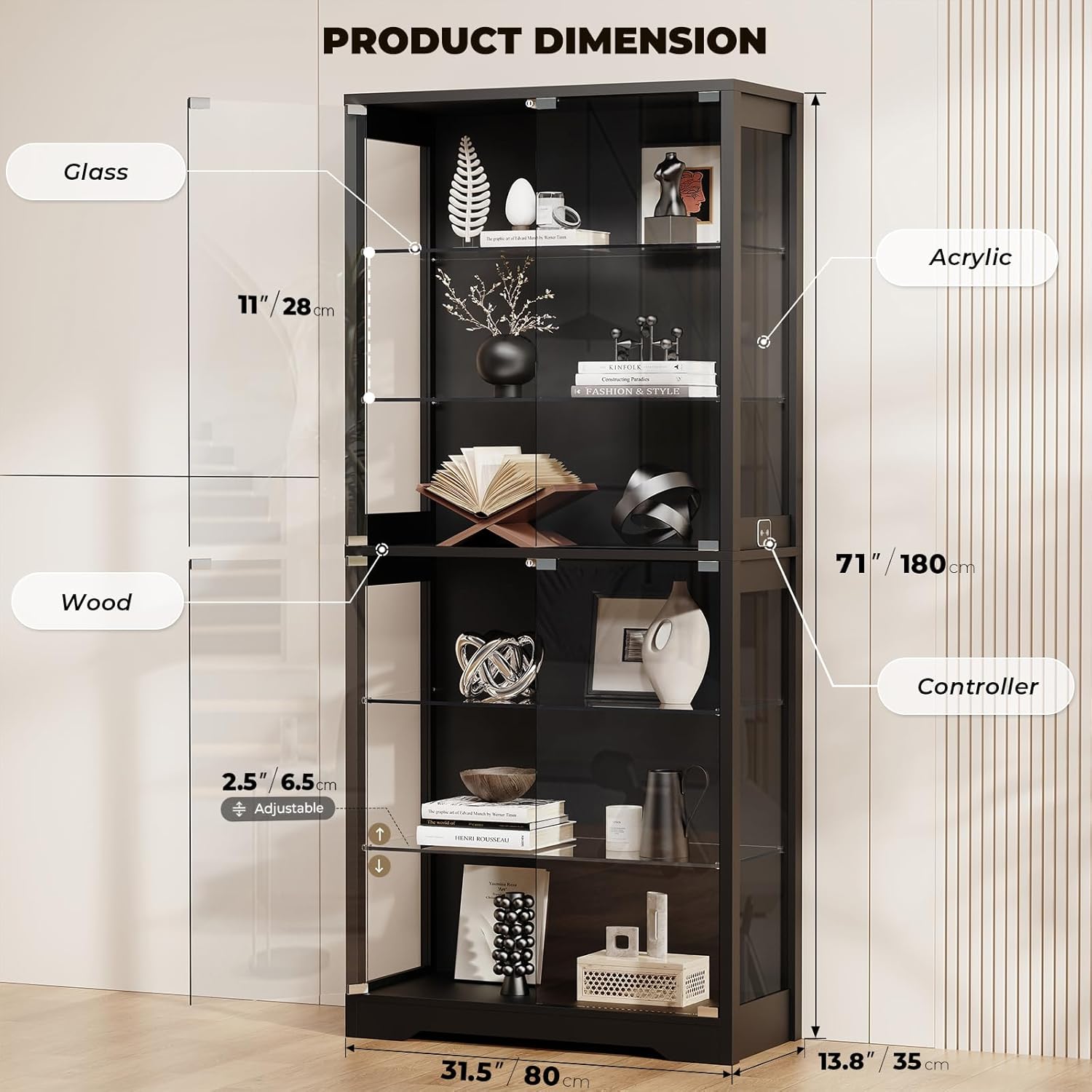
Image: Product dimensions and material breakdown.
Official Product Video
Video: BROTTAR 71" Display Cabinet with Glass Door. This video provides an overview of the cabinet's features and design.
Warranty and Support
BROTTAR is committed to providing quality products. While specific warranty details are not provided in this manual, please retain your proof of purchase for any warranty claims.
For any questions regarding assembly, operation, missing parts, or troubleshooting that is not covered in this manual, please contact BROTTAR customer support. Our team is available to assist you and provide the best possible solution.
Contact information can typically be found on the product packaging or the retailer's website where the product was purchased.