
1. Introduction
The QUINEAR Cordless Leg Recovery System is designed to provide advanced air compression therapy for leg recovery and circulation improvement. This system utilizes 5-zone air compression with adjustable intensity and modes to target various areas of the legs, promoting muscle relaxation and reducing fatigue. It is suitable for athletes, office workers, and individuals seeking relief from leg stiffness and swelling.
Key benefits include accelerating post-workout recovery, improving blood circulation, relieving pain and fatigue, and promoting muscle relaxation.

Image: The QUINEAR Cordless Leg Recovery System in use, showing the leg sleeves and the control unit. This system is designed for post-workout recovery and circulation improvement.
2. Safety Information
Please read all instructions carefully before using the QUINEAR Cordless Leg Recovery System. Retain this manual for future reference.
- Do not use this device if you have any medical conditions that may be aggravated by compression, such as deep vein thrombosis, severe circulatory disorders, or skin infections. Consult a physician before use if you have concerns.
- Keep the device away from water and high humidity.
- Do not attempt to disassemble or repair the device yourself. Contact customer support for assistance.
- Ensure the power adapter and cables are not damaged before use.
- Keep out of reach of children and pets.
- Do not use while sleeping or in an unconscious state.
- If you experience any discomfort or pain during use, discontinue immediately.
3. Package Contents
Verify that all items listed below are included in your package:
- 2 x Leg Massager Sleeves
- 1 x Controller Pump (with Touch Remote)
- 1 x Power Adapter
- 1 x Duffle Bag (Travel Bag)
- 1 x User Manual (this document)

Image: Visual representation of all items included in the QUINEAR Cordless Leg Recovery System package.
4. Product Overview
The QUINEAR Leg Recovery System consists of two leg sleeves and a central control unit. The leg sleeves feature multiple air chambers that inflate and deflate to provide compression. The control unit manages the massage modes, intensity, and timing.
4.1. Leg Sleeves
Each leg sleeve is equipped with 5 independent air chambers, allowing for targeted compression across the foot, lower calf, upper calf, lower thigh, and upper thigh. The sleeves are made from durable polyester with smooth zippers for easy application and removal.

Image: Breakdown of the 5 massage zones within each leg sleeve, indicating areas from foot to upper thigh.
4.2. Controller Pump
The controller pump features an intuitive 3.5-inch full-color LCD touchscreen for easy operation. It allows users to select massage modes, adjust intensity levels, set treatment duration, and independently control each of the 5 air chambers. The unit also includes smart pressure sensors that auto-adjust compression based on leg shape and a memory function to save preferred settings.

Image: The controller pump's touchscreen interface, showing options for battery status, time settings, intensity levels, massage modes, and individual zone control.
5. Setup
Follow these steps to set up your QUINEAR Leg Recovery System for first use:
- Charge the Controller: Before initial use, fully charge the controller pump using the provided power adapter. Connect the adapter to the charging port on the controller and plug it into a power outlet. The battery indicator on the screen will show charging status. A full charge takes approximately 120 minutes.
- Select Correct Size: Ensure you are using the correct size leg sleeves for optimal comfort and effectiveness. Refer to the sizing guide below.
- Apply Leg Sleeves: Sit comfortably and slide your legs into the massager sleeves. Ensure your feet are positioned correctly at the bottom of the sleeves. Zip up the sleeves securely but not too tightly.
- Connect Hoses: Connect the air hoses from each leg sleeve to the corresponding ports on the controller pump. Ensure a secure connection.
5.1. Sizing Guide
To determine the appropriate size, measure your upper thigh circumference and inseam (distance from heel to uppermost part of your thigh).

Image: Sizing chart and measurement guide to help users select the correct leg sleeve size.
| Size | Upper Thigh | Inseam | Height |
|---|---|---|---|
| Small | up to 28.3" | up to 28" | 5'1"-5'7" |
| Medium | up to 29.5" | up to 32.5" | 5'8"-6'2" |
| Large | up to 32.2" | up to 36" | 6'3"-6'7" |
6. Operating Instructions
Once the leg sleeves are connected and the controller is charged, you can begin your compression therapy session.
- Power On: Press and hold the power button on the controller pump to turn it on. The touchscreen will illuminate.
- Select Mode: Choose one of the three available massage modes from the touchscreen:
- Combination: Provides gentle, wave-like compression.
- Circulation: Offers deep kneading compression.
- Sequence: Designed to boost blood flow with sequential compression.
- Adjust Intensity: Select from 11 intensity levels (50-150 mmHg) to find your preferred compression strength. Use the '+' and '-' buttons on the touchscreen.
- Set Time: Choose a treatment duration from 10 customizable time presets (15-60 minutes).
- Select Zones (Optional): You can independently enable or disable any of the 5 air chambers (Foot, Lower Calf, Upper Calf, Lower Thigh, Upper Thigh) to target specific areas or avoid sensitive ones.
- Start Session: Press the 'Start' button on the touchscreen to begin the compression therapy.
- Adjust During Session: You can adjust the intensity, mode, or active zones at any point during the session.
- Power Off: The device will automatically shut off after the set time. You can also manually power off by pressing and holding the power button.
Note: The smart pressure sensors will automatically adjust inflation volume based on your leg size for consistent compression.
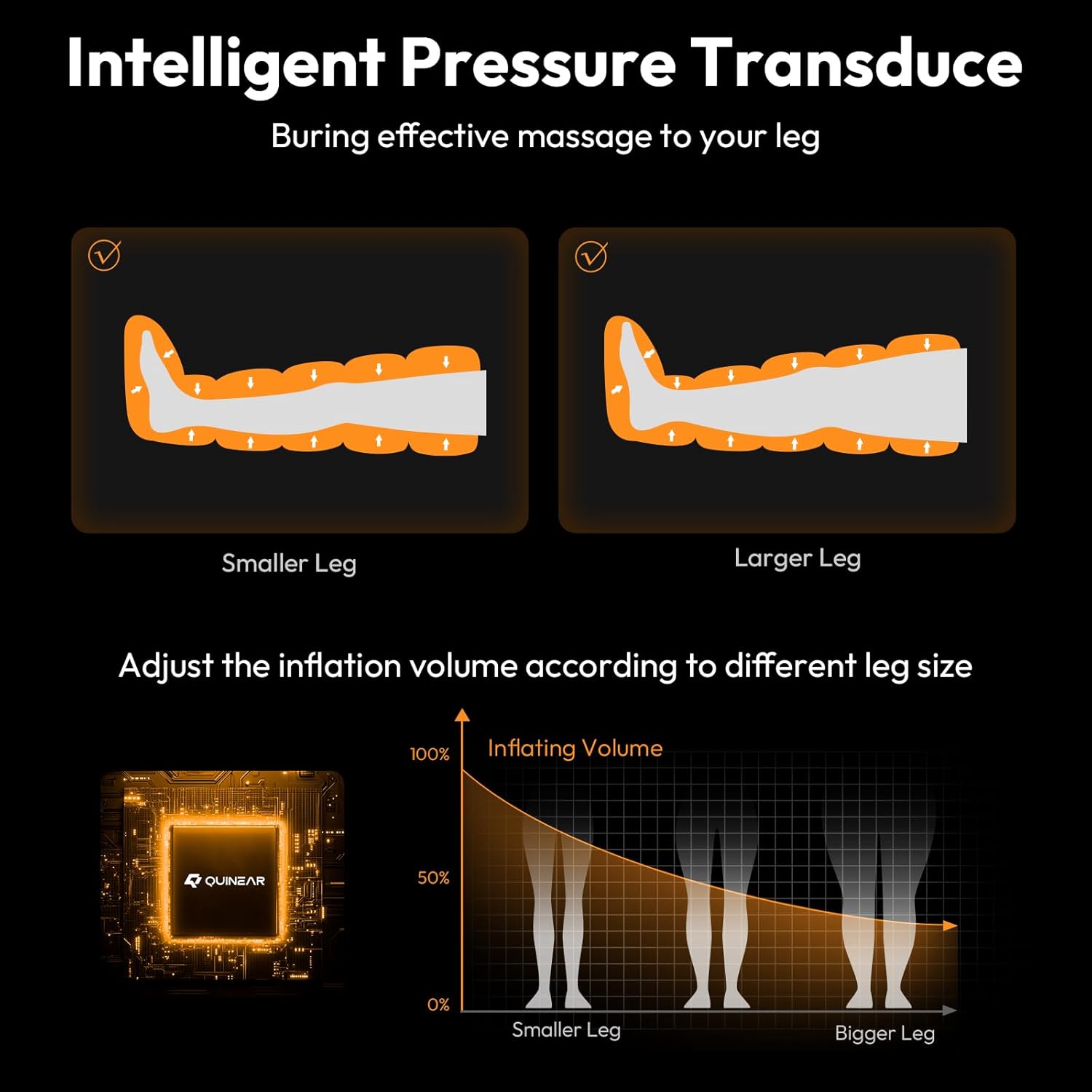
Image: Explanation of the intelligent pressure transducer technology, which adapts compression to different leg sizes.
7. Charging
The QUINEAR Cordless Leg Recovery System is equipped with a rechargeable battery in the controller pump, offering 2-4 hours of cordless operation per charge.
- Connect the provided power adapter to the charging port on the controller.
- Plug the adapter into a standard electrical outlet.
- The battery icon on the touchscreen will indicate charging status.
- A full charge typically takes approximately 120 minutes.
- Avoid using non-approved chargers, as this may damage the device.
8. Maintenance
Proper maintenance ensures the longevity and optimal performance of your device.
8.1. Cleaning
- Disconnect the device from the power source before cleaning.
- Wipe the leg sleeves and controller pump with a soft, damp cloth.
- Do not use abrasive cleaners, solvents, or harsh chemicals.
- Ensure the device is completely dry before storing or next use.
8.2. Storage
- Store the device in its provided duffle bag to protect it from dust and damage.
- Keep the device in a cool, dry place, away from direct sunlight and extreme temperatures.
- Avoid placing heavy objects on the device during storage.
9. Troubleshooting
If you encounter any issues with your QUINEAR Leg Recovery System, refer to the following common problems and solutions:
| Problem | Possible Cause | Solution |
|---|---|---|
| Device does not power on. | Low battery or no charge. | Charge the controller pump fully (approx. 120 minutes). |
| No compression or weak compression. | Hoses not securely connected. Leg sleeves not zipped properly. Intensity level too low. | Ensure all air hoses are firmly connected to the controller. Check that leg sleeves are fully zipped. Increase the intensity level on the touchscreen. |
| Uneven compression in zones. | Specific zones disabled. | Check the touchscreen to ensure all desired zones are enabled. |
| Device stops unexpectedly. | Session time completed. Low battery. | This is normal if the set time has elapsed. Recharge the controller pump. |
| Touchscreen unresponsive. | Temporary software glitch. | Power off the device, wait a few seconds, then power it back on. |
If the problem persists after trying these solutions, please contact QUINEAR customer support.
10. Specifications
| Model Name | Air Compression Recovery System QN-113A-M-UL1 |
| Brand | QUINEAR |
| Material | Polyester |
| Item Weight | 3.6 Kilograms |
| Product Dimensions (L x W x H) | 40.9L x 32W x 15.7H centimetres |
| Massage Technique | Compression |
| Intensity Levels | 11 (50-150 mmHg) |
| Massage Modes | 3 (Combination, Circulation, Sequence) |
| Air Chambers | 5 per leg (independently controlled) |
| Timer Settings | 10 presets (15-60 minutes) |
| Battery Life | 2-4 hours per charge |
| Charging Time | Approx. 120 minutes |
| Special Features | Auto Shut-Off, Smart Pressure Sensors, Memory Function, Touchscreen Remote |
11. Warranty and Support
Warranty: The QUINEAR Cordless Leg Recovery System comes with a 24-month (2-year) warranty from the date of purchase. This warranty covers manufacturing defects and malfunctions under normal use. Please retain your proof of purchase for warranty claims.
Exclusions: The warranty does not cover damage caused by misuse, accidents, unauthorized repairs, or normal wear and tear.
Customer Support: For technical assistance, warranty claims, or any questions regarding your QUINEAR product, please contact QUINEAR customer support through the retailer where the product was purchased or visit the official QUINEAR website for contact information.