1. Introduction
Thank you for choosing the Soudorv T70-N Smart Watch. This device is designed to enhance your daily life with features like fitness tracking, health monitoring, and smart notifications. Please read this manual carefully to understand the watch's functions and ensure proper use.
Package Contents
- Smartwatch x 1
- Magnetic Charger x 1
- 22mm Replaceable Strap x 1
- Instructions Manual x 1
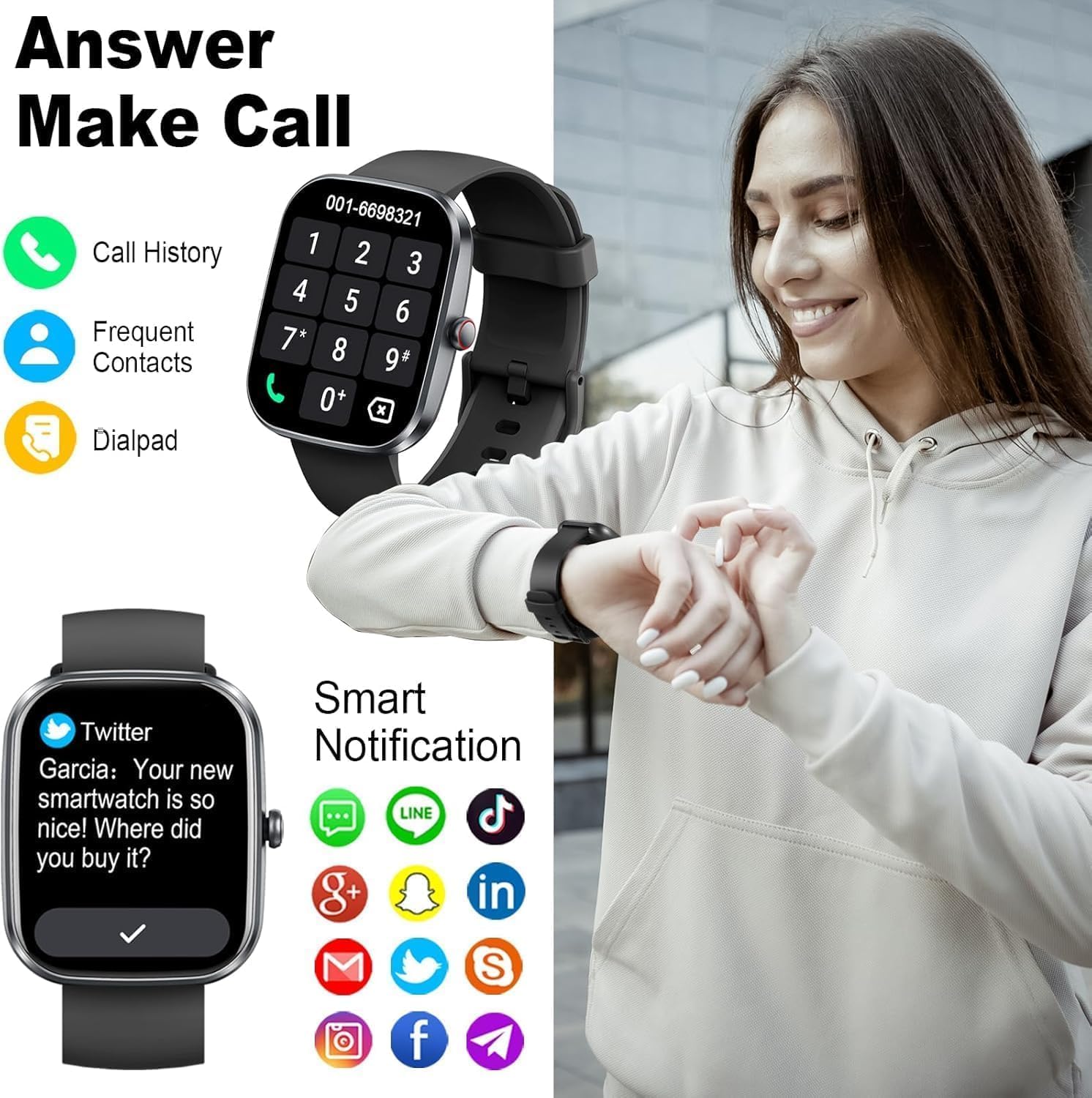
Image 1.1: The Soudorv T70-N Smart Watch, featuring a sleek design and black strap.
2. Safety Information
- Do not attempt to disassemble or modify the device.
- Keep the device away from extreme temperatures and direct sunlight.
- Avoid exposing the watch to strong impacts or drops.
- This device is IP68 waterproof, suitable for daily use and light water activities. Do not use in hot showers, saunas, or for diving.
- Consult a medical professional before starting any new exercise regimen.
- The health monitoring data is for reference only and should not be used for medical diagnosis or treatment.
3. Getting Started
3.1 Charging the Device
Before first use, fully charge your smartwatch. Connect the magnetic charger to the charging contacts on the back of the watch. Plug the USB end of the charger into a standard USB power adapter (not included) or a computer USB port.
- Charging time: Approximately 2 hours.
- Battery life: Up to 7 days with normal use.

Image 3.1: The smartwatch screen indicating 80% battery charge, demonstrating the magnetic charging feature.
3.2 Powering On/Off
- Power On: Press and hold the side button for a few seconds until the screen lights up.
- Power Off: From the watch face, swipe down to access quick settings, or navigate to 'Settings' > 'System' > 'Power Off'. Confirm to shut down.
3.3 App Installation and Pairing
The Soudorv T70-N Smart Watch uses the GloryFit application for full functionality. Ensure your smartphone meets the compatibility requirements (Android 5.0+ or iOS 9.0+).
- Download the App: Search for "GloryFit" in the Apple App Store or Google Play Store, or scan the QR code provided in the watch's quick start guide.
- Register/Log In: Open the GloryFit app and follow the on-screen instructions to create an account or log in.
- Enable Bluetooth: Ensure Bluetooth is enabled on your smartphone.
- Pair the Watch: In the GloryFit app, navigate to the 'Device' section and select 'Add Device'. The app will search for your watch. Select "T70-N" from the list of available devices to pair.
- Enable Call Function: After successful binding, go to the app's settings, find 'Bluetooth Call', and enable the call function to use the watch for making and answering calls.

Image 3.2: Overview of the GloryFit app, showing health data, download options, and steps for connecting the watch via Bluetooth.
4. Basic Operation
4.1 Touchscreen Navigation
- Swipe Up: View notifications.
- Swipe Down: Access quick settings (brightness, DND, battery, etc.).
- Swipe Left/Right: Cycle through widgets (activity data, heart rate, weather, music control, etc.).
- Tap: Select an item or open an application.
- Press and Hold: On the watch face, press and hold to change watch faces.

Image 4.1: The watch display showing various metrics like time, weather, steps, calories, and heart rate.
4.2 Button Functions
The watch features a single physical button on the side.
- Short Press: Return to the previous screen or wake up the screen.
- Long Press: Power on/off the device (when off), or access the power menu (when on).
4.3 Customizing Watch Faces
The Soudorv T70-N Smart Watch offers a variety of watch faces. You can change them directly on the watch or through the GloryFit app.
- On Watch: Press and hold the current watch face. Swipe left or right to browse available faces and tap to select.
- Via App: Open the GloryFit app, go to the 'Device' section, and select 'Dial Center' or 'Watch Face'. You can choose from over 100 online watch faces or customize one using your own photos.

Image 4.2: A selection of customizable watch faces available for the Soudorv T70-N Smart Watch.
5. Features
5.1 Bluetooth Calling and Notifications
The watch supports Bluetooth calling, allowing you to make and answer calls directly from your wrist. It also displays notifications from your smartphone.
- Making Calls: Access the dial pad or contact list on the watch to initiate calls.
- Answering Calls: When a call comes in, you can answer or reject it directly from the watch screen.
- Notifications: Receive alerts for incoming calls, SMS messages, and app notifications (e.g., Facebook, Twitter, WhatsApp, Instagram) with customizable vibrations.

Image 5.1: The smartwatch displaying a call interface and various social media notification icons.
Video 5.1: Demonstration of the Soudorv T70-N Smart Watch's call answering and making capabilities, along with smart notification features.
5.2 Activity Tracking (120+ Sports Modes)
The watch offers over 120 sports modes to track your workouts. It records data such as heart rate, steps, calories burned, distance, and active hours in real-time.
- Available Modes: Running, cycling, fitness, swimming, badminton, tennis, football, basketball, and many more.
- Data Recording: View your exercise data summaries on the watch and detailed reports in the GloryFit app.

Image 5.2: The smartwatch tracking various activities, displaying metrics such as calories, distance, and steps, with a visual representation of over 110 sport modes.
5.3 Health Monitoring
The watch provides continuous health monitoring features to help you stay informed about your well-being.
- Heart Rate Monitor: Tracks your heart rate 24/7.
- Sleep Monitor: Analyzes sleep patterns, including deep sleep, light sleep, and awake times.
- Blood Oxygen (SpO2) Monitor: Measures your blood oxygen levels.
- Menstrual Cycle Tracking: For female users, track menstrual cycles and predict ovulation.

Image 5.3: The smartwatch displaying real-time health data, including heart rate, blood oxygen saturation, and sleep duration, while being worn during exercise.

Image 5.4: The smartwatch monitoring sleep patterns, showing deep sleep, light sleep, and awake times.
5.4 IP68 Waterproofing
The Soudorv T70-N Smart Watch is IP68 rated, meaning it is resistant to dust and can withstand immersion in water up to 1.5 meters for 30 minutes. This allows for use during hand washing, rain, and light water activities.
Note: Not suitable for hot showers, saunas, or diving. Avoid contact with hot water or corrosive liquids.

Image 5.5: The smartwatch being worn during swimming, illustrating its IP68 waterproof capability.
5.5 Other Practical Functions
The watch includes several convenient tools for daily use:
- Weather Forecast: Get real-time weather updates.
- Music Control: Control music playback on your smartphone.
- Camera Control: Remotely trigger your smartphone's camera.
- Find Phone: Locate your paired smartphone.
- Alarm Clock: Set multiple alarms.
- Timer & Stopwatch: For various timing needs.
- Voice Assistant: Interact with your phone's voice assistant.
- Calculator: Perform basic calculations.
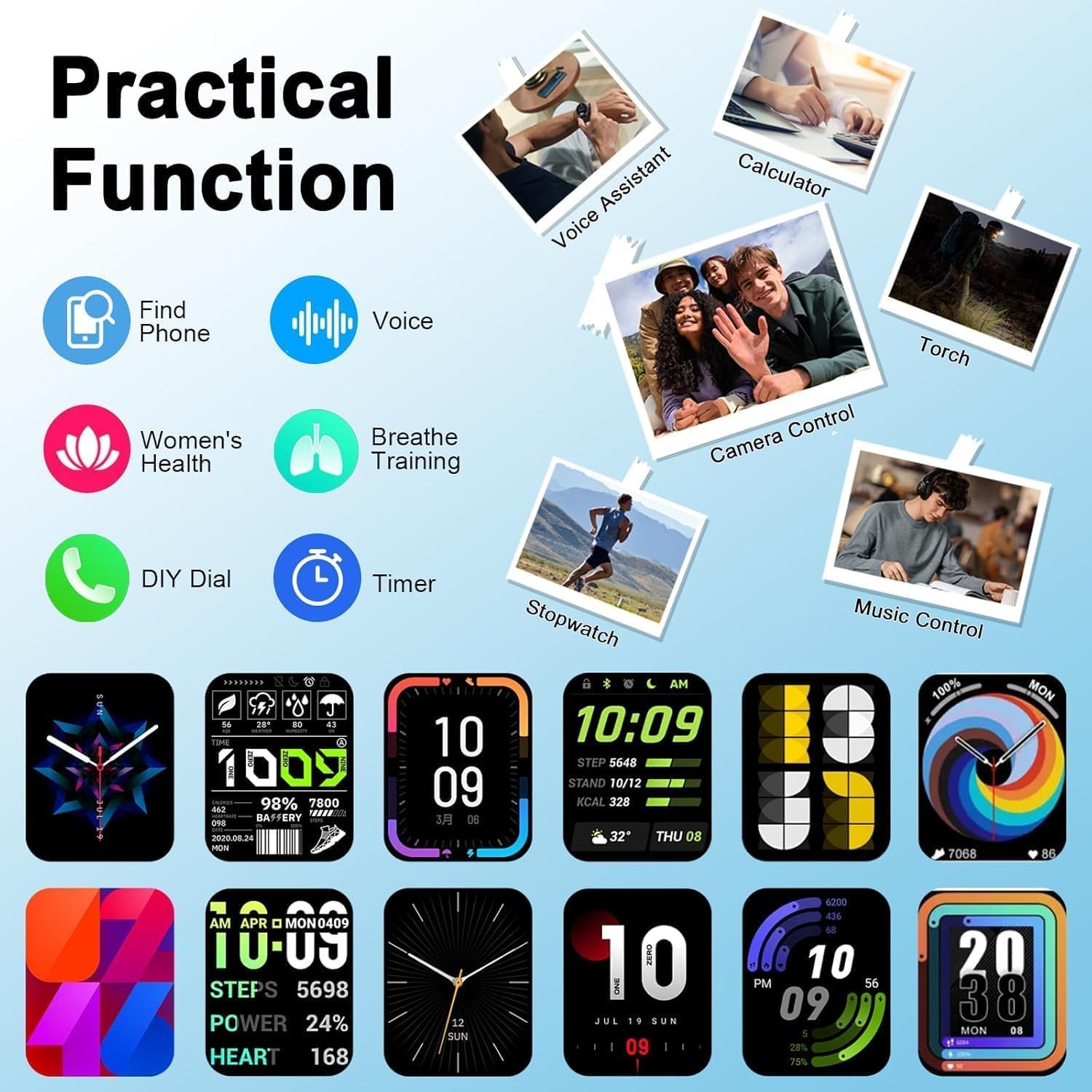
Image 5.6: The smartwatch interface showcasing practical functions such as voice assistant, calculator, and remote camera control.
6. Maintenance
- Cleaning: Regularly wipe the watch screen and strap with a soft, damp cloth. Avoid using harsh chemicals.
- Strap Care: If the strap gets wet, dry it thoroughly before wearing to prevent skin irritation.
- Charging Contacts: Keep the charging contacts clean and dry to ensure efficient charging.
- Storage: Store the watch in a cool, dry place when not in use.
7. Troubleshooting
| Issue | Solution |
|---|---|
| Watch not turning on | Ensure the watch is fully charged. Connect it to the charger for at least 10 minutes before attempting to power on. |
| Unable to pair with phone | Make sure Bluetooth is enabled on your phone. Ensure the watch is within range. Restart both the watch and your phone. Check if the GloryFit app has necessary permissions. |
| Notifications not received | Verify that app notifications are enabled in the GloryFit app. Check your phone's notification settings to ensure the GloryFit app has permission to send notifications. Ensure the watch is connected via Bluetooth. |
| Inaccurate health data | Ensure the watch is worn snugly on your wrist, about one finger's width from your wrist bone. Clean the sensor on the back of the watch. Avoid excessive movement during measurements. |
| Bluetooth calling not working | Ensure the Bluetooth call function is enabled in the GloryFit app settings. Check your phone's Bluetooth settings to confirm the watch is connected for calls. |
8. Specifications
| Feature | Detail |
|---|---|
| Model Number | T70-N |
| Screen Size | 1.91 Inches HD Touchscreen |
| Connectivity | Bluetooth 5.3 |
| Water Resistance | IP68 |
| Battery Capacity | 300 Milliamp Hours |
| Operating System | Android Wear 1.0 (Compatible with Android 5.0+ / iOS 9.0+) |
| Item Weight | 3.2 ounces |
| Package Dimensions | 6.85 x 3.74 x 0.75 inches |
| Special Feature | Touchscreen, Heart Rate Monitor, Sleep Monitor, Blood Oxygen Monitor, 120+ Sports Modes, Bluetooth Calling |
9. Warranty and Support
For warranty information and customer support, please refer to the warranty card included in your product packaging or contact Soudorv customer service through the retailer where you purchased the product. Please have your model number (T70-N) and purchase date available when contacting support.